Best VPN for Mac in 2026


As of May 2026, NordVPN remains the best VPN for Mac, as it has intuitive macOS-optimized apps, offers extremely fast connection speeds, and robust security features to shield you from cyberthreats.
VPN for Mac is an essential tool for protecting your privacy online, accessing restricted or geo-locked content, and securing your network connection. A VPN encrypts your data, hides your IP, and routes your traffic through a secure server. Not even Macs are immune to online tracking, snooping, data leaks, or the dangers of unencrypted public Wi-Fi connections, but a VPN can solve these issues. Additionally, using a VPN allows you to access geo-locked services and streaming platforms when traveling or from the comfort of your home.
That said, not all VPNs are compatible with Macs and offer the highest level of security and privacy for these devices. To find the services that truly have what it takes to protect your Mac, I did thorough testing and reviewing of more than 20 VPNs. Continue reading to learn which VPNs made it to my top 5 Mac VPNs list, how to use them, and what benefits they offer for Mac users.
🏷️ LIMITED OFFER: NordVPN deal! Get 76% OFF NordVPN + 3 months FREE 🏷️
Top 5 VPNs for Mac: shortlist
-
Best overall VPN for Mac with robust security features
-
Fast Mac VPN with unlimited connections
-
Privacy-oriented VPN for Mac
-
Affordable and beginner-friendly Mac VPN
-
Secure and easy-to-use VPN for Mac
![NordVPN mobile logo [IN USE]](https://media.vpnpro.com/Nord-VPN-review.jpg)
![Surfshark mobile logo [IN USE]](https://media.vpnpro.com/surfshark-60x60-1.jpg)
![Proton VPN mobile logo [IN USE]](https://media.vpnpro.com/ProtonVPN-small.jpg)
![TotalVPN mobile logo [IN USE]](https://media.vpnpro.com/totalvpn-mobile.png)
![IPVanish mobile logo [IN USE]](https://media.vpnpro.com/IPVanish-VPN-small.jpg)


Since 2018, VPNpro has delivered unbiased, expert-backed insights through in-house research and thorough VPN testing. Our team ensures every review is fact-checked and reliable. Learn how we maintain these high standards in our testing methods.
Why do I need a VPN for Mac?
A VPN for Mac is essential for privacy, security, and accessing geo-locked content from anywhere. Although due to the macOS architecture, devices using it are known to be a bit harder for hackers to breach, the built-in security features cannot encrypt your traffic and mask your IP address like a VPN does. Here’s a more detailed look at the reasons why you need a VPN for Mac:
- Get a secure IP address in any location. Mask your real IP address and obtain a new one in a country of your choice every time you connect. Not only will this make it much harder for anyone to track down your real IP, but you’ll also be able to access geo-locked content this way.
- Privacy and security. VPNs offer numerous privacy and security features, meant to shield your identity and make your online activities invisible to onlookers. Starting from encryption and IP & DNS leak protection, and ending with stealth protocols – all of it helps you stay anonymous and more secure online.
- Safe public Wi-Fi. Using public Wi-Fi connections is generally unsafe, but a VPN can encrypt your connection and tunnel your traffic via a secure tunneling protocol, making shared connections at cafes, airports, and malls safe to use.
- Fast and reliable. Premium VPN services with macOS-optimized apps ensure smooth connections for comfortable online activities and deliver reliable performance that does not interrupt your day-to-day tasks.
For the best security and access to geo-locked content, use NordVPN. The provider offers macOS-streamlined performance, a large server fleet, and the fastest connection speeds in the industry for seamless integration and performance.

Best Mac VPNs in 2026: detailed list
- NordVPN – the overall best VPN for Mac with the most extensive features list
- Surfshark – powerful and affordable Mac VPN
- Proton VPN – freemium VPN for Mac with strong privacy features
- TotalVPN – cheap Mac VPN with antivirus integration
- IPVanish – simple yet robust VPN for Mac
To find the best VPNs for Mac, I tested over 20 VPN services. I paid the most attention to seamless integration with macOS, available feature set, server networks, connection speeds, and more. Ultimately, I found my top 5 Mac VPNs – you can read my detailed reviews below.
Top 1. NordVPN - best VPN for Mac overall
![NordVPN mobile logo [IN USE]](https://media.vpnpro.com/images/170x89/2025/08/nord-rreview.jpg)


137

9300

24/7, email

452 Mbps
-
macOS-optimized apps
-
Extensive security and privacy feature list
-
Incredibly fast connection speeds
-
Only up to 10 simultaneous connections
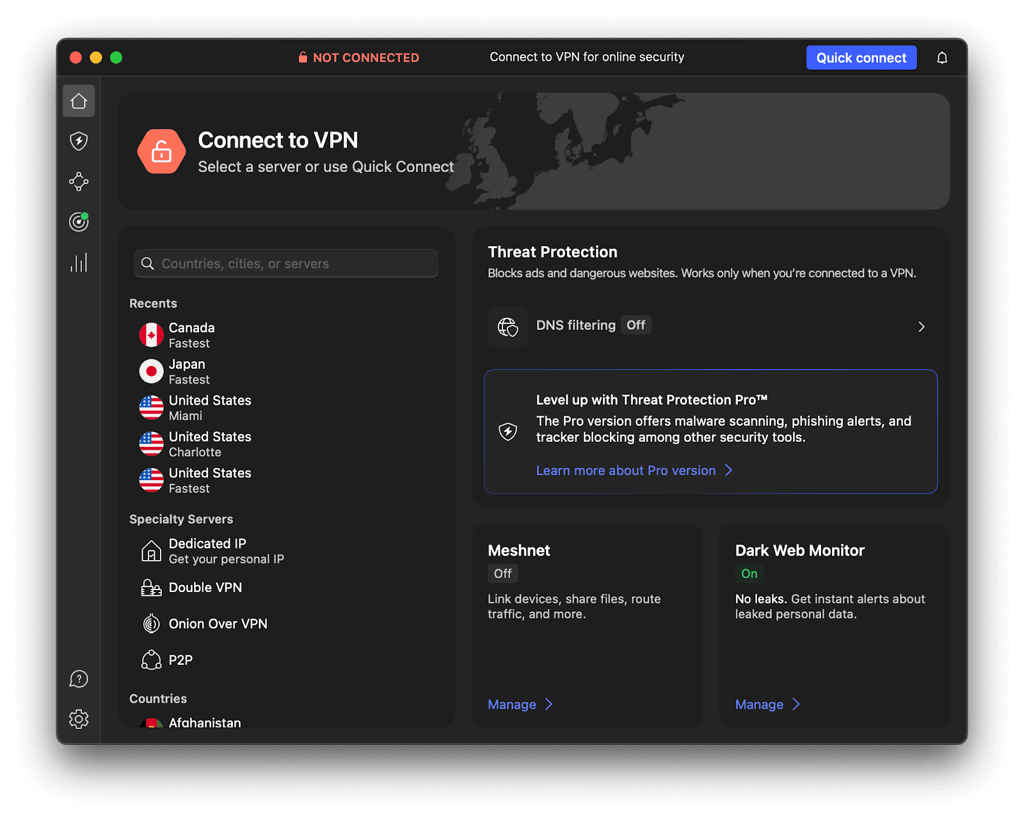
The best VPN for Mac is NordVPN, as it offers native macOS Apple Silicon-optimized apps for smooth performance, an advanced features list, and the fastest connection speeds. Plus, NordVPN proved to be extremely reliable at geo-unblocking and streaming. Also, NordVPN just released a new UI design for its macOS apps, making it more in line with the general Mac aesthetic.
NordVPN server network
NordVPN operates a large fleet of 9,300 servers in around 137 countries. All the servers are RAM-only for increased privacy and can be used with the speedy NordLynx protocol. When I tested the fleet’s capabilities regarding connection speeds, I got an incredible 466Mbps average with a 94% initial speed retention rate. Such fast speeds are excellent for all sorts of online activities, including bandwidth-heavy ones like downloading and gaming.
Streaming and P2P file sharing with NordVPN
Because of the fast speeds I got during my NordVPN speed tests, I already knew there would be no issues in streaming with NordVPN in full HD quality with no lag whatsoever. However, I still had to check its geo-unblocking capabilities, so I connected to various servers worldwide and tried to access some of the most popular streaming platforms, like Netflix, HBO Max, Hulu, BBC iPlayer, ESPN+, and more. Unsurprisingly, I got into each platform on the first try, which marks a truly excellent performance. As for torrenting, NordVPN offers P2P-optimized servers. I used one of them to download files from the Internet Archive page, and found the experience fast and smooth.
Security and privacy features
Unlike most VPN services, NordVPN keeps almost the same feature set in its macOS app as compared to the usually more elaborate Windows apps. So, you can take advantage of basic features, like AES-256 encryption and modern tunneling protocols, as well as advanced features that are usually unavailable with other Mac VPNs, such as kill switch, Split Tunneling, Double VPN, obfuscated servers, and even an ad & tracker blocker called Threat Protection Pro.
Compatibility and price
Besides macOS laptops, NordVPN can also be used on iOS devices and Apple Smart TVs. If you’d like to protect all of your macOS/iOS devices at once, you can set up NordVPN on your router. This powerful VPN comes at a reasonable price, with subscriptions starting at $3.09/month. You can test it out with the 3-day free trial, but using the 30-day money-back guarantee might be easier for macOS users.
For more information, read our in-depth NordVPN review.
Top 2. Surfshark - advanced Mac VPN with affordable subscriptions
![Surfshark mobile logo [IN USE]](https://media.vpnpro.com/images/170x89/surfshark-review-logo-2.jpg)
100
4500
24/7, FAQ
405 Mbps
-
M1/M2 optimized macOS apps
-
Advanced security and privacy features
-
Excellent at streaming and geo-unblocking
-
Some features cost extra
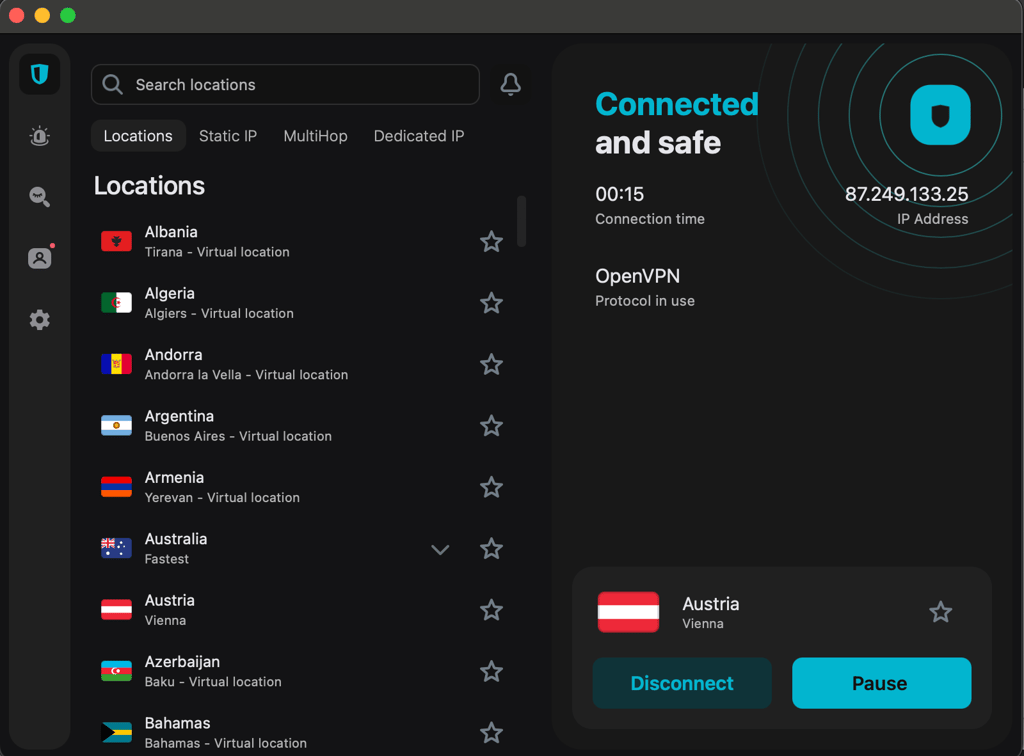
Surfshark is an excellent VPN for Mac, offering M1/M2 optimized, sleek, and user-friendly apps. Additionally, Surfshark offers great connection speeds, a well-spread server fleet, and advanced security features.
Surfshark server network
Surfshark owns a mid-sized fleet of 4,500 servers in 100+ countries. All of the servers are RAM-only for more privacy and are interconnected via the unique Nexus network. This network makes server upkeep and upgrade easier and quicker, so you can be sure all of Surfshark’s fleet is always in top working order. You can use the server with the speedy WireGuard tunneling protocol, and using it, I got an excellent 465Mbps average connection speed with a 93% initial speed retention rate during my tests.
Streaming and P2P file sharing with Surfshark
Surfshark offers P2P-optimized servers for convenient file sharing. The best part is, is that you do not have to connect to one of these servers before you start torrenting, as Surfshark’s capable of matching you with a P2P server the moment it notices such traffic. This made my torrenting experience with Surfshark really smooth. As for streaming, I easily unblocked top streaming platforms like BBC iPlayer, Netflix, Hulu, Amazon Prime Video, and Disney+ with Surfshark, while the great connection speeds allowed me to stream without any interruptions.
Security and privacy features
Surfshark offers an extensive feature list available on its macOS apps, which keeps up almost completely with its Windows version. You can use such advanced features as a kill switch, CleanWeb adblocker, Camouflage mode obfuscation, NoBorders mode to bypass censorship, and Bypasser split tunneling. Of course, all the necessities are also there, including modern tunneling protocols and robust encryption.
Compatibility and price
Surfshark’s user-friendly apps can be used on all macOS devices, iOS, routers, and newer models of Apple Smart TVs. The subscriptions are very affordable starting at $1.99/month and considering that just one account covers unlimited devices, makes it a real bargain. You can safely test out Surfshark during the 7-day free trial and purchase it risk-free with the 30-day money-back guarantee.
For more information, read our in-depth Surfshark review.
Top 3. Proton VPN - freemium Mac VPN with focus on privacy
![Proton VPN mobile logo [IN USE]](https://media.vpnpro.com/images/170x89/proton-vpn-review-logo-2.jpg)
145
20075
423 Mbps
-
Offers native macOS apps
-
Strong privacy features
-
Massive server fleet
-
Slightly more expensive
Proton VPN is a great VPN for Mac, especially if you are looking for a provider that puts privacy first and does not mind slightly slower connection speeds. The service has native macOS apps for seamless integration and ensures your privacy with yearly no-logs policy audits and Swiss privacy laws.

Proton VPN server network
Proton VPN owns a massive fleet of 20,075 servers in around 145 countries. Interestingly, Proton uses bare-metal servers, claiming they’re more reliable than the RAM-only counterparts. Be as it may, all of them can be used with the WireGuard tunneling protocol, but even that did not help in my speed tests. Sure, an average connection speed of 428Mbps with an 88% initial speed retention rate is not bad, but I did expect more from this provider. Using the VPN Accelerator helped boost my speeds on faraway connections, but even then, it did not match the averages I got with NordVPN.
Streaming and P2P file sharing with Proton VPN
Proton only allows P2P traffic on the special P2P servers. That’s not really an issue, as it has plenty of them on its fleet, and they proved to be in great working order when I tried them. As for streaming, the slightly slower connection speeds saw me encountering some minor buffering issues, while the geo-unblocking performance was quite good, and I got into platforms like Netflix, HBO Max, Paramount+, and more, pretty easily.
Security and privacy features
Proton VPN macOS app offers both basic and advanced features, such as a system-wide kill switch, Stealth protocol, DNS leak protection, modern tunneling protocols, and Secure Core servers to route your traffic through two servers, instead of one. You can also use the Tor over VPN servers if you need complete untraceability. Of course, all of these features are built upon robust AES-256 encryption.
Compatibility and price
Proton VPN offers native macOS apps, iOS compatibility, and can also be used on most Apple Smart TVs. There’s also the option for router setup, if you like it better. Proton VPN comes at a slightly higher price, with subscriptions starting at $2.99/month. Although the provider does not have a free trial, you can test it out with the limited-feature free version. If you decide to subscribe, your purchase will be protected by the 30-day money-back guarantee.
Top 4. Total VPN - the most affordable VPN for Mac
![TotalVPN mobile logo [IN USE]](https://media.vpnpro.com/images/170x89/totalvpn.jpg)
90
1800
24/7, email
179 Mbps
-
Cheap subscription prices
-
Robust basic security features
-
Integration with TotalAV antivirus
-
Not as good at geo-unblocking
TotalVPN is the most affordable VPN for Mac on my list. While it does not offer a lot of advanced security features for Mac, it shows reliable performance and beginner-friendly features.

TotalVPN server network
TotalVPN owns a minimal fleet of 1,800+ servers in 90+ countries. This might seem very little, but the server covers all the most popular locations and is in great working order as per my tests. Speaking of which, I did my TotalVPN speed tests using the OpenVPN tunneling protocol, as WireGuard is reserved for Android only with this provider. I got an average connection speed of about 417Mbps with an 84% initial speed retention rate. Because of this, I mostly recommend using TotalVPN for browsing and encrypting your traffic, as such a retention rate may slow down your connection if your internet is already on the slower side.
Streaming and P2P file sharing with Total VPN
TotalVPN does not have any P2P or streaming-optimized servers, but it does not mean it can’t be used for these activities. For instance, you can torrent on any of TotalVPN server, but since they’re not optimized for the activity, your download speed will correspond to the speed of the server connection. As for streaming, TotalVPN did work with some Netflix libraries and smaller streaming platforms, but I couldn’t get into BBC iPlayer when I tried it.
Security and privacy features
TotalVPN ensures user privacy and security with military-grade AES-256 encryption, a kill switch, and reliable tunneling protocols, like OpenVPN. While the provider does not offer any advanced features like obfuscation, Split Tunneling, or Stealth protocols, it does have one of the best ad blockers I've tried, called Total Adblock. Lastly, if you’re interested in VPN + AV bundles, TotalVPN integrates seamlessly with TotalAV antivirus software.
Compatibility and price
You can use TotalVPN with macOS and iOS devices, but you won’t be able to use it with Apple TVs. Instead, you can set up TotalVPN on your router to cover your Smart TV with a VPN connection. TotalVPN comes at a very low price with subscriptions starting at a mere $1.59/month. Purchasing a subscription is risk-free thanks to the 30-day money-back guarantee.
For more information, read our in-depth TotalVPN review.
Top 5. IPVanish - user-friendly MacVPN with functional app
![IPVanish mobile logo [IN USE]](https://media.vpnpro.com/images/170x89/IPVanish.jpg)
113
3200
24/7, email
270 Mbps
-
Simple, but functional macOS app
-
Great torrenting performance
-
Fast connection speeds
-
Not a lot of advanced features
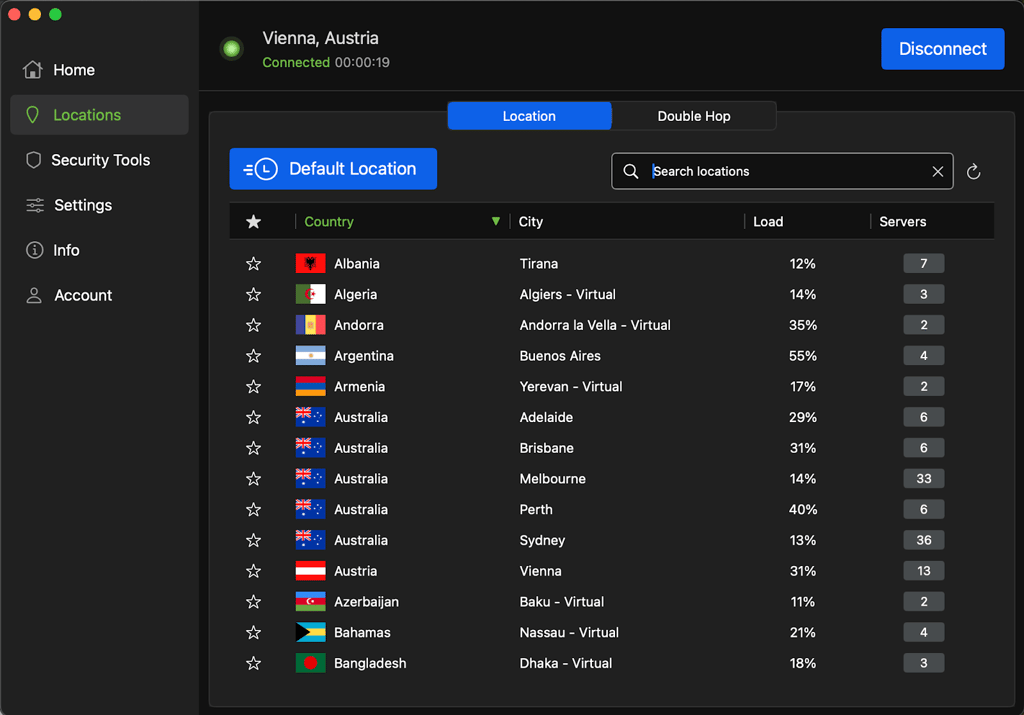
IPVanish is a good VPN for Mac, especially if you’re looking for something simple, affordable, and easy to use. Although you won’t find a lot of advanced features with IPVanish, you might be impressed with its P2P file-sharing performance.
IPVanish server network
IPVanish owns all of its 3,200+ servers, spread across 113+ countries. This mid-sized fleet covers all of the most popular connection spots, plus some niche areas like Macau and Jersey. IPVanish offers OpenVPN and IKEv2 tunneling protocols for its macOS apps, so I used OpenVPN for my speed tests. Ultimately, I got a nice average connection speed of 456Mbps with a 91% initial speed retention rate. This meant I could smoothly use IPVanish for all sorts of online activities, including ones requiring fast connection speeds.
Streaming and P2P file sharing with IPVanish
IPVanish is truly great for torrenting, as it offers P2P-optimized servers and free SOCKS5 proxy servers to all its clients. Naturally, with this setup, I found torrenting with IPVanish a pleasant experience. As for streaming, the fast connection speeds allowed for HD quality, but the geo-unblocking capabilities weren’t as reliable as with my other top Mac VPNs. For instance, I did get into Netflix and BBC iPlayer, but only after switching the servers a couple of times.
Security and privacy features
IPVanish offers secure tunneling protocols, a system-level kill switch, and an ad blocker for its macOS app users. This is not much compared to NordVPN or Surfshark, but it does the basic VPN job quite nicely. Of course, there’s also the AES-256 encryption to keep your online activities always masked.
Compatibility and price
IPVanish does not have a native macOS app, but the one it offers is functional and very easy to use. If you prefer, you can set it up on your router, to protect all of your macOS and iOS devices at once. IPVanish is competitively priced at $2.99/month and you can test it our first during the 7-day free trial. All your purchases with the provider are risk-free because of the 30-day money-back guarantee.
For more information, read our in-depth IPVanish review.
Best Mac VPNs compared
| Best Mac VPN | VPN rating | MacOS app features | Servers | Speed | Price | Free version |
| 1. NordVPN | 9.8 ⭐⭐⭐⭐⭐ | Modern tunneling protocols, kill switch. app-based Split Tunneling, Double VPN, onfuscated servers, Threat Protection Pro | 9,300+ in 137+ countries | 456Mbps | 3.09/month | ✅ Yes, 3-day free trial, but requires account setup with an Android device + 30-day money-back guarantee |
| 2. Surfshark | 9.5 ⭐⭐⭐⭐⭐ | Modern tunneling protocols, kill switch, app-based Bypasser, Multi Hop, Camouflage mode, CleanWeb, NoBorders mode | 4,500+ in 100+ countries | 455Mbps | 1.99/month | ✅ Yes, 7-day free trial + 30-day money-back guarantee |
| 3. Proton VPN | 8.6 ⭐⭐⭐⭐⭐ | Modern tunneling protocols, kill switch, Stealth protocol, DNS leak protection, Secure Core | 20,075+ in 145+ countries | 428Mbps | $2.99/month | ✅ Yes, free version |
| 4. TotalVPN | 8.2 ⭐⭐⭐⭐ | Secure tunneling protocols, kill switch, and antivirus integration | 1,800+ in 90+ countries | 417Mbps | $1.59/month | ✅ Yes, 30-day money-back guarantee |
| 5. IPVanish | 8.4 ⭐⭐⭐⭐ | Secure tunneling protocols, system-level kill switch, ad blocker, unlimited connections | 3,200+ in 113+ countries | 456Mbps | $2.99/month | ✅ Yes, 7-day free trial + 30-day money-back guarantee |
![NordVPN winner logo [IN USE]](https://media.vpnpro.com/images/160x40/2025/01/NordVPN-winner-banner-logo.png)
How I tested and selected the best VPNs for Mac in May 2026
To find the best VPNs for Mac, I performed numerous in-house tests and reviewed around 20 VPN services. I checked their MacOS compatibility, app integration, server fleets, offered privacy and security features, unblocking capabilities, and more. Below, you can find a more detailed look at my tests and methodology:
- MacOS compatibility (30%). Simply having a macOS VPN app did not cut it for me, so I looked at how well the available VPN apps integrated within the system and whether they offer native support. I found native macOS apps with NordVPN, Surfshark, and Proton VPN, while TotalVPN and IPVanish offer simple but well-designed apps for the system.
- Available security and privacy features (20%). It’s nothing new that macOS VPN apps are usually not as feature-loaded as their Windows VPN counterparts. So, I made sure none of the essentials were missed on my chosen services, plus ensured my top picks also offered at least some advanced features, like obfuscation or double-hop.
- Speed (20%). I performed speed tests for each VPN using the Speedtest by Ookla and comparing the results with my baseline connection, which was always 500Mbps download/upload and 1ms ping. In the end, NordVPN proved to be the fastest, but my other choices also did not go below the 80% Initial speed retention rate mark for optimal usability.
- Servers (10%). A high-quality server fleet with enough available or often updated IP addresses is a must if you plan to use your VPN to access geo-locked content. I made sure my chosen providers either have big fleets, like NordVPN and Proton VPN, or have them constantly refreshed and well-maintained, like with Surfshark.
- Unblocking capabilities (10%). I checked each VPN’s geo-unblocking capabilities by connecting to servers in specific locations and trying to access popular streaming platforms, like Netflix, BBC iPlayer, Hulu, HBO Max, and more. In the end, I only included the services that performed consistently well at the task.
- Customer support (10%). I contacted each VPN’s customer support and reviewed their responsiveness and how fast they were able to help me solve some complicated issues. Ultimately, I selected the providers with excellent customer support, so you’ll always have backup if troubleshooting is needed.
Is Mac VPN legal to use?
Using a VPN for Mac is perfectly legal all across the US, Europe, and most of the world. If you’re unsure about the VPN legality status in your country, you can refer to our guide just to be on the safe side. What’s more, VPN use does not clash with any sort of macOS or iOS terms and conditions.
However, remember that using a VPN for illegal activities, such as downloading pirated content, is still unlawful and can lead to legal trouble.
Mac VPN not working: step-by-step fix
Your VPN for Mac may not be working properly due to an outdated app version, incorrect server or tunneling protocol choice, or interference with other apps you’re currently running. Here’s a quick guide on the most common Mac VPN not working issues and how to fix them:
- Outdated macOS or VPN app. Compatibility issues can arise if you’re using different versions of the OS and VPN app. Make sure both are updated if there are any pending upgrades.
- Incorrect protocol setting. Each tunneling protocol has its own use. If your VPN currently isn’t working properly, try switching back to the default protocol or switching it around.
- Antivirus or firewall interference. Antivirus software can sometimes block VPN connections. Close your security apps and check if it helps with VPN performance.
- Incorrect server choice. If you’re trying to access a specific geo-locked site, ensure you’re connected to a VPN server in the right location.
- App Store version limitations. Sometimes, Apple App Store VPN app versions have fewer features than apps on the VPN provider’s official site. Try installing the website version.
- IP or DNS leaks. Check if your VPN is not leaking your IP or DNS data using the ipleak.net tool. If you catch a leak, try another server or tunneling protocol.
- Browser cookies and cache are exposing your IP address. While both are good to enhance your browsing experience, if not cleared, they might be giving away your real IP address. Clear them and check your VPN performance again.
If you keep running into issues with your current Mac VPN, upgrading to a premium service might be worth it. For instance, you can try NordVPN during the 30-day free trial to see if it fits your needs.
Get the best VPN for Mac – NordVPN
Can I use a free VPN for Mac?
Yes, technically, you can use a free VPN for Mac. However, I strongly advise against it. For one, free VPNs usually lack any sort of advanced security features, and the selection on their macOS app is even more limited. If you manage to find a free Mac VPN with decent features, it’s likely your server location choice will only be limited to a couple of countries, with only a small fleet covering the locations. What’s more, unpaid VPNs often have daily data caps insufficient for anything more than a couple of hours of very casual browsing. Lastly, free VPNs still have to make money somehow, and a bunch of them are known to sell their client data to third parties.
Instead of risking it with suspicious quality free VPNs, I recommend choosing a premium VPN and taking advantage of the offered free trial and money-back guarantee. For instance, you can use NordVPN for free for 33 days in total, combining the 3-day free trial and the 30-day money-back guarantee. Meanwhile, another great Mac VPN, Surfshark, offers a 7-day free trial and a 30-day money-back guarantee.
Try NordVPN for Mac for free today
Video review
If you want to find the best VPN for Mac in 2026 and see the top options compared, check out the full video below.
Conclusion
Even Macs aren’t immune to cyber threats like tracking, snooping, or data leaks. A reliable VPN for Mac helps protect your privacy by encrypting your internet connection and routing your traffic through secure, anonymous servers. This not only shields your activity from onlookers but also allows you to bypass geo-restrictions and censorship, giving you access to content that might otherwise be blocked.
However, not all VPNs have what it takes to be the best VPN for Mac, and after my extensive testing I found that NordVPN is the top Mac VPN. The provider offers MacOS-optimized apps with an extensive security and privacy features list. Additionally, NordVPN has the fastest connections speeds for smooth browsing and streaming and great geo-unblocking capabilities to access restricted content from anywhere.

![Surfshark weekly deals logo [IN USE]](https://media.vpnpro.com/surfshark-weekly-deals.svg)
![Proton VPN winner logo [IN USE]](https://media.vpnpro.com/2025/05/protonvpn-winner.png)
FAQ
How can I get Mac VPN?
To get a Mac VPN, select a provider that’s compatible with macOS. My top choices are NordVPN, Surfshark, and Proton VPN as they offer fully macOS-customized apps. Once you choose your provider, head to its official website, subscribe, and download the app. Install it by following the instructions, launch, and connect to a server of your choice.
What is the best VPN for Mac?
The best VPN for Mac is NordVPN. The provider offers a fully macOS-optimized app with advanced security features, such as Split Tunneling, Double VPN, and Threat Protection Pro. Plus, NordVPN showed the fastest connection speeds during my tests and the most reliable geo-unblocking performance.
Is there a free VPN for Mac?
Yes, you can use the free Proton VPN app for your Mac. While most free Mac VPN are unreliable to say the least, Proton VPN offers a solid free version of its service. While it has fewer features and limited connection spots, it does a good job at encrypting your traffic for secure browsing. Upgrading to a premium Proton VPN plan unlocks full feature set and a huge server network.


