Surfshark vs NordVPN comparison: which VPN is better in 2026


Surfshark and NordVPN are two of the most popular VPN providers on the market, known for fast speeds, strong security features, large server networks, and the ability to unblock restricted content worldwide. Whether you’re streaming, torrenting, or safeguarding your online privacy, these VPNs aim to deliver top-tier performance.
🏷️ LIMITED OFFER: NordVPN deal! Get 76% OFF NordVPN + 3 months FREE 🏷️
🏷️ LIMITED OFFER: Surfshark VPN Deal! Now up to 87% OFF Surfshark + 3 months FREE 🏷️
In this NordVPN vs Surfshark comparison, I tested both services across key areas such as server networks, connection speeds, security features, ease of use, and pricing. I also looked into their performance in real-world scenarios to evaluate their geo-unblocking capabilities, connection stability, device compatibility, customer support, and overall value for money.
Below, I break down which VPN – Surfshark or NordVPN – is the better option for your needs.


Since 2018, VPNpro has delivered unbiased, expert-backed insights through in-house research and thorough VPN testing. Our team ensures every review is fact-checked and reliable. Learn how we maintain these high standards in our testing methods.

NordVPN vs Surfshark VPN compared
Surfshark and NordVPN both provide secure, no-log usage. However, while Surfshark is slightly cheaper than NordVPN and allows unlimited simultaneous connections, NordVPN outshines Surfshark with a superior server network, better streaming capabilities, and faster torrenting performance. Both services excel in security and privacy, but the differences in performance and features can be decisive for users.
| VPN: | NordVPN | Surfshark |
| Rating: |
9.8 ⭐⭐⭐⭐⭐ | 9.5 ⭐⭐⭐⭐⭐ |
| Servers: | 9,300+ servers in 137+ countries | 4,500+ servers in 100+ countries |
| Average download speed: | 274Mbps | 239Mbps |
| Netflix access: | Unblocks 39+ Netflix regions | Unblocks 26+ Netflix regions |
| Torrenting: | ✅ Yes (P2P supported) | ✅ Yes (P2P supported) |
| Logging: | Independently audited no-log policy | Independently audited no-log policy |
| Simultaneous connections: | 10 | Unlimited |
| Price: | $3.09/month | $1.99/month |
| Full review: | NordVPN review | Surfshark review |
| Official website: |
www.nordvpn.com |
www.surfshark.com |
Are NordVPN and Surfshark owned by the same company? In 2022, Nord Security and Surfshark announced a merger, making Nord Security the parent company of both. Despite this, the two VPNs continue to operate independently with separate infrastructures, maintaining their unique features and identities.
Key differences between NordVPN and Surfshark explained
If you’re in a hurry, here’s a brief breakdown on the key differences between NordVPN and Surfshark. These points highlight how the two providers compare across core features and will give you a quick sense of which VPN fits your needs better:
- Surfshark is more affordable than NordVPN, with plans starting at $1.99/month compared to NordVPN’s $3.09/month.
- Surfshark allows unlimited simultaneous device connections, while NordVPN allows up to 10 devices per account. This makes Surfshark a better fit for large households, whereas NordVPN is well-suited for individual users or smaller households with multiple devices.
- NordVPN operates a larger server network with 9,300+ servers in 137+ countries, while Surfshark covers 4,500+ servers across 100+ countries.
- NordVPN performs slightly better in terms of speed. In my tests, Surfshark’s WireGuard speeds ranged between 230 and 254Mbps, while NordVPN consistently achieved 269 to 277Mbps speeds using its proprietary NordLynx protocol.
- NordVPN’s Panama jurisdiction is more privacy-friendly than Surfshark’s Netherlands base. Additionally, NordVPN’s independently audited no-logs policy and advanced security features, like DoubleVPN, provide an extra layer of assurance.
- Both NordVPN and Surfshark support P2P file sharing, but NordVPN’s faster speeds and specialized P2P servers make it a better choice for torrenting enthusiasts.
- Both providers excel at unblocking streaming platforms like Netflix, Amazon Prime Video, and BBC iPlayer. However, NordVPN’s more extensive server network performs better when accessing region-specific libraries.
Final verdict: NordVPN and Surfshark are both strong VPN services, making either a solid choice in 2026. That said, NordVPN comes out ahead thanks to faster speeds, a larger server network, and more advanced security features. While it’s a bit pricier than Surfshark, NordVPN’s performance and privacy benefits justify the price. Nevertheless, Surfshark remains an excellent alternative for users who want an affordable VPN with unlimited device connections without sacrificing core performance.

Surfshark vs NordVPN price overview
Regarding pricing, Surfshark and NordVPN cater to different budgets and preferences. NordVPN offers a more affordable 1-month plan, while Surfshark provides better value on longer-term subscriptions. Below is a detailed comparison of their subscription plans:
| Subscription plans | NordVPN | Surfshark VPN |
| 1-month plan | $12.99/month | $15.45/month |
| 1-year plan | $4.99/month | $3.19/month |
| 2-year plan | $3.09/month | $1.99/month |
| Free trial | ✅ Yes, 3 days (mobile, Android) | ✅ Yes, 7 days |
| Money-back guarantee | ✅ Yes, 30 days | ✅ Yes, 30 days |
| Current deal | Save 76% on NordVPN | Save 87% on Surfshark VPN |
| Review the full VPN pricing: | NordVPN pricing | Surfshark pricing |
Both NordVPN and Surfshark offer 1-month, 12-month, and 24-month plans. NordVPN’s 1-month plan is cheaper at $12.99/month compared to Surfshark’s $15.45/month. However, Surfshark takes the lead with its lower prices on 1-year and 2-year plans, costing $3.19/month and $1.99/month, respectively.
Both NordVPN and Surfshark offer a 30-day money-back guarantee, allowing users to test their services before committing. When it comes to free trials, Surfshark offers a 7-day free trial that can be started directly through its website and used on up to three devices. By contrast, NordVPN's free trial is available only on Android and lasts just 3 days. Additionally, NordVPN goes the extra mile by allowing cash payments in retail locations across nine countries (the US, the UK, Canada, Germany, the Netherlands, Italy, France, Spain, and Japan), which is not an option with Surfshark.
Otherwise, both VPN providers support a wide range of payment methods, including credit cards, PayPal, Sofort, Google Pay, Amazon Pay, and cryptocurrencies. This flexibility ensures a seamless subscription experience tailored to various use cases. Lastly, if you’re looking to save, check out our NordVPN coupons and Surfshark coupons pages to find the latest discounts.
Verdict: NordVPN is better suited for short-term use, especially if you want a VPN that supports alternative payment methods like cash. That said, Surfshark delivers better long-term value with more affordable 1-year and 2-year plans, and a more accessible 7-day free trial. This makes Surfshark the stronger option for budget-conscious users.

Server locations
When comparing Surfshark and NordVPN server networks, NordVPN has a clear advantage with a more extensive server fleet and broader global coverage. NordVPN offers 9,300+ servers across 137+ countries, while Surfshark provides 4,500+ servers in 100+ countries.
| Server Specification | NordVPN | Surfshark |
| Servers | 9,300+ | 4,500+ |
| Countries | 137+ | 100+ |
| See all VPN server locations | NordVPN servers list | Surfshark servers list |
In terms of regional coverage, NordVPN has a broader server distribution, particularly in regions like North America, the Middle East, and Africa. Additionally, in December 2025, NordVPN expanded its reach by adding almost 30 new virtual locations, bringing the total to 79 virtual servers. Overall, I found that NordVPN’s broader server distribution made it easier for me to find ideal servers for unblocking foreign streaming sites or bypassing various geo-restrictions.
Surfshark, though smaller, strategically places its servers to cover key areas effectively, offering reliable performance and access for its users. Plus, in late 2025, Surfshark added 100 Gbps servers to its network (a tenfold capacity increase over the previous standard), helping keep connections stable even during peak usage.
| Region | NordVPN (countries) | Surfshark (countries) |
| The Americas | 27+ | 18+ |
| Europe | 47+ | 46+ |
| Asia Pacific | 27+ | 27+ |
| Middle East & Africa | 28+ | 9+ |
Verdict: Thanks to its larger server network and broader regional coverage, NordVPN is the better option for users who want more location choices and consistent access to international content. Surfshark’s smaller network still performs reliably, but NordVPN offers greater flexibility for region-specific use cases.
NordVPN vs Surfshark speed test
When it comes to speed, NordVPN slightly outperforms Surfshark in most scenarios. I recorded an average download speed of 274Mbps with NordVPN, while Surfshark followed closely with an average of 239Mbps. Both VPNs use the next-gen WireGuard protocol to deliver high speeds, but in my experience, NordVPN’s proprietary NordLynx technology provided a slight edge in performance.
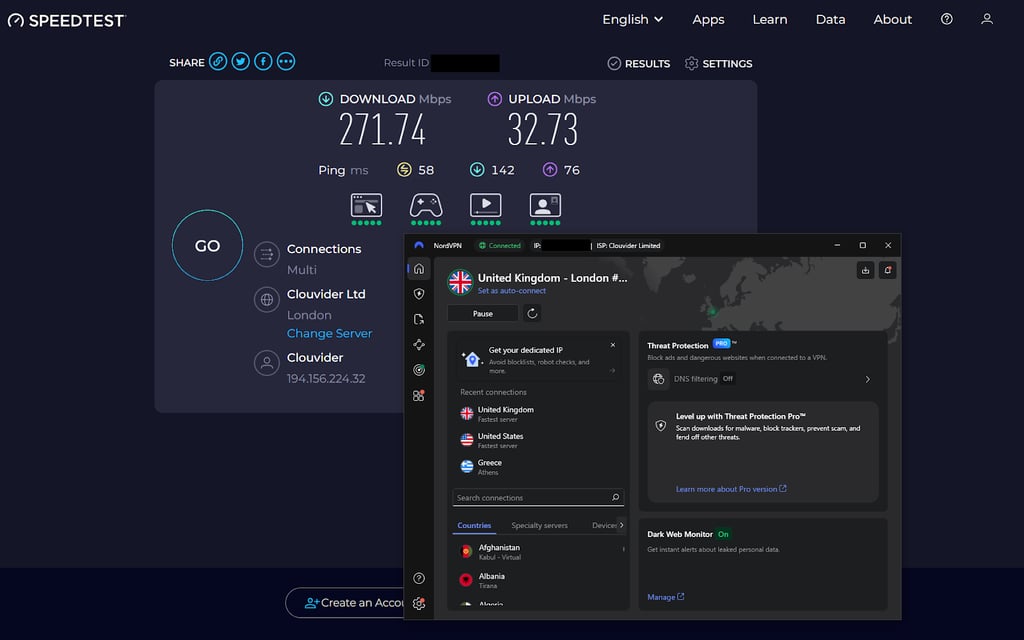
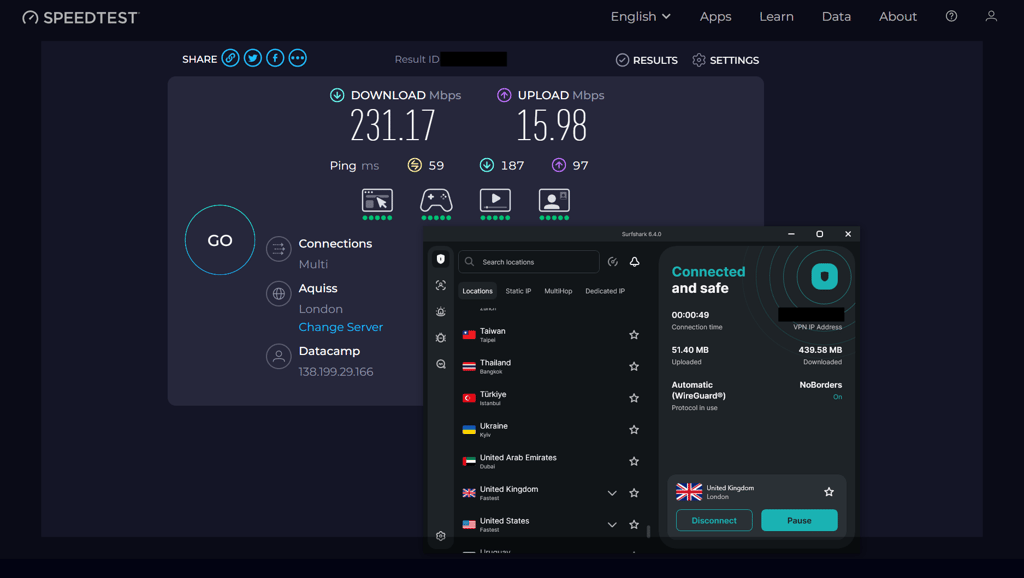
I ran these speed tests on a Windows 11 system with an i5-13600KF processor and 32GB of RAM, using Speedtest by Ookla. My baseline connection speed reached 294Mbps download, 35Mbps upload, and 19ms ping. I tested both VPNs by connecting to local and international servers across multiple countries. Both NordVPN and Surfshark were tested using their WireGuard-based protocols: NordLynx for NordVPN and WireGuard for Surfshark. You can see the detailed result below:
| Speed type | NordVPN | Surfshark VPN |
| Local server download speed | 275Mbps | 246Mbps |
| Local server upload speed | 34Mbps |
15Mbps |
| Local server ping | 23ms |
19ms |
| International server download average | 273Mbps |
242Mbps |
| International server upload average | 33Mbps |
16Mbps |
| International server ping average | 58ms |
59ms |
Note: Speed test results may vary depending on factors such as the distance between you and the server, server load, and your internet service provider's performance.
NordVPN consistently outperformed Surfshark in download and upload speeds across local and international servers. For example:
- On local (American) servers, NordVPN delivered a download speed of 275Mbps compared to Surfshark’s 246Mbps, along with higher upload speeds.
- On international servers, NordVPN maintained an average of 273Mbps, slightly ahead of Surfshark’s 242Mbps.
Verdict: While NordVPN only slightly outperforms Surfshark in speed, both services rank among the fastest VPNs available. In my tests, Surfshark delivered consistently strong performance using WireGuard, but NordVPN’s NordLynx technology maintained a small edge across most scenarios. If speed is your top priority, then NordVPN is the better choice for you, although Surfshark remains a strong alternative for everyday use.
Is NordVPN better than Surfshark for streaming?
Both NordVPN and Surfshark proved to be highly reliable at unblocking popular streaming platforms like Netflix, Amazon Prime Video, Hulu, HBO Max, Disney+, BBC iPlayer, YouTube TV, Sling, and ESPN+. I was able to successfully access Netflix libraries in the US, UK, Japan, and the Netherlands, while maintaining UHD (4K) quality without any noticeable buffering. Here’s a breakdown of how each service performed:
| Streaming platforms | NordVPN | Surfshark |
| Netflix US | ✅ Yes | ✅ Yes |
| Other Netflix libraries | ✅ Yes | ✅ Yes |
| Amazon Prime Video | ✅ Yes | ✅ Yes |
| Hulu | ✅ Yes | ✅ Yes |
| HBO Max | ✅ Yes | ✅ Yes |
| Disney+ | ✅ Yes | ✅ Yes |
| BBC iPlayer | ✅ Yes | ✅ Yes |
| YouTube TV | ✅ Yes | ✅ Yes |
| Sling | ✅ Yes | ✅ Yes |
| ESPN+ | ✅ Yes | ✅ Yes |
During my tests, both providers worked reliably across platforms like Amazon Prime Video, Hulu, HBO Max, Disney+, BBC iPlayer, ESPN+, and Sling TV. That said, some streaming services did not display clear error messages when a server wasn’t working as expected, which meant I occasionally had to double-check whether the correct regional library had loaded. In those cases, switching to another server within the same country or reconnecting to the VPN typically fixed the issue and refreshed the correct regional content. Later on, when using each provider’s custom DNS addresses, I noticed a decrease in such hiccups, which made accessing the correct content much more consistent.
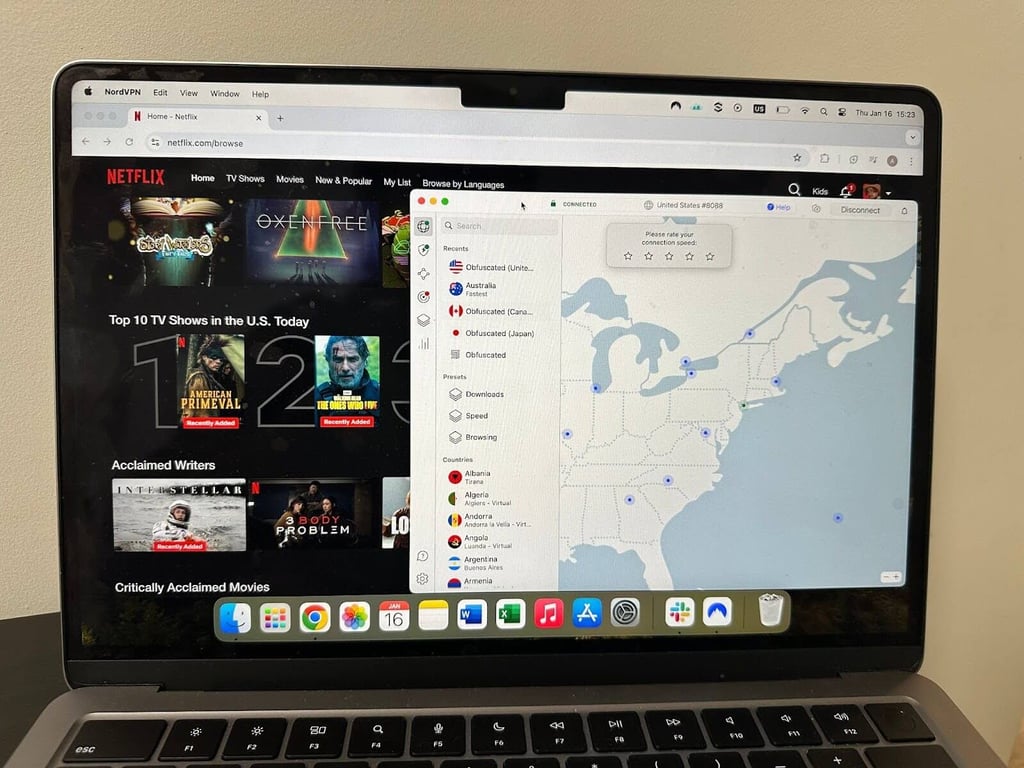
Additionally, both NordVPN and Surfshark offer Smart DNS, which I found useful for streaming on devices that don’t support VPN apps, such as smart TVs and gaming consoles. This feature, combined with NordVPN’s 10-device limit and Surfshark’s unlimited connections, makes them versatile for multi-device households.
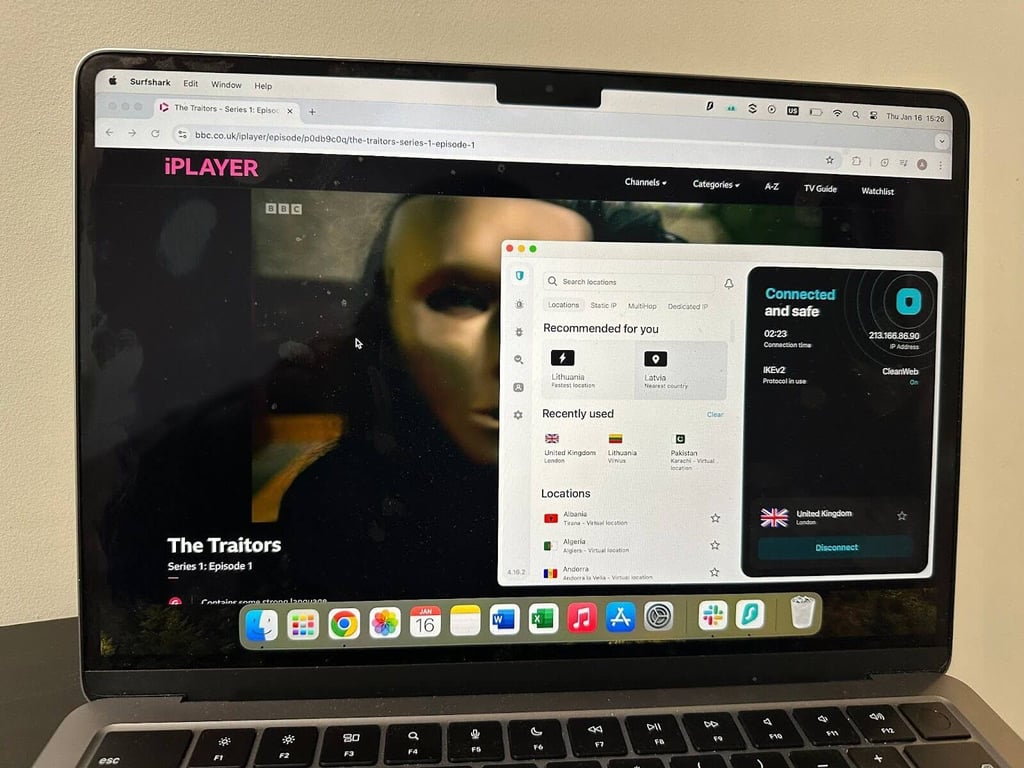
Verdict: While both NordVPN and Surfshark are excellent for streaming, NordVPN has a slight edge due to its consistently faster speeds, which ensures an even smoother UHD experience.
Is Surfshark better than NordVPN for torrenting?
Regarding torrenting, both NordVPN and Surfshark are strong options, offering robust security features and support for P2P file sharing. Based on my torrenting tests, however, I found that their different approaches to P2P support can affect how convenient each service is to use. So, to compare them fairly, I tested both VPNs by downloading large files, including Ubuntu ISOs via BitTorrent. Here’s a quick summary of the key torrenting features that NordVPN and Surfshark offer:
| P2P specifications | NordVPN | Surfshark VPN |
| Allowed on | ✅ Specialized P2P servers | ✅ All servers |
| Free SOCKS5 proxy | ✅ Yes | ❌ No |
| Split tunneling | ✅ Yes (Windows, Android, and Android TV) | ✅ Yes (Windows, macOS, iOS, Android, and Android TV) |
| Kill Switch | ✅ Yes | ✅ Yes |
| Leak Protection | ✅ Yes | ✅ Yes |
In my torrenting tests, NordVPN handled P2P traffic through its specialized P2P servers, which are optimized for speed and performance. Using these servers, I generally saw faster and more consistent download and upload speeds while maintaining a secure connection. However, not all NordVPN servers support torrenting – servers in Albania, Bosnia, Moldova, and North Macedonia are excluded from P2P use. NordVPN also offers a free SOCKS5 proxy, which I found useful for improving torrenting speeds and adding an additional layer of flexibility.
Unlike NordVPN, Surfshark allows torrenting on all 4,500+ servers globally, which makes it easier to use without having to worry about choosing a specific server type. While this provides more flexibility, I noticed that my speeds did not match NordVPN’s specialized P2P servers. I also found the experience slightly less intuitive in practice: with NordVPN, I could simply connect to a dedicated P2P server, while with Surfshark I had to manually search for P2P servers using the server list. This extra step was minor, but it did make NordVPN feel more straightforward for torrenting. Surfshark also does not include a SOCKS5 proxy, which might be a drawback for users who prefer this feature for faster torrenting.
Both NordVPN and Surfshark come equipped with essential security features like a kill switch and leak protection, ensuring your IP address and personal data remain hidden during torrenting. Both providers offer split tunneling, allowing you to choose which apps or websites bypass the VPN, too.
Verdict: If torrenting speed and optimized performance are your top priorities, NordVPN is the better torrenting VPN thanks to its dedicated P2P servers and SOCKS5 proxy support. Meanwhile, Surfshark remains a strong alternative for users who value flexibility and want the convenience of torrenting on any server.
Surfshark VPN vs NordVPN security overview
When comparing NordVPN vs Surfshark for security, both are industry leaders, providing a powerful set of features to protect your data and online privacy. Both VPNs use AES-256 and ChaCha20 encryption, offering strong protection against cyber threats. In addition, they include vital security tools such as a Kill Switch, DNS leak protection, and obfuscated servers, which are essential for maintaining privacy and bypassing censorship. However, they are based in different jurisdictions, which can impact your data privacy.
| Security features | NordVPN | Surfshark VPN |
| Jurisdiction | Panama (privacy-friendly, no Eyes) | The Netherlands (Nine Eye jurisdiction) |
| VPN protocols | NordLynx (WireGuard-based), OpenVPN, IKEv2/IPSec | WireGuard, OpenVPN, IKEv/IPSec |
| Encryption | AES-256, ChaCha20 | AES-256, ChaCha20 |
| Kill switch | ✅ Yes, app-based & system-wide | ✅ Yes, on all platforms |
| DNS leak protection | ✅ Yes | ✅ Yes |
| Obfuscated servers | ✅ Yes | ✅ Yes |
| RAM-only servers | ✅ Yes, all the servers | ✅ Yes, part of the fleet |
Verdict: Both NordVPN and Surfshark offer strong security features, including modern encryption, leak protection, obfuscation, and RAM-only servers. However, NordVPN has a slight edge in this category thanks to its Panama jurisdiction and system-wide kill switch options, which may appeal to users who prioritize maximum privacy.
Jurisdiction
NordVPN is based in privacy-friendly Panama, while Surfshark operates from the Netherlands, a Nine Eyes intelligence alliance member, which generally makes NordVPN the preferred option for strict privacy.
While Surfshark’s jurisdiction may raise potential surveillance concerns, its no-logs policy and RAM-only plus virtual servers ensure no user data is stored. In contrast, NordVPN operates outside the Eyes alliances and faces no mandatory data retention laws.
NordVPN’s jurisdictional advantage, combined with multiple independent audits, makes NordVPN the better choice for those prioritizing anonymity.
Encryption
Both NordVPN and Surfshark use AES-256 encryption; however, the primary distinction lies in their jurisdiction and the specific protocols they support, with NordVPN using its proprietary NordLynx protocol while Surfshark leans towards WireGuard. To boost security, Surfshark now also includes post-quantum protection, which is designed to help defend against future quantum-based threats. Meanwhile, NordVPN’s proprietary NordLynx protocol, based on WireGuard, enhances privacy with a double NAT system, offering faster and more secure connections. While both are highly secure, NordVPN’s NordLynx gives it a slight edge in combining performance with privacy.
NOTE: You can use tools like GlassWire or Wireshark to verify that your VPN connection is active and that your traffic is going through an encrypted tunnel. With GlassWire, simply download and install the app to monitor your network activity in real time and confirm if your data is routed through the VPN interface. Alternatively, Wireshark is a more advanced packet inspection tool that lets you capture and analyze internet packets; encrypted data will appear scrambled or unreadable, verifying your VPN’s encryption. Both tools can help confirm that your VPN connection is active and encrypted, but keep in mind that they cannot verify encryption strength or implementation details.
Kill switch
NordVPN and Surfshark include a kill switch to prevent data leaks during VPN disconnections. NordVPN offers more customization with system-wide and app-specific kill switch settings, making it ideal for tailored protection. Surfshark’s kill switch is reliable but operates only at the network level and offers less flexibility compared to NordVPN’s more configurable implementation.
Both providers passed leak tests, but NordVPN’s granular controls and additional features like Threat Protection make it more versatile. Surfshark’s CleanWeb ad blocker outperforms on ad-heavy sites, making it a strong contender for browsing privacy.
Cloaking technology
Both VPNs provide obfuscated servers and NordWhisper protocol to disguise VPN traffic as regular HTTPS activity, bypassing VPN blocks and censorship. These features are especially useful on restrictive networks or regions like China or Iran. NordVPN offers a broader range of obfuscated servers across more locations, giving it a clear edge for users in heavily censored areas. Surfshark’s obfuscation is effective but less extensive, making NordVPN the superior choice for robust cloaking capabilities.
NOTE: While Surfshark’s CleanWeb feature excels at blocking ads and avoiding detection on anti-adblock sites, its overall security suite is slightly less extensive than NordVPN’s.
Surfshark vs NordVPN independent audits
Independent audits verify VPN providers’ claims, especially about no-logs policies and security, helping to ensure transparency and user trust. NordVPN has undergone multiple audits, including Deloitte’s 2026 review of its no-logs policy and infrastructure, which confirmed strict adherence to privacy commitments. NordVPN’s applications and infrastructure were also audited by Cure53 in 2025, making it one of the most thoroughly reviewed VPNs. NordVPN also uses a bug bounty program to address vulnerabilities.
Surfshark has also completed multiple security and no-logs audits, including Deloitte’s 2025 review, which confirmed that Surfshark does not track or store user activity. Additionally, SecuRing audited its applications and infrastructure in 2025 and 2026, and found no critical vulnerabilities, confirming the overall resilience of Surfshark’s systems. Surfshark’s transparency in publicizing audit results is widely praised despite the company being based in one of the Nine Eyes Alliance countries, the Netherlands.
Verdict: NordVPN and Surfshark have both undergone independent audits to verify their privacy claims, reinforcing trust in their services. While Surfshark has expanded its audit coverage in recent years, NordVPN’s longer track record of repeated no-logs and security audits gives it the edge in this category.
Extra features included in NordVPN and Surfshark subscriptions
Both NordVPN and Surfshark offer valuable features like Double VPN, split tunneling, DNS leak protection, and ad blockers as part of their standard subscriptions. However, certain advanced features may require a higher-tier plan or additional purchase:
| Features | NordVPN | Surfshark |
| Double VPN/Multi-Hop | ✅ Yes | ✅ Yes |
| Split tunneling | ✅ Yes | ✅ Yes |
| GPS Spoofing | ❌ No | ✅ Yes |
| Smart DNS | ✅ Yes | ✅ Yes |
| Ad blocker | ✅ Yes, Threat Protection | ✅ Yes, Clean Web |
| Dedicated IP | ☑️ Yes, but at an extra cost | ☑️ Yes, but at an extra cost |
| Incogni (personal data removal tool) | ❌ No | ☑️ Yes, but at extra cost |
| Alternative Phone Number | ❌ No | ☑️ Yes, but at extra cost |
Verdict: While both VPNs offer strong core features, Surfshark provides a wider range of optional extras, whereas NordVPN focuses on advanced security tools. Users looking for additional privacy features may prefer Surfshark, while those prioritizing security-first functionality may lean toward NordVPN.
Double VPN
NordVPN and Surfshark each offer double encryption by routing your data through two servers, enhancing privacy. While the functionality is similar, NordVPN calls it Double VPN, and Surfshark refers to it as Multi-Hop, with slight differences in how they work.
NordVPN’s Double VPN routes your traffic through two specific servers, offering enhanced security and making it fairly impossible to trace your activity. However, I noticed that the number of available server pairs was fairly limited, especially when compared to Surfshark’s MultiHop servers. This naturally reduced flexibility and, in some cases, I noticed performance drops. That said, Surfshark’s Multi-Hop also encrypts data twice and allows more customization thanks to a wider selection of server combinations across different countries, giving me more control over how and where my traffic was routed.
In practice, both features had some impact on speed. During my tests, NordVPN’s Double VPN caused a more noticeable slowdown, likely due to its fixed server pairs. Surfshark’s Multi-Hop felt easier to use and more flexible when choosing locations, but the extra routing still resulted in a slight speed reduction.
Therefore, if you prioritize flexibility and ease of use, Surfshark’s Multi-Hop is the better option. However, if you prefer a more structured, secure solution with a strong reputation, NordVPN’s Double VPN stands out as the more traditional choice.
Split tunneling
Surfshark and NordVPN offer split tunneling, allowing users to route specific apps or traffic through the VPN while others bypass it. This feature helps manage bandwidth and access local content while maintaining privacy for certain activities.
NordVPN’s split tunneling works on Windows and Android, enabling users to choose which apps use the VPN. However, it lacks support for macOS and iOS, limiting its compatibility. Meanwhile, Surfshark offers split tunneling on Windows, Android, macOS, and iOS, making it versatile across platforms.
While both services performed well with minimal speed loss during in-house testing, the main difference remains platform support. Hence, Surfshark’s broader compatibility makes it the better option for users who need split tunneling across various devices.
GPS spoofing
Surfshark stands out as the only option offering GPS spoofing, and users can manually change their GPS location to match the VPN server. NordVPN lacks this feature, which limits its ability to mask location for apps relying on GPS data.
Surfshark’s GPS spoofing overrides your device’s coordinates, aligning them with the VPN server. This is useful for apps that depend on GPS, such as ridesharing, dating, or location-based games, and helps bypass restrictions on services using GPS alongside IP addresses. It’s particularly effective for streaming content or testing location-based apps. However, it’s only available on Android, which limits its usability.
Smart DNS
Smart DNS is crucial for accessing geo-restricted content on devices that don’t support VPNs, such as smart TVs, gaming consoles, and some streaming devices. Redirecting your DNS queries through a server in the desired location, Smart DNS allows you to bypass restrictions without encrypting your traffic, thus ensuring faster streaming speeds.
Both Surfshark and NordVPN offer Smart DNS functionality. NordVPN’s SmartDNS is straightforward to set up and supports various devices, making it ideal for streaming services like Netflix or Hulu. Surfshark also provides a Smart DNS feature, and in practice, it works similarly and is just as easy to configure.
Note: Smart DNS is not a VPN and does not encrypt your connection. Its purpose is to help unblock geo-restricted content on devices that don’t support native VPN apps, but it doesn't offer the same level of privacy or security as a VPN.
Ad blocker
Surfshark’s CleanWeb and NordVPN’s Threat Protection block ads, trackers, and malicious websites, but their functionality differs. CleanWeb operates at the DNS level, preventing unwanted content from loading, while Threat Protection adds file scanning and works even when the VPN is off.
My in-house testing showed that they both effectively blocked ads and trackers. CleanWeb was seamless with no impact on browsing speed, while Threat Protection’s malware scanning offered extra security but slightly slowed downloads.
NOTE: No ad blocker replaces antivirus software, as they focus on blocking ads and web threats, not complete malware defense.
NordVPN vs Surfshark paid extra features
Both NordVPN and Surfshark provide optional paid features for users seeking advanced tools. NordVPN offers a dedicated IP, a password manager (NordPass), and encrypted cloud storage (NordLocker). Surfshark also provides a dedicated IP and its Surfshark One bundle, which includes antivirus, a privacy search tool, and data breach monitoring.
| Extra paid features | NordVPN | Surfshark |
| Dedicated IP | ✅ Yes ($4.19/month) | ✅ Yes ($3.75/month) |
| Password manager | ✅ Yes (from $1.38/month) | ❌ No |
| Encrypted cloud storage | ✅ Yes (from $2.99/month) | ❌ No |
| Antivirus | ❌ No | ✅ Yes (part of Surfshark One, $2.49/month) |
| Privacy search tool | ❌ No | ✅ Yes (part of Surfshark One, $2.49/month) |
| Data breach monitoring | ❌ No | ✅ Yes (part of Surfshark One, $2.49/month) |
Verdict: Both VPNs cater to different user needs with their paid extras. NordVPN’s offerings focus on privacy and security tools like cloud storage and password management, while Surfshark’s bundle provides an all-in-one solution with antivirus and privacy utilities.
Dedicated IP
Both NordVPN and Surfshark offer dedicated IP addresses as a paid add-on, providing users with a unique, static IP address that only they can use. This feature is ideal for accessing sensitive services like banking, corporate networks, or platforms that block shared VPN IPs. It ensures consistent access and reduces the chances of CAPTCHA verification or account bans. Additionally, Surfshark’s dedicated IP feature is now fully supported on Linux with the previous limitation finally being removed.
- NordVPN offers dedicated IPs in 28 countries, including the US, UK, Germany, Japan, Spain, and South Africa, with prices starting at $4.19/month.
- Surfshark provides dedicated IPs in 16 countries at $3.75/month.
Therefore, NordVPN is the better choice for those prioritizing a specific country or broader options. However, NordVPN's cost is the primary concern and the available countries meet your needs, Surfshark is a strong contender.
Incogni feature
Incogni is a privacy tool offered by Surfshark and NordVPN. It is designed to help users remove their personal data from data brokers. While Surfshark owns the service, NordVPN is a referral partner, but functionality and pricing are identical.
Incogni requests data removal from brokers on your behalf, leveraging privacy laws like GDPR or CCPA to protect your personal information and reduce risks like identity theft or targeted ads. This relatively new feature reflects increased demand for tools beyond traditional VPN services.
Alternative phone number and scam call protection
The Alternative Phone Number feature is a relatively new addition from Surfshark. It is designed to provide users with a temporary, private US phone number for verification purposes. It helps maintain privacy when signing up for services or verifying accounts that require a phone number. The app generates a temporary phone number for use in situations when you need to provide a phone number but want to keep your personal number private. It helps protect you against spam, unsolicited calls, and unwanted tracking.
Meanwhile, NordVPN takes a different approach on mobile, offering the Call Protection feature on Android. It helps identify and warn about suspicious or spam calls before you answer them. While it doesn’t provide an alternative number, it focuses on detecting potential scam activity and reducing unwanted calls directly.
Surfshark vs NordVPN apps: tested on different devices
Both NordVPN and Surfshark support various operating systems and devices, including mobile phones, desktops, and even smart TVs. They also offer browser extensions for easier use. However, a key difference lies in the number of simultaneous connections: Surfshark allows unlimited connections, while NordVPN limits users to 10 devices at a time. Here’s a comparison of their app support and features:
| Feature | NordVPN | Surfshark |
| Supported OS | Windows, macOS, Linux, Android, iOS | Windows, macOS, Linux, Android, iOS |
| Dedicated Linux app | ❌ No | ✅Yes |
| Other software and devices | Routers, Fire TV Stick, Apple TV, Android TV |
Routers, Fire TV Stick, Apple TV, Android TV |
| Browser extensions | Chrome, Firefox, Edge | Chrome, Firefox, Edge |
| Simultaneous connections | 10 | Unlimited |
| Usability level | 🙌 Easy | 🙌 Easy |
I tested NordVPN and Surfshark on various devices, including mobile (iPhone 13, Samsung Galaxy S22) and desktop (MacBook Pro, Windows 11 PC). My tests focused on installation, usability, and performance across different operating systems and device types.
Verdict: Both VPNs deliver reliable apps across all major platforms. However, Surfshark offers greater flexibility with unlimited device connections and a dedicated Linux app, while NordVPN is better suited for users with a smaller number of devices.
Compare NordVPN and Surfshark mobile apps
I tested Surfshark vs. NordVPN mobile apps on iOS (iPhone 13) and Android (Samsung Galaxy S22). Both were easy to install and set up. I particularly enjoyed NordVPN’s minimalistic interface, which has an interactive map for server selection and features like Threat Protection and a kill switch. However, the server list can seem a bit cluttered. Meanwhile, Surfshark offers a sleek, modern design with features like Camouflage Mode and Bypasser (split tunneling) for extra privacy. The app feels more polished and organized.
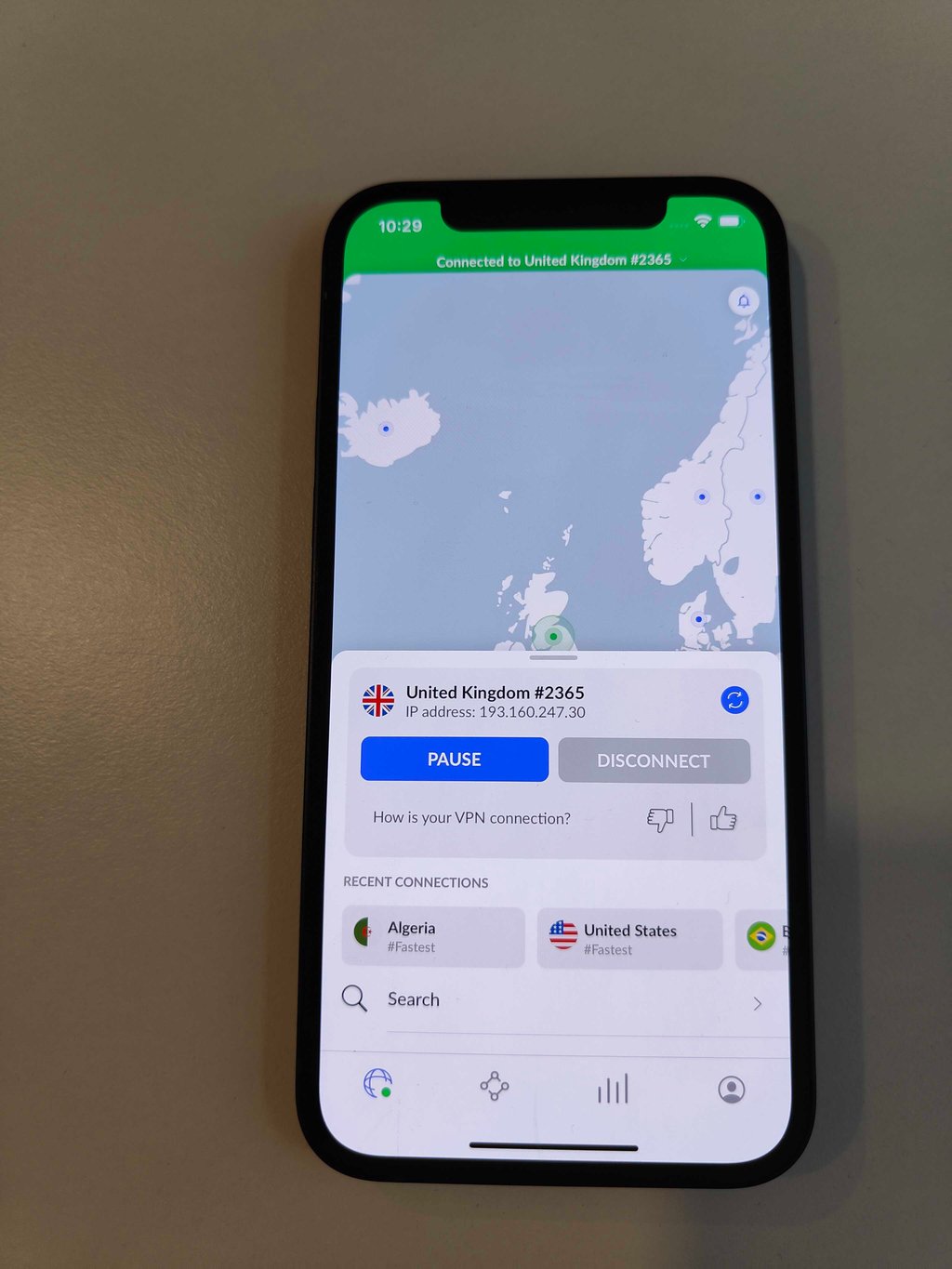
From experience, NordVPN excels in security with its intuitive interface, making it easy to access essential features like server selection and specialized tools. Surfshark, on the other hand, impresses with its sleek, modern design and user-friendly layout, which makes navigating advanced features like Bypasser and Camouflage Mode seamless.
However, it’s worth noting that Surfshark has recently reduced support for older Android versions. The app officially supports devices running Android 6.0 (Marshmallow) and newer, while Android 5 (Lollipop) no longer receives the latest updates.
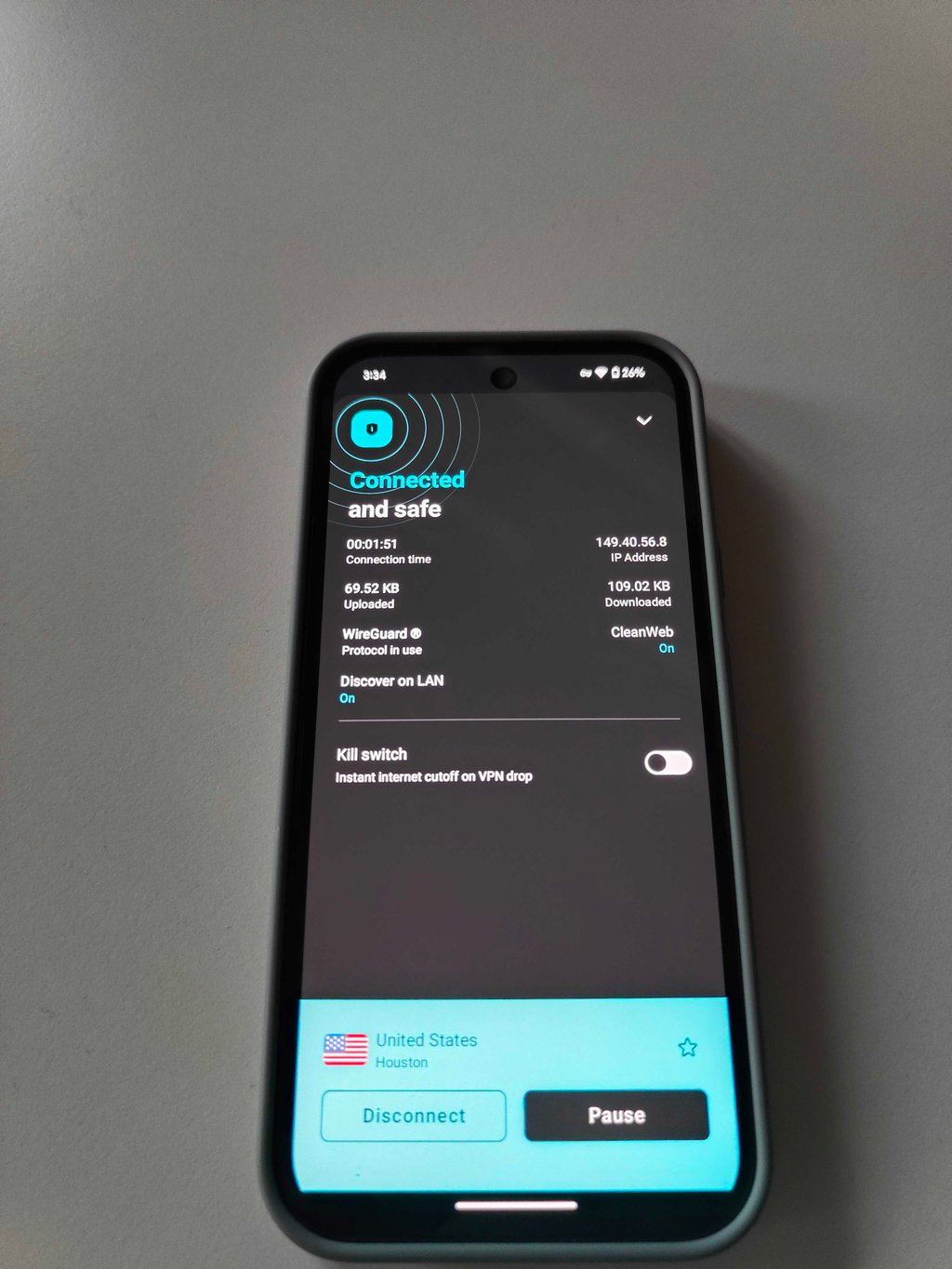
The main difference between these two VPNs is that Surfshark allows unlimited simultaneous connections, while NordVPN allows up to 10 devices. Surfshark’s app is more feature-rich, while NordVPN focuses on security with options like Double VPN. In summary, Surfshark is better for privacy-focused users, while NordVPN is ideal for those seeking strong security and design simplicity.
Compare NordVPN and Surfshark desktop apps
I tested both NordVPN and Surfshark desktop apps on Windows and macOS. Both apps are easy to install and feature intuitive interfaces, but each has strengths. NordVPN offers a straightforward design and includes strong security features like a kill switch, Threat Protection (ad and malware blocking), and DoubleVPN. However, the server list can feel slightly cluttered (much like with the mobile app), especially when manually selecting servers.
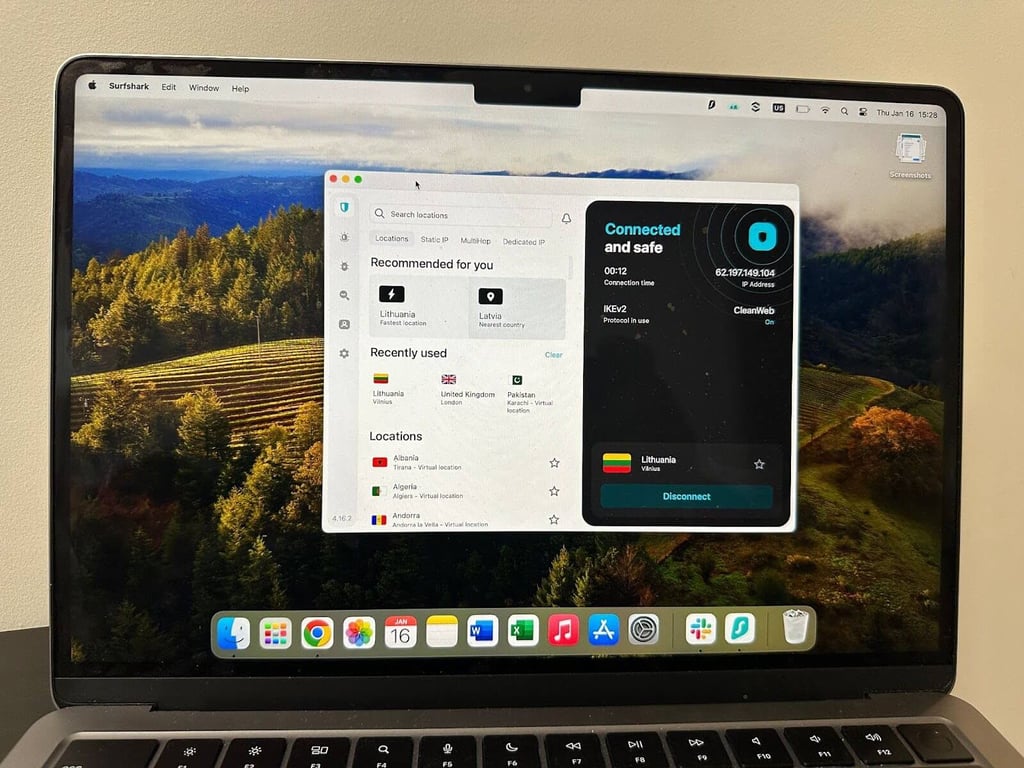
Surfshark has a sleek, modern design and includes privacy features like Camouflage Mode (to hide VPN traffic) and Bypasser. The app is well-organized and user-friendly, but lacks some advanced security features in NordVPN, such as antivirus.
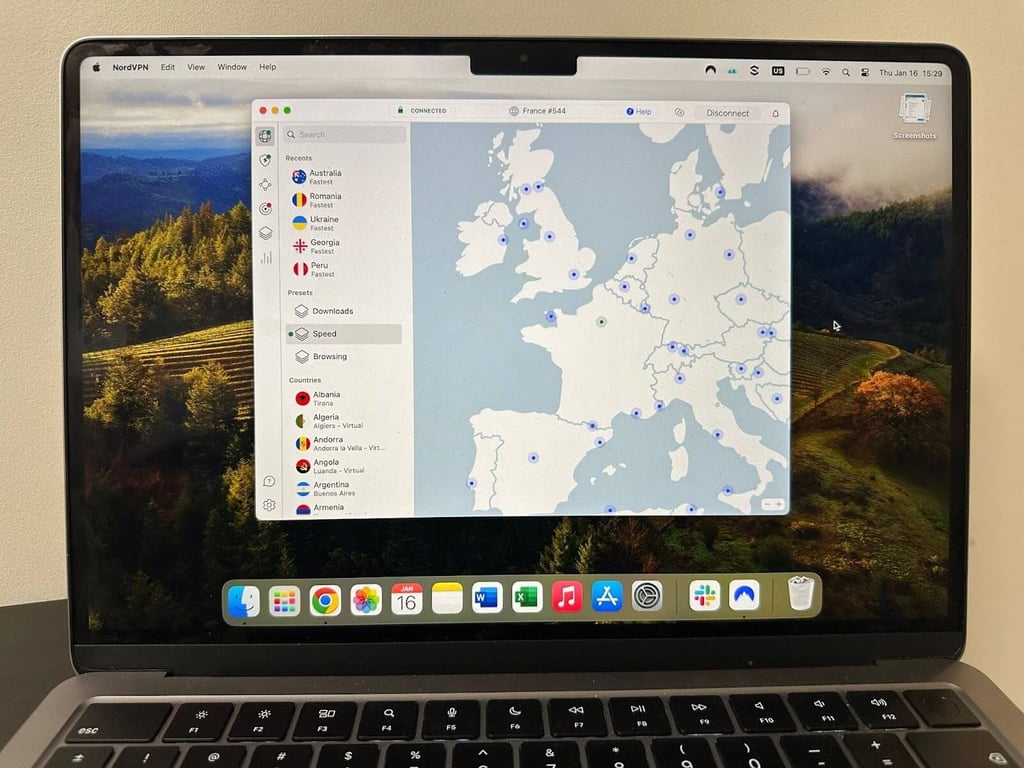
Regarding performance, NordVPN excels in security with its advanced features, while Surfshark offers more flexibility with its privacy tools, making NordVPN the better choice for users prioritizing robust protection.
Which customer support is better: NordVPN or Surfshark
When comparing customer support for NordVPN vs Surfshark, they both offer 24/7 live chat, email support, and an extensive knowledge base, but neither provides phone support. I tested their responsiveness and found that NordVPN generally offers faster and more reliable support.
| Support options | NordVPN | Surfshark VPN |
| 24/7 live chat | ✅ Yes (1-2 mins) | ☑️ Yes (3-4 mins) |
| Email support | ✅ Yes | ✅ Yes |
| Knowledge base | ✅ Yes | ✅ Yes |
| Phone support | ❌ No | ❌ No |
NordVPN’s live chat responses were quick, often within a minute, and the agents provided clear, helpful answers. Their comprehensive knowledge base and email support are available for more detailed inquiries. Meanwhile, Surfshark's support is more mixed. While some users report prompt responses, I found their live chat took about 3-4 minutes. The answers were helpful but occasionally less detailed.

Verdict: Both NordVPN and Surfshark provide strong customer support with 24/7 live chat and helpful knowledge bases. However, based on my experience, NordVPN stands out with faster response times and more detailed answers, making it the better choice for users who value quick and reliable support.
Surfshark vs NordVPN Reddit reviews
Redditors widely praise NordVPN for its speed and reliability. One user highlighted their five-year experience, noting consistent performance and dependable connections, making it their “VPN provider of choice.” Others emphasized NordVPN’s superior speed on PCs, describing it as “way faster” than Surfshark. Overall, NordVPN is seen as a high-performing, trusted option for those prioritizing speed and stability.

Surfshark is celebrated on Reddit for its affordability and features. Users appreciate its unlimited device support, making it an ideal choice for families or heavy device users. Its mobile, Fire TV, and Android TV apps are often preferred over NordVPN’s. While Surfshark is slightly slower on desktops, it compensates with its robust security features, global server coverage, and strong compatibility with streaming platforms.


Reddit discussions often reveal that both VPNs have their strengths. For instance, NordVPN excels in speed and reliability, especially on PCs, while Surfshark is more user-friendly for streaming and mobile apps. A common sentiment is that Surfshark offers better value for money, but NordVPN is unbeatable regarding desktop performance.
According to Redditors, you should choose NordVPN if you prioritize speed, desktop performance, and long-term reliability, and Surfshark if you want an affordable VPN with excellent streaming and mobile compatibility.
Surfshark vs NordVPN recap
| Category | Winner | Notes |
| 💰 Price | Surfshark | Surfshark offers a more affordable 2-year plan at $1.99 per month, compared to NordVPN’s $3.09 per month |
| 🔄 Servers | NordVPN | NordVPN has a larger server network, with 9,300+ servers across 137+ countries, compared to Surfshark’s 4,500+ servers in 100+ countries |
| ⚡ Speed | NordVPN | NordVPN consistently offers faster speeds, especially with its NordLynx protocol, which outperforms Surfshark in speed tests |
| 🍿 Streaming | NordVPN | NordVPN excels in unblocking streaming services like Netflix, BBC iPlayer, and Hulu, and offers more flexibility in accessing content on various devices |
| 🔃 Torrenting | 🤝 Tie | Both VPNs offer excellent torrenting support with P2P-optimized servers and strong privacy features |
| 🔒 Protection | NordVPN | NordVPN provides more substantial security features like DoubleVPN and Threat Protection, making it a better choice for those prioritizing security |
| 📦 Extra Features | Surfshark | Surfshark offers unique features like Camouflage Mode, Bypasser, and unlimited simultaneous connections, which give it an edge in flexibility. However, you pay extra. |
| 👥 Customer Support | NordVPN | NordVPN offers faster and more reliable customer support with quicker response times and helpful answers compared to Surfshark |
In conclusion, NordVPN is the overall winner due to security, speed, and server count, while Surfshark shines in price, extra features, and streaming flexibility.
Which should you choose?
Choose NordVPN if you prioritize top-tier security, faster speeds, and a larger server network. It’s ideal for users who need robust privacy features, reliable performance for activities like 4K streaming or gaming, and access to a wide range of international content. With its advanced security tools and consistent high-speed connections, NordVPN is the better choice for those who value premium protection and performance.
Choose Surfshark if you’re looking for a budget-friendly VPN with excellent value. It’s perfect for users who need unlimited device connections, making it ideal for families or small businesses. Surfshark also offers strong streaming capabilities and flexibility, making it a great option for those seeking affordability without sacrificing key features.

![Surfshark weekly deals logo [IN USE]](https://media.vpnpro.com/surfshark-weekly-deals.svg)
![Proton VPN winner logo [IN USE]](https://media.vpnpro.com/2025/05/protonvpn-winner.png)
FAQ
Is Surfshark better than NordVPN?
Based on our tests, NordVPN outperformed Surfshark in key areas like speed, server network size, security features, and overall reliability. While Surfshark is more affordable and allows unlimited device connections, NordVPN is the better choice for users who prioritize performance, privacy, and advanced security.
Is Surfshark owned by Nord?
Yes, Surfshark is owned by Nord Security, which is also the parent company of NordVPN. Despite shared ownership, both services are run as separate products with different features, pricing, and branding.
Is NordVPN safer than Surfshark?
NordVPN is considered safer due to its advanced security features like DoubleVPN, Threat Protection, and NordLynx. While Surfshark offers solid encryption and privacy features, NordVPN’s extensive security tools make it a better choice for those prioritizing safety. However, both services provide strong protection against data leaks and cyber threats.
Can I be tracked if I use NordVPN?
Using NordVPN significantly reduces the risk of being tracked online by masking your IP address and encrypting your internet traffic. However, no VPN can guarantee 100% anonymity. If you don't follow safe browsing practices, use an antivirus, or have weak security settings, there’s still a tiny risk of being tracked.
Can you be tracked with Surfshark?
While Surfshark provides strong encryption and privacy features, making tracking difficult, no VPN alone offers complete anonymity. You still risk being tracked if you fail to use secure browsing habits, a reliable antivirus, or expose personal information. Overall, Surfshark is highly effective at protecting your privacy.
Is Surfshark faster than NordVPN?
No, Surfshark is not faster than NordVPN. While their performance is fairly close, during my speed tests, NordVPN delivered average international download speeds of 273Mbps, compared to Surfshark’s 242Mbps, which makes NordVPN the faster option in most scenarios.
Why is NordVPN more expensive than Surfshark?
NordVPN is more expensive because it delivers higher speeds, stronger privacy protections, and a larger global server network. Surfshark offers cheaper plans starting at $1.99/month, while NordVPN starts at $3.09/month and is oriented towards users who prioritize performance over price.

