
Surfshark review: best cheap VPN for streaming & torrenting
 Rated #2 out of 54 VPNs
Surfshark VPN is one of the well-known names in the VPN market. Due to its excellent performance and competitive price, it competes with giants like NordVPN and Proton VPN. Keep on reading for my honest and unbiased Surfshark review.


Article summary
- Surfshark is the best value VPN, offering incredibly fast performance, a robust feature set, and unlimited device support.
- Starting at just $1.99/month, Surfshark ranks as the #1 most affordable monthly VPN on our list.
- It offers strong AES 256 and Chacha 20 encryption, a no-logs policy, and RAM servers.
- Surfshark operates 4,500+ 10Gbps servers in 100 countries worldwide to deliver faster, more reliable internet speeds.
- With 4500+ fast P2P-friendly servers worldwide, WireGuard protocol, and the NoBorders feature, Surfshark is excellent at streaming, torrenting, and bypassing geo-blocks.
- You can test Surfshark without a long-term commitment by taking advantage of its 7-day free trial on mobile devices and a 30-day money-back guarantee.
In today's market, Surfshark is a top-tier, budget-friendly VPN, praised for its unlimited device connections, strong security, excellent streaming unblocking, and fast performance. In my Surfshark VPN review, I tested it across multiple platforms over several weeks to see if it still deserves its spot on our list of the best VPNs. My testing included speed and DNS leak tests, streaming performance assessment, and an overview of privacy policies and security features.
Overall, Surfshark performed stellar in every category, including security, privacy, speed, and streaming. It’s an affordable VPN that’s truly worth investing in.
🏷️ LIMITED OFFER: Surfshark VPN Deal! Now up to 87% OFF Surfshark + 3 months FREE 🏷️
Surfshark VPN overview
| Surfshark rating: | 9.5/10 ⭐⭐⭐⭐⭐ |
| VPN price: | $1.99/month (ranked #2 among the cheapest VPNs) |
| Free trial: | 7-day free trial for new users |
| Free version: | ❌ No |
| Servers: | 4,500+ servers in 100 countries |
| Netflix access: | Unblocks Netflix (multiple libraries) |
| Log files | No Logging Policy (independently audited) |
| Torrenting | All Surfshark servers support P2P file sharing |
| Surfshark official website: | www.surfshark.com |


Since 2018, VPNpro has delivered unbiased, expert-backed insights through in-house research and thorough VPN testing. Our team ensures every review is fact-checked and reliable. Learn how we maintain these high standards in our testing methods.
How much does Surfshark VPN cost per month?
Surfshark VPN pricing starts at $1.99/month but can increase to $4.19/month if you opt for a 2-year plan with more features. In total, Surfshark offers 3 plans:
- Starter (from $1.99/month) gives you core VPN features with an ad blocker and identity protection.
- One (from $2.49/month) adds antivirus and real-time data breach alerts.
- One+ (from $4.19/month) offers everything in One, plus Incogni data removal.
| Surfshark VPN plans | Starter | One | One+ |
| Price for a monthly plan | $15.45/month | $17.95/month | $20.85/month |
| Price for an annual plan | $3.19/month + 3 months free | $3.39/month + 3 months free | $6.99/month + 3 months free |
| Price for a 2-year plan | $1.99/month + 3 months free | $2.49/month + 3 months free | $4.19/month + 3 months free |
If you’re a student, you can grab the latest deals on our Surfshark student discount codes page, while active military members, veterans, and their families can take advantage of the verified military discount. You can also find the best Surfshark deals anytime on our coupons page.
If you’re interested in a Surfshark subscription, you can get it using various payment methods. You can use a credit or debit card, PayPal, Google Pay, and Amazon Pay. In addition, it is possible to pay using cryptocurrency, which is an excellent option as it guarantees total anonymity.
Surfshark free trial and money-back guarantee
Surfshark offers a 7-day free trial for mobile users. To access it, without being charged up front, you have to choose a long-term plan, sign up through a mobile app store, and provide your payment details. What I found handy is that after starting the trial, you can use your credentials on other devices (Windows or macOS), with up to 3 simultaneous connections. This limit is removed once you move to a paid plan. To avoid being charged for the full 12-month or 24-month plan, you must cancel the free trial at least 24 hours before the 7-day period ends.
If you prefer to sign up via computer or the official Surfshark website, you can take advantage of Surfshark’s 30-day money-back guarantee. Once you pay for a subscription (monthly or long-term) upfront, you have 30-days to try out the full service, including unlimited simultaneous connections. Just don’t forget to contact customer support via live chat within the 30-day period to get your money back.
Is Surfshark VPN safe?
I’ve found Surfshark to be a safe and reliable VPN with strong protection features. It uses AES-256 encryption, which routes your internet traffic through an encrypted tunnel, keeping your online activity private and undetectable.
A kill switch, another core security feature, immediately blocks access to the internet if the VPN connection unexpectedly falters. Additionally, Surfshark’s handy split-tunneling feature lets you apply VPN to specific apps or websites.
Currently, Surfshark has created a completely new, patented feature, called Everlink. The technology is designed to seamlessly recover a dropped VPN connection and minimize the risk of IP exposure.
In addition to excellent security features, Surfshark has a strict no-logs policy, which prevents Surfshark from recording or tracking your personal information and ensures your data is safe and private.
However, if you’re planning to use Surfshark’s new public DNS without the VPN, keep in mind that DNS queries won’t be encrypted by default. To keep your internet activity private, you’ll need to manually enable DoH, DoT, or DoQ in your device settings.
Surfshark privacy policy analysis
Surfshark is a cybersecurity company based in the Netherlands, a member of the Nine Eyes surveillance alliance, which means that the alliance can track and store your internet activities. Since Surfshark is based in the Netherlands, it’s not immune to surveillance. However, Surfshark mitigates the surveillance risk with its independently audited no-logs policy, public DNS service, and RAM-only servers.
In its privacy policy, I found that Surfshark claims not to store any information that could lead to users’ online activities, such as their real IP address, browsing history, or downloads. In 2025, an independent audit by Deloitte, one of the Big Four auditing firms, confirmed this, reporting that Surfshark does not log or track browsing activities.
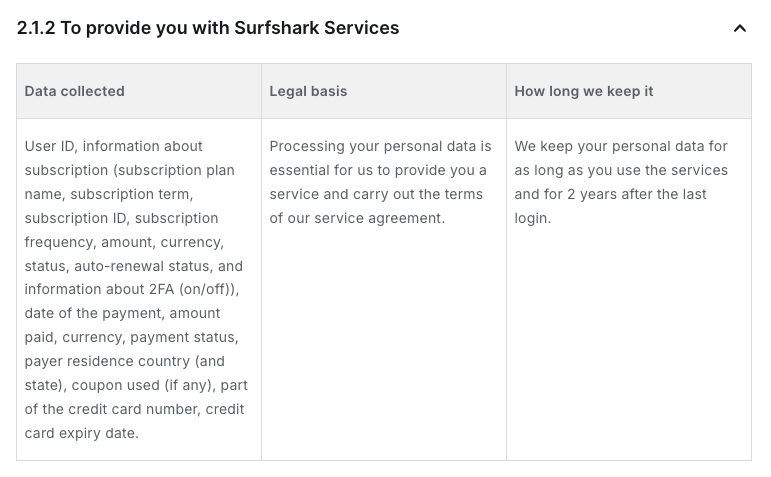
That said, during my analysis, I discovered that Surfshark records limited personal data, including user ID, subscription information, and certain payment details, to provide services to users. If you're uncomfortable with that, you can minimize it further by paying with crypto, which removes traces of your billing information, or using an alternative ID that generates a fake name and email to use during registration.
Surfshark has also introduced a new public DNS service that follows the same no-logs principles. While an independent audit is planned, it hasn’t been completed yet. That said, privacy-conscious users may want to keep an eye out for that verification when it becomes available.
Does Surfshark effectively hide your IP address?
Surfshark, like any VPN, hides your IP address by rerouting your internet traffic through one of its servers, replacing your actual IP address with the VPN server’s IP address. This way, instead of your actual IP address, ISP, websites, apps, and other online services see the VPN-assigned IP address.
To test if Surfshark performs well and hides your IP address, I used well-known leak checkers such as ipleak.net, dnsleaktest.com, and geolocation.com. No leaks were detected during my testing, and the real IP address was successfully hidden.
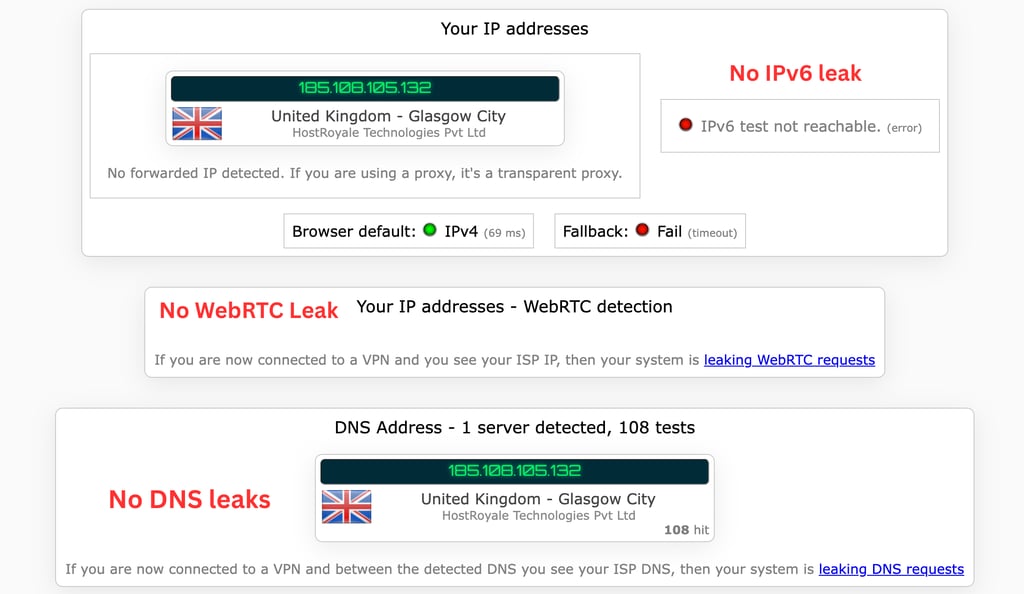
In my tests, Surfshark effectively hid my IP address using AES-256-GCM encryption, tunneling protocols like WireGuard and OpenVPN, and features like MultiHop and IP Rotator to hide traces of my digital footprint and location.
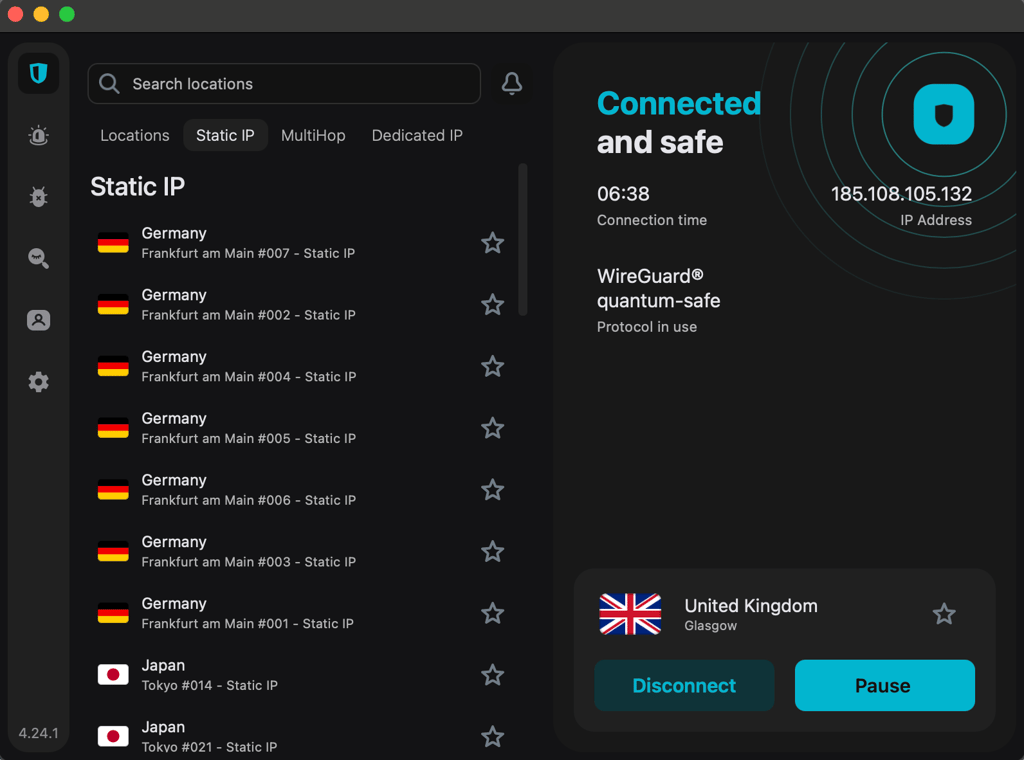
For Surfshark to hide your IP address effectively, it offers two specialized modes that, during my testing, successfully concealed VPN usage. Even on platforms with strong VPN detection (like Netflix, Amazon Prime, and Disney+), these modes let me access content without being flagged or blocked.
- Camouflage mode – using obfuscation, it disguises VPN traffic to look like regular internet traffic. This is very useful to bypass strict network restrictions and keep your actual IP address hidden.
- NoBorders mode – it’s activated on networks where VPNs are blocked, offering a list of servers optimized for highly restricted environments. It’s especially handy in geo-blocked or censorship-heavy regions where you need to mask your real IP address.
Is Surfshark good for torrenting?
Surfshark is a great option for torrenting as it always provides security and privacy. The robust AES-256 encryption and additional features, such as a Kill Switch, ensure that the VPN keeps you secure, especially when using torrenting services, as it might come with some security risks.

Equally important, Surfshark has specialized P2P servers optimized for sharing files via torrenting services. I tested Surfshark’s P2P capabilities myself, and the experience was smooth. Its specialty P2P servers handled torrenting effortlessly, working perfectly with clients like uTorrent, BitTorrent, and Vuze.
I was able to access sites like ThePirateBay and LimeTorrents without any restrictions, and the speeds were consistently strong across multiple servers in different locations. With over 100+ Surfshark locations offering P2P-optimized servers, I never had trouble finding one that fit my needs.
I tested Surfshark for torrenting by downloading a 5.27GB Ubuntu 24 client while connected to the closest VPN server. When I tried to download a file, it took about 5 minutes, and the download speed reached 25Mbps at its peak.
Surfshark VPN speed test
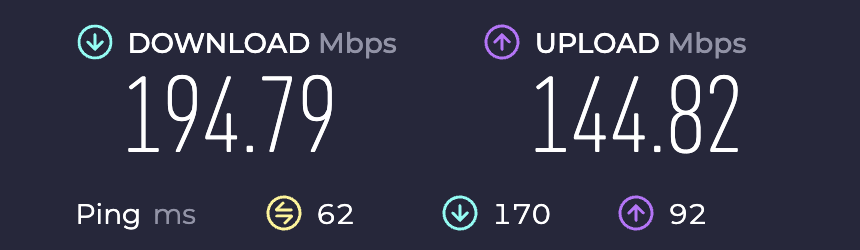
During my tests, Surfshark proved to be a fast VPN, with average download speeds of 194.79Mbps and upload speeds of 144.82Mbps. I tested the VPN speed in five different locations, including the US, UK, Canada, Germany, and India, using the WireGuard protocol. I conducted the test using trustworthy online speed tests like speedtest.net and fast.com. Across all locations, Surfshark retained 92% of my baseline speed and did not cause any noticeable slowdown.
The overall VPN speed depends on various factors, such as location, device, and network. However, with a high-quality provider like Surfshark, this speed loss is usually unnoticeable.
| Surfshark server location | Download speed (Mbps) | Upload speed (Mbps) |
| US | 790Mbps | 92Mbps |
| UK | 846Mbps | 173Mbps |
| Canada | 800Mbps | 82Mbps |
| Germany | 830Mbps | 326Mbps |
| Singapore | 700 Mbps | 156Mbps |
With Surfshark’s speeds, you should not experience any issues gaming or using torrenting services. I tried streaming a few services with Surfshark and did not experience any slow speed or buffering issues. My speeds stayed at a comfortable 200+Mbps at all times, and I was able to enjoy high-quality content.
In addition, Surfshark recently introduced a FastTrack feature that optimizes users' traffic paths for improved speeds and performance. The solution works by routing traffic through a network of servers rather than a single VPN tunnel and can boost internet speeds by up to 70%. It currently works only on macOS on Sydney, Seattle, and Vancouver servers. The FastTrack optimized servers are distinguishable by the FastTrack icon on the server list. However, if you don't see one, it means that at that moment, the most optimized route for you is the direct one, not through multiple servers.
Surfshark global streaming access
Surfshark is one of the best VPNs for streaming due to the extensive list of servers and fast speeds. I tested Surfshark and tried to watch Netflix US, UK, Canada, Australia, Japan, South Korea, India, Egypt, Colombia, Brazil, Morocco, New Zealand, and Nigeria outside the country. Surfshark bypassed geo-restrictions, and I had no issues watching Netflix. The quality of the streaming was top-notch, even with the VPN enabled.
| Streaming site | Does it work with Surfshark VPN? |
| Netflix | ✅ Yes (UK, US, Canada, Australia, Japan, South Korea, India, Egypt, Colombia, Brazil, Morocco, New Zealand, Nigeria) |
| Hulu | ✅ Yes |
| Disney+ | ✅ Yes |
| BBC iPlayer | ✅ Yes |
| HBO Max | ✅ Yes |
| Amazon Prime Video | ✅ Yes |
| Paramount Plus | ✅ Yes |
When I tested out other popular streaming services, Surfshark performed just as well. Paramount Plus worked perfectly on UK servers, allowing us to stream Landman in 4K. Surfshark also had no trouble accessing popular streaming platforms such as BBC iPlayer, Amazon Prime Video, Disney+, HBO Max, and Paramount+.
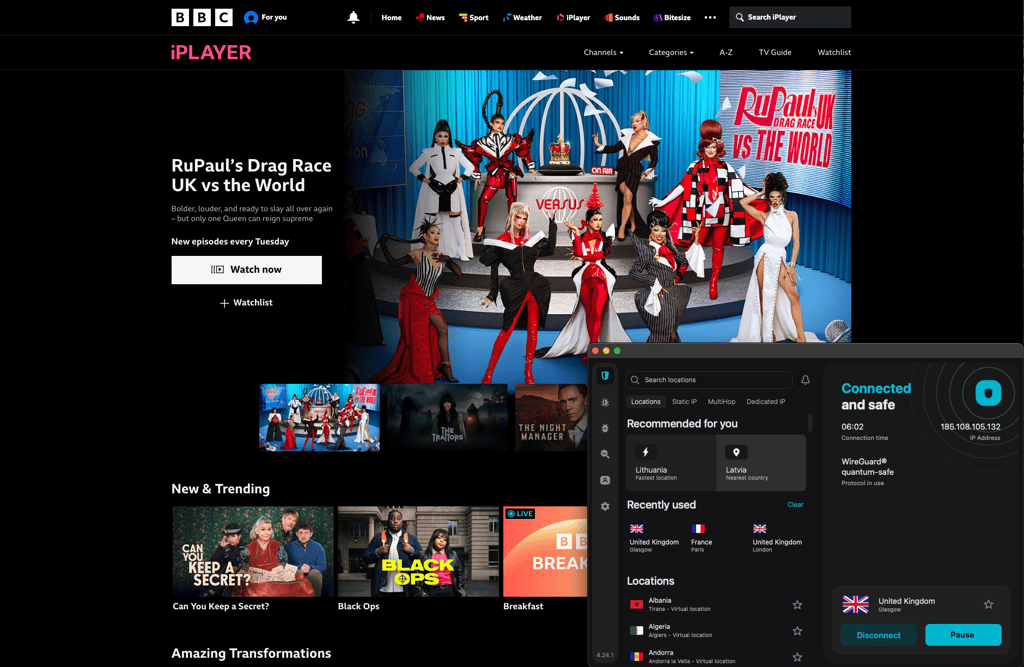
Pro tip: if you ever have issues with a streaming service, connect to a different city in the same country or clear your cookies.
How many servers does Surfshark have?
Surfshark has 4,500+ servers in 100 countries across the globe, including specialty servers like P2P, MultiHop, and obfuscated servers. You can choose from an extensive list of Surfshark countries from Europe, the Americas, Asia Pacific, the Middle East, and Africa. Below, you can find the full list of Surfshark server locations.
| Surfshark server regions | Countries |
| Americas | Argentina, Bahamas, Belize, Bolivia, Brazil, Canada, Chile, Colombia, Costa Rica, Ecuador, Mexico, Panama, Paraguay, Peru, US |
| Europe | Albania, Andorra, Armenia, Austria, Belgium, Bosnia & Herzegovina, Bulgaria, Croatia, Cyprus, Czechia, Denmark, Estonia, Finland, France, Georgia, Germany, Greece, Greenland, Hungary, Iceland, Ireland, Isle of Man, Italy, Latvia, Lithuania, Luxembourg, Malta, Moldova, Montenegro, Netherlands, North Macedonia, Norway, Poland, Portugal, Romania, Serbia, Slovakia, Slovenia, Spain, Sweden, Switzerland, Türkiye, Ukraine, United Kingdom |
| Asia Pacific | Australia, Azerbaijan, Bangladesh, Bhutan, Brunei, Cambodia, Hong Kong, India, Indonesia, Japan, Kazakhstan, Laos, Macau SAR China, Malaysia, Mongolia, Myanmar (Burma), Nepal, New Zealand, Pakistan, Philippines, Singapore, South Korea, Sri Lanka, Taiwan, Thailand, Uzbekistan, Vietnam |
| The Middle East and Africa | Algeria, Egypt, Ghana, Israel, Morocco, Nigeria, Saudi Arabia, South Africa, United Arab Emirates |
Compared to most VPN providers, Surfshark has an extensive list of servers in different countries. Having many Surfshark countries available is beneficial for accessing geo-restricted content and improving the overall VPN performance, such as the VPN server speed. Some services, such as gambling sites, are only available in specific regions, so using servers from different countries can grant you access by bypassing restrictions.
Surfshark app interface on different devices
Surfshark is compatible with all major operating systems, including Windows, macOS, Linux, Android, and iOS. You can even set it up on a router such as AsusWRT, OpenWRT, DD-WRT, GL.iNet, etc. Surfshark also offers unlimited devices, so you’ll have no issues securing all your devices. The setup process is quite simple – simply download and install the app. Though the setup process for routers is different, you will need to set it up manually using WireGuard, OpenVPN, or IKEv2 protocols.
Surfshark also supports Apple TV, Android TV, Samsung TV, Fire TV, and Roku devices. You can get Surfshark on your smart TV by either setting it up on your router or using a Windows device, which creates a VPN-protected Wi-Fi hotspot and shares it with your smart TV.
I have tested Surfshark on Windows, macOS, Android, and iOS devices to see if it’s easy to install and navigate. Below, you can find insights about the Surfshark app on different gadgets.
Surfshark for Android and iPhone
- To use Surfshark on your Android phone, simply download the app from the Google Play Store, log in, and connect to a server of your choice.
- For iPhone: get the Surfshark VPN app from the App Store, sign in with your account, and select a server to connect to.
I have tested Surfshark VPN on a OnePlus 15 and an iPhone 16 device to see how it works on mobile phones. The VPN app was user-friendly and intuitive on Android and iOS devices. Even though there was no server map, both Android and iOS apps had a complete list of servers available, and it was easy to find specialty servers like Static IP, MultiHop, and Dedicated IP at the top of the main page.
I was surprised to see that it was very easy to find Surfshark features on both mobile device apps. All I had to do was go to Settings from the main page and then choose VPN settings to access the features. There, I was able to enable features such as Auto-connect, which enables the VPN automatically, or Kill Switch, which adds an extra layer of security by disabling the internet in case the VPN connection gets interrupted. However, I was disappointed that the Android app had more features than the iOS app. Android users are additionally able to use features like Override GPS location, which is a GPS spoofing feature, and Small packet, which reduces transmitted packet size.


Surfshark for Windows and Mac
- Surfshark is compatible with Windows 7, 8, 8.1, 10, and newer versions of the operating system
- The Surfshark VPN app is compatible with all macOS versions starting with Big Sur 11, including: macOS 11 Big Sur, macOS 12 Monterey, macOS 13 Ventura, and macOS 14 Sonoma.
To test Surfshark desktop apps, I installed Surfshark on Windows 11 and MacBook Air M2 devices. Windows and macOS app versions look very similar, which is very convenient if you have both devices in your household. Similarly to mobile devices, there is no server map available on macOS or Windows devices. Still, it’s easy to navigate through the locations and find specialty servers like Static IP, MultiHop, or Dedicated IP. What I liked about the desktop app version is that you can easily change the language and notification settings and enable dark mode by simply going to the App Settings.

To find the additional features on Windows and macOS devices, I went to VPN settings, which I found when going to Settings from the main page. I was able to enable features like Kill Switch, change the connection protocol, and even select if I wanted to launch the app on startup. I found out that, unfortunately, Apple users will not be able to use Bypasser, a VPN split tunneling feature, as it is only available on iOS, Android, and Windows devices. Other than that, Windows and macOS apps had similar functionality.

Additional features you get with Surfshark
Surfshark VPN is well-known for its extensive list of additional features that are integrated into the app. Apart from the previously mentioned and widely used features like Kill Switch or split tunneling, I found that Surfshark offers other great options to personalize your VPN:
- Cookie pop-up blocker. This feature is handy if you want to get rid of cookie consent pop-ups, and it’s available with Surfshark browser extensions. I enabled this feature using the Chrome browser extension, and I was not prompted with any cookie pop-ups when visiting different websites.
- CleanWeb. Another feature to get rid of malicious ads is the CleanWeb feature, available on mobile and desktop devices and browser extensions. With CleanWeb enabled, I could even avoid ads while streaming content on different services.
- IP Rotator. To enhance your privacy, IP Rotator changes your IP address every 5 to 10 minutes without disconnecting the VPN connection. I tested it with Surfshark’s US location, and the IP address was indeed rotated within this location without interruptions.
- Incogni. It’s a data removal tool that helps protect your privacy even further by deleting your personal information from data broker databases.
- Pause VPN. Enabling Pause VPN allows you to pause the VPN for 5 minutes, 30 minutes, or 2 hours, without the need of doing this manually. I paused my VPN for 30 minutes and I had no issues with it. The connection resumed itself after 30 minutes as promised.
Try additional Surfshark VPN features
Is Surfshark a good VPN in 2026: final verdict
Surfshark is a great VPN option because it is trustworthy and performs excellently in terms of privacy and security. Apart from security and privacy, Surfshark also allows users to achieve their use cases by successfully unlocking various services, and Stipp keeps you safe online.
Surfshark for torrenting – offers P2P-optimized servers, fast speed, and reliable security ⭐⭐⭐⭐⭐ (5/5)
Torrenting is the most popular way to share files, but it comes with certain security risks. Surfshark is a great option that mitigates these dangers by offering specialty P2P servers that will keep you secure. P2P servers are available in all 100 Surfshark locations, so you’ll have no issues torrenting with Surfshark.
Surfshark for streaming – capable of unblocking content while maintaining high-speed connections ⭐⭐⭐⭐⭐ (5/5)
Surfshark has proven itself to successfully unlock various streaming services, including Netflix, Disney+, Hulu, and many more. Due to its extensive list of servers, you will have no issues bypassing geo-restrictions when visiting streaming services.
Surfshark for gaming– effectively prevents bandwidth throttling and minimizes your ping ⭐⭐⭐⭐⭐ (5/5)
Using a VPN for gaming has many benefits, and Surfshark delivers them. It guarantees privacy and protection against DDoS attacks, as well as provides fast speeds and avoids bandwidth throttling.
Surfshark for betting – successfully unblocks sports betting and casino platforms ⭐⭐⭐⭐⭐ (5/5)
Many betting and online casino websites are restricted in some regions, but Surfshark is known to successfully bypass these restrictions and keep your activities private and secure.

![Surfshark weekly deals logo [IN USE]](https://media.vpnpro.com/surfshark-weekly-deals.svg)
![Proton VPN winner logo [IN USE]](https://media.vpnpro.com/2025/05/protonvpn-winner.png)
You may also like to read:
ExpressVPN vs NordVPN vs Surfshark
Norton VPN vs Surfshark
Surfshark vs IPVanish
Surfshark vs Proton VPN
Surfshark vs PIA comparison
Surfshark VPN YouTuber codes
FAQ
What does Surfshark do?
Surfshark is a VPN (Virtual Private Network) provider that keeps your online data safe by encrypting and hiding it from prying eyes. It also has many other benefits, such as bypassing geo-restrictions, removing ads, and shielding users from phishing scams.
How to get Surfshark?
To get Surfshark on a computer, download it from Surfshark’s official page (www. surfshark.com). On a phone, install it through the Google Play Store or the Apple App Store.
How much does Surfshark cost?
Surfshark is an affordable VPN, costing between $1.99 and $20.85 a month. The pricing typically varies by plan and subscription length. To get the best deal, I suggest going for long-term plans, such as 2-year and 1-year plans.
Is Surfshark free?
No, Surfshark is not free, but you can sign up for a 7-day free trial on the Google Play Store or the Apple App Store before getting a paid subscription. Additionally, all subscriptions, including monthly plans, come with a 30-day money-back guarantee, providing an advantage to users.
Does Surfshark have a free trial?
Yes, Surfshark has a 7-day free trial, available via the Google Play Store or Apple App Store. The free trial provides access to full features on up to 3 devices, so you can try out Surfshark risk-free.
Does Surfshark work with Netflix?
Yes, Surfshark works with Netflix, allowing users to unlock various Netflix libraries (Netflix US, UK, Canada, India) by connecting to servers in corresponding countries. Plus, it delivers HD streaming without any noticeable slowdown.
Does Surfshark work in China?
Yes, Surfshark works in China. However, since China has strict network restrictions, users might experience issues. The best way to connect to Surfshark in China is by using the manual connection method, which works well in restricted countries.

