Best dedicated IP VPN or static IP in 2026



When you connect to a VPN server, you're usually assigned a dynamic IP address. Numerous other users may share the same IP address, which can cause problems when trying to access services with strict anti-VPN policies. You may be blocked from a website if unusual activity is detected.
This is where a VPN with a dedicated IP can make all the difference. With a dedicated IP, the address is unique to you, which reduces the chances of being blacklisted, eliminates captchas, and ensures secure access to sensitive services like work networks or personal accounts. However, not every VPN provider offers this feature. That's why I’ve created this guide to the best dedicated IP VPN services, helping you find the ideal option for your needs.
🏷️ LIMITED OFFER: NordVPN deal! Get 76% OFF NordVPN + 3 months FREE 🏷️
Best dedicated IP VPN services in 2026: shortlist
-
Best VPN with dedicated IPs overall
-
Fastest dedicated IP VPN service
-
Secure VPN with dedicated IP for business
-
Reliable dedicated IP VPN
-
Dedicated IP address with VPN protection
![NordVPN mobile logo [IN USE]](https://media.vpnpro.com/Nord-VPN-review.jpg)
![Surfshark mobile logo [IN USE]](https://media.vpnpro.com/surfshark-60x60-1.jpg)
![Proton VPN mobile logo [IN USE]](https://media.vpnpro.com/ProtonVPN-small.jpg)
![CyberGhost mobile logo [IN USE]](https://media.vpnpro.com/CyberGhost-VPN-small.jpg)
![ExpressVPN mobile logo [IN USE]](https://media.vpnpro.com/expressvpn4.png)


Since 2018, VPNpro has delivered unbiased, expert-backed insights through in-house research and thorough VPN testing. Our team ensures every review is fact-checked and reliable. Learn how we maintain these high standards in our testing methods.
What is a dedicated IP?
A dedicated IP address is a unique IP assigned specifically to you. Unlike shared IPs, where multiple users share the same address, a dedicated IP ensures that your online activities are solely associated with your IP. This means you'll have a consistent browsing and a reliable, clean reputation without the risk of being flagged by services that track shared IP usage.
Using a VPN with a dedicated IP allows you to maintain the same IP address every time you connect. This is a big advantage for accessing geo-restricted content or services that require login credentials. For example, if you access your online banking with a shared IP, the service might flag your connection as suspicious, locking you out of your account. With a dedicated IP, only you can use that address, reducing the chances of triggering security checks, CAPTCHAs, or being placed on blocklists.
Having a dedicated IP also ensures that services recognize your connection as legitimate, reducing the chances of it being flagged for unusual activity. While this setup improves security and access, it doesn’t directly affect VPN speed. Since you’re still sharing the same VPN server with other users, the server load remains the same, meaning your connection speed should be similar to that of a regular VPN.
![NordVPN winner logo [IN USE]](https://media.vpnpro.com/images/160x40/2025/01/NordVPN-winner-banner-logo.png)
Top dedicated IP VPNs: overview
- NordVPN – best dedicated IP VPN service
- Surfshark VPN – high-quality security VPN with dedicated IP
- Proton VPN - dedicated IP for business with a reliable VPN
- CyberGhost – fast and affordable dedicated IP VPN
- ExpressVPN – privacy-focused VPN with dedicated IP
After testing 28 VPNs, I’ve rounded up the best VPNs with static IP options. I based my selection on key factors such as strong VPN security, fast speeds, reliability, and value for money. Each one offers a VPN with a dedicated IP, ensuring you get a unique, private address for a more consistent and secure connection.
1. NordVPN – the best VPN with dedicated IPs
![NordVPN mobile logo [IN USE]](https://media.vpnpro.com/images/170x89/2025/08/nord-rreview.jpg)


9300

137

24/7, email

452 Mbps
-
10 dedicated IP server countries
-
Threat Protection blocks ads and malware
-
NordLynx protocol for the best speeds
-
No free version
NordVPN is the best VPN with dedicated IP address. You can choose an IP address from 32 locations across 24 countries. These include seven cities in the US, Germany, the UK, the Netherlands, two towns in France, Italy, Sweden, Japan, Canada (two cities), Australia, Hong Kong, Switzerland, Spain, Belgium, Denmark, Singapore, Ireland, Austria, Poland, Portugal, South Africa, Mexico, Czech Republic, and South Korea.
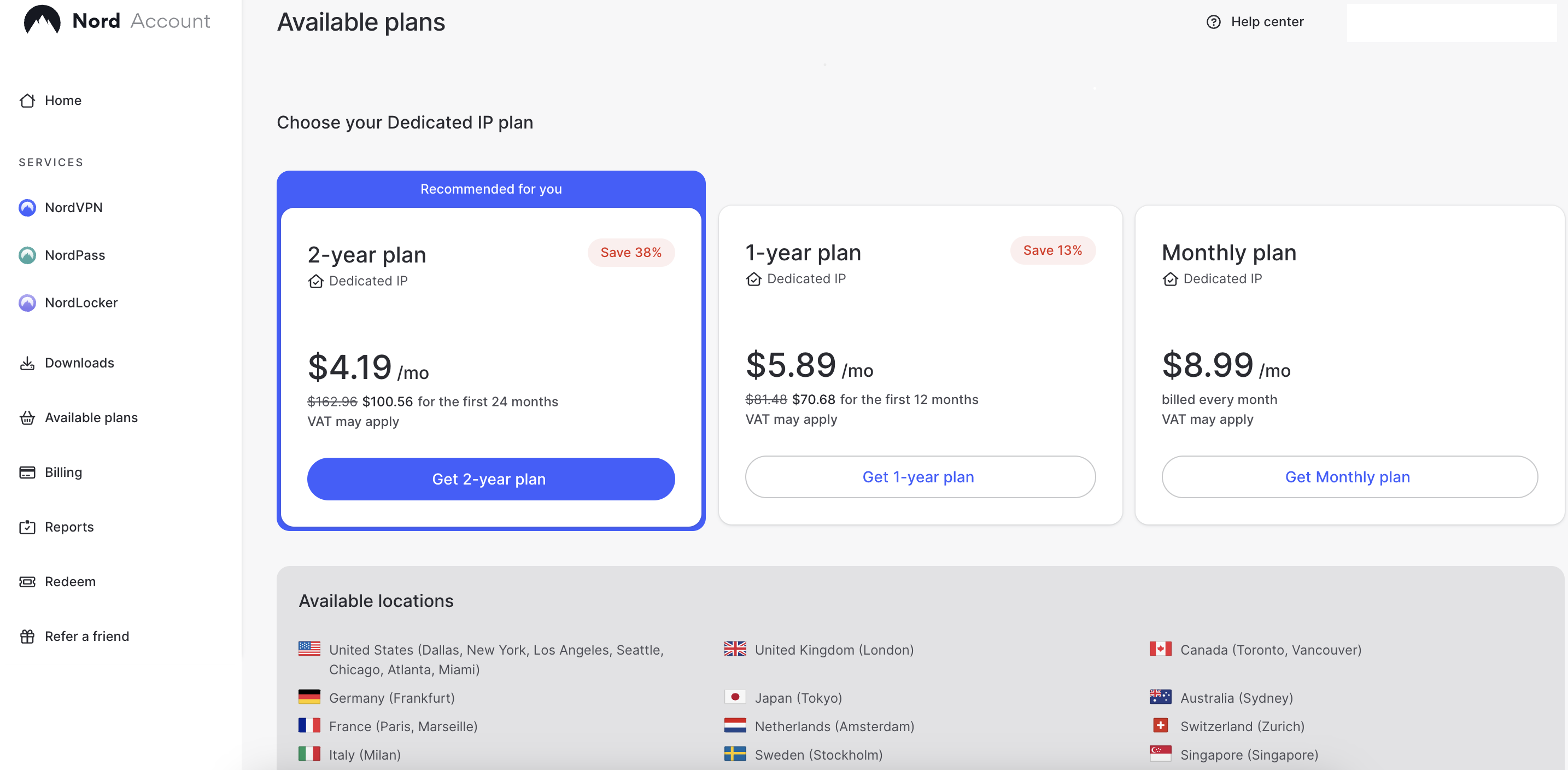
The dedicated IP feature is available for $4.19/month as an add-on to your regular NordVPN subscription. It can be used on up to 10 devices simultaneously, making it a great option for users who need stable access across multiple platforms. If you already have a NordVPN account, you’ll need to create one temporarily and contact customer support to transfer the dedicated IP to your main account.
NordVPN uses AES-256 and ChaCha20 encryption to protect your data and adds hash functions for robust authentication processing. It also includes Threat Protection for safe browsing, a kill switch to protect your connection if it drops, and a Double VPN for extra encryption by routing your traffic through two servers. Additionally, obfuscated servers mask your VPN use if you need to bypass restrictions. Besides, split tunneling lets you choose which apps use VPNs and which don't. Plus, NordVPN follows a strict no-logs policy that has been independently audited, so your online activities are kept private and visible only to you.
Currently, NordVPN is offering 76% off on their plans, and all subscriptions come with a 30-day money-back guarantee, so trying it out is risk-free. Plus, Android users can test the service for free for 7 days with their trial.
For a deeper investigation of NordVPN, read our NordVPN review.
2. Surfshark – dedicated IP VPN with unlimited devices
![Surfshark mobile logo [IN USE]](https://media.vpnpro.com/images/170x89/surfshark-review-logo-2.jpg)
4500
100
24/7, FAQ
405 Mbps
-
13 dedicated countires
-
Robust security toolkit
-
WireGuard-fuelled performance
-
No split tunneling on iOS and mac
Surfshark VPN also provides dedicated IP addresses. You can choose from 13 locations in 11 countries, including 3 cities in the US, the UK, Netherlands, Germany, France, Australia, Japan, Italy, Canada, South Africa, and Hong Kong.
Surfshark provides advanced security features like MultiHop, which routes your traffic through multiple regions for enhanced protection, and AES-256 encryption for safeguarding your data. Additionally, the WireGuard tunneling protocol ensures fast and secure connections, as well as CleanWeb, split tunneling, and real-time antivirus protection. Surfshark also includes a no-logs policy independently audited by Deloitte, ensuring private online activities. Plus, there’s no device limit, so you can secure every device you own, from your phone to your laptop and beyond.
You can get a dedicated IP VPN for an additional $3.75/month. Right now, Surfshark offers 85% off plans and a 30-day money-back guarantee. If you're unsure, you can test the service with a 7-day free trial to see if it fits you.
For a deeper investigation of Surfshark VPN, read our Surfshark VPN review.
3. Proton VPN - VPN with dedicated IP for businesses
![Proton VPN mobile logo [IN USE]](https://media.vpnpro.com/images/170x89/proton-vpn-review-logo-2.jpg)
20075
145
423 Mbps
-
25 dedicated IP locations
-
Independently audited no-logs policy
-
Advanced security features
-
Business plans only have dedicated IP addresses
Proton VPN offers dedicated IP addresses only for business plans. It covers exclusive IPs from 20 locations across 15 countries, including Australia, Brazil, Canada, Colombia, France, Germany, India, Japan, the Netherlands, Peru, Ireland, Singapore, Switzerland, the UK and the US (6 cities).
A proton VPN provides a static IP address that is always available to avoid issues like CAPTCHAs or other identity verification methods common with shared IPs. Using a dedicated IP address reduces the possibility that your emails will be flagged or blocked by services that monitor IP addresses for spam or malicious activity.
Proton VPN provides strong privacy laws as it's based in Switzerland. Their no-logs policy has been independently audited, ensuring your online activities remain private. Additionally, it uses AES-256 and ChaCha20 encryption, ensuring your data is protected. Plus, there’s the WireGuard tunneling protocol for reliable speeds and the VPN Accelerator feature for optimized performance. For added privacy, Proton VPN includes a kill switch, customizable split tunneling, double VPN, Tor over VPN, and the NetShield ad blocker to enhance security further and prevent ads and malware.
If you’re looking to use Proton VPN for business, the Proton VPN Professional business-only plan is $39.99/month and requires at least one dedicated server. You can also try the service risk-free for 7 days and get a 30-day money-back guarantee if you're not satisfied.
Get a complete overview of Proton VPN based on real testing.
4. CyberGhost – speedy dedicated IP VPN service
![CyberGhost mobile logo [IN USE]](https://media.vpnpro.com/images/170x89/CyberGhost-VPN.jpg)
9887
100
24/7
432 Mbps
-
20 dedicated IP locations
-
Multiple tunneling protocols
-
Good for Netflix and P2P
-
A limited set of features
Another VPN with a dedicated IP list that I recommend is CyberGhost VPN. It offers dedicated IP addresses in 20 locations: six cities in the US, Singapore, Sweden, the Netherlands, Japan, the UK (two towns), France, Spain, Germany, Switzerland, Canada (two cities), Belgium, and Australia. Depending on your VPN plan, a dedicated IP costs $5.00 per month, added on top of your standard subscription.
CyberGhost uses AES 256-bit encryption, ensuring your data is protected by one of the most secure encryption standards available. Combined with the WireGuard tunneling protocol, you get fast, secure, and reliable connections. A kill switch also automatically disconnects you from the internet if the VPN connection drops, so your real IP never gets exposed. On top of that, CyberGhost follows an independently-audited no-logs policy, meaning they don't track or store your online activities.
With over 9,887 servers in 100+ countries, CyberGhost delivers excellent coverage and performance. It also features dedicated gaming, streaming, and torrenting servers, all supported by the WireGuard protocol. Moreover, CyberGhost provides split tunneling, an ad and malware blocker, and even a SOCKS5 proxy for maximum flexibility.
Currently, you can get 87% off CyberGhost, plus 2 months free. And, to make sure you're fully satisfied, CyberGhost has a 45-day money-back guarantee. If you'd rather test it out first, there's a free 7-day trial to see if you like it.
For a deeper investigation of CyberGhost VPN, read our CyberGhost VPN review.
5. ExpressVPN - privacy-focused dedicated IP VPN
![ExpressVPN mobile logo [IN USE]](https://media.vpnpro.com/images/170x89/expressvpn2.png)
3000
105
24/7, email
440 Mbps
-
28 dedicated IP locations
-
Audited no-logs policy
-
Easy to set up
-
Above-average cost
ExpressVPN provides dedicated IP addresses as an add-on to your regular subscription. It offers dedicated IPs in 28 locations: Australia, Austria, Belgium, Canada, Denmark, France, Germany, Hong Kong, Ireland, Italy, Japan, the Netherlands, Norway, Poland, Portugal, Singapore, South Africa, Spain, Sweden, Switzerland, the UK, and 7 cities in the US.
ExpressVPN dedicated IPs are available for an additional $3.49/month on top of your regular subscription. The service uses AES-256 encryption and features Lightway—ExpressVPN’s fast and secure tunneling protocol. Additionally, it provides comprehensive leak protection, a kill switch, and support for OpenVPN and IKEv2 protocols. Besides, split tunneling allows you to route some traffic through the VPN while letting others access the internet directly.
Moreover, ExpressVPN has a strict no-logs policy, which was audited and certified by PwC (PricewaterhouseCoopers). For additional protection, Threat Manager blocks trackers, scams, and malware, keeping your devices safe while browsing. Also, with no bandwidth limits and great speeds, ExpressVPN is ideal for streaming, gaming, and other high-bandwidth activities. Plus, you can connect up to 14 devices simultaneously to protect them all.
If you’re considering ExpressVPN, you can use a 78% discount and try the dedicated IP VPN for a 7-day free trial. You'll also have a 30-day money-back guarantee on all plans, allowing you to test the service.
For a deeper investigation of ExpressVPN, read our ExpressVPN review.
Best VPNs for dedicated IP address: comparison
| Dedicated IP VPN provider | My rating | Static IP | Dedicated IP | Dedicated/static IP countries |
| NordVPN | 9.8 ⭐⭐⭐⭐⭐ | ❌No | ✅Yes | US (7), Germany, UK, Netherlands, France (2), Italy, Sweden, Japan, Canada (2), Australia, Hong Kong, Switzerland, Spain, Belgium, Denmark, Singapore, Ireland, Austria, Poland, Portugal, South Africa, Mexico, Czech Republic, South Korea |
| Surfshark | 9.5 ⭐⭐⭐⭐⭐ | ✅Yes | ✅Yes | US (3), UK, Netherlands, Germany, France, Australia, Japan, Italy, Canada, South Africa, Hong Kong |
| Proton VPN | 8.6⭐⭐⭐⭐ | ❌No | ✅Yes | Australia, Brazil, Canada, Colombia, France, Germany, India, Japan, Netherlands, Peru, Ireland, Singapore, Switzerland, UK, US (6) |
| CyberGhost | 8.9 ⭐⭐⭐⭐ | ❌No | ✅Yes | US (6), Singapore, Sweden, Netherlands, Japan, UK (2), France, Spain, Germany, Switzerland, Canada (2), Belgium, Australia |
| ExpressVPN | 8.4 ⭐⭐⭐⭐ | ✅Yes | ✅Yes | Australia, Austria, Belgium, Canada, Denmark, France, Germany, Hong Kong, Ireland, Italy, Japan, Netherlands, Norway, Poland, Portugal, Singapore, South Africa, Spain, Sweden, Switzerland, UK, US (7) |

How to choose a dedicated or static IP VPN
Choosing the right VPN with a dedicated or static IP can be tricky, so I've outlined the most important factors to help you decide. Here’s what to look for in a VPN with dedicated IP:
- Dedicated or static IP options. A dedicated IP reduces CAPTCHAs, making your browsing experience smoother. It also gives you more control over site access, which can be particularly useful if you're running a business that needs to manage or restrict user permissions.
- Multiple IP locations. A VPN with static IP should offer dedicated IPs in various countries, not just one. This gives you flexibility and access to more services worldwide.
- Performance. Consider choosing a VPN with a dedicated IP and focusing on speed by selecting a provider that uses fast, modern tunneling protocols like WireGuard or NordLynx. These protocols provide high-speed connections while maintaining strong security and reducing latency.
- Security and privacy. I recommend choosing a service outside the 14-Eyes alliance for maximum privacy. Additionally, look for a VPN with an independently audited, no-logs policy, AES-256 encryption, a kill switch, and leak protection to keep your data safe.
- Pricing. Some VPNs offer dedicated IP for an additional fee, meaning you’ll need to pay for both a regular VPN subscription and the dedicated IP add-on. Find a provider that offers reasonable pricing for both services.
Differences between dynamic and static IP
| IP type | Dedicated IP | Static/Dynamic IP |
| Changes every time of connection | ❌No | ✅Yes |
| Shared among multiple users | ❌No | ✅Yes |
| Costs extra | ✅Yes | ❌No |
| Higher level of anonymity | ❌No | ✅Yes |
| Easily traceable | ✅Yes | ❌No |
| More likely to be blacklisted | ❌No | ✅Yes |
The main difference between shared and dedicated IP addresses is how they are assigned and used. For example, a static IP is an IP address that remains the same over time and is often assigned by an Internet Service Provider (ISP). While a single device can use it, it’s often shared across multiple devices within a network. Static IPs are less private because activities linked to the same IP can be traced back to it, making it easier for websites or services to identify or block users based on their shared IP. While a static IP provides stability, it doesn’t offer the same privacy or security as a dedicated IP.
A dedicated IP, on the other hand, is a unique, unchanging IP address assigned exclusively to one user. It’s typically used in VPN services to ensure stable and secure access to specific services, like banking or remote work, where consistency and reliability are important. Because it’s not shared with anyone else, a dedicated IP offers privacy and reduces the chances of being flagged or blacklisted due to other users' activities. It also eliminates common issues like CAPTCHAs or denial-of-service errors, making it the ideal choice for users who need a more secure and predictable online experience.
Advantages and disadvantages of dedicated IP
| Advantages of dedicated IPs | Disadvantages of dedicated IPs |
| ✅ Only one user | ❌ Extra price |
| ✅ Avoid geo-blocking | ❌ DDoS attacks |
| ✅ Personal P2P download cap | ❌ Easier to trace |
| ✅ Improved performance | |
| ✅ No "bad neighbor" effect | |
| ✅ Fewer CAPTCHAs | |
| ✅ IoT protection | |
| ✅ Easy 2FA | |
| ✅ Email deliverability |
One of the biggest benefits I’ve experienced with a dedicated IP is how it makes accessing streaming platforms like Netflix, Amazon Prime Video, and Hulu easier. For instance, I can watch shows and movies only available in specific regions when I use my dedicated IP. A dedicated IP makes me appear like a local user from my region, so geo-restrictions are bypassed more smoothly.
Also, I have also noticed an advantage when downloading from torrent sites. However, these sites sometimes limit how much data can be downloaded from a single IP address. Luckily, with a dedicated IP, I don't have to worry about other users affecting my downloads. Plus, since I’m not sharing my VPN traffic with anyone else, my connection is more stable, and the speeds are generally better.
From a personal standpoint, a dedicated IP makes my online life simpler. For example, I encounter fewer CAPTCHAs, which can be annoying to deal with constantly. I also don’t need to verify that I’m not a bot as often. Two-factor authentication (2FA) works seamlessly since I’m seen as the same user each time I log in. Another small but significant perk is that my emails are less likely to land in the spam folder, which often happens with dynamic IPs.
There are, however, some disadvantages to consider as well. For one, a dedicated IP makes me a more visible target for hackers and DDoS attacks. Since the same IP is always associated with my activities, it could become a prime target for malicious actors. Also, if there’s a direct link between my dedicated IP and my VPN account, my traffic becomes more identifiable, potentially compromising my privacy.
How to get a dedicated IP address using a VPN
The process of getting a dedicated IP differs from one provider to another. But generally speaking, most follow the same steps:
-
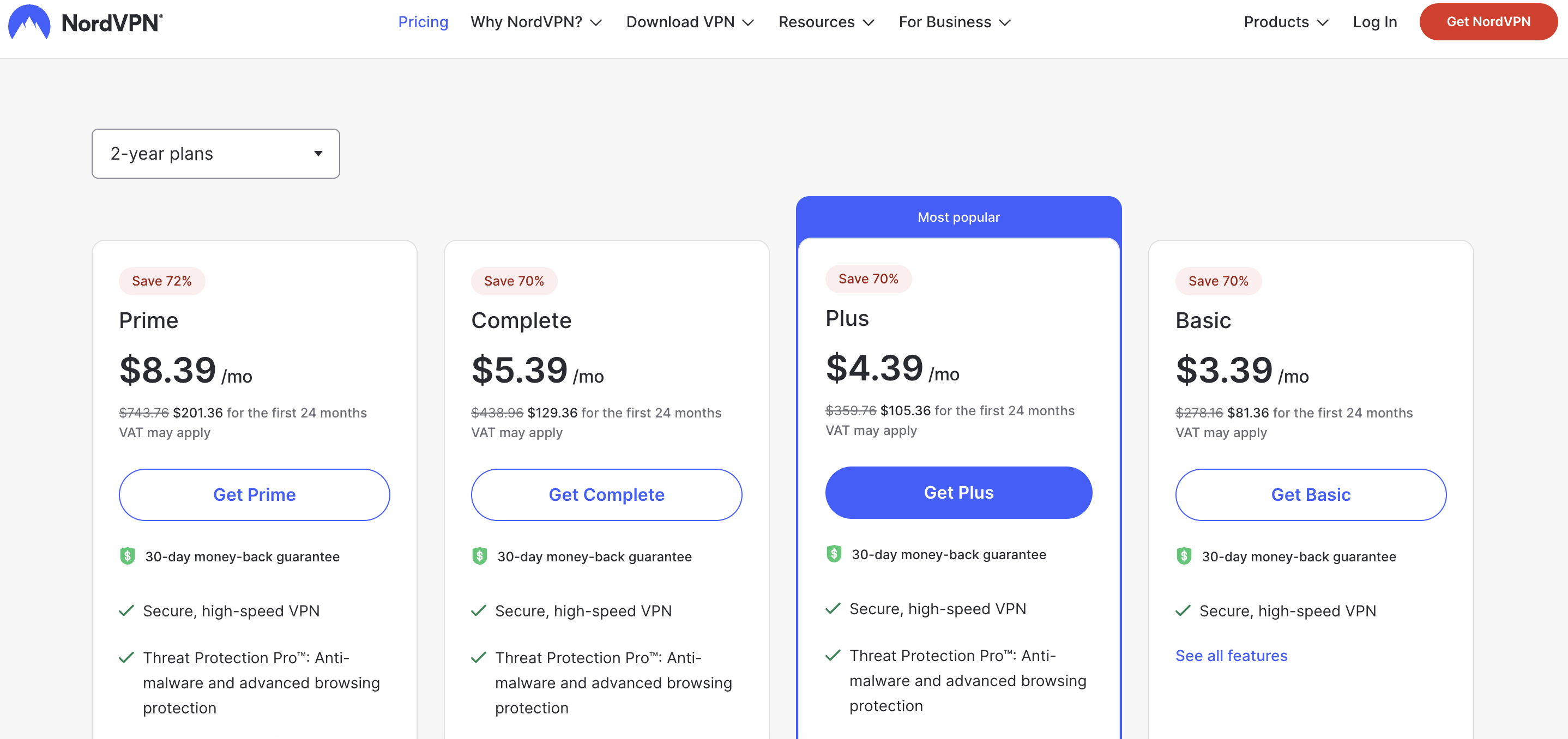
Subscribe to a reliable VPN with dedicated IP. I recommend NordVPN at 76% off.

-
Choose a dedicated IP from the available add-ons and complete the purchase.

-
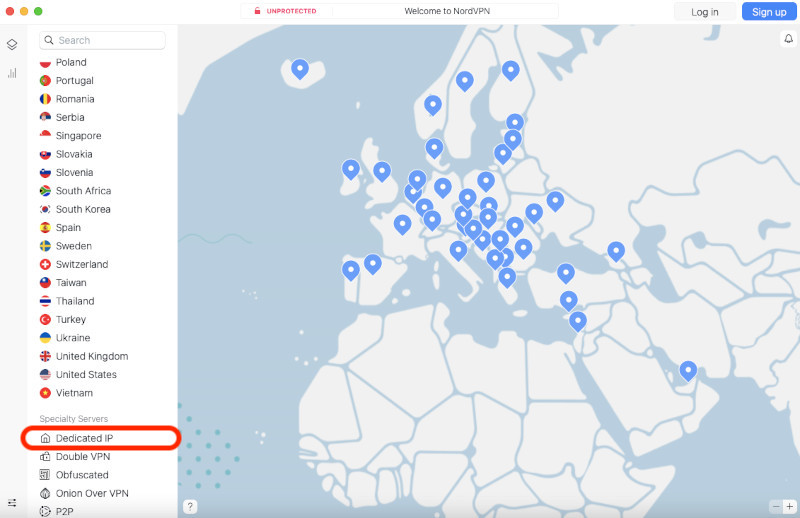
Activate the dedicated IP by following your provider's instructions. Ask customer support for help if needed.

- Start enjoying your new dedicated IP!
Should I get a dedicated IP VPN?
If you are considering whether to get a dedicated IP VPN, it depends on your specific needs, but from my experience, it's worth it if you want a more personalized and secure connection. Here’s why I recommend it:
- Remotely access work or private systems. If you need to securely access work files or private systems, having a dedicated IP ensures you can log in securely without interruptions or unauthorized access.
- Preventing lockouts from bank accounts. With a dedicated IP, you won’t run into issues like getting locked out of your bank account, which often happens with shared IPs. Banks and financial services flag suspicious logins from unfamiliar IPs, so having your own can help avoid triggering these security measures.
- Avoiding blacklisting. Some platforms and services block VPN traffic to prevent abuse, but with a dedicated IP, you significantly lower the risk of getting blacklisted.
- Skipping CAPTCHAs. It's less likely to encounter CAPTCHAs if you have a dedicated IP address. The system often displays these annoying puzzles when it thinks you're a bot, often when you use a shared VPN IP address.
- Securing IoT devices. A dedicated IP adds an extra layer of security for smart home devices, which are often targeted by cybercriminals due to their vulnerabilities.
- Improving online gaming. A dedicated IP can reduce online gaming ping and boost performance.
Conclusion
The best dedicated IP VPN allows you to enjoy uninterrupted streaming, manage secure business operations, and maintain consistent online access. With a dedicated IP, you can simplify remote access, secure business operations, and enhance overall online stability. Dedicated IP addresses provide an address that bypasses blacklists and geo-blocks, making them ideal for users who frequently encounter IP-based restrictions.
There are many VPN providers, but NordVPN stands out among them as the best. It offers dedicated IP addresses that provide high-speed servers, strong encryption, and a reputation for reliability that enhances your online experience. Using a VPN with a dedicated IP allows you to enjoy seamless connections, improved privacy, and full control over your online activities.

![Surfshark weekly deals logo [IN USE]](https://media.vpnpro.com/surfshark-weekly-deals.svg)
![Proton VPN winner logo [IN USE]](https://media.vpnpro.com/2025/05/protonvpn-winner.png)
You may also like to read:
Best VPN to bypass MLB.tv blackouts
Best residential VPNs
Best VPN for Black Desert
Best VPN for ChatGPT
Best VPN for MEGA
Best VPN for BlueStacks
Best VPN for Telegram
FAQ
Is dedicated IP good for VPN?
Depends on what you want a dedicated IP for. They are great denial or service errors, CAPTCHAs, remote access work files, secure IoT devices, etc.
Can a dedicated IP VPN be tracked?
No, you can't be tracked using a dedicated IP VPN because it encrypts your data. While a VPN encrypts your internet traffic, protecting it from your ISP or potential hackers, a dedicated IP address doesn't make you completely invisible. If someone actively tracks your activities (like a website you visit or an entity monitoring traffic), they will see your dedicated IP, not your real IP address.
What is dedicated IP vs static IP VPN?
Only you can use a dedicated IP address, while static IP is shared between multiple VPN users. There are more differences between the two, such as the level of security, the probability of getting blacklisted, and so on.
How much does a dedicated IP VPN cost?
It depends on the VPN service. A dedicated IP is usually an add-on, so it’s charged separately from the VPN subscription. The cost varies between $1.00/month and $6.00/month. Certain providers, like PrivateVPN, offer it for free.
Why get a dedicated IP on a VPN?
Dedicated IPs are useful for many things. They are excellent against geo-blocking and allow access to multiple streaming platforms. They are also invaluable for remote access and a stable gaming experience.
Does NordVPN provide a dedicated IP?
Yes, NordVPN offers a dedicated IP for $4.19/month. For $100.56/year, you can choose from 32 locations: the US (7), Germany, the UK, the Netherlands, France (2), Italy, Sweden, Japan, Canada (2), Australia, Hong Kong, Switzerland, Spain, Belgium, Denmark, Singapore, Ireland, Austria, Poland, Portugal, South Africa, Mexico, Czech Republic, South Korea. This option works on 10 devices simultaneously.
Does Surfshark VPN provide a dedicated IP?
Yes, Surfshark VPN offers dedicated IP addresses for an extra cost. Currently, you can choose from 13 locations, like the US (3), UK, Netherlands, Germany, France, Australia, Japan, Italy, Canada, South Africa, and Hong Kong.
Does ExpressVPN provide a dedicated IP address?
Yes, ExpressVPN offers fixed IPs, but NordVPN is better for dedicated IP addresses. It provides a broader range of locations, enhanced security features, and more reliable connections, and it is ideal for securely browsing online and accessing restricted content.
Is a dedicated IP safe?
Yes, using a dedicated IP is safe. Your internet traffic is still encrypted, and your actual IP address is hidden. However, your online actions will be tied to it. The dedicated IP might also be linked to your email address, depending on the VPN service.


