How to watch Channel 5 in the US in June 2026


Channel 5 is geo-restricted to the UK only due to broadcasting rights. To watch Channel 5 in the US, you will need a robust VPN provider. My in-house tests revealed that NordVPN is the best Channel 5 VPN as it bypasses geo-blocks and delivers fast speeds. Surfshark and Proton VPN are also excellent options for Channel 5 in 2026.
Channel 5 is a popular, free British TV channel that offers a variety of content, including shows, reality TV, and news. While it’s widely known, Channel 5 is geo-restricted to the UK only due to broadcasting rights and agreements. If you want to access Channel 5 for free in the US, you will need a reliable streaming VPN. A VPN will change your IP address, which will help you to bypass Channel 5’s geo-restrictions.
While there are many VPN providers, not all can unblock Channel 5. To find the best VPNs for Channel 5, I collaborated with the VPNpro research team, which performed extensive in-house tests. This way, I was able to identify the top 3 Channel 5 VPNs in 2026 that guarantee a smooth streaming experience.
In this article, you will not only find the best VPN recommendations but also detailed guides on how to watch Channel 5 in the US.
🏷️ LIMITED OFFER: NordVPN deal! Get 76% OFF NordVPN + 3 months FREE 🏷️
Top 3 Channel 5 VPNs in 2026
-
Overall best VPN for Channel 5
-
Budget-friendly VPN to watch Channel 5 outside the UK
-
Reliable Channel 5 VPN with a free version
![NordVPN mobile logo [IN USE]](https://media.vpnpro.com/Nord-VPN-review.jpg)
![Surfshark mobile logo [IN USE]](https://media.vpnpro.com/surfshark-60x60-1.jpg)
![Proton VPN mobile logo [IN USE]](https://media.vpnpro.com/ProtonVPN-small.jpg)
Why do I need a VPN to watch Channel 5 in the US?
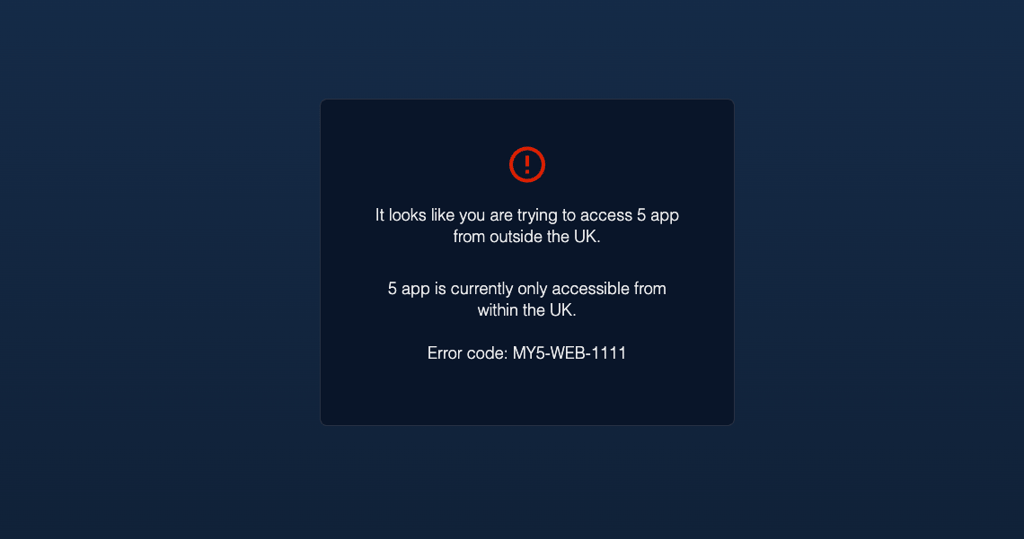
Due to broadcasting rights and agreements, Channel 5 is only available for viewers in the UK. If you try to access Channel 5 outside of the UK, you will be denied access and prompted with an error message stating that the site is unavailable in your region.
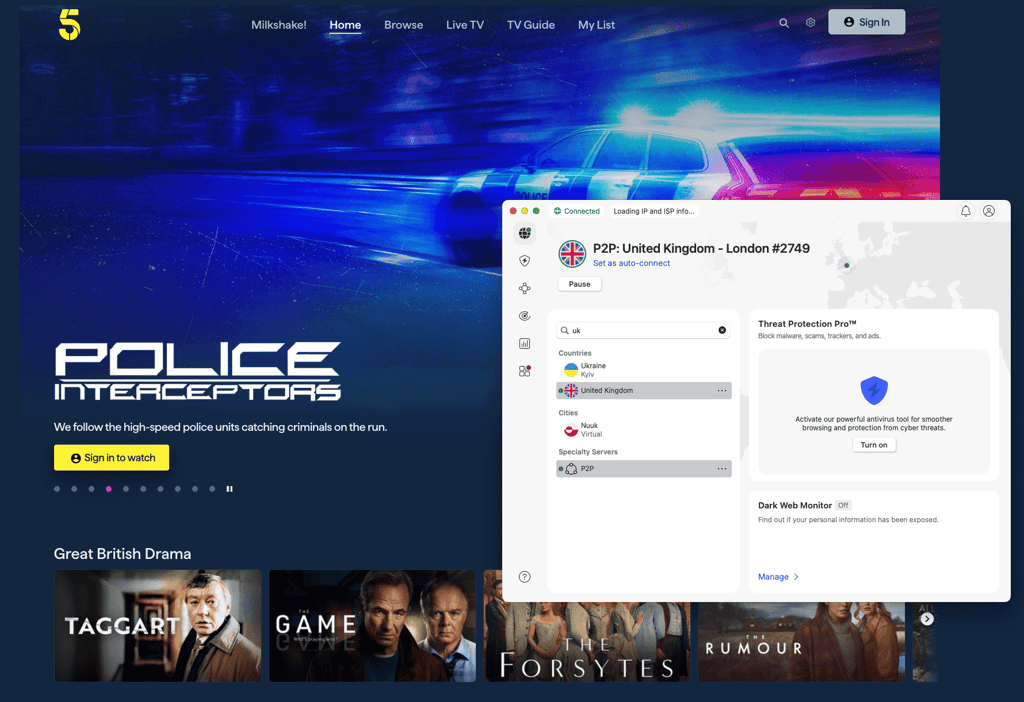
To access Channel 5 from the US, you will need a reliable VPN with UK servers. By connecting to a VPN server in the UK, you will be assigned a new UK IP address, which will trick Channel 5 into thinking that you’re physically in the country.
Many providers have servers in the UK, but I found that NordVPN is the best VPN for Channel 5. It not only successfully bypasses geo-restrictions but also delivers fast speeds for a lag-free streaming experience. Additionally, it’s one of the most secure VPNs, ensuring your privacy is protected.
How to watch Channel 5 in the US with a VPN?
- Choose and subscribe to a reliable VPN provider. I recommend NordVPN, now 76% off.
- Download and install the VPN app on your device.
- Connect to a VPN server in the UK.
- Enjoy watching Channel 5 for free in the US without restrictions!
Best VPNs for Channel 5
The best VPNs for Channel 5 must have UK servers that successfully bypass geo-restrictions, deliver fast speeds, and ensure online privacy. After testing 31 VPN providers, I found that NordVPN, Surfshark, and Proton VPN are the top Channel 5 VPNs in 2026, as they guarantee a smooth, uninterrupted streaming experience in the UK.
Top 1. NordVPN - best VPN for Channel 5 in the US overall
![NordVPN mobile logo [IN USE]](https://media.vpnpro.com/images/170x89/2025/08/nord-rreview.jpg)


137

9300

24/7, email
-
UK servers in five locations
-
Fastest speeds on the market
-
Robust security features
-
Short free trial
NordVPN stands out as the best VPN for Channel 5, reliably unblocking the service from the US and offering fast speeds, stable connections, and seamless streaming.
With NordVPN, you can connect to up to 9,300+ servers in 137 countries, including over 440 servers in the UK. During my in-house tests, NordVPN successfully unlocked Channel 5 using its London and Manchester servers. It also delivered exceptional speeds of 756Mbps, proving that NordVPN is indeed the fastest VPN in 2026. If you want to ensure Channel 5’s system won’t detect you, I advise using NordVPN’s obfuscated servers, which few VPN providers offer.
NordVPN is also an excellent choice if you want to secure your digital footprint while streaming content online. Apart from the necessary security measures, NordVPN also offers features like a kill switch, Threat Protection, Double VPN, and Dark Web Monitoring. Having these additional features allows you to customise your connection further and add an extra layer of security.
Based on our tests, NordVPN is the best VPN for Channel 5, and you can currently get it for $3.09/month with our 76% off coupon code. You can also test it risk-free as it has a 30-day money-back guarantee. If you’re not sure just yet, you can use the 3-day free trial instead.
For more information, read our in-depth NordVPN review.
Top 2. Surfshark - affordable Channel 5 VPN with extra features
![Surfshark mobile logo [IN USE]](https://media.vpnpro.com/images/170x89/surfshark-review-logo-2.jpg)
100
4500
24/7, FAQ
-
Budget-friendly pricing
-
Advanced security features
-
Unlimited simultaneous connections
-
Based in the Netherlands, part of the Nine Eyes surveillance alliance
Surfshark is a top Channel 5 VPN that offers premium services for a budget-friendly price. The provider not only successfully bypasses geo-restrictions but also provides many additional features and doesn’t limit the number of devices.
Surfshark has 4,500+ servers in 100 countries, including over 212 servers in London, Manchester, Glasgow, and Edinburgh for Channel 5. When I tested Surfshark, it quickly unlocked Channel 5 without any restrictions. I was also surprised to see that the average download speed was 753Mbps, which is almost as fast as NordVPN. Additionally, Surfshark offers obfuscation, which will help you avoid detection while streaming Channel 5.
Even though Surfshark is cheaper than most VPNs, it still guarantees robust security and has many additional features. With Surfshark, you can enhance your privacy with features like split tunnelling, kill switch, MultiHop VPN, IP Rotator, and NoBorders. There is also a CleanWeb feature that works as an ad blocker, which will be helpful when streaming content online.
By using our Surfshark 87% off coupon, you can get the cheapest Channel 5 VPN for only $1.99/month, with a 30-day money-back guarantee. If you want to test it first, a 7-day free trial is available.
For more information, read our in-depth Surfshark review.
Top 3. Proton VPN - freemium VPN to watch Channel 5 in the US
![Proton VPN mobile logo [IN USE]](https://media.vpnpro.com/images/170x89/proton-vpn-review-logo-2.jpg)
145
20075
-
Reliable free version
-
733+ servers in the UK
-
Additional security features
-
Free version doesn’t have servers in the UK
Proton VPN is another top VPN for Channel 5, safeguarding your privacy at all times. Apart from robust security, Proton VPN offers an impressive number of servers, solid speeds, and a trustworthy free app version.
Proton VPN has 20,075+ servers in 145 countries, including 733+ servers in the UK, which is much more than NordVPN or Surfshark. It also successfully bypasses geo-restrictions, as I had no issues watching Channel 5 outside the UK with Proton VPN. While it’s a bit slower than other top Channel 5 VPNs, it still offers fast speeds of 737Mbps. If you want to hide the fact that you’re using a VPN, you can use Proton VPN’s Stealth protocol, which offers obfuscation.
Since Proton VPN is based in a privacy-oriented country (Switzerland), it offers strong security and additional features. With Proton VPN, you get access to features like a kill switch, split tunnelling, and Tor over VPN. I also liked its NetShield Ad-blocker feature, which is useful for browsing and streaming online.
Proton VPN is an excellent VPN for Channel 5, available for $2.99/month with our 70% off discount code. All paid plans come with a 30-day money-back guarantee, allowing you to test the service risk-free.
For more information, read our in-depth Proton VPN review.
Compare the best Channel 5 VPNs
| VPN for Channel 5 | Rating | Unblocks Channel 5? | Servers in the UK | Speed | Price | Free trial |
| 1. NordVPN | 9.8⭐⭐⭐⭐⭐ | ✅Yes | 440+ | Extremely fast | $3.09/month | ✅Yes, 3-day free trial |
| 2. Surfshark | 9.5⭐⭐⭐⭐⭐ | ✅Yes | 212+ | Extremely fast | $1.99/month | ✅Yes, 7-day free trial |
| 3. Proton VPN | 8.6⭐⭐⭐⭐⭐ | ✅Yes | 733+ | Fast | $2.99/month | ❌No, but has a free version |
How to choose the best VPN for Channel 5
For the best streaming experience, it’s essential to choose a VPN that not only unlocks geo-restricted services but also ensures a stable connection, fast speeds, and robust online security. Here are a few key factors that you should consider when choosing the best VPN for Channel 5:
- Does it have servers in the UK? Since Channel 5 is only available to viewers in the UK, it is essential to choose a VPN provider with servers in the country. For the best experience, I would recommend picking a VPN for Channel 5 that offers UK servers in at least a couple of different cities.
- Will it bypass Channel 5 geo-restrictions? While many VPNs claim they can unblock various streaming services, not all are successful, as Channel 5 detects and blocks VPNs. To avoid such issues, I tested each VPN's capabilities and recommend using those that have multiple UK servers, support various VPN protocols, and implement all necessary privacy measures.
- Is it fast for streaming? For a smooth and lag-free streaming experience, you need to choose a fast VPN. Choosing a VPN provider that offers the fast WireGuard protocol would also be beneficial. During my tests, I used speedtest.net to test each VPN's speed.
- Does it ensure online privacy? The primary purpose of a VPN is to protect your online privacy, and it’s crucial to safeguard your digital footprint when streaming geo-restricted content. That’s why it’s essential to choose VPNs that use robust encryption, don’t keep logs, and offer additional features for even more added security.
- Does it provide good value for money? To ensure you get the most out of your VPN at the best price, I compared each VPN's pricing. I also only selected VPNs that offer free versions, free trials, or money-back guarantees for risk-free testing.


Since 2018, VPNpro has delivered unbiased, expert-backed insights through in-house research and thorough VPN testing. Our team ensures every review is fact-checked and reliable. Learn how we maintain these high standards in our testing methods.
Can I use a free VPN for Channel 5?
There are no reliable free VPNs that you could use to watch Channel 5 from the US. Most free VPNs are not secure and cannot bypass geo-restrictions. The only trustworthy free VPN is Proton VPN, but even its free version will not work for Channel 5 because it doesn’t have servers in the UK.
Instead of using a free VPN for Channel 5, choose a premium provider that offers a free trial or a money-back guarantee, such as NordVPN. While it’s one of the best VPNs on the market, it still has a 3-day free trial and a 30-day money-back guarantee. By taking advantage of this, you can use NordVPN for up to 33 days without spending any money.
How to watch Channel 5 outside the UK: step-by-step guide
To watch Channel 5 in the US for free, you will need to use a VPN. Using a VPN for streaming is very simple, and you can find a detailed guide on how to do it below:
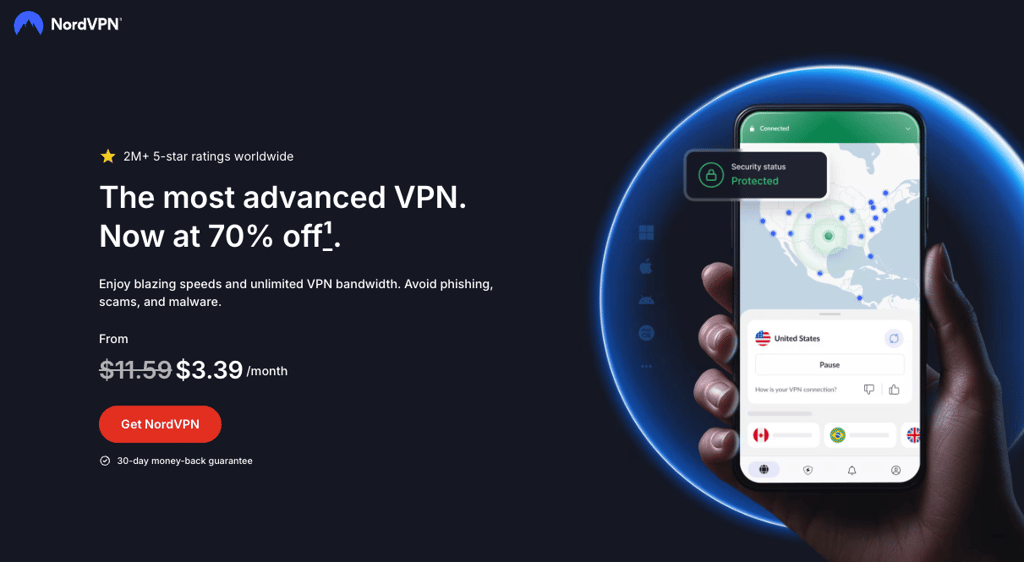
Step 1. Get a robust streaming VPN
Channel 5 is geo-restricted to the US only due to broadcasting rights. However, it is possible to access it in the US by using a VPN provider. My in-house tests revealed that NordVPN is the best VPN to unblock geo-restrictions in 2026. NordVPN provides stable connections, fast speeds, and robust security features, ensuring an uninterrupted streaming experience.
Step 2. Download and install the VPN app
After you subscribe to a VPN provider, download and install the VPN app on your device. Most VPN providers offer dedicated apps for all major operating systems, so you’ll be able to watch Channel 5 on computers, phones, tablets, and smart TVs. You can download the app from your VPN provider’s official website, Google Play Store, or the Apple App Store.
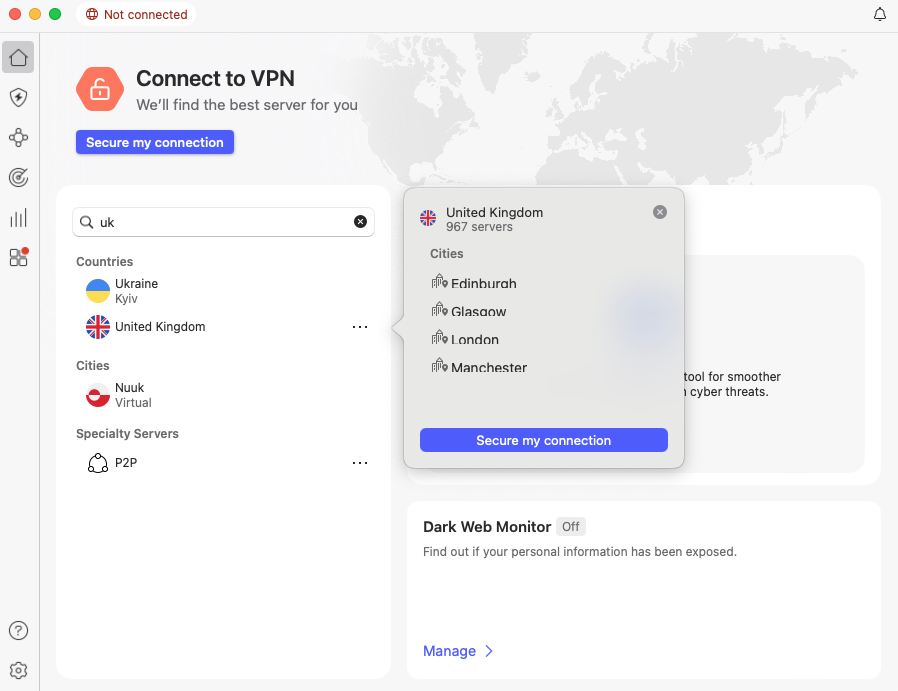
Step 3. Connect to a VPN server in the UK
To start watching Channel 5 in the US, connect to a VPN server in the UK. By doing so, your IP address will be changed to a UK address, which will trick Channel 5 into granting you access to the site without restrictions.
Step 4. Watch Channel 5 in the US without restrictions
Once you successfully connect to the VPN, you can visit Channel 5 and enjoy US content for free, without any limits. If you’re still unable to access Channel 5, try connecting to a different UK VPN server. I would also advise changing the VPN protocol, as it can also resolve connectivity-related issues.
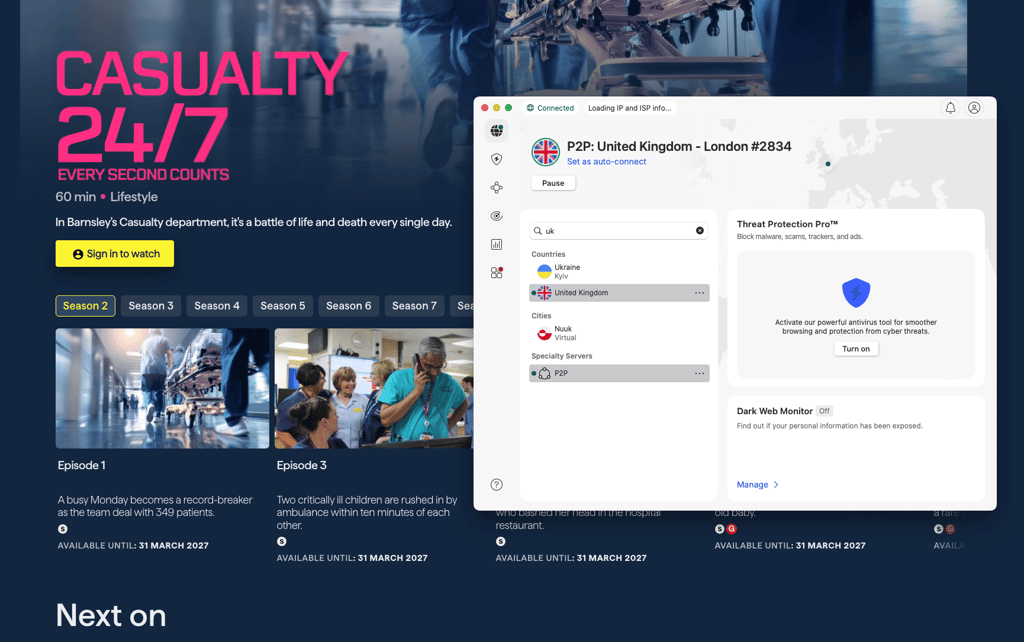
Watch Channel 5 outside the UK with NordVPN
Channel 5 not working with a VPN: easy fixes
If you’re still unable to watch Channel 5 outside the UK, there might be issues with your VPN connections or the site itself. Luckily, there are a few quick and simple steps that usually solve such problems:
- Connect to a different UK server. The IP address that you’re connected to may already be blocked by Channel 5. By simply reconnecting to a different server in the UK, you should be able to solve any issues.
- Check if your IP or DNS addresses are not leaking. To ensure a smooth streaming experience, check that your connection is working properly. You can check that using ipleak.net and dnsleaktest.com.
- Use a different VPN protocol. If you're experiencing slow speeds or connectivity issues, switch to a different VPN protocol. For better speeds, I recommend using the WireGuard protocol.
- Reach out to customer support. If the steps above did not help, reach out to your VPN provider’s customer support. They will provide you with further troubleshooting steps or more information about any possible issues.
Final thoughts
Channel 5 is a popular site that offers a wide range of content for free, but it’s unavailable in the US. Channel 5 is geo-restricted to the UK only due to broadcasting rights and agreements. This means that you won’t be able to watch Channel 5 in the US for free, unless you use a robust streaming VPN.
While there are many VPN providers available, not all of them work with streaming sites. I’ve tested 31 providers and found that NordVPN is the best Channel 5 VPN in 2026. With NordVPN, you get access to stable servers worldwide, including the UK, and fast speeds for uninterrupted streaming. Additionally, it’s a secure VPN that uses all the necessary security measures and offers advanced features for even more privacy.

![Surfshark weekly deals logo [IN USE]](https://media.vpnpro.com/surfshark-weekly-deals.svg)
![Proton VPN winner logo [IN USE]](https://media.vpnpro.com/2025/05/protonvpn-winner.png)
FAQ
How to watch Channel 5 on demand outside the UK?
To watch Channel 5 on demand outside the UK, use a reliable VPN, such as NordVPN. By connecting to a VPN server in the UK, your IP address will be changed, tricking Channel 5 into thinking you’re physically in the country. This way, you’ll be able to bypass geo-restrictions and watch Channel 6 outside the UK easily.
Where can I watch Channel 5?
You can watch Channel 5 via the My5 app, which is entirely free. The app is available on various devices, including computers, phones, tablets, and TVs. You can also access it via a browser. However, it’s only available in the UK, so if you’re outside of the country, you will need to use a VPN.
What is Channel 5 in the UK?
Channel 5 is a British TV channel that is completely free for viewers in the UK. The service offers a variety of live and on-demand content, including shows, reality TV series, and news. While it’s a popular channel, it's unavailable outside the UK, unless you use a robust VPN, such as NordVPN.
Can I watch Channel 5 in the US?
Yes, you can watch Channel 5 in the US with a robust VPN provider, such as NordVPN. By using a VPN, you can connect to a server in the UK, which will assign you a new IP address from that country. Once you have a UK IP address, Channel 5 will think that you’re located in the country and grant you full access to the service without restrictions.
Can you use a VPN to watch Channel 5?
Yes, you can use a VPN to watch Channel 5, as the primary purpose of a VPN is to protect your online privacy. However, it is essential to note that Channel 5 uses advanced systems to detect and block VPN connections, ensuring users cannot bypass geo-restrictions. That’s why it’s necessary to choose a robust VPN provider with many UK servers, such as NordVPN.
How to get around the Channel 5 VPN block?
To get around the Channel 5 VPN block, try connecting to a different UK VPN server. While the current IP address might already be blocked, Channel 5 may work with other UK IP addresses. Additionally, be sure to clear your browser/app cache and use obfuscation to avoid being detected.


