Best VPNs for IPTV streaming in 2026


Many legal IPTV services, including YouTube TV and Hulu + Live TV, are geo-blocked, and users may also face ISP throttling or sports blackouts. A VPN helps bypass these restrictions and ensures smoother streaming. Based on my testing, NordVPN is the best VPN for IPTV as it offers the fastest speeds and excellent unblocking, Surfshark is the top budget choice, and Proton VPN is the best freemium option.
🏷️ LIMITED OFFER: NordVPN deal! Get 76% OFF NordVPN + 3 months FREE 🏷️
IPTV, or Internet Protocol Television, delivers your favorite TV shows, live sports, and on-demand movies via internet connections rather than traditional cable or satellite signals. However, it also often suffers from buffering, ISP throttling, blocked streams, and geo-restricted content.
Fortunately, a reliable streaming VPN for IPTV can solve all these issues. A VPN encrypts your connection and routes your traffic through a secure server, letting you bypass geo-restrictions, avoid ISP throttling and blackouts, and access channels and content from anywhere in the world.
After testing 23 different VPNs, NordVPN, Surfshark, and Proton VPN stood out as the best options for IPTV streaming in 2026. These providers combine lightning-fast speeds, robust security, and the ability to effortlessly bypass geo-blocks. In this guide, I’ll share my top picks and explain how a VPN can turn your IPTV experience into seamless, unrestricted entertainment.
DISCLAIMER: Although using a VPN is completely legal, a virtual private network does not legitimize illegal or pirated IPTV streams. Ensure you are using only licensed IPTV services to comply with local laws.
Our recommended IPTV VPNs
-
Overall best VPN for IPTV streaming in 2026
-
Affordable IPTV VPN with unlimited connections
-
Private and speedy VPN for IPTV UK
-
Cheapest VPN for streaming IPTV without lag
-
Secure IPTV VPN
![NordVPN mobile logo [IN USE]](https://media.vpnpro.com/Nord-VPN-review.jpg)
![Surfshark mobile logo [IN USE]](https://media.vpnpro.com/surfshark-60x60-1.jpg)
![Proton VPN mobile logo [IN USE]](https://media.vpnpro.com/ProtonVPN-small.jpg)
![TotalVPN mobile logo [IN USE]](https://media.vpnpro.com/totalvpn-mobile.png)

Try before you buy: NordVPN is the overall best VPN for IPTV streaming in 2026. You can try it before purchasing with the 3-day free trial available via the Google Play Store. Taking advantage of the free trial will give you a chance to test NordVPN risk-free before purchasing.


Since 2018, VPNpro has delivered unbiased, expert-backed insights through in-house research and thorough VPN testing. Our team ensures every review is fact-checked and reliable. Learn how we maintain these high standards in our testing methods.
Does a VPN help with IPTV buffering?
Yes, a reliable VPN can help reduce or completely avoid IPTV buffering if your ISP (Internet Service Provider) is throttling your streaming traffic. Here, a VPN helps by encrypting your data, which hides your online activities from your ISP. If your ISP cannot identify your traffic as streaming, it will prevent active throttling, making your streaming smoother.
How to use IPTV with VPN
- Select a reliable VPN suitable for IPTV streaming. I recommend NordVPN, now 76% off, as it offers incredibly fast connection speeds.
- Download and install the VPN on your streaming device.
- Launch the VPN app and connect to a server. Choose either a country where your desired content is available or one closest to you for the fastest speeds.
- Launch your favorite IPTV and enjoy smooth streaming!
In addition to solving buffering issues, a reliable IPTV VPN can bypass geo-restrictions to unlock international shows and sports channels unavailable in your region.
Key reasons to use a VPN for IPTV:
- Stop ISP throttling and buffering. ISPs often slow down connections when they detect IPTV streaming, causing buffering and dropouts. A strong VPN with fast servers and unlimited bandwidth will fix that.
- Bypass geo-restrictions. With a VPN, you can unlock geo-restricted IPTV channels, exclusive shows, and international content that may not be available in your region.
- Protect your privacy. A reliable IPTV VPN encrypts your internet connection, keeping your streaming habits hidden from ISPs, hackers, and other third parties.
- Access your IPTV service while traveling. An IPTV VPN can help you access your preferred service while traveling by changing your IP address to your home country via a server connection.

Best VPNs for IPTV - detailed list
|
VPN for IPTV |
Rating | Work with IPTV? | Best for: | Speed | Servers | Price |
| 1. NordVPN | 9.8⭐⭐⭐⭐⭐ | ✅ Yes | Best overall VPN for IPTV | 571Mbps | 9,300+ servers in 137countries | $3.09/month + 3-day free trial |
| 2. Surfshark | 9.5⭐⭐⭐⭐⭐ | ✅ Yes | Best affordable IPTV VPN | 745Mbps | 4,500+ servers in 100 countries | $1.99/month + 7-day free trial |
| 3. Proton VPN | 8.6⭐⭐⭐⭐ | ✅ Yes | Best freemium IPTV VPN | 513Mbps | 20,075+ servers in 145 countries | $2.99/month + free version |
| 4. TotalVPN | 8.2⭐⭐⭐⭐ | ✅ Yes | Best for basic IPTV use with bundled security tools | 417Mbps | 90+ servers in 50+ countries | $1.59/month + 30-day money-back guarantee |
| 5. Norton VPN | 7.3 ⭐⭐⭐⭐ | ✅ Yes | Best for beginners | 400Mbps | 3,200+ servers in 113 countries | $3.33/month + 30-day free trial |
I tested 23 services, looking for VPNs that delivered the smoothest performance for IPTV. Key tasks for my research were to evaluate speed, reliability, and consistent unblocking performance. Ultimately, NordVPN, Surfshark, Proton VPN, TotalVPN, and Norton VPN stood out as the best IPTV VPNs for their exceptional streaming performance, strong security, and ease of use. Each of these VPNs delivered smooth, buffer-free IPTV playback, consistently unblocked geo-restricted channels on legitimate services, and offered stable, high-speed connections across their global server networks.
Top 1. NordVPN – overall best IPTV VPN
![NordVPN mobile logo [IN USE]](https://media.vpnpro.com/images/170x89/2025/08/nord-rreview.jpg)


137

9300

24/7, email
-
3,338+ US servers
-
Incredible download speeds
-
Unblocks PrimeSalto, Typhoon Labs TV, and other IPTVs
-
Short 3-day free trial
NordVPN is the best VPN for IPTV due to its fast speeds, extensive server network, and strong security features. It effectively helped me bypass geo-restrictions by masking my IP and encrypting traffic. This ensured smooth and unrestricted access to IPTV content from anywhere.
My tests proved that NordVPN is the overall best VPN for IPTV, and right now you can subscribe to it for only $3.09/month or try it first risk-free with a 3-day free trial.
When properly configured, NordVPN can drastically reduce IPTV buffering and deliver smooth, high-quality streams. During testing, I switched to a nearby server and used the NordLynx protocol, which boosted my connection speed to an impressive 517 Mbps — more than enough for uninterrupted HD IPTV streaming. I connected to a server in New York, and to my surprise, the speed retention rates were up to 94%, which is an extremely good number for streaming or any other activity.
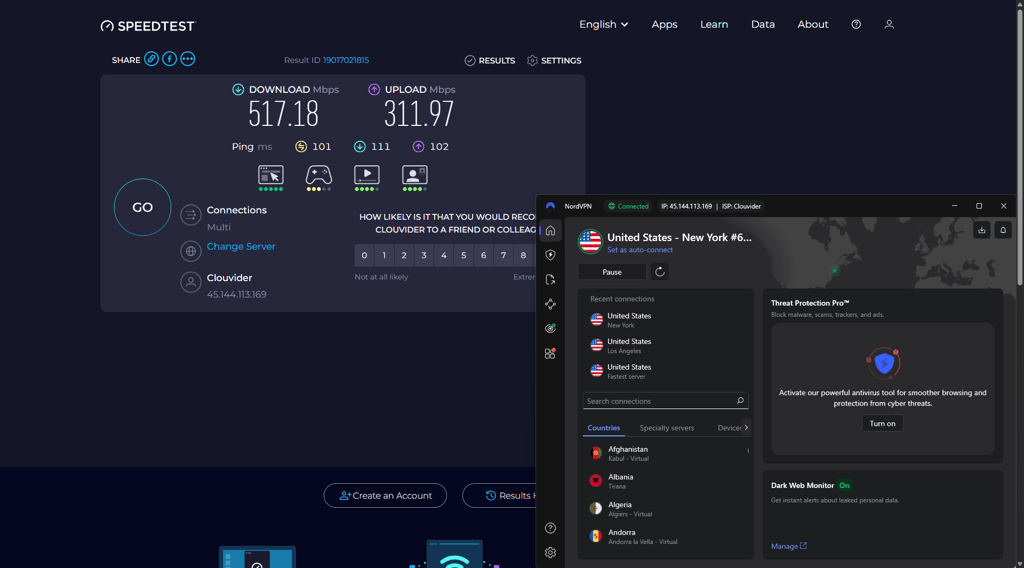
Besides the superior speeds, NordVPN demonstrated outstanding unblocking capabilities with UK-based IPTV services like BBC iPlayer and Channel 4, as well as popular US platforms such as YouTube TV, Hulu, and Sling TV.
With over 9,300 servers in 137 countries, including 3,338+ US servers, NordVPN makes it easy to access location-restricted, legal IPTV content anywhere in the world. Most IPTV providers are US-based, so having thousands of US servers ensures fast, reliable, and uninterrupted streaming.

Apart from its excellent unblocking capabilities, NordVPN offers top-notch security features. This IPTV VPN includes a kill switch that disconnects your internet if the VPN connection fails, ensuring your ISP can’t see your online activities. Another great perk is the Threat Protection Pro feature that blocks malicious websites and ads, while the Dedicated IP offers a personal VPN-guarded IP address just for you.
Setting up NordVPN for IPTV streaming is straightforward. Simply download the app to your streaming device, install it, connect to a server, and start streaming. I had no trouble setting it up on devices like Apple TV, Android TV, Amazon Fire TV, and even a router.
You can get NordVPN, our #1 IPTV VPN, for just $3.09/month. It comes with a 3-day free trial on Android and a 30-day money-back guarantee, making it simple and risk-free to try.
For a deeper investigation of NordVPN, read our NordVPN review.
Top 2. Surfshark – fastest VPN for IPTV streaming without buffering
![Surfshark mobile logo [IN USE]](https://media.vpnpro.com/images/170x89/surfshark-review-logo-2.jpg)
100
4500
24/7, FAQ
-
600+ US servers
-
Great unblocking capabilities
-
Excellent speed retention rates for HD streaming
-
Some features cost extra
Surfshark is my top VPN choice for IPTV, as it easily bypasses ISP throttling and content restrictions. After connecting to the nearest server and using the WireGuard protocol, Surfshark completely eliminated IPTV buffering and delivered a smooth, uninterrupted streaming experience.
During my tests, Surfshark reached impressive download speeds of around 745Mbps, retaining 96% of my baseline connection. For optimal performance, I recommend temporarily turning off the Web Protection feature, as it can occasionally slow down video loading times.
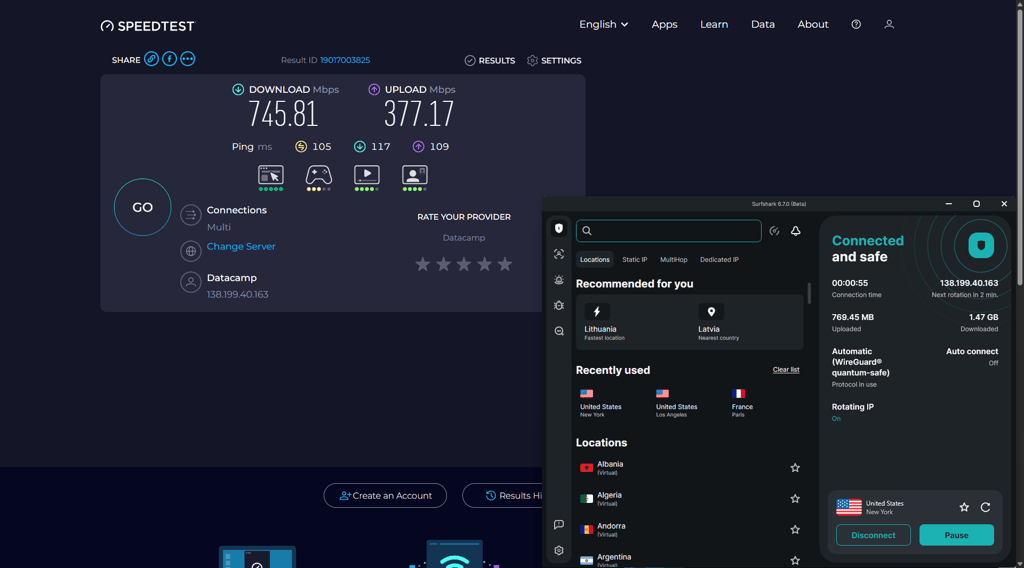
With over 4,500 servers in 100+ countries, Surfshark is a top VPN for IPTV. More than 600 servers in the US help ensure fast, buffer-free streaming. With this many US-based servers to choose from, I had absolutely no trouble unblocking the geo-restricted content on my chosen legal IPTV service providers. Surfshark successfully unblocked the most popular IPTV services, including YouTube TV, Hulu + Live TV, Sling TV, fuboTV, DirecTV Stream, Tubi, and Pluto TV.

Surfshark is user-friendly and perfect for IPTV streaming, as you only have to install the app on the device you want to stream on. Although it worked great for me, if you find your Surfshark app not working with your IPTV, try connecting to a different server. If that does not do the trick, uninstall and reinstall the IPTV application while the VPN is running. Lastly, check if Surfshark is running on the default protocol. If not, change it back, and it should solve the problem.
Surfshark is the cheapest IPTV VPN on my list, with subscriptions starting only at $1.99/month with a 7-day free trial and a 30-day money-back guarantee.
For a deeper investigation of Surfshark VPN, read our Surfshark VPN review.
Top 3. Proton VPN – reliable IPTV VPN with global server fleet
![Proton VPN mobile logo [IN USE]](https://media.vpnpro.com/images/170x89/proton-vpn-review-logo-2.jpg)
145
20075
-
Massive server fleet
-
Good speeds for streaming
-
Excellent security package
-
Above average price
Proton VPN is an excellent VPN choice for IPTV users who prioritize cybersecurity without compromising streaming performance. During testing, I consistently achieved speeds of around 513Mbps, making Proton VPN one of the fastest VPNs for IPTV. These impressive speeds reduced loading times and ensured smooth, lag-free streaming.
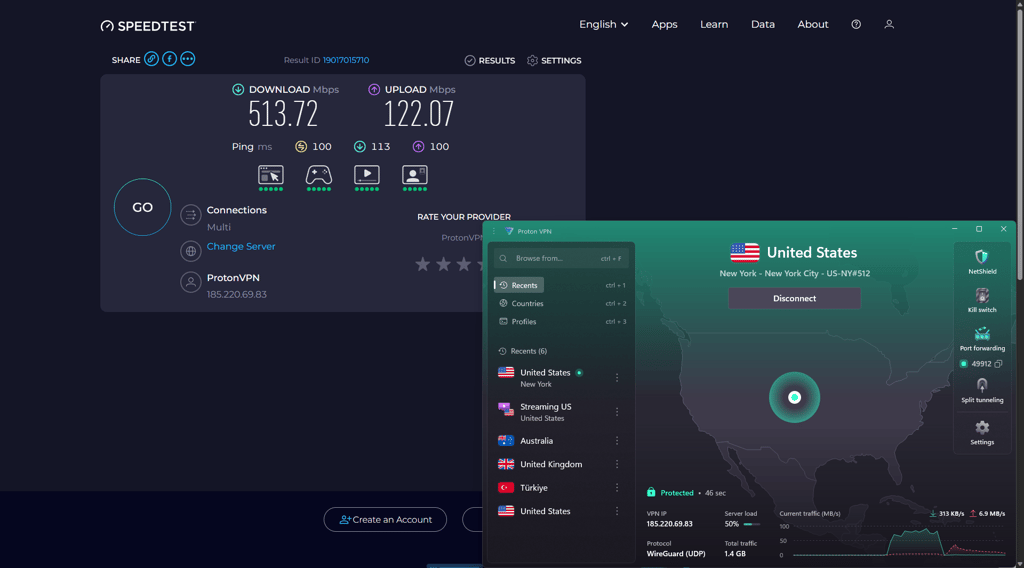
Proton VPN offers an impressively sized fleet of 20,075+ servers in 145+ regions. 5,000+ of those servers are located in the US, which is especially important since most IPTV service providers are based there, too. The VPN performs exceptionally well at unblocking IPTV services. Proton VPN is simple to set up and use. After connecting to a preferred server, I easily bypassed geo-restrictions to access IPTV services such as YouTube TV, Hulu + Live TV, Sling TV, fuboTV, DirecTV Stream, Tubi, and Pluto TV.
As for Proton VPN security features, it has the industry-standard AES-256 encryption, a kill switch, a strict third-party audited no-logs policy, and is based on the WireGuard protocol. To boost its download speeds, Proton VPN has the VPN Accelerator feature, which can make your IPTV streaming experience more pleasant and less prone to hiccups. Proton VPN has a speed retention rate of about 88%, plus the VPN Accelerators boost it by an additional 2-3%.
You can get Proton VPN, a Swiss-based IPTV VPN, for $2.99/month. While Proton VPN does not offer a free trial of its premium service, you can still try it out with the 30-day money-back guarantee it provides.
Top 4. TotalVPN – cheapest VPN for uninterrupted IPTV access
![TotalVPN mobile logo [IN USE]](https://media.vpnpro.com/images/170x89/totalvpn.jpg)
90
1800
24/7, email
-
Affordable pricing
-
Intuitive interface
-
Reliable speeds
-
No WireGuard option
TotalVPN is a solid VPN choice for IPTV streaming, offering affordability and reliable performance. During my tests, I got stable download speeds of 417Mbps, which provided a smooth and hassle-free IPTV streaming experience. While TotalVPN has a smaller server network with 1,800+ servers in 90+ countries, it still delivered consistent performance, and I had no issues connecting to US servers and unblocking various legal IPTV services.

TotalVPN unblocked Sling TV, Smart IPTV, and Yeah! TV with ease. While its 73% speed retention rates were slightly lower when compared to other VPNs on this list, I still had no problem streaming shows in HD.
Using TotalVPN for IPTV streaming was pretty straightforward. All I had to do was download the app, install it, connect to the US, and start streaming. In addition to being user-friendly, TotalVPN provides robust security with features like AES-256 encryption, a kill switch, and a Stealth mode to bypass geo-restrictions on streaming platforms. These features ensure that your internet traffic is safe from your ISP, accidental data leaks, and other potential threats.
If you’re looking for a budget-friendly VPN for IPTV, TotalVPN is a great option, with plans starting at around $1.59/month. Plus, there’s a 30-day money-back guarantee for you to test the service out risk-free.
For a deeper investigation of TotalVPN, read our TotalVPN review.
Top 5. Norton VPN – a secure VPN for unlocking IPTV content

65
2000
24/7 live chat
-
Reliable bypassing capabilities
-
User-friendly interface
-
Robust security features
-
Does not offer Dedicated IP
Norton VPN is a secure, beginner-friendly option for IPTV streaming that focuses on privacy and ease of use while still delivering solid performance for everyday viewing. It may not offer as many advanced tools as top-tier competitors, but it provides all the essentials needed for reliable IPTV access and solid speeds reaching up to 400Mbps.
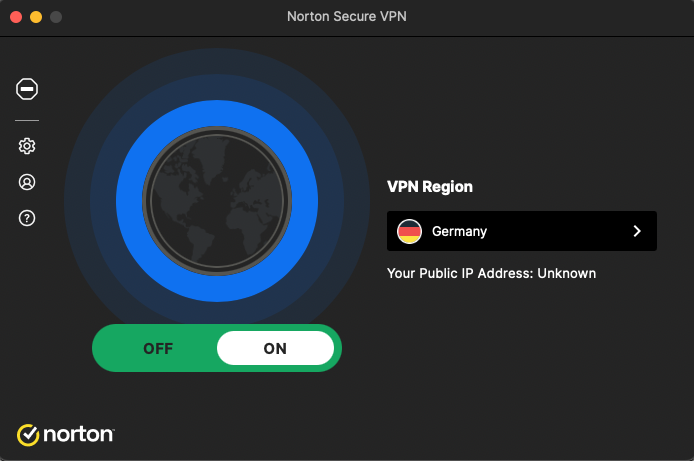
Norton VPN runs a growing network of 2,000+ servers in 65+ countries worldwide, including multiple locations in the US, UK, and other key regions, making it suitable for unblocking major legal IPTV and streaming platforms. With support for modern protocols like WireGuard, OpenVPN, and its own Mimic option, connections remain stable enough for HD streaming when using a nearby server. When I tried it, it easily unblocked popular IPTV and streaming platforms, including services like YouTube TV, Sling TV, Hulu + Live TV, and BBC iPlayer, letting you watch your favorites with far fewer restrictions.
In terms of security, Norton VPN uses strong AES-256 or ChaCha20 encryption, a kill switch, and a strict no-logs policy to keep your streaming activity private from ISPs, advertisers, and other third parties. Split tunneling is available on supported platforms, allowing you to route IPTV apps through the VPN while keeping other traffic on your regular connection for better flexibility and speed.
Norton VPN offers well-balanced pricing with subscriptions starting at $3.33/month and including a 30-day free trial and a 60-day money-back guarantee. Each subscription lets you connect multiple devices at the same time, which is helpful if you stream IPTV on a smart TV, laptop, and mobile devices in one household.
For more information, read our in-depth Norton VPN review.
How I tested IPTV VPNs
Not every VPN is equal – while some are excellent for IPTV streaming, others might excel at different tasks. To find the best options, I tested each VPN against the following criteria:
- Speed and streaming reliability (30%). Free or low-quality VPNs often cause buffering, lag, or poor video quality on IPTV. I focus on premium VPNs with fast servers and consistent performance. Services with around 400Mbps speeds or no lower than 70% initial speed retention rate let you stream in HD or 4K without interruptions.
- Security and privacy (25%). Streaming IPTV exposes your data and IP address, which can be risky. I tested VPNs for strong security features, including AES-256 encryption and modern protocols like WireGuard and OpenVPN.
- Useful additional features (20%). Ads, trackers, or malicious websites can disrupt your IPTV experience. I tested VPNs for built-in ad blockers, malware protection, and tracker prevention by visiting websites known for intrusive ads and malware. VPNs that successfully blocked ads, prevented trackers, and kept the connection safe scored higher.
- Reputation and trustworthiness (15%). Not all VPNs are trustworthy or reliable over time. I reviewed user feedback, expert evaluations, and third-party audits to verify reliability.
- Price (10%). I focused on the best possible price-to-feature ratio and made sure all the IPTV VPNs on my list are worth the subscription price with additional features, smooth performance, and excellent unblocking.
Get NordVPN for IPTV streaming
How to use a VPN with IPTV: step-by-step guide
IPTV VPN setup is fairly simple and requires just a couple of steps to get your chosen VPN to work with IPTV. Here’s what you should do:
Step 1. Select a reliable IPTV VPN
Based on my testing, NordVPN is the best VPN for IPTV, thanks to its wide global server fleet, consistently fast speeds, and advanced Obfuscated servers that help avoid VPN bans on strict platforms. It provides secure, high-quality access to all major IPTV websites, letting you enjoy smooth, buffer-free streaming with strong privacy protection.

Other VPNs I recommend as the best IPTV VPNs are Surfshark, as it combines an attractive price and great performance, and Proton VPN for its consistent geo-unblocking capabilities.
Step 2. Install the VPN app on your streaming device
Install your IPTV VPN directly on the device or network where you watch IPTV, then follow the on-screen setup steps to finish the process.
For Firestick:
- Download the VPN app from the Amazon Appstore on your Firestick.
- Sign in, choose a fast nearby server, and keep the app running before you open your IPTV app.
For IPTV boxes & apps (IPTV Smarters, etc.):
- Install the VPN app from the device’s app store or sideload it if needed.
- Connect to a suitable server first, then launch your IPTV app (like IPTV Smarters) to stream securely.
For smart TVs & routers:
- If your smart TV supports VPN apps, install the VPN from its app store and connect to a server before opening your IPTV app.
- If it doesn’t, set up the VPN on your router so every device on your home network, including the TV and IPTV box, is protected automatically.

Step 3. Connect to a server location close to you
Choose a server on your IPTV VPN in the same country where your preferred IPTV service provider is located. This way, you’ll be able to unblock any legal geo-restricted content. Just make sure to connect to the nearest server for smoother, buffer-free IPTV streaming. I had the best experience using NordVPN servers in the US, such as in New York and Los Angeles.

Step 4. Go to IPTV and start streaming
Head to your preferred legal IPTV service, log in, and start streaming from anywhere in the world without buffering, enjoying a smooth viewing experience.
Get NordVPN to access US IPTV from anywhere
How to add a VPN to IPTV Smarters?
IPTV Smarters is an IPTV streaming app for all iOS and Android devices, including Amazon Firestick and Android TV devices. Since it’s a third-party app, I strongly recommend using a VPN for all your legal Smart IPTV activities, just to be safe. The easiest way to combine IPTV and VPN is to simply download the NordVPN or Surfshark app and run it while streaming, but if you’d like to get a VPN service within the IPTV Smarters app, here are the steps:
- Download VPN configuration files. You can find these files on your provider’s webpage. In NordVPN’s case, you can download them here.
- Prepare the files. Here, you should first unzip them and then move the server configuration files to your Android or Fire TV Stick device storage.
- Open the IPTV Smarters app. Launch your app and tap on the “Connect VPN” option.
- Add a VPN certificate by clicking on the “Add certificate” section.
- Import configuration file to the app. Under the “Add certificate” option, mark “File.” Then, click “Browse” and navigate to the place you put your unzipped configuration files. Select your file and press “Import.”
- Connect to VPN. Tap on the imported server file and enter your VPN username and password. Tap “Save” and then “Connect.”
- Check if you have successfully connected. If you’re connected to a VPN, you’ll see a green circle or the word “Connected” next to the IPTV Smarters app's top menu selections.
This is quite a complicated way to get a VPN directly to your IPTV Smarters app. If you feel like this is a bit too advanced for you, you can simply install a VPN app on your streaming device or router and use it that way.
Get the NordVPN free trial today
Why is my IPTV not working with a VPN?
If IPTV is not working with a VPN, it is likely because the server’s IP is being blocked. Below, I’ll list the most common issues and solutions to VPN not working with IPTV:
- IP locking blocks access. Many IPTV providers actively block known VPN server IPs to enforce geo-restrictions. To avoid this, use a dedicated or static IP and whitelist it.
- Wrong server location. Connect to a server in the country where your IPTV service is officially available, ideally the closest major city server for better speed and reliability.
- VPN IP is blacklisted. Switch servers or use a static/residential IP
- Slow VPN speeds cause buffering. Use a faster protocol, such as WireGuard, and a nearby server.
- IP/DNS leaks expose real location. Enable leak protection and kill switch.
- VPN protocol is blocked. Try different protocols or obfuscated servers.
- Device and app incompatibility. Set up the VPN on a router or supported app/device.
- VPN traffic is detected. Use obfuscation or a VPN with strong unblocking.
However, if you’ve tried the steps above but still cannot access your IPTV service, try contacting both the streaming service and your VPN provider about VPN compatibility, specific policies, potential workarounds, and authorized IP configurations.
Get the best IPTV VPN – NordVPN
Are there any free VPNs that work for IPTV?
Proton VPN is the best completely free VPN for IPTV that I’ve tested. It’s fast, secure, and free servers give you enough speed and bandwidth for basic IPTV streaming without tracking or logging your online activity. Its strong encryption, no-logs policy, and decent server selection are especially important for avoiding ISP throttling and keeping your IPTV viewing private. However, the free plan still has limitations, such as fewer server locations, more crowded servers at peak times, and a higher chance of buffering or blocks on popular IPTV and streaming platforms compared to premium services.
Instead of relying on a free VPN for IPTV, a better choice is NordVPN, which offers a 3-day trial on Android and a 30-day money-back guarantee for all users, effectively letting you test it risk-free. NordVPN provides significantly faster speeds, a much larger global server network, and advanced features like obfuscated servers, making it more reliable than Proton VPN for smooth, buffer-free IPTV streaming and consistent access to major IPTV sites.
Conclusion
IPTVs are hugely popular and highly convenient service which allow users to stream content via an internet connection. However, IPTVs can often be affected by geo-restrictions, ISP throttling, and pose privacy risks. To avoid regional blocks, deliberate IPS slowdowns, maintain stable streaming, and protect your privacy, you can use a reliable VPN for IPTV.
After testing numerous services, I found that NordVPN, Surfshark, and Proton VPN are the best IPTV VPNs in 2026. All of these VPNs guarantee user privacy and security, can easily unblock restricted IPTV content, bypass ISP throttling, and deliver a smooth streaming experience. While NordVPN is the overall best IPTV VPN, Surfshark stood out for its affordable prices, while Proton VPN showed excellent dedication to privacy.
Legal Reminder: Always double-check that the IPTV services you use have the necessary licenses for streaming. Remember, using a VPN does not make illegal streaming legal.

![Surfshark weekly deals logo [IN USE]](https://media.vpnpro.com/surfshark-weekly-deals.svg)
![Proton VPN winner logo [IN USE]](https://media.vpnpro.com/2025/05/protonvpn-winner.png)
You may also like to read:
Should I leave my VPN on all the time?
How to pay for a VPN anonymously
Best VPN for crypto trading
Best VPN for Crunchyroll
FAQ
What is IPTV and how does it work?
IPTV (Internet Protocol Television) delivers live channels and on-demand shows over the internet instead of cable or satellite. It works by sending TV content as data packets to your device’s app or box, which decodes the stream so you can watch in real time.
Is IPTV legal?
IPTV technology (streaming TV over the internet) is legal, but many cheap online services are illegal, pirating premium channels like sports and movies without licenses. We strongly discourage using unlicensed IPTV services. Stick to verified, legal providers for safe and legal streaming.
Should I use a VPN with IPTV?
You don't technically need a VPN for IPTV, but it helps bypass geo-restrictions, stop ISP throttling that causes buffering, and protect your privacy from hackers and tracking. For smooth, secure streaming on legal services, I recommend a strong VPN like NordVPN.
Do I need a VPN for IPTV in Canada?
Yes, it is highly recommended to use a VPN for IPTV in Canada. A VPN can protect your privacy, bypass ISP throttling, unblock geo-restricted content, and maintain a smooth streaming experience. For the best experience, choose a reliable IPTV VPN, such as NordVPN, with fast connection speeds and strong privacy features.
What is the best VPN for IPTV?
Based on our tests, NordVPN proves to be the best VPN for IPTV. It can access all major IPTV websites and delivers impressive speeds. With features like AES-256 encryption, a kill switch, and the NordLynx protocol, NordVPN ensures secure, smooth HD and 4K streaming, making it ideal for anyone looking for reliable IPTV access.
What is the best VPN for IPTV on Firestick?
The best VPN for IPTV Firestick is NordVPN. This VPN offers the fastest connection speeds for smooth streaming, easily bypasses geo-restrictions, makes it easy to avoid ISP throttling, and ensures your privacy. You can get the NordVPN Fire TV Stick app directly from the Amazon Appstore and easily install it on your device.
What is the best VPN for IPTV Smarters Pro?
The best VPN for IPTV Smarters Pro is NordVPN. The service offers thousands of secure servers worldwide, which makes it easy to change your IP address and access geo-locked content. Additionally, NordVPN is very easy to use, offers the fastest connection speeds for smooth streaming, and protects your privacy while you enjoy the content.
Do IPTV have VPN built in?
No, most IPTV service providers do not come with a built-in VPN. However, you can solve it easily by downloading NordVPN or Surfshark VPN and installing the app on your device. A reliable VPN helps bypass geo-blocks, allowing you to enjoy IPTV no matter your location.
What country should I set my VPN to for IPTV?
The best VPN IPTV country is usually the one closest to your actual location, as choosing a server close to you ensures the fastest speeds. For bypassing geo-restrictions, the US, UK, Canada, and the Netherlands are highly popular choices.
Does IPTV work better with VPN?
Yes, IPTV can work better with a VPN. If you constantly run into ISP bandwidth throttling issues that cause your streams to buffer, a VPN can solve this issue by masking your activities and preventing your ISP from deliberately slowing down your traffic. Additionally, a VPN, such as NordVPN, can help you unblock geo-restricted content with virtual location change. Lastly, using a VPN with IPTV makes your activities safer and more private, thanks to the encryption VPN services use.
Will a VPN stop my IPTV from buffering?
Yes, VPN can stop your IPTV from buffering. Your ISP is less likely to throttle your speeds because you’re using an alternative IP with a VPN. Alternatively, some VPNs have the VPN Accelerator feature, which makes the connections smoother and faster.


