Best VPN for multiple devices in 2026


After my examination, I found the VPN for multiple devices in 2026 that will ensure security on all your devices and even allow you to share the account with your family.
The majority of VPN providers have device limits, which help manage resources like CPU and bandwidth and ensure stable performance. This can make it challenging for users with multiple devices to find a VPN that covers them all. In fact, a Forbes Advisor poll from June 2025 found that nearly half (49%) of respondents used a VPN on at least some devices, while just under a quarter (23%) used a VPN on all of their devices. For security-conscious users, protecting every personal device is important, which is why I tested over 25 providers to find the best VPN for multiple devices in 2026. 2026.
After my in-house tests, I found that Surfshark, IPVanish, NordVPN, Private Internet Access, and ExpressVPN are the top 5 best VPNs for multiple devices. These providers allow a solid number or even an unlimited number of simultaneous connections and ensure total protection. Continue reading to learn more about the best multiple device VPN providers and their benefits in 2026.
🏷️ LIMITED OFFER: Get Surfshark 87% OFF + 3 months free 🏷️
Top 5 best multi-device VPNs: shortlist
-
Overall best VPN for multiple devices in 2026
-
Best VPN with unlimited devices at a great price
-
Secure VPN for all family devices
-
Budget-friendly long-term plan VPN for personal use
-
Trustworthy multi-device VPN for streaming
![Surfshark mobile logo [IN USE]](https://media.vpnpro.com/surfshark-60x60-1.jpg)
![IPVanish mobile logo [IN USE]](https://media.vpnpro.com/IPVanish-VPN-small.jpg)
![NordVPN mobile logo [IN USE]](https://media.vpnpro.com/Nord-VPN-review.jpg)
![PIA mobile logo [IN USE]](https://media.vpnpro.com/PIA_60x60.jpg)
![ExpressVPN mobile logo [IN USE]](https://media.vpnpro.com/expressvpn4.png)
How I tested the best VPNs for multiple devices
It’s important to be selective and consider the features you get for the price when choosing a VPN for multiple devices. Out of 25 tested VPNs, only 5 made the cut. Here are some points that I prioritized.
- Number of simultaneous connections (25%). You can install a VPN on multiple devices, but some providers may limit the number of connections that can be used at the same time. Therefore, I examined how many gadgets I could connect without losing performance. Recent studies show that the average US household uses up to 17 devices at once, making a VPN with multiple simultaneous connections essential. Surfshark, IPVanish, and PIA offer unlimited connections, perfect for large families. NordVPN and ExpressVPN support up to 10 and 14 devices, balancing speed and flexibility.
- Platform compatibility (25%). The best VPNs have to be compatible with most apps and devices. I prioritized compatibility with Windows, macOS, Linux, and phones and gave extra points for support on routers, such as FireStick and PlayStation.
- Speed (20%). Ideally, using a VPN for multiple devices shouldn’t reduce speed - but that’s rarely the case. I tested each VPN under heavy load, and while all showed some slowdown, NordVPN led with nearly 95% speed retention on average.
- Privacy and security (15%). While comparing VPNs' privacy and security features, I looked more at the extras since most service providers now offer AES-256 encryption, a kill switch, or IP and DNS leak protection as default (if they even lacked these, they immediately fell down my list). So, I looked for features such as Dark Web monitoring, Ad blocks, Password managers, etc.
- Use cases (15%). I tested on Windows, macOS, Android, and iOS devices to find the best experience while streaming, gaming, and torrenting. I evaluated VPN capability to circumvent geo-restrictions and maintain lag-free performance. Additionally, I examined features intended for these activities, such as SmartPlay technology in NordVPN or port forwarding.


Since 2018, VPNpro has delivered unbiased, expert-backed insights through in-house research and thorough VPN testing. Our team ensures every review is fact-checked and reliable. Learn how we maintain these high standards in our testing methods.
Best VPNs for multiple devices and family sharing in 2026
- 🥇Surfshark – best multi-device VPN in 2026
- 🥈IPVanish – security-oriented VPN with unlimited devices
- 🥉NordVPN – multi-device VPN with advanced security features
- Private Internet Access – budget-friendly multi-device VPN for individual use
- ExpressVPN – a reliable streaming VPN for multiple devices
I tested 25 top VPNs to determine the best options for multiple devices, focusing on platform compatibility and simultaneous connections. I also evaluated VPN performance across various devices and operating systems, ensuring reliable functionality and considering key features like privacy, speed, and network coverage. After extensive testing, Surfshark, IPVanish, NordVPN, Private Internet Access, and ExpressVPN stood out as the best multi-device VPNs in 2026.
Top 1. Surfshark – the best VPN for multiple devices
![Surfshark mobile logo [IN USE]](https://media.vpnpro.com/images/170x89/surfshark-review-logo-2.jpg)


24/7, FAQ

405 Mbps

WireGuard, OpenVPN, IKEv2
-
Unlimited simultaneous connections
-
Wickedly fast
-
Excellent for streaming
-
Some features cost extra
Surfshark is the best VPN for multiple devices, offering unlimited simultaneous connections. It features dedicated apps for major streaming platforms like Android TV and Amazon Fire TV. You can configure the VPN on various devices, including routers. It also offers FireTV VPN for your smart TVs and other devices, making it the best VPN for families.
Surfshark is renowned for its user-friendly interface, making it the go-to VPN for beginners and experienced users. Its clean, intuitive design ensures straightforward navigation across various OS, including Windows, macOS, Android, iOS, and browser extensions. Shurfshark’s installation and setup are quick and hassle-free, with a one-click connect feature for immediate protection. User-friendly features like a kill switch, CleanWeb, MultiHop, and Bypasser are easy to enable and configure.
Surfshark houses a fleet of 4,500 RAM-only servers across 100 countries. Pick any server, and you won’t experience unstable connections or slow speeds, thanks to WireGuard. Using Surfshark as a VPN for my phone and laptop, I could seamlessly switch between my Android phone and Windows laptop without compromising speed or security. During my test, the speed was stable, with a speed of 746 Mbps on a UK server.
It also unblocks Netflix, Amazon Prime Video, Disney+, and many more region-locked streaming platforms. Plus, if you’re safety-oriented, Surfshark is a great choice as it’s one of the most secure VPNs. Apart from the essential features, you get CleanWeb, which fends off malware, trackers, and annoying ads. More so, you can grab the Surfshark One package that includes antivirus, a private search engine, and real-time alerts about data breaches.
Surfshark is the best multiple-device VPN for just $1.99/month and you can use it on unlimited devices at the same time. A 30-day money-back guarantee covers all plans if you decide this VPN is not for you. And don’t forget to peruse Surfshark’s discount coupons for a potentially better deal. Finally, a 7-day free trial is available on Android and iOS devices.
For a deeper investigation of Surfshark VPN, read our Surfshark VPN review.
Top 2. IPVanish – reliable family VPN for all devices
![IPVanish mobile logo [IN USE]](https://media.vpnpro.com/images/170x89/IPVanish.jpg)
24/7, email
270 Mbps
WireGuard, OpenVPN, IKEv2/IPSec, L2TP/IPSec
-
Unlimited simultaneous connections
-
P2P friendly
-
Owns its server network
-
US-based
IPVanish is another excellent VPN for everyday use across a wide range of devices. It offers dedicated apps for all major platforms, including Windows, macOS, iOS, Android, Fire TV, and Linux. On top of that, IPVanish supports unlimited simultaneous connections, making it a perfect fit for households or small businesses that want to protect every device under one account.
IPVanish’s clean and intuitive interface makes it easy to use even for people who are new to VPNs. The apps are well-organized, with essential features clearly accessible, so connecting to a server or adjusting settings feels straightforward and hassle-free. During testing, the overall navigation experience felt smooth and beginner-friendly.
The service operates thousands of servers across 113+ locations worldwide, with many servers offering 10 Gbps capacity for fast and reliable connections. IPVanish consistently delivered strong speeds, allowing me to enjoy high-quality streaming, gaming, and browsing without noticeable slowdowns. By bypassing geo-restrictions, you can access services like Netflix, Hulu, and other major streaming platforms from different regions.
For users in restrictive environments, IPVanish’s Scramble (obfuscation) feature helps disguise VPN traffic, making it easier to stay connected in countries with strict internet controls. Additionally, Threat Protection helps block ads, trackers, and malicious websites, improving both security and browsing comfort.
IPVanish is a robust multi-device VPN with subscriptions starting at $2.99/month with long-term deals, and all purchases are backed by a 30-day money-back guarantee, allowing you to test the service risk-free. Plus, you can also take advantage of a 7-day free trial.
Uncover the strengths and limitations of IPVanish in our full analysis.
Top 3. NordVPN – super-secure VPN for multiple devices
![NordVPN mobile logo [IN USE]](https://media.vpnpro.com/images/170x89/2025/08/nord-rreview.jpg)
24/7, email
452 Mbps
NordLynx, OpenVPN, IKEv2
-
Protect up to 10 devices simultaneously
-
Fastest speeds due to NordLynx
-
Excellent for streaming, P2P, and online gaming
-
No router applet
NordVPN is one of the best family VPN for multiple devices in 2026. You can use it on up to 10 devices: phones, tablets, computers, streaming devices, and more. However, expanding the number of connections by setting up NordVPN on your router is also an option. This way, the VPN will protect all household devices.
NordVPN is also worthy of its position in this list, offering over 9,300 high-speed servers across 137 countries for secure and reliable connections on all major platforms. I particularly enjoyed that NordVPN is designed with user convenience in mind, ensuring a seamless experience from installation to daily use. The intuitive interface allows users to connect to a secure server with just one click. It automatically selects the fastest server based on your location, ensuring optimal performance.
My tests confirmed that NordVPN easily bypasses the geo-restrictions of Netflix, Hulu, and BBC iPlayer libraries, among many other online streaming services. I connected to NordVPN's servers in London to watch BBC iPlayer from the USA, where its programs are strictly geo-blocked. Since it’s BBC iPlayer, I also made sure all security features were on. Plus, I used Nordlynx to optimize speed as it was a remote server.
Additionally, P2P fans won’t be disappointed as I received 485 Mbps speed while connected to London torrenting servers. With NordVPN’s split tunneling feature, you can route your torrenting traffic through the VPN while keeping other apps on your regular internet connection, maximizing security and performance.
NordVPN is the fastest VPN for multiple devices, offering a 3-day free trial for Android devices. Subscriptions start at $3.09/month and cover up to 10 devices at once. Should you need more time for testing, don’t hesitate to exercise the 30-day money-back guarantee option. And don’t forget to grab a NordVPN coupon to save some cash!
For a deeper investigation of NordVPN, read our NordVPN review.
Top 4. Private Internet Access – multi-device VPN for personal use
![PIA mobile logo [IN USE]](https://media.vpnpro.com/images/170x89/PIA_520x520.jpg)
95 Mbps
WireGuard, OpenVPN, IKEv2
-
Unlimited simultaneous connections
-
Budget-friendly long-term subscriptions
-
Reliable connections
-
Based in the US
Private Internet Access (PIA) supports unlimited simultaneous connections and offers competitively priced long-term subscriptions. This makes it an excellent option for users who want to secure all their devices without worrying about connection limits or paying extra for additional coverage.
PIA delivers broad compatibility across Windows, macOS, Linux, Android, and iOS, and it also supports router installation, allowing you to protect your entire home network at once. Thanks to its unlimited-device policy and router support, PIA is well-suited for families, power users, and anyone managing multiple devices under a single account.
PIA strikes a solid balance between ease of use and advanced functionality. The apps are intuitive enough for beginners to get started quickly, while still offering plenty of customization for experienced users. During my testing, setup was quick and straightforward, and I was able to connect to a US server and start streaming platforms like Netflix with minimal effort.
Security is a strong point for PIA. It uses AES-256 encryption and supports modern, secure protocols such as OpenVPN and WireGuard, along with a reliable kill switch. PIA operates one of the largest VPN networks available, with 35,000+ servers across 90+ countries. Despite the massive server count, performance remained consistent, delivering fast speeds suitable for HD and 4K streaming. I was able to unblock Netflix and Prime Video without issues.
Private Internet Access is a cost-effective VPN for users with multiple devices, with subscriptions starting at $2.03/month. There’s a 7-day free trial for mobile devices, and every subscription comes with a 30-day money-back guarantee, giving you plenty of time to test the service risk-free.
Top 5. ExpressVPN – trustworthy VPN to bypass geo-restrictions on multiple devices
![ExpressVPN mobile logo [IN USE]](https://media.vpnpro.com/images/170x89/expressvpn2.png)
24/7, email
440 Mbps
Lightway, OpenVPN, IKEv2
-
Unblocks geo-restricted services
-
User-friendly interface
-
Robust security measures
-
Higher price
ExpressVPN is a top-tier VPN for multiple devices, allowing up to 14 simultaneous connections per subscription. While some competitors now offer unlimited device connections, ExpressVPN’s limit is still more than sufficient for most users. It’s a premium VPN that excels at protecting your data while reliably bypassing geo-restrictions worldwide.
You can use ExpressVPN on all major platforms, including Windows, macOS, Android, iOS, Linux, and it also works on smart TVs, streaming devices, and gaming consoles. Unlike some providers, ExpressVPN offers dedicated router firmware, which makes it easy to protect every device on your home network at once.
ExpressVPN provides clear setup guides and an extremely polished user experience, making it a great choice even if you’re new to VPNs. During testing, the apps felt fast, intuitive, and responsive across both desktop and mobile. Connecting to a server took seconds, and I was able to start streaming geo-blocked content almost instantly.
In terms of security, ExpressVPN uses AES-256 encryption, enforces a strict no-logs policy, and includes DNS leak protection. Additional features include a reliable kill switch (Network Lock) and split tunneling. ExpressVPN also uses its proprietary Lightway protocol, designed to deliver faster speeds and improved stability without compromising security.
ExpressVPN operates 3,000+ servers in 105 countries, offering excellent global coverage. In my tests, it easily unblocked major streaming platforms such as Netflix, BBC iPlayer, Hulu, and Disney+. Speed performance was one of its strongest points, with average download speeds exceeding 500 Mbps, making it well-suited for 4K streaming, gaming, and large downloads.
ExpressVPN is a reliable and fast VPN for multiple device use, with plans starting at $2.79/month on long-term subscriptions, which is higher than many competitors’. There is a 7-day free trial, and every plan is backed by a 30-day money-back guarantee, allowing you to try ExpressVPN completely risk-free.
For a deeper investigation of ExpressVPN, read our ExpressVPN review.
Compare the best multiple devices VPNs
| VPN for multiple devices | VPN Rating | Simultaneous connections | Average speed | Compatible devices | Starting price | Money-back guarantee |
| 1. Surfshark | 9.5 ⭐⭐⭐⭐⭐ | Unlimited | 746 Mbps | Windows, MacOS, Android, iOS, Linux, Amazon Fire, Smart TV | $1.99/month | 30-day |
| 2. IPVanish | 8.4 ⭐⭐⭐⭐ | Unlimited | 590 Mbps | Windows, MacOS, Android, iOS, Linux, Amazon Fire, Smart TV | $2.99/month | 30-day |
| 3. NordVPN | 9.8 ⭐⭐⭐⭐⭐ | 10 | 756 Mbps | Windows, MacOS, Android, iOS, Linux, Amazon Fire, Smart TV | $3.09/month | 30-day |
| 4. Private Internet Access | 8.1 ⭐⭐⭐⭐ | Unlimited | 596 Mbps | Windows, MacOS, Android, iOS, Amazon Fire, Smart TV | $2.03/month | 30-day |
| 5. ExpressVPN | 8.4⭐⭐⭐⭐⭐ | 14 | 570 Mbps | Windows, MacOS, Android, iOS, Linux | $2.79/month | 30-day |
Can I use the same VPN on multiple devices?
Yes, you can use the same VPN on multiple devices. Many VPNs offer from 5 to 10 simultaneous connections, while others, like Surfshark, go the extra mile and allow unlimited device count. So before purchasing a VPN subscription, check if it offers enough simultaneous connections for all the devices you plan to use.
Surfshark proved to be the best VPN for multiple devices. It supports unlimited simultaneous connections and has a comprehensive router support, allowing users to protect all devices on their home network. Not to mention its robust security and privacy toolkit and vast server selection.
![Surfshark logo for comparison table [IN USE]](https://media.vpnpro.com/surfshark-comparison.svg)
Why choose a multi-device VPN?
If you use multiple devices, you must protect them with the best VPN. Even if one device is unprotected, it severely impacts your overall security and privacy. After all, you probably use email, Facebook, Netflix, online banking, and other services on your computer and smartphone.
Therefore, installing a VPN on all devices is crucial to:
- Secure the whole family. Everyone can benefit from the extra security a VPN offers, including your family members. And a service that offers broad device support and numerous simultaneous connections makes it easy to achieve.
- Get extra protection. Most VPNs for multiple devices have additional features. These include ad and malware blockers, antiviruses, data breach monitors, etc.
- Avoid geo-blocking. Many streaming platforms and websites are available in selected countries. But with a VPN, you can change your location and access your favorite content abroad.
- Hide your IP address. If a third party has your IP, it also has your approximate location. Some users don’t know their IP is visible when torrenting, making them vulnerable to cybercriminals. Thus, a P2P VPN may prevent disasters.
- Encrypt your traffic. Without a VPN, your traffic is visible to your Internet Service Provider (ISP) and other third parties interested in your browsing habits. Clearly, you want to hide your online activities to prevent throttling, targeted ads, cyber attacks, and such.
How to use a VPN on multiple devices
Some popular VPN providers that allow you to connect multiple devices simultaneously include Surfshark, IPVanish, and NordVPN. After installing the VPN app, you can easily set it up to protect several devices at once. Here’s how to use a VPN on multiple devices:
- Choose a VPN that supports simultaneous connections. I recommend Surfshark, which supports unlimited simultaneous connections.
- Download and install the VPN app on each device you want to protect.
- Log in with your credentials.
- Connect to a server and start browsing securely on all devices.
How to set up a multi-device VPN on your router:
Another method is to install a VPN on your router. This method routes all connected devices' traffic through the VPN and counts as a single connection. The VPN works even on devices without VPN apps as long as your bandwidth and router can handle the load.
- Choose a VPN-compatible router, like NordVPN.
- Access the router's admin panel. Open a web browser and enter your router's IP address (commonly 192.168.1.1 or 192.168.0.1). Log in using your admin credentials.
- Locate the VPN settings. Navigate to the VPN section of your router's settings. This may be under "Advanced," "Security," or a similar category.
- Configure the VPN connection. Choose the VPN protocol (OpenVPN is recommended for its balance of security and speed). Download the configuration files from your VPN provider.
- Upload configuration files. In the router's VPN settings, upload the OpenVPN configuration files (usually .ovpn files) you downloaded. Enter your VPN username and password.
- Save and apply settings. Save the changes and apply the updated configuration. Restart your router to ensure the settings take effect.
- Test the VPN connection. Connect a device to your router and verify the VPN is working by checking your IP address through an IP checker tool.
- Set up additional features (optional). Configure advanced settings such as split tunneling or a kill switch if your router firmware supports these features.
And that's it! Your router is now ready to connect multiple devices through VPN encryption securely.
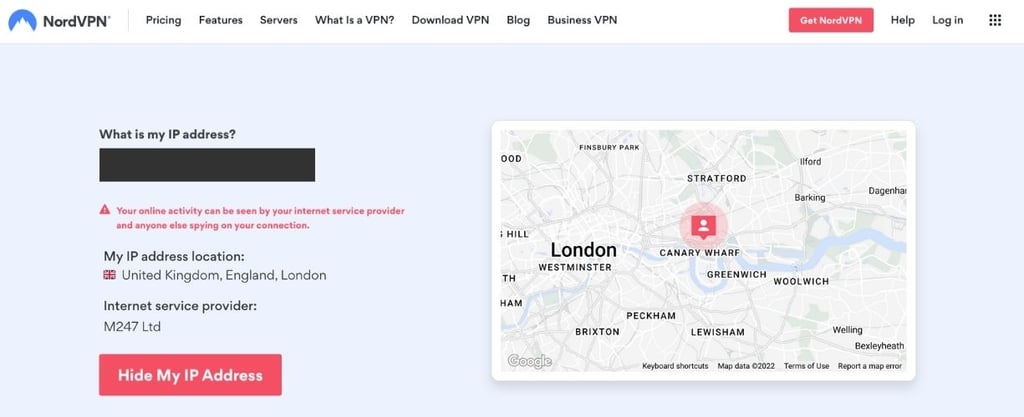
If the connection fails, double-check your credentials, configuration files, and settings. Consult your VPN provider’s support resources for specific troubleshooting steps. Also, keep your router firmware updated and periodically check the VPN connection to ensure it remains secure and functional. However, keep in mind that once you set a VPN up on the router, your location will change throughout the network based on the server you connect to.
Is there a free multi-device VPN?
I can’t recommend free VPN services because most severely limit simultaneous connections. For starters, unpaid subscription tiers usually restrict customers to one device per account. Secondly, free VPNs impose other limitations, such as monthly data caps, fewer server options and features, slower speeds, and limited device compatibility. Thus, you’ll be constrained to only one device and have to deal with subpar performance in all areas.
Instead of using a free multi-device VPN, I recommend getting Surfshark or NordVPN, both of which offer free trials and money-back guarantees. This way, you can use a premium VPN with all the advanced features on multiple devices without paying for it.
Bottom line
A VPN is a necessary security tool to protect your online privacy, but many VPN providers offer a limited number of simultaneous connections. To ensure total anonymity, it’s important to protect all personal devices. That is why I tested over 25 providers to find the best ones that offer multiple device protection. During my tests, Surfshark proved to be the best VPN for multiple devices in 2026, offering unlimited simultaneous connections. Additionally, Surfshark provides advanced security features, delivers fast speeds, and even supports routers. By setting up Surfshark on a router, you can protect all devices connected to the same network.

![Surfshark weekly deals logo [IN USE]](https://media.vpnpro.com/surfshark-weekly-deals.svg)
![Proton VPN winner logo [IN USE]](https://media.vpnpro.com/2025/05/protonvpn-winner.png)
You may also like to read:
Best VPN for Kodi
Best VPN for ChatGPT
Best VPN for Twitter
Best VPN for ad blocking
Best VPN for Apple TV
Best VPN for travel
FAQ
What is the best VPN for families?
The best VPN for families is Surfshark. Unlike many providers, Surfshark offers unlimited simultaneous connections, so every family member can protect all of their devices without hitting a device cap. You can also install Surfshark on a router, which covers all devices connected to your home network at once. With its strong security features and consistently fast speeds, Surfshark delivers smooth, uninterrupted streaming, gaming, and everyday browsing for the whole household.
Is there a VPN with unlimited devices?
Yes, Surfshark is a VPN with unlimited devices. Surfshark is a premium VPN that guarantees security, offers additional features, and doesn’t limit the number of simultaneous connections. Additionally, the provider offers budget-friendly prices, which makes it an excellent choice for users who use many devices.
Can I share my VPN with family members?
Yes, you can share your VPN with family members, but be sure to get a VPN that allows multiple simultaneous devices. To share your account with family members, simply download and install the VPN app on their devices. Once you have the app, log in using the same credentials, and your family members will be able to use the VPN on their devices.
Can I use the same VPN for my phone and computer?
Yes, you can use the same VPN for your phone and computer. However, if you want to use the VPN on several devices at once, be sure to get a provider that offers multiple device support, like NordVPN. With NordVPN, you can set up the VPN on up to 10 devices simultaneously.
How many people can use VPN at the same time?
The number of people who can use the same VPN depends on the VPN’s device limits. If you want to share the account with your family or friends, be sure to get a VPN that allows more simultaneous connections. Top provider Surfshark allows unlimited simultaneous connections.
Do I need a VPN on every device?
Yes, you need a VPN on every device to protect your online privacy. If you don’t want to install the VPN app on each device separately, you can also opt for a VPN that supports routers, such as NordVPN. By setting up the VPN on a router, the VPN will cover all devices under the same network.
Which is the best VPN for multiple devices?
Surfshark is the best VPN for multiple devices. With Surfshark, you can connect an unlimited number of devices at once. It also supports routers, which means that you can simply set up the VPN on a router and the connection will cover all devices under the same network. Surfshark VPN is the best choice as it ensures stability, speed, and overall online security.
Can NordVPN connect 10 devices at the same time?
Yes, NordVPN can connect up to 10 devices simultaneously. The provider has a limit of 10 simultaneous connections, which means that you’ll have no issues using the VPN on 10 devices. If you want to secure more devices, you can set up NordVPN on a router.
Does NordVPN have a family plan?
NordVPN doesn’t have a family plan, but it allows up to 10 simultaneous connections. If your family has more than 10 devices, you can set up NordVPN on a router. This way, the VPN will cover all devices under the same network.
How to set up a VPN on multiple devices?
To set up a VPN on multiple devices, choose a multiple-device provider that supports all major operating systems, like Surfshark. Once you have an active subscription, simply download the VPN app on each device and log in to your account. You can download the VPN apps from the Apple App Store, Google Play Store, or the provider’s official website, depending on your device.


