Best VPN for Wi-Fi in 2026


Quick summary: Using public Wi-Fi without protection puts your data at risk. However, with a reliable VPN for Wi-Fi you can secure your online activity, hide your digital identity, and bypass various network restrictions.
Connecting to public Wi-Fi is fast, free, and incredibly risky if you’re not protected. Even in 2026, unsecured networks remain one of the easiest ways for data leaks, tracking, and cyberattacks to happen. That’s why it’s important to use the best VPNs for public Wi-Fi – these tools lock down your connection by encrypting your traffic and hiding your internet activity from anyone else who’s also sharing the same network.
A high-quality VPN for Wi-Fi security shields your devices from malicious hotspots, while also keeping sensitive information like logins, emails, and payment data safe. It doesn’t matter if you’re in an airport, café, hotel, or library – using a VPN on public Wi-Fi helps keep your online activity private and secure. Below, you’ll find the top VPNs for Wi-Fi in 2026, which I’ve tested for speed, security, and real-world protection.
🏷️ LIMITED OFFER: NordVPN deal! Get 76% OFF NordVPN + 3 months FREE 🏷️
Best VPN for Wi-Fi: shortlist
-
The overall best VPN for Wi-Fi
-
Affordable VPN for Wi-Fi with no device limit
-
Privacy-first VPN for Wi-Fi security
-
Straightforward VPN for unsecured Wi-Fi networks
-
Beginner-friendly VPN for everyday Wi-Fi use
![NordVPN mobile logo [IN USE]](https://media.vpnpro.com/Nord-VPN-review.jpg)
![Surfshark mobile logo [IN USE]](https://media.vpnpro.com/surfshark-60x60-1.jpg)
![Proton VPN mobile logo [IN USE]](https://media.vpnpro.com/ProtonVPN-small.jpg)

![TotalVPN mobile logo [IN USE]](https://media.vpnpro.com/totalvpn-mobile.png)


Since 2018, VPNpro has delivered unbiased, expert-backed insights through in-house research and thorough VPN testing. Our team ensures every review is fact-checked and reliable. Learn how we maintain these high standards in our testing methods.
How to use a VPN on public Wi-Fi in 2026
- Subscribe to a top-grade Wi-Fi VPN. We recommend NordVPN, now 76% off!
- Download the VPN app and install it
- Connect to a nearby server for better connectivity
- Enjoy public Wi-Fi without any dangers or restrictions!
Why do you need a VPN for public Wi-Fi?
Firstly, one of the main concerns when connecting to a public Wi-Fi network is safety. Most public Wi-Fi networks are unencrypted and poorly secured, which makes them vulnerable to data interception, like personal information or digital identity theft. Using a VPN significantly reduces the risk of your online traffic being intercepted by encrypting your connection.
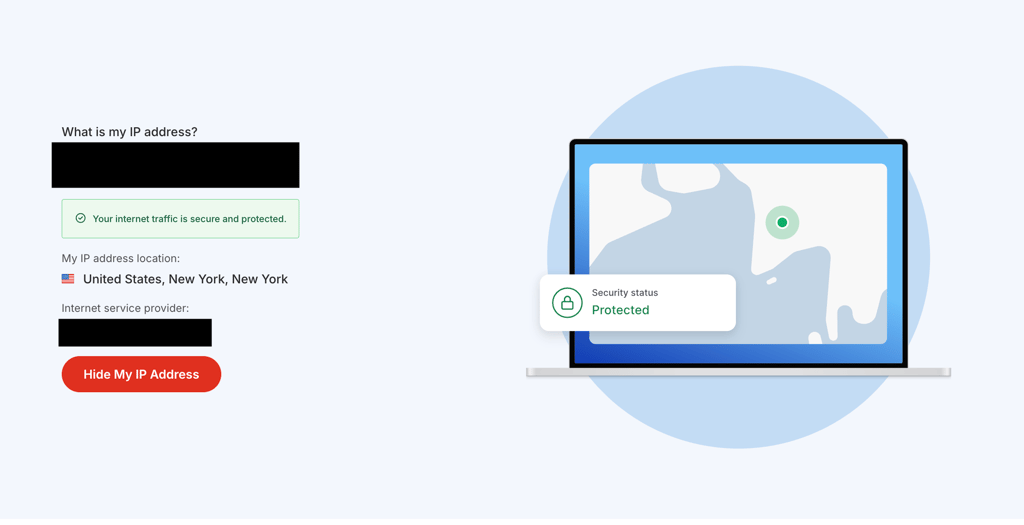
Secondly, anyone with sufficient technical knowledge can see your online activities on unsecured networks, including snoopers, ISPs (Internet Service Providers), and other third parties connected to the same Wi-Fi. This way, they can collect and analyze your data without your consent. Fortunately, a reputable VPN ensures that your personal information and activities are private, even on a public Wi-Fi.
Moreover, due to licensing agreements and regional laws, much online content is geo-blocked. As luck would have it, a high-quality VPN provider can help you access platforms like Netflix US, Hulu, Disney+, and many other streaming services. Plus, with a multiple device VPN, you can unblock them on your phone, tablet, computer, or smart TV.
Lastly, if you’re facing significant speed drops while gaming, streaming, or torrenting, your ISP may be throttling your bandwidth. Some ISPs usually do that to manage network congestion, but that may leave you with poorer network performance. Hence, to prevent that from happening, a VPN hides your traffic and can reduce throttling, resulting in more stable connection speeds.
![NordVPN responsive banner logo [IN USE]](https://media.vpnpro.com/images/160x40/2025/08/nord-responsive.png)
Best VPNs for Wi-Fi: overview
- NordVPN – the all-around best VPN for public Wi-Fi
- Surfshark VPN – VPN with no device limit
- Proton VPN – secure Wi-Fi VPN with a free option
- Norton VPN – reliable public Wi-Fi VPN with robust security
- TotalVPN – simple VPN for everyday Wi-Fi protection
Our main priority is your security. Therefore, I picked VPNs with DNS and IP leak protection, kill switches, and military-grade encryption. Additionally, most of these providers are among the best no-logs VPNs, so you know your sessions are private.
Plus, all top Wi-Fi VPNs on this list offer extra helpful features, such as large server networks, fast speeds, and the ability to bypass even the toughest geo-restrictions. Not to mention, they offer multiple simultaneous connections and are compatible with all major devices.
Top 1. NordVPN – the best VPN for Wi-Fi
![NordVPN mobile logo [IN USE]](https://media.vpnpro.com/images/170x89/2025/08/nord-rreview.jpg)


Panama

NordLynx, OpenVPN, IKEv2

24/7, email

452 Mbps
-
Ultra-fast connectivity
-
Strong security & privacy practices
-
Reliable geo-block bypassing
-
No router app
NordVPN is the best VPN for Wi-Fi as it offers unparalleled security and privacy features. Additionally, it’s the fastest VPN on the market, thanks to the ultra-speedy NordLynx tunneling protocol.
Apart from that, the provider is based in privacy-friendly Panama, meaning that they don’t keep any logs. Additionally, NordVPN's logging practices have been thoroughly audited and verified five times by third parties, ensuring an impeccable reputation. Furthermore, the service comes with obfuscated servers and NordWhisper protocol, meaning that you can bypass firewalls and browse on workplace or school Wi-Fi freely.
Security-wise, NordVPN offers Threat Protection, which blocks malicious websites, trackers, and intrusive ads. Moreover, you can use Double VPN to route your traffic through 2 VPN servers, adding that extra layer of safety. And if something goes wrong, a kill switch will prevent your data from leaking on the web.
NordVPN can also bypass any geo-restrictions with 9,300+ servers in 137+ countries. Thus, you’ll have access to boatloads of streaming platforms, like Hulu, HBO Max, BBC iPlayer, and Netflix. Plus, you’ll get 10 simultaneous connections that you can use for almost any smart device.
Grab a NordVPN coupon and get the subscription for $3.09/month. All plans are also protected by a 30-day money-back guarantee. Or, if you want to take it for a spin, try NordVPN out with a 3-day free trial.
For a deeper investigation of NordVPN, read our NordVPN review.
Top 2. Surfshark VPN – one VPN for every device on public Wi-Fi
![Surfshark mobile logo [IN USE]](https://media.vpnpro.com/images/170x89/surfshark-review-logo-2.jpg)
Netherlands
WireGuard, OpenVPN, IKEv2
24/7, FAQ
405 Mbps
-
Unlimited simultaneous connections
-
Fantastic performance
-
Reliable safety features
-
Some features cost extra
Surfshark is a strong VPN option for protecting your privacy on public Wi-Fi. With unlimited simultaneous connections, you can enjoy total safety on the web and share your account with family or friends.
All Surfshark’s 4,500+ servers in 100+ locations utilize RAM-only technology, ensuring a more private and secure connection. Additionally, the provider has a strict zero-logs policy, meaning that your info won’t end up in the wrong hands. Furthermore, Camouflage Mode (Stealth VPN) and NoBorders Mode will lift any restrictions imposed on public Wi-Fi.
For extra security measures, you can opt for the Surfshark One package that comes with an antivirus and additional security features to prevent any cyber threats, biased search results, and personal data breaches. Not to mention that the provider offers a MultiHop (Double VPN) feature that will encrypt your traffic twice, making it impenetrable.
Thanks to the blazing-fast WireGuard tunneling protocol and fantastic ability to bypass the toughest geo-restrictions, Surfshark users can stream or torrent trouble-free. You’ll obtain content worldwide, even in highly restricted countries like China or the UAE.
Get Surfshark for only $1.99/month, protected by a month-long money-back guarantee. Otherwise, you can test the waters with a 7-day free trial. And if you want to find other deals, check out Surfshark’s discount section.
For a deeper investigation of Surfshark VPN, read our Surfshark VPN review.
Top 3. Proton VPN – security-oriented Wi-Fi VPN with a free plan
![Proton VPN mobile logo [IN USE]](https://media.vpnpro.com/images/170x89/proton-vpn-review-logo-2.jpg)
Switzerland
WireGuard, OpenVPN, IKEv2/IPsec, Stealth
423 Mbps
-
Strong privacy focus with Swiss jurisdiction
-
Reliable free plan for basic Wi-Fi protection
-
Independently audited no-logs policy
-
Free version has limited features and servers
Proton VPN is a strong choice for anyone who prioritizes privacy and security on public Wi-Fi. It’s based in Switzerland (a country known for strict privacy laws) and follows an independently audited no-logs policy. Proton VPN’s apps are also open source, which adds an additional layer of transparency and trust.
Proton VPN operates a massive network of 20,075+ servers across 145+ countries, offering stable speeds and broad global coverage. For Wi-Fi security, Proton VPN includes essential protections like AES-256 encryption, DNS leak protection, and a reliable kill switch.
There’s also an always-on VPN feature that automatically enables the VPN when you connect to public networks. Proton VPN’s Stealth protocol helps bypass Wi-Fi restrictions, while Secure Core servers route your internet traffic through multiple privacy-friendly locations. NetShield further enhances protection by blocking ads, trackers, and malicious domains.
While Proton VPN offers a free version, the free servers do not support streaming, and advanced security features are available only in paid subscription plans. Hence, the free tier is better suited for basic browsing, rather than entertainment.
You can get Proton VPN for $2.99/month and test its features with the 30-day money-back guarantee. Additionally, you can find other deals and grab a coupon on the Proton VPN discount page.
For a deeper investigation of Proton VPN, read our Proton VPN review.
Top 4. Norton VPN – lightweight VPN for safe Wi-Fi browsing

United States
OpenVPN (Windows, Android), L2TP/IPSec (macOS, iOS)
24/7 live chat
-
Beginner-friendly service
-
Strong Wi-Fi Security with automatic risk detection
-
30-day free trial and 60-day money-back guarantee
-
Based in the US (14-Eyes alliance)
Norton VPN is a lightweight VPN designed for users who want straightforward protection on public Wi-Fi without overly complicated settings. It focuses on Wi-Fi security and ease of use, making it a practical option for everyday browsing on shared or unsecured networks.
The service operates servers in 65+ countries, though the exact server count isn’t disclosed. While Norton VPN is based in the US (a country in the 14-Eyes alliance), it compensates with strong security features. The service uses AES-256 encryption, comes with an automatic kill switch, and DNS leak protection to secure your connection. Plus, Norton VPN’s built-in Wi-Fi Security feature scans networks for potential risks and alerts you when a connection may be compromised.
Additional tools include ad and tracker blocker, IP rotation, split tunneling, and Double VPN – all of which add an extra layer of privacy within a simple-to-use UI. One of Norton VPN’s biggest strengths is its tight integration with the broader Norton security ecosystem. In other words, users who are already relying on Norton antivirus or identity protection tools can manage everything from a single interface.
Starting at $3.33/month, Norton VPN also includes a 30-day free trial and a 60-day money-back guarantee. Overall, Norton VPN is a solid choice for users who value simplicity, integrated security, and hassle-free Wi-Fi protection.
For a deeper investigation of Norton VPN, read our Norton VPN review.
Top 5. TotalVPN – budget-friendly VPN for public Wi-Fi
![TotalVPN mobile logo [IN USE]](https://media.vpnpro.com/images/170x89/totalvpn.jpg)
UK
24/7, email
179 Mbps
-
Very affordable pricing
-
User-friendly apps
-
Strong core security
-
Lacks advanced features
TotalVPN is a low-cost VPN built for securing public Wi-Fi on a tight budget. It covers the essentials (encryption, leak protection, and basic blocking tools), which make it an easy-to-use choice for browsing on unsecured Wi-Fi networks.
TotalVPN operates a network of 1,800+ servers across 90+ locations, which is a decent global coverage for general use. Since it’s based in the UK, TotalVPN falls under the 14-Eyes alliance, which may matter to privacy-focused users. However, its transparent feature set and low pricing make it appealing for cost-conscious users.
For secure browsing on public Wi-Fi, TotalVPN uses AES-256 encryption and includes features like a reliable kill switch and DNS/IPv6 leak protection. It supports time-tested OpenVPN and IKEv2 protocols and includes an integrated AdBlock and WebShield feature to help reduce ads, trackers, and malicious websites.
While it’s not designed as a high-performance or streaming-focused VPN, it performs well for basic privacy tasks like securing café, hotel, or airport Wi-Fi connections. The apps are straightforward and beginner-friendly, requiring minimal setup or manual configuration.
TotalVPN plans start at around $1.59/month and come with a 30-day money-back guarantee, making TotalVPN an accessible option for securing public Wi-Fi on a tight budget.
For a deeper investigation of TotalVPN, read our TotalVPN review.
Best Wi-Fi VPNs compared
| VPN for Wi-Fi protection | VPN rating | Servers | Security features | Based in | Works on restricted Wi-Fi? | Price | Free trial |
| 1. NordVPN | 9.8⭐⭐⭐⭐⭐ | 9,300+ servers in 137+ countries | AES-256 encryption, auto-connect, kill switch, Threat Protection, Double VPN, DNS leak protection, Obfuscated Servers, and NordWhisper protocol | Panama | ✅ Yes | From $3.09/month | ✅ Yes, 3-day free trial for Android and 30-day money-back guarantee |
| 2. Surfshark | 9.5⭐⭐⭐⭐⭐ | 4,500+ servers in 100+ countries | AES-256 encryption, kill switch, CleanWeb, dynamic MultiHop (Double VPN), auto-connect, NoBorders Mode (obfuscation), and DNS leak protection | The Netherlands | ✅ Yes | From $1.99/month | ✅ Yes, 7-day free trial and 30-day money-back guarantee |
| 3. Proton VPN | 8.6⭐⭐⭐⭐ | 20,075+ servers in 145+ countries | AES-256 encryption, kill switch, NetShield, Secure Core servers, always-on VPN (auto-connect), DNS leak protection, and Stealth Protocol | Switzerland | ✅ Yes | From $2.99/month | ✅ Yes, free version and 30-day money-back guarantee |
| 4. Norton VPN | 7.3⭐⭐⭐ | Undisclosed number of servers in 65+ countries | AES-256 encryption, kill switch, auto-connect, Wi-Fi Security (compromised network scanning), ad tracker blocking, Double VPN, IP rotation, and split tunneling | The US | ✅ Yes | From $3.33/month | ✅ Yes, 30-day free trial and 60-day money-back guarantee |
| 5. TotalVPN | 8.2⭐⭐⭐⭐ | 1,800+ servers in 90+ countries | AES-256 encryption, kill switch, DNS/IPv6 leak protection, and integrated AdBlock/WebShield | The UK | ✅ Yes | From $1.59/month | ✅ Yes, 30-day money-back guarantee |
How I picked the best VPN for public Wi-Fi
Choosing the right provider can be overwhelming. That’s why I analyzed over 200 VPNs and picked the top Wi-Fi VPNs. And the main aspects I looked into were:
- Robust security. A safety-first VPN should include strong encryption, a reliable kill switch, and leak protection. Moreover, some providers also earned extra points for additional features, like malware blockers, stealth modes, or obfuscated servers.
- Anonymity. To keep you safe from privacy breaches, I paid close attention to VPNs with strict no-logs policies. I also prioritized providers that are based outside the Fourteen Eyes jurisdiction.
- Extensive coverage. The best Wi-Fi VPNs should offer large server networks in as many locations as possible. That way, if one server gets blocked, you can switch to a different one and stream or torrent without any troubles.
- Breakneck connectivity. A virtual private network shouldn’t slow you down, even on shared Wi-Fi. Thus, providers with bare-metal servers, WireGuard, and NordLynx protocols ranked higher on the list due to their consistently strong performance.
- Compatibility. Our VPN choices are compatible with all major platforms and devices. Furthermore, each provider supports more than 5 simultaneous connections for added convenience.
- Affordability. A good VPN shouldn’t be unreasonably expensive. Therefore, all services on this list offer long-term plans priced under $4.00/month.
- Customer service. All reliable providers offer 24/7 customer support with a live chat option. Thus, if your VPN stops working in the middle of the night, you can drop a message to customer support.
How to set up a VPN for Wi-Fi
Connecting to a public Wi-Fi network is easy. However, unsecured networks can pose serious risks if you don’t take certain precautions. That’s why protecting your devices and personal information by installing one of the best Wi-Fi VPNs is essential.
Set up a VPN for Wi-Fi on Windows and Mac
Whether you use your computer for work or entertainment, connecting your device to public Wi-Fi without any protection is a bad idea. Thus, you need an extra layer of security to prevent any privacy breaches or cyber threats. Here’s how to set up a Wi-Fi VPN on your laptop or PC device:
Step 1. Pick a secure VPN for Wi-Fi networks
Start by choosing a VPN that’s designed for public Wi-Fi security. Look for strong encryption, a kill switch, and protection against tracking on unsecured networks. That said, among the VPNs I’ve tested, NordVPN proved to be the most reliable option for staying secure on public Wi-Fi.
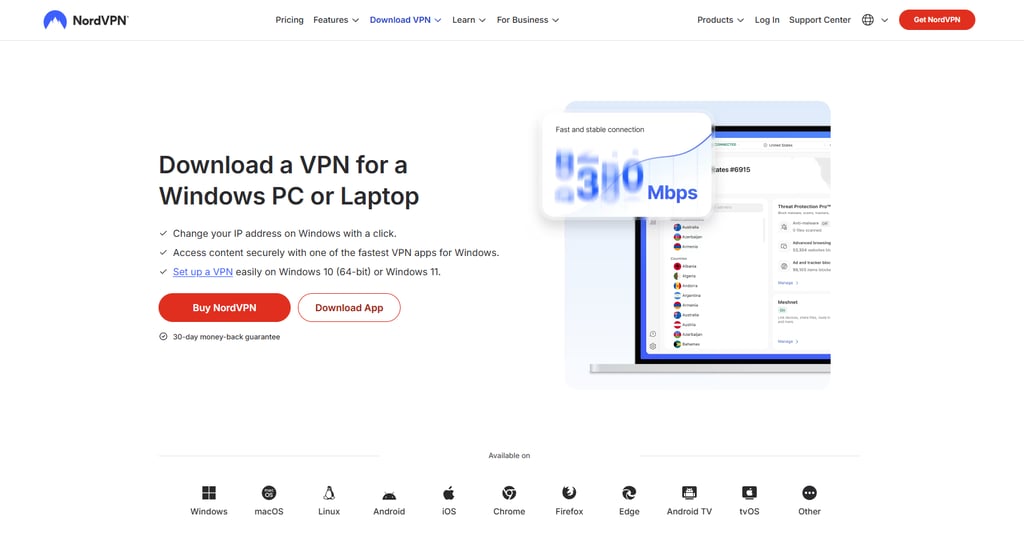
Step 2. Download and install the VPN app
After picking a VPN, head to its official website and download the app for your operating system. Generally, VPN apps for Windows and Mac are quick to install and don’t require any technical setup. Simply follow the installation steps and log in once the app is ready.
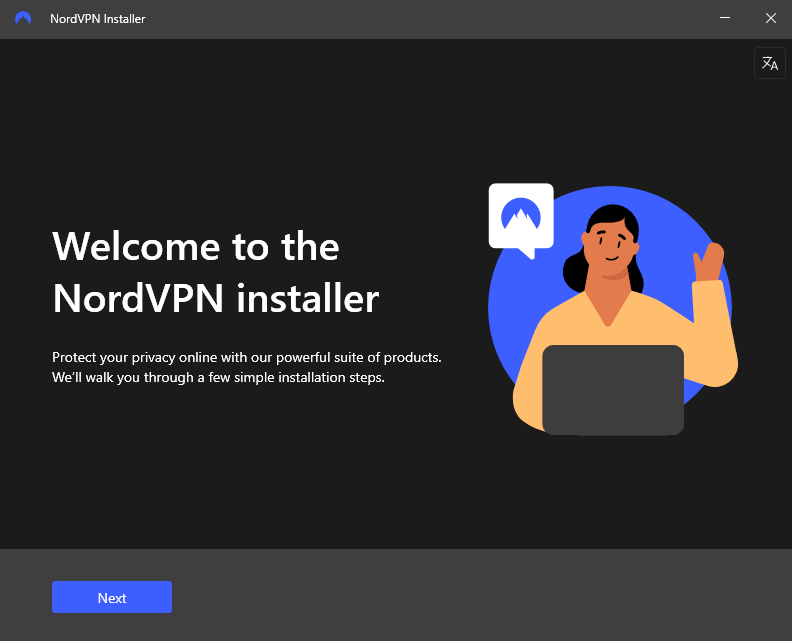
Step 3. Connect to a VPN server before joining public Wi-Fi
Open the VPN app and connect to a server before using public Wi-Fi. For the best speeds and stability, choose a server close to your physical location. Once connected, your internet traffic will be encrypted and protected on the shared network.
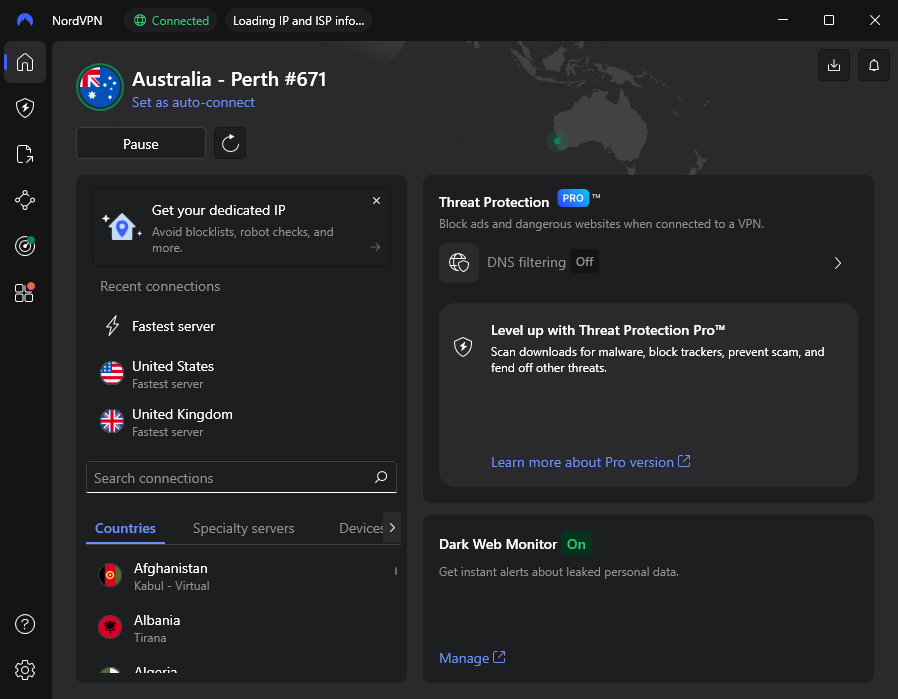
Step 4. Browse the internet securely on public Wi-Fi
After connecting to the VPN, join the public Wi-Fi network and use the internet as usual. Just make sure that the VPN is enabled the entire time to keep your data private and secure on the shared connection.
Subscribe to the best Wi-Fi VPN
Set up a VPN for Wi-Fi on iOS and Android
Smartphones are the most popular way to access public Wi-Fi networks. Still, whether you’re using iOS or Android, unsecured Wi-Fi can expose your personal data to tracking or interception.
Fortunately, setting up a VPN on mobile devices is quick and straightforward. Most top VPN providers offer dedicated apps that automatically protect your connection on public Wi-Fi. With that in mind, here are the steps on how to set up a VPN for Wi-Fi on iOS and Android:
Step 1. Choose a reliable VPN app for mobile
Before installing, make sure that your chosen VPN is designed for mobile use. A good mobile VPN should automatically protect your connection on public Wi-Fi, run smoothly in the background, and secure your data without manual setup every time you connect. Based on my testing, NordVPN delivers the most reliable mobile Wi-Fi protection on both iOS and Android.
Step 2. Download the VPN app from the App Store or Google Play
Go to the App Store or Google Play Store and install the VPN app on your device. Note that during setup, the app may ask for permission to add VPN configurations or run in the background. Make sure you approve these permissions so the VPN can protect your connection on public Wi-Fi.
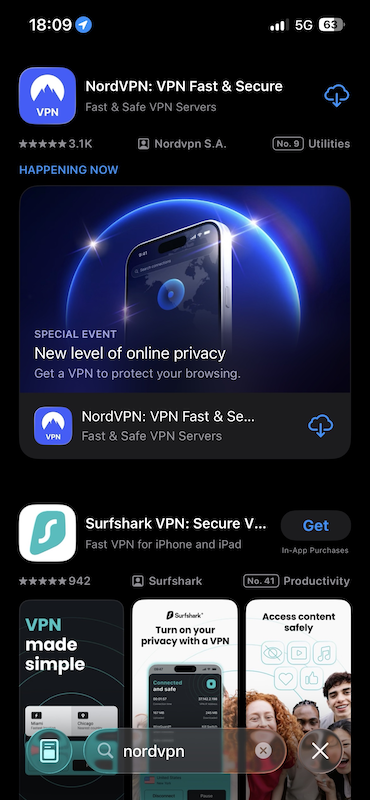
Step 3. Connect to a VPN server on your phone
Launch the VPN app, log in, and connect to a server. If available, enable the auto-connect so your connection is protected automatically whenever you join a public Wi-Fi network. This will help you prevent accidental exposure when switching networks.
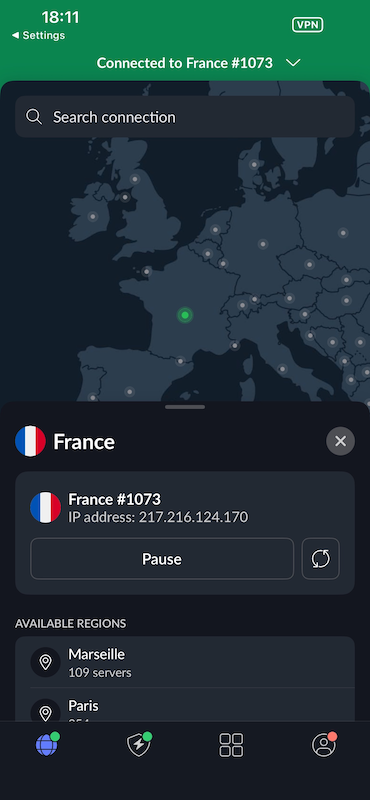
Step 4. Browse securely on public Wi-Fi
With the VPN turned on, connect to public Wi-Fi and start browsing. Keeping the VPN enabled ensures your mobile traffic stays private and secure on unsecured networks.
Get the best public Wi-Fi VPN for mobile
How to bypass public Wi-Fi restrictions
It’s common for school, university, and workplace Wi-Fi networks to block access to social media, streaming platforms, and other websites. The best way to open up all of those sites is to use a VPN to bypass public Wi-Fi restrictions. It will encrypt your internet traffic, hide your actual IP, and help you get through any firewalls.
But not all VPNs are up for the task. Some networks restrict VPN use as well. Hence, you’ll need a premium VPN with obfuscation features. That way, you can reliably bypass any blocks. Here’s how to bypass Wi-Fi restrictions with a VPN:
Step 1. Choose a VPN that works on restricted Wi-Fi networks
Start by choosing a VPN that’s known to work on restrictive networks. Since not all VPNs can reliably handle these limitations, it’s important to pick a provider that supports obfuscation features, like NordVPN or Surfshark.
Step 2. Install the VPN on your device
Download the VPN app from the provider’s official website or your device’s app store. Install it, open the app, and sign in to your account. Using the official app ensures you have access to features needed for restricted networks.
Step 3. Turn on VPN obfuscation to bypass Wi-Fi blocks
Open your VPN settings and enable its obfuscation or stealth feature. These tools disguise VPN traffic as regular internet traffic, helping bypass public Wi-Fi firewalls and network filters. For example, enable Obfuscated Servers in NordVPN or NoBorders Mode in Surfshark before connecting.
Step 4. Connect to the VPN and bypass Wi-Fi restrictions
With obfuscation enabled, connect to a VPN server and join the public Wi-Fi network. Your VPN traffic should now bypass network restrictions, allowing you to browse, stream, or work without limitations.
Grab the best VPN for school Wi-Fi
VPN not working on Wi-Fi: solution
Not all VPNs perform reliably on public Wi-Fi, and some of them can fail us when you need secure internet access the most. Luckily, there are simple ways to troubleshoot these issues. Below, you’ll find practical solutions on how to fix “VPN not working on Wi-Fi” problems.
No connection with Wi-Fi VPN
There are a few reasons you may have trouble connecting with a VPN. Before you throw your whole computer or mobile away, try these simple steps:
- Check your internet connection. Try loading up a few safe web pages without the VPN to see if they work. If they don’t, disconnect from the Wi-Fi network, restart your device, and reconnect before turning the VPN back on.
- Switch VPN protocols. Some public Wi-Fi networks restrict certain types of VPN traffic, which can prevent a connection from working properly. Switching your VPN protocol can often fix this. That said, try changing from a UDP-based protocol to a TCP-based option, such as OpenVPN TCP. Alternatively, enable automatic protocol selection in your VPN app to bypass network restrictions.

Slow connection with Wi-Fi VPN
Another common issue is slow connection speeds when using a VPN on Wi-Fi. A virtual private network shouldn’t cause major speed drops, so if you run into this problem, try the following steps:
- Run a speed test. Compare your connection speeds with and without the VPN enabled. This will help you determine whether the problem lies with your VPN provider or ISP.
- Switch servers. Try connecting to a server that’s nearby. Usually, the performance differs depending on user proximity and server load.
Getting disconnected with Wi-Fi VPN
If your VPN keeps disconnecting on Wi-Fi, it can expose your data, especially on public networks. Fortunately, by making some adjustments, you can stabilize the connection. Try the following steps:
- Change your VPN tunneling protocols. VPNs come with different protocols, and some perform better than others on public Wi-Fi. Try switching to modern options like WireGuard, or the ultra-fast NordLynx if you have NordVPN.
- Change your firewall settings. Some firewalls do not work well with VPNs, so ensure that yours does not disrupt your VPN traffic. Add your VPN software to exceptions so that you won't need to disable your firewall entirely and lose a layer of protection.
If all else fails
Suppose you’re losing your patience and can’t solve the problem yourself. In that case, you can always get in touch with your VPN provider’s customer support. They should be knowledgeable enough to solve any VPN-related issues 24/7 through live chat.
Otherwise, if they don’t offer you a solution, it’s probably time to switch to a new VPN provider. I highly suggest picking NordVPN, which is the best VPN for public Wi-Fi. The service guarantees excellent connectivity, loads of features, and professional customer support that can solve any issues you may encounter
What else can I do with a VPN for Wi-Fi?
Best VPNs for Wi-Fi do more than just protect you on public networks. They encrypt your connection, help you safeguard your personal data, and limit tracking by ISPs and other third parties.
Beyond security, a Wi-Fi VPN can be useful in many daily situations. With the right provider, you can access geo-restricted content, maintain privacy while traveling, and find cheaper prices for flights, hotels, subscriptions, or digital services. With a top VPN for Wi-Fi, you can enjoy a safer, more flexible internet experience across different networks.
Find better deals
A dependable VPN can help you avoid location-based price differences when shopping online. Prices for hotels, video games, online subscriptions, and plane tickets can vary depending on your location and browsing data.
Therefore, grab a VPN to change your virtual location, connect to a different region, and save money on your purchases. Remember to clear your browser’s cookies and cache to prevent skewed results. Otherwise, use a new browser or an incognito tab when searching for deals.
Reduce risk when torrenting
If you want to use P2P services, the ultimate torrenting VPN can help shield you from various online risks. Without an extra layer of security, your IP address is exposed. This can lead to cyberattacks, personal information theft, bandwidth throttling, and even fines or imprisonment.
However, a VPN can help secure your connection while torrenting by hiding your IP address and encrypting your traffic. Additionally, it can prevent your ISP from throttling your bandwidth, meaning that you can get your files way faster thanks to more stable download speeds.
Revamp your gameplay
A well-rounded provider can also improve your gaming experience. For example, a VPN can stop your internet service provider from slowing you down. This means fewer slowdowns and a more consistent connection, especially on shared networks. Moreover, if you want to try out other gaming servers or regions, you can easily do that by switching your virtual location and joining matches abroad.

Unfortunately, some highly competitive gamers might attack you with distributed denial of service (DDoS) attacks. Thousands of requests per second overload your device and eventually crash it completely. Luckily, the best gaming VPNs help protect against such attacks by masking your IP address and filtering malicious traffic, keeping your connection more stable during gameplay.
Discover new content
Even on public Wi-Fi, you can turn on your VPN and access geo-blocked streaming platforms. So, while you’re waiting or simply relaxing, you can watch Netflix US, HBO Max, Hulu, or BBC iPlayer with a VPN fit for streaming.
Additionally, it’s great for travelers who miss local content. By changing your virtual location to your home country, you can catch up with shows or movies on platforms like Viaplay, Ziggo Go, or Stan.
Best free VPN for public Wi-Fi
Just like public Wi-Fi, free VPNs come with notable risks. Many free providers rely on data collection or advertising to fund their services, which can compromise your privacy. Moreover, the worst VPNs offer next to no security features, so you get exposed to online threats.
Additionally, free VPNs for Wi-Fi come with heavy limitations. They can throttle your bandwidth, meaning that you’ll get to watch infinite loading screens due to slow speeds and buffering. Plus, free services tend to offer very few servers, which are often overcrowded by other users. Not to mention, most free VPNs can’t bypass geo-restrictions, making access to streaming platforms or gaming servers on different servers unreliable.
However, some reliable freemium VPNs can help you browse safely on public networks. They come with a few curbs, but they will ensure maximum security and privacy.
Proton VPN offers one of the best security-first free Wi-Fi VPN services. It’s based in Switzerland and doesn’t collect any logs, meaning that your browsing sessions stay a secret. Proton VPN’s free plan covers 10 countries, with no data caps and no annoying ads.
As another option, you can try a free trial premium VPN that usually comes with a 30-day money-back guarantee. That way, you’ll get access to all VPN’s features, unparalleled protection, and the ability to bypass various geo-blocks.
Summary
While public Wi-Fi is convenient, it comes with real privacy and security risks. However, with a high-quality VPN, you can keep your personal information away from potential third-party threats that lurk on unsecured networks. A reliable VPN helps protect your data, encrypts your connection, and reduces online tracking.
After reviewing and testing dozens of services, NordVPN proved to be the best VPN for Wi-Fi security. It’s an all-around solution that combines strong security, fast speeds, and global access. Not only does it protect your online identity with features like Threat Protection and strong AES-256 encryption, but it also delivers stable and reliable performance across all your devices.

![Surfshark weekly deals logo [IN USE]](https://media.vpnpro.com/surfshark-weekly-deals.svg)
![Proton VPN winner logo [IN USE]](https://media.vpnpro.com/2025/05/protonvpn-winner.png)
FAQ
What are the risks of using a public Wi-Fi Hotspot?
Using a public Wi-Fi hotspot can put your personal data at risk. Hackers and other network users may intercept unencrypted traffic, track browsing activity, or exploit security gaps. This can lead to data theft, account compromise, and increased exposure to malware or phishing attacks.
Does a VPN work on Wi-Fi?
Yes, a VPN works on Wi-Fi, including public networks. It encrypts your traffic and masks your IP address to protect your data on unsecured connections. While some networks may restrict VPN usage, premium VPNs come with features designed to bypass such limits, like NordVPN’s Obfuscated Servers and the NordWhisper protocol, or Surfshark’s NoBorders mode.
Does a VPN protect you on public Wi-Fi?
Yes, a VPN protects you on public Wi-Fi by encrypting your internet traffic and hiding your IP address. This prevents snoopers and other network users from monitoring your activity or intercepting sensitive data like passwords, emails, and payment information on unsecured networks.
Does a VPN slow down the Wi-Fi connection?
A VPN can slightly slow down a Wi-Fi connection due to encryption, but the impact is usually minimal with a high-quality provider. Premium VPNs, like NordVPN, use optimized servers and modern protocols to maintain fast speeds, even on public or shared Wi-Fi networks.
What’s the best VPN for public Wi-Fi?
NordVPN is the best VPN for public Wi-Fi. It offers strong security features, fast connection speeds, and the ability to bypass various network restrictions with Obfuscated Servers or the NordWhisper protocol. It encrypts your traffic, protects your data on shared networks, and works reliably on public hotspots.
Can Wi-Fi providers see your history with a VPN?
No, Wi-Fi providers can’t see your browsing history when you use a VPN. A VPN encrypts your internet traffic, which in turn prevents network owners from viewing the websites you visit, services that you use, or the data you transmit over public or private Wi-Fi networks.
Can I use a free VPN on public Wi-Fi?
You can use a free VPN on public Wi-Fi, but it’s not recommended due to various risks. Many free VPN services often lack security features, offer fewer servers, and have data limits. A safer option is a reputable free plan like Proton VPN, or try a premium VPN for Wi-Fi through a free trial or money-back guarantee, such as NordVPN.


- Best VPN for Wi-Fi: shortlist
- Why do you need a VPN for public Wi-Fi?
- Best VPNs for Wi-Fi: overview
- Best Wi-Fi VPNs compared
- How I picked the best VPN for public Wi-Fi
- How to set up a VPN for Wi-Fi
- How to bypass public Wi-Fi restrictions
- VPN not working on Wi-Fi: solution
- What else can I do with a VPN for Wi-Fi?
- Best free VPN for public Wi-Fi
- Summary
- FAQ