Best T-Mobile VPN: how to use a VPN on T-Mobile in 2026


As of December 2025, NordVPN, Surfshark, Proton VPN, TotalVPN, and Norton VPN are the best VPNs for T-Mobile. These top T-Mobile VPN providers guarantee security without slowing down your overall speed.
T-Mobile is a major US wireless carrier that provides mobile and home internet services. It also offers 5G internet, currently the fastest one. Despite this, users often encounter issues such as bandwidth throttling, network congestion, and internet speed limitations, particularly during peak usage periods.
Luckily, a reliable VPN can help by encrypting your data and preventing T-Mobile from monitoring or slowing down your connection. Plus, a VPN protects your personal information on public or private networks and can help unblock content restricted in your area.
However, not all VPNs work well with T-Mobile because some are blocked or struggle with its technologies. In this article, I will cover which VPNs work best with T-Mobile, the key features to look for, and how to utilize them for optimal performance.
🏷️ LIMITED OFFER: NordVPN deal! Get 76% OFF NordVPN + 3 months FREE 🏷️
Top 5 best VPNs for T-Mobile Home Internet
-
Best T-Mobile VPN in 2026
-
Affordable VPN for T-Mobile with strong security
-
Freemium VPN for T-Mobile home internet
-
Cheapest VPN for T-Mobile with an antivirus
-
User-friendly T-Mobile VPN
![NordVPN mobile logo [IN USE]](https://media.vpnpro.com/Nord-VPN-review.jpg)
![Surfshark mobile logo [IN USE]](https://media.vpnpro.com/surfshark-60x60-1.jpg)
![Proton VPN mobile logo [IN USE]](https://media.vpnpro.com/ProtonVPN-small.jpg)
![TotalVPN mobile logo [IN USE]](https://media.vpnpro.com/totalvpn-mobile.png)


Since 2018, VPNpro has delivered unbiased, expert-backed insights through in-house research and thorough VPN testing. Our team ensures every review is fact-checked and reliable. Learn how we maintain these high standards in our testing methods.
Why do I need a VPN for T-Mobile?
A VPN adds an extra layer of privacy and security when using T-Mobile’s network by encrypting your internet traffic and masking your IP address. Even though T-Mobile offers a strong and reliable connection, a VPN gives you more control over how your data is handled and accessed online. Here are a few key reasons why having a VPN for T-Mobile is beneficial:
- Avoid bandwidth throttling. T-Mobile is known to limit users’ data speed, which can significantly impact your gaming, streaming, and torrenting experience. A robust VPN for T-Mobile will hide your activity from your ISP by encrypting your data, helping to avoid limited speed issues.
- Security and privacy. Without a VPN, T-Mobile can see your browsing activity, including the websites you visit and how long you stay on them. A VPN encrypts your traffic, preventing your ISP from monitoring, logging, or potentially sharing your online behavior.
- Bypass geo-restrictions. Many popular services have geo-restrictions, meaning you might be unable to access your favorite content from anywhere. The most reliable way to bypass such restrictions is by using a streaming VPN provider.
How to use VPN on T-Mobile Home Internet
You can use a VPN on T-Mobile Home Internet by installing the VPN app directly on your devices or by setting up a VPN-compatible router behind the T-Mobile gateway for whole-home coverage, as direct VPN installation on T-Mobile’s router isn’t typically supported. Here’s the easiest way to use a VPN on T-Mobile Home Internet:
- Get a reliable T-Mobile VPN. I recommend NordVPN, now 76% off!
- Download and install the VPN app on your device
- Connect to your preferred server country
- Enjoy unrestricted and private internet access!
Best T-Mobile VPNs: detailed list
While searching for the best T-Mobile VPN, I ensured that all top providers had advanced security features, like leak protection, AES-256 encryption, and a powerful kill switch. I also reviewed log policies, audit histories, and jurisdictions to assess privacy. Rankings also considered server coverage, hardware quality, restriction bypassing, device compatibility, and support for multiple household connections. After testing over 20 VPNs, I concluded that NordVPN, Surfshark, Proton VPN, TotalVPN, and Norton VPN are the best T-Mobile VPNs in 2026.
Top 1. NordVPN – the best T-Mobile VPN service
![NordVPN mobile logo [IN USE]](https://media.vpnpro.com/images/170x89/2025/08/nord-rreview.jpg)


137

9300

24/7, email
-
Blazing-fast thanks to NordLynx
-
Smart DNS for bypassing geo-blocks
-
Independently audited and secure
-
Only 10 simultaneous connections
NordVPN is the best T-Mobile VPN because it guarantees fast speeds, a wide selection of servers, and robust security measures. While testing NordVPN, I experienced no bandwidth throttling from T-Mobile and was able to easily access geo-restricted content.
NordVPN offers 9,300 RAM-only servers in 137+ locations, including 1970+ servers across the US, perfect for US T-Mobile users who want stellar performance nationwide. Furthermore, all hardware is RAM-only, giving the user an extra layer of security. Best of all, the provider is based in Panama and operates under a certified no-logs policy.
During my testing, I bypassed geo-restrictions on Netflix, Disney+, HBO Max, ESPN+, MLB.tv, and loads of other streaming platforms. You won’t have to worry about buffers either, thanks to the ultra-fast NordLynx tunneling protocol. I was pleased to see that my speed remained consistently at 468Mbps. With 10 simultaneous connections and the SmartPlay DNS feature, you can enjoy shows and movies on devices that don’t usually support VPNs.
NordVPN is the best VPN for T-Mobile, currently available for only $3.09/month, thanks to a 77% discount. Android users can test the service for free for 3 days, while a 30-day money-back guarantee is included with all subscriptions.
For a deeper investigation of NordVPN, read our NordVPN review.
Top 2. Surfshark – T-Mobile VPN for unlimited devices
![Surfshark mobile logo [IN USE]](https://media.vpnpro.com/images/170x89/surfshark-review-logo-2.jpg)
100
4500
24/7, FAQ
-
No device limit
-
Advanced security features
-
Top-tier speed with WireGuard
-
Bonus features cost extra
Surfshark is an excellent T-Mobile VPN choice for excellent performance and an affordable price – just $1.99/month. The provider doesn’t skimp on security features, successfully unblocks geo-restricted content, and offers unlimited simultaneous connections.
Surfshark has 4,500+ RAM-only servers in more than 100 countries, ensuring exceptional connectivity. Combine that with the WireGuard tunneling protocol, and one can stream videos in 4K or download files without significant delays. When connected to Surfshark with T-Mobile, my speeds remained at 466Mbps. Not to mention, Surfshark can bypass geo-blocks, so accessing more content is easier than you think. During my testing, Surfshark successfully bypassed geo-restrictions on Netflix, ESPN+, Hulu, MLB.tv, Disney+, and several other popular services.
Protection-wise, Surfshark VPN is one of the most secure VPNs for T-Mobile. MultiHop (Double VPN) connects the user via two VPN servers, adding additional security, while CleanWeb takes care of pesky ads and malware. Then there are Camouflage and NoBorders modes that make sure that even T-Mobile can’t detect that you are using a VPN. It also lets you explore the web freely in internet-restricted countries like China.
Surfshark is one of the most affordable T-Mobile VPNs and costs only $1.99/month with a 30-day money-back guarantee. Or you can try it with a 7-day free trial by downloading it from the Google Play or Apple App Store. Lastly, if you want to discover better deals, check out Surfshark’s discount section.
For a deeper investigation of Surfshark VPN, read our Surfshark VPN review.
Top 3. Proton VPN – freemium VPN for T-Mobile Home Internet
![Proton VPN mobile logo [IN USE]](https://media.vpnpro.com/images/170x89/proton-vpn-review-logo-2.jpg)
145
20075
-
VPN Accelerator powered WireGuard
-
Trustworthy for streaming and P2P
-
Industry-leading privacy practices
-
Lacks Smart DNS
Yes, you can use a VPN with T-Mobile for free, and Proton VPN offers one of the best options. Its free version is great for casual browsing as it supports one device, has no ads, and no logs. Plus, it does come with limitations like fewer servers and slower speeds. If you need more flexibility, Proton VPN’s premium plan unlocks faster speeds, streaming support, and more global servers. Not to mention that it includes over 3500 servers in 19 locations across the US.
Beyond the US, Proton VPN's extensive server network packs 20,075+ bare-metal servers in 145 countries. I was pleasantly surprised that Proton unlocked services like MLB.tv, Netflix, Hulu, Disney+, ESPN+, and Amazon Prime Video. On top of that, all of them use the modern WireGuard protocol, further boosted by VPN Accelerator technology. When testing Proton VPN with the fast WireGuard protocol, my speeds remained at 428Mbps, and I successfully got over T-Mobile’s bandwidth throttling with no buffering issues. Also, Proton VPN offers P2P-friendly servers in North America, Europe, and Asia, all equipped with port forwarding and a reliable kill switch to prevent accidental IP leaks.
The security features include all the essentials to stay under T-Mobile’s radar, like virtually unbreakable AES-256 encryption and robust IP and DNS leak protections. It’s also based in Switzerland, a country well known for its strong privacy laws, and enforces an audited zero-logs policy. Plus, the software is also open-source, and Proton VPN is extremely transparent with all of its customer policies.
Proton VPN is a secure T-Mobile VPN for $2.99 per month, but you should check the current Proton VPN deals for the best prices. A limited free version is a nice way to test the waters, but the actual premium features are available with the Plus plan. Plus, Proton VPN offers a 30-day money-back guarantee, allowing you to try the premium version completely risk-free.
For a deeper investigation of Proton VPN, read our Proton VPN review.
Top 4. TotalVPN – cheapest VPN for T-Mobile
![TotalVPN mobile logo [IN USE]](https://media.vpnpro.com/images/170x89/totalvpn.jpg)
90
1800
24/7, email
-
Industry-standard security
-
Great price-to-performance ratio
-
No-logs policy
-
No router compatibility
TotalVPN is the cheapest T-Mobile VPN service. Despite costing just $1.59/month, it offers a full set of essential tools to keep your connection private and secure. Plus, with it, I avoided T-Mobile’s speed limitations.
With TotalVPN, you get access to a network of over 1,800 servers spread across 90countries. During my testing, TotalVPN servers unlocked Netflix, MLB.tv, Channel 4, ESPN+, and Peacock. However, I had some issues loading videos on ESPN+ while connected to TotalVPN. While speeds may vary on distant servers, nearby ones are usually sufficient to avoid T-Mobile bandwidth throttling and maintain a speedy connection. The average download speed of TotalVPN was 417Mbps, and I did not experience any lag. If you do, the reliable OpenVPN tunneling protocol will provide you with stable connections for all your browsing needs.
For those who value security without overspending, TotalVPN is definitely a wise choice. It includes AES-256 encryption, a double kill switch, and firm protection against IP, DNS, and WebRTC leaks. It even integrated seamlessly with TotalAV for a comprehensive all-around digital security solution. And let's not forget about Total AdBlock, which keeps online ads and trackers at bay.
TotalVPN is the cheapest solution to bypass T-Mobile's tracking and speed limitations, especially when using the latest deals to get it for just $1.59/month. Plus, with a risk-free 7-day trial and a 30-day money-back guarantee, you can try it out worry-free for more than a month.
For a deeper investigation of TotalVPN, read our TotalVPN review.
Top 5. Norton VPN – fast and secure T-Mobile VPN

65
2000
24/7 live chat
-
Independently audited no-logs policy
-
Norton antivirus
-
Great speed
-
US-based
If safety is your top priority, Norton VPN is a great T-Mobile VPN to consider. It has all the essential VPN features and adheres to a no-logs policy that has been audited (and found to be true). Furthermore, with 10 simultaneous connections, you can protect all your essential devices and stay anonymous online.
Speed-wise, the service is relatively fast, thanks to the WireGuard tunneling protocol. I didn’t notice any slowdowns while using T-Mobile, and the average download speed stayed at 398Mbps at all times. With 2,000+ servers in 65+ countries, you will enjoy stable and fast connectivity at home and while traveling. Norton VPN’s servers also bypassed geo-restrictions on Netflix, ESPN+, MLB.tv, Disney+, Peacock, and Hulu. Additionally, all servers support P2P sharing, allowing you to access files instantly.
You can purchase a Norton Antivirus package that includes Norton VPN. It ensures that no annoying ads, user trackers, or malicious software ruins your online adventures. On top of that, you can use the obfuscated servers, which hide VPN traffic, meaning that T-Mobile can’t block a VPN.
Let your digital problems disappear into thin air for only $3.33/month with this great T-Mobile Home Internet VPN. Try this provider free for 30 days and get a generous 60-day money-back guarantee if you’re not satisfied.
For a deeper investigation of Norton VPN, read our Norton VPN.
Top T-Mobile VPN services compared
| VPN for T-Mobile | Rating | Servers | Encryption | Speed | Bypass geo-blocks? | Price |
| 1. NordVPN | 9.8⭐⭐⭐⭐⭐ | 9,300+ servers in 137 countries | AES-256-bit, ChaCha20 | Very fast | ✅Yes | From $3.09/month |
| 2. Surfshark | 9.5⭐⭐⭐⭐⭐ | 4,500+ servers in 100 countries | AES-256-bit, ChaCha20 | Very fast | ✅Yes | From $1.99/month |
| 3. Proton VPN | 8.6⭐⭐⭐⭐ | 20,075+ servers in 145 countries | AES-256-bit, ChaCha20 | Fast | ✅Yes | From $2.99/month |
| 4. TotalVPN | 8.2⭐⭐⭐⭐ | 1,800+ servers in 90 countries | AES-256-bit | Fast | ✅Yes | From $1.59/month |
| 5. Norton VPN | 7.3⭐⭐⭐⭐ | 2,000+ servers in 65 countries | AES-256-bit | Fast | ✅Yes | From $3.33/month |
![NordVPN winner logo [IN USE]](https://media.vpnpro.com/images/160x40/2025/01/NordVPN-winner-banner-logo.png)
How I picked the best T-Mobile VPN
I examined each provider according to a detailed criteria list, ensuring top quality. But if you want to do some research yourself, the main things that you should look into are:
- Guaranteed privacy. I selected providers with zero-logs policies as they indicate that the VPN doesn’t participate in user surveillance. Additionally, I gave extra points to those operating outside the Fourteen Eyes jurisdiction and third-party audits.
- Impenetrable security. Apart from preventing DNS and IP leaks, a proper T-Mobile VPN should have solid encryption, a kill switch, and other handy features. Without them, you'll be visible to T-Mobile and other online snoopers.
- Global reach. A proper T-Mobile VPN offers a wide selection of servers to choose from in the US and around the world. Other aspects worth considering are bare-metal, RAM-only, or self-managed hardware for extra security.
- Optimal performance. To avoid annoying buffering, lags, and long loading screens, I tested each provider’s speeds and found out which VPN won’t slow me down. Having modern tunneling protocols like WireGuard also plays a role into speed, so don’t overlook them either.
- Broad compatibility. There is no point in having a VPN that only works on one type of device. Therefore, I paid attention to services that support a variety of platforms, from popular operating systems to streaming devices, like Amazon Fire TV Sticks. Moreover, being able to configure the VPN on a router manually also helps achieve full household coverage.
- Value for money. A good T-Mobile Home Internet VPN doesn’t have to break the bank. If it’s cheap and has everything you need, there’s no harm in subscribing. Plus, 30-day money-back guarantees protect most, so you won’t suffer a loss even if they don’t live up to your standards.
- Customer support. To solve tricky problems, you need always available experts. That’s why 24/7 live chat support is a must for any top provider.
Secure your T-Mobile connection with NordVPN
Is there any free VPN for T-Mobile?
Proton VPN is the best free VPN for T-Mobile thanks to unlimited speeds and data, and servers in 10 countries, including the US. While it is secure, it has some limitations, such as you can’t select the server and changing requires waiting for a cooldown. Therefore, instead of relying on a free VPN for T-Mobile, choose NordVPN premium VPN that offers a 3-day free trial and a 30-day money-back guarantee. It has lightning-fast speeds, strong security, and full access to restricted content. This makes it an ideal choice for both T-Mobile mobile and home internet users who want full privacy and functionality.
How to use VPN on T-Mobile Home Internet: step-by-step
Setting up a VPN on your T-Mobile Home Internet is beneficial for different use cases. With a T-Mobile VPN, you can bypass geo-blocks, prevent slowdowns, and, most importantly, protect your privacy. The best part is that setting up a VPN for T-Mobile requires just a few simple steps.
Step 1. Choose a reliable VPN provider
There are many VPN providers available, but not all of them are suitable for T-Mobile, as they cannot guarantee security or bypass geo-restrictions. For the best experience, I recommend NordVPN. It is the top VPN for T-Mobile that successfully bypasses geo-restrictions, provides fast speeds, and uses necessary security measures.

Step 2. Download and install a VPN app
You can set up a VPN on your devices directly or through your router. You shouldn’t experience any issues with either setup, but setting it up on a router is more convenient. Router setup is the most effective way to secure all personal devices using T-Mobile Home Internet.
- Option 1: Set up the VPN on a router
To set up a T-Mobile VPN on your router, you will need to access your router’s admin panel and connect using special configuration files that you will get from your VPN provider. While it might look difficult at first, many VPN providers have detailed guides that will make it way easier. By setting up the VPN on a router, the VPN connection will cover all devices under the same T-Mobile network.
- Option 2: Set up VPN on individual devices
If you decide to set up a VPN on individual devices, you will simply need to download the VPN app on your device and log in to your account. Setting up a VPN on devices directly requires only a few simple steps, and detailed guides for specific devices are available. However, if you want to protect multiple devices, you will need to set up the VPN separately on each of them.
Step 3. Connect to the VPN server location of your choice
Once you have set up your VPN, you need to connect to a VPN server to start using it. Usually, VPN providers offer a wide selection of servers in different countries, so choose a server that best fits your needs. If you’re looking to improve your speed, consider connecting to servers closer to your actual location. If you want to bypass geo-restrictions for MLB.tv or ESPN+, connect to US servers to avoid errors.
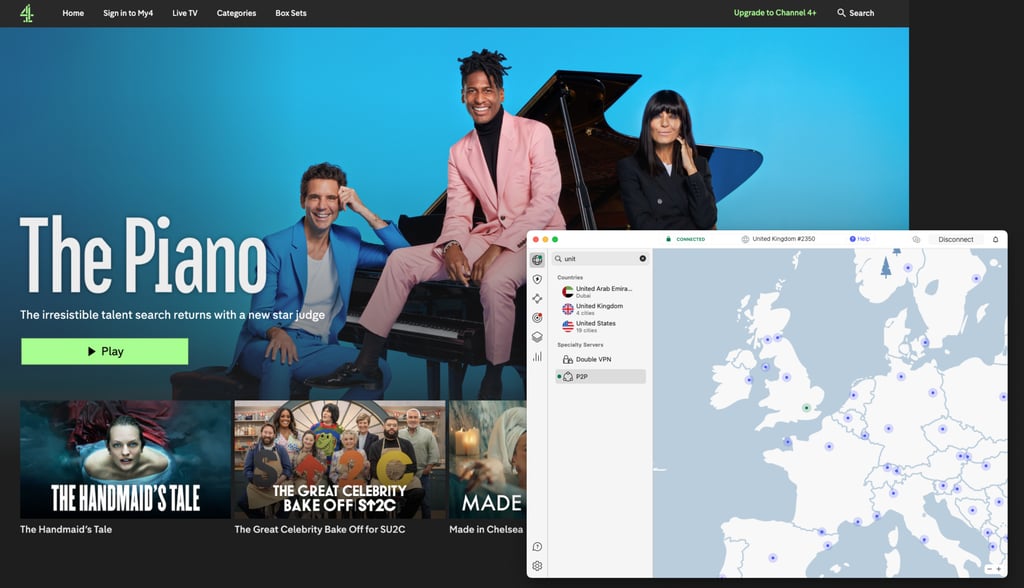
Step 4. Enjoy secure internet on your T-Mobile home network
Once you have your T-Mobile VPN up and running, you can enjoy a private and secure online browsing experience without any slowdowns. Additionally, you will be able to play your favorite content from anywhere, bypassing geo-restrictions. For the best T-Mobile VPN experience, don’t forget to switch between servers and protocols to find the best results for your specific needs.
Recommend T-Mobile APN settings
T-Mobile might block your VPN, and the most common reason for that is IPv6. IPv6 is a communication protocol used by T-Mobile, but its traffic is limited in specific scenarios. VPN services rely on IPv4 rather than IPv6 due to security and privacy concerns. If your VPN connection gets blocked, you can simply disable IPv6 and enable IPv4 via your computer’s settings. If you're using a mobile phone, you can tweak your APN (access point name) settings so the VPN works with T-Mobile without issues.
| Name: | T-Mobile |
| APN: | fast.t-mobile.com |
| Proxy: | Not set |
| Port: | Not set |
| Username: | Not set |
| Password: | Not set |
| Server: | Not set |
| MMSC: | http://mms.msg.eng.t-mobile.com/mms/wapenc |
| MMS proxy: | Not set |
| MMS port: | Not set |
| MMS protocol: | WAP 2.0 |
| MCC: | 310 |
| MNC: | 260 |
| Authentication Type: | Not set |
| APN Type: | default,supl,mms |
| APN Protocol: | IPv4/IPv6 |
| APN roaming protocol: | IPv4 |
| Bearer: | Unspecified |
T-Mobile VPN not working: connection problems
A VPN may not work with T-Mobile because the network can detect and block certain VPN traffic using traffic management and filtering systems. Additionally, some VPNs struggle with T-Mobile’s network setup, leading to connection issues or reduced performance. Here are some steps that you can take to fix the problem:
- Connect to another VPN server. T-Mobile blacklists some servers, so try joining another server. A provider will give you a bunch of servers to choose from, so finding a working one will be easy.
- Delete your browser’s cookies. Some websites might find out your actual IP address and location due to cookies stored in the cache. To avoid this, you would have to delete them or use another browser, preferably in incognito mode.
- Check for leaks. If your T-Mobile VPN is leaking your actual IP address, you might be in trouble. Thus, pick a provider with solid leak protection and make sure your kill switch is on.
- Talk to customer service. You don't have to deal with everything on your own, and there’s no shame in asking for help. A reliable provider will offer 24/7 live chat support and deal with any problems that you may run into.
- Switch providers. None of the above worked? Then it’s time to change providers. With one of the best T-Mobile VPNs, you can stay safe, and T-Mobile won’t block your VPN traffic.
Does T-Mobile have a VPN service?
No, T-Mobile doesn’t have a free built-in VPN service. While T-Mobile offers a so-called MPLS VPN service, keep in mind that it’s not an actual virtual private network. Instead, it’s a business solution meant to converge a company’s different communication networks into one handy, secure platform.
Even if this ISP did have a VPN, I'd strongly advise against using it. T-Mobile doesn’t have the best track record of respecting its customers’ privacy and has even suffered a data breach back in 2021, affecting 77 million people in the US alone. Third-party services are the way to go here, and I can begin by looking at the top T-Mobile VPNs.
Bottom line
T-Mobile is a popular wireless carrier, but users often run into issues like bandwidth throttling, data collection, and restricted access to certain online content. A reliable VPN is an effective solution, as it protects your privacy, helps prevent slowdowns, and allows you to bypass geo-blocks. However, not every VPN works smoothly with T-Mobile’s network.
After testing many VPNs, I concluded that NordVPN is the best T-Mobile VPN in 2026. It offers strong security, proven privacy protections, and an extensive server network spanning 137 countries, providing unrestricted access worldwide.

![Surfshark weekly deals logo [IN USE]](https://media.vpnpro.com/surfshark-weekly-deals.svg)
![Proton VPN winner logo [IN USE]](https://media.vpnpro.com/2025/05/protonvpn-winner.png)
You may also like to read:
Best VPNs for TextNow
VPNs for Cox
VPNs for Spectrum
VPN for Verizon Fios
VPN for Comcast Xfinity
Best Reliance Jio VPN
Best VPN for Vodafone
FAQ
Does T-Mobile have VPN service?
No, T-Mobile does not offer a built-in VPN service. However, you can use third-party VPN services on T-Mobile’s 5G and home internet networks to protect your data and privacy. They can also help with bandwidth throttling and improving your internet speeds.
Can I use a VPN with T-Mobile home internet?
Yes, you can use a VPN with T-Mobile Home Internet to encrypt your traffic and improve privacy and security while browsing. Most VPN services, such as NordVPN, function properly over a 5G home broadband connection for tasks like streaming and hiding your IP address.
Can I use a free VPN for T-Mobile?
You can use a free T-Mobile VPN, but we do not recommend using one. They come with a bunch of limitations and hidden quirks that can compromise your security and privacy. Hence, get a subscription with a free trial and a 30-day money-back guarantee if you’re on a tight budget.
Why is T-Mobile throttling my internet?
T-Mobile throttles your internet if you exceed your data usage limits. Additionally, it can impose speed limitations based on your online activity, mainly if it uses a lot of bandwidth. For example, T-Mobile might throttle your internet or slow down your speed when torrenting or playing video games.
How to stop T-Mobile bandwidth throttling?
To stop T-Mobile bandwidth throttling, get a robust and fast VPN service. A VPN will change your IP address and encrypt your internet traffic. This way, your ISP (Internet Service Provider) will be unable to track your activity and throttle your bandwidth.
Which VPN works best with T-Mobile Home Internet?
NordVPN works best with T-Mobile Home Internet. It’s easy to install, comes with plenty of robust security features, operates from privacy-respecting Panama, and facilitates some of the best speeds in the industry.
Can T-Mobile VPN be used to access geo-restricted content?
Yes, a T-Mobile VPN can be used to access geo-restricted content. Many popular websites and streaming services are geo-restricted due to copyright laws and licensing agreements. A fast and easy way to bypass such restrictions is by using a reliable VPN provider, like NordVPN. A T-Mobile VPN will change your IP address, which will trick services into thinking that you’re located in a different location, granting you access to geo-restricted content.
How to set up a VPN on T-Mobile?
Setting up a VPN on T-Mobile is easy, especially with NordVPN. First, download the NordVPN app from the Google Play Store or Apple App Store. Then, open the app, sign in, and tap “Connect” to automatically connect to the fastest server. Once connected, all your internet traffic on T-Mobile will be secure and private.


