
Best VPN with a kill switch feature in 2026



Quick summary: This guide explains why a VPN with a kill switch is essential for online privacy. A kill switch blocks your internet if the VPN drops, preventing IP leaks on public Wi-Fi or unstable networks while browsing, streaming, or torrenting. Based on my testing, NordVPN, Surfshark, and ExpressVPN stand out as the best kill switch VPNs for reliable kill switch functionality.
A VPN with a kill switch adds an extra layer of protection by cutting your internet connection if the encrypted tunnel fails, so your real IP address and location never leak. This prevents your traffic from quietly switching back to an unsecured network, which is especially important on public Wi-Fi or unstable connections common to remote work in 2026.
However, choosing the right VPN with a kill switch isn’t always easy. Many providers hide this feature in settings or fail to implement it correctly. After testing 24 premium VPN services, NordVPN, Surfshark, and ExpressVPN stood out for reliably blocking data leaks while maintaining strong privacy and solid performance.
In this guide, I explain how kill switches work in real-world use and why they are essential for secure browsing, streaming, and torrenting.
🏷️ LIMITED OFFER: NordVPN deal! Get 76% OFF NordVPN + 3 months FREE 🏷️
Top 5 VPNs with kill switch: shortlist
-
overall the best VPN with a kill switch
-
affordable kill switch VPN
-
fast kill switch VPN with advanced protection
-
easy-to-use kill switch VPN for everyday browsing
-
reliable kill switch VPN with advanced privacy protection
![NordVPN mobile logo [IN USE]](https://media.vpnpro.com/Nord-VPN-review.jpg)
![Surfshark mobile logo [IN USE]](https://media.vpnpro.com/surfshark-60x60-1.jpg)
![ExpressVPN mobile logo [IN USE]](https://media.vpnpro.com/expressvpn4.png)
![IPVanish mobile logo [IN USE]](https://media.vpnpro.com/IPVanish-VPN-small.jpg)
![CyberGhost mobile logo [IN USE]](https://media.vpnpro.com/CyberGhost-VPN-small.jpg)


Since 2018, VPNpro has delivered unbiased, expert-backed insights through in-house research and thorough VPN testing. Our team ensures every review is fact-checked and reliable. Learn how we maintain these high standards in our testing methods.
How to use a VPN kill switch feature to secure your connection?
A kill switch VPN automatically disconnects your internet if the VPN drops, protecting your IP and data from leaks. In most VPN apps, you can find the kill switch option in the settings, usually by toggling a button or checking a box. Here is how to turn on the kill switch:
- Get a VPN with a kill switch feature. I recommend NordVPN, now 76% off!
- Download the VPN app and install it on your device. Log in to your account
- Go to the settings or security tab
- Enable the Kill Switch
- Once you connect to a VPN server, you'll be protected!
What is a VPN kill switch?
A VPN acts like a secure, private tunnel that hides your online activity. However, if that tunnel collapses, which can happen if your Wi-Fi glitches or you switch between networks, your device will naturally try to stay online using an unprotected connection. This is the moment when your private data, such as your real location and identity, is most likely to leak. A kill switch prevents this by instantly shutting down your entire internet connection the moment the VPN fails, ensuring your information never travels over an unencrypted path.
The process happens in four stages. First, the software monitors your connection around the clock, watching for any changes in your VPN status. It immediately blocks your device from accessing the internet if it detects even a tiny interruption, keeping your connection in a waiting room so no data leaks. Once the VPN reconnects and the secure tunnel is fixed, the kill switch restores access, allowing you to browse safely again.
A kill switch protects your data from hackers, ISPs, and others accessing public networks, hides your true IP address and location, and ensures nothing leaks online. Whether you’re torrenting, working remotely, or browsing in a café, a kill switch keeps your online activity safe and private.
Secure your connection with NordVPN
Best 5 kill switch VPNs: detailed list
- NordVPN - overall best VPN with kill switch
- Surfshark - affordable kill switch VPN with unlimited devices
- ExpressVPN - speedy VPN with a kill switch
- IPVanish - beginner-friendly VPN with a kill switch feature
- CyberGhost - private VPN kill switch for streaming and torrenting
I tested 24 VPNs to see which ones protect your data with a reliable kill switch. Using my best VPN list as a reference, I switched servers, turned off Wi-Fi, and disconnected VPNs mid-session. Those VPNs that stood out blocked internet access immediately, preventing any traffic leaks and restoring protection safely once reconnected.
Top 1. NordVPN - best overall VPN with a kill switch
![NordVPN mobile logo [IN USE]](https://media.vpnpro.com/images/170x89/2025/08/nord-rreview.jpg)


137

9300

24/7, email
-
Network and app kill switch
-
Automatically reconnects and disables the kill switch
-
Reliable and fast performance
-
Can block the internet unexpectedly
NordVPN is the best VPN with a kill switch, ensuring your internet connection remains safe at all times. During my tests, NordVPN’s kill switch consistently provided seamless protection, instantly blocking traffic whenever the VPN connection dropped.
Kill switch. NordVPN offers two types of protection: a system-level Internet Kill Switch that blocks all traffic if the VPN fails, and an App Kill Switch that lets you target specific programs like torrent clients or browsers. On Windows, iOS, and Android, the feature is exceptionally user-friendly; it automatically blocks data during a drop and restores it the moment the VPN reconnects, requiring no manual intervention. Moreover, the macOS version downloaded from the NordVPN website includes the App Kill Switch, while the App Store version uses a system-wide kill switch that is always on by default. This dual-layer approach makes NordVPN one of the most flexible options for users who want to protect specific high-risk apps without losing their entire internet connection.
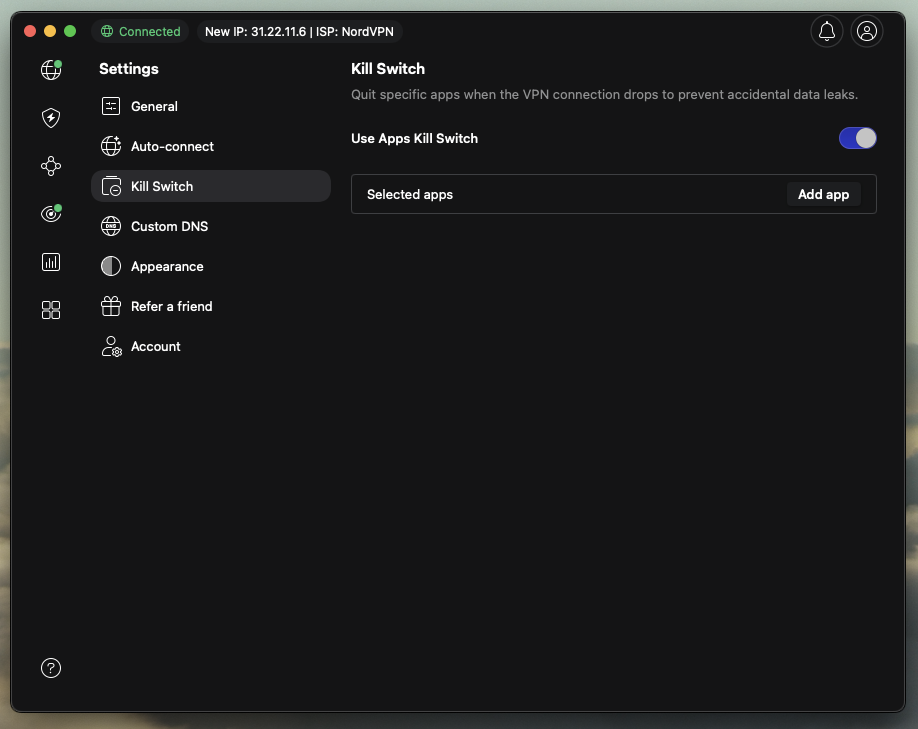
Configuration tips. To configure the NordVPN kill switch on Windows, open the app, go to Settings > Kill Switch, and select your mode: the Internet Kill Switch (blocks traffic only during accidental drops), or the App Kill Switch (terminates specific programs you select). You can also create a permanent kill switch on Windows by blocking internet access even during manual disconnections. On Android, you should use system-level settings (Connections > More connection settings > VPN) to enable "Always-on VPN" and "Block connections without a VPN." For iOS and macOS App Store versions, the kill switch is integrated by default and requires no manual setup. It is important to note that the kill switch is not available on the Amazon Fire TV Stick due to OS limitations.
Other benefits. Additionally, NordVPN impressed me with its fast speeds, especially when using the NordLynx protocol. When I tested this protocol for streaming and gaming, it performed better than many competitors, retaining 96% of speed. NordVPN operates in Panama, a privacy-friendly country, and has a strict no-logs policy, using AES-256 encryption and multiple protocols, including OpenVPN. Plus, NordVPN's Meshnet feature, which enables me to connect multiple devices directly, worked smoothly while keeping all traffic secure.
Price. NordVPN is the best VPN with a kill switch, available for as low as $3.09/month with current deals, allowing you to choose the plan that best fits your needs. Android users can try the service risk-free for 3 days and benefit from a 30-day money-back guarantee.
Top 2. Surfshark - affordable kill switch VPN
![Surfshark mobile logo [IN USE]](https://media.vpnpro.com/images/170x89/surfshark-review-logo-2.jpg)
100
4500
24/7, FAQ
-
Advanced encryption
-
Built-in leak protection
-
Full system-wide protection
-
Some features cost extra
Surfshark stands out as an affordable VPN with a kill switch, offering powerful, reliable protection for $1.99/month. Moreover, its built-in kill switch, Rotating IP, and NoBorders mode hide all VPN activity in restricted regions like China, or for those seeking extra security.
Kill switch. Surfshark offers two kill switch modes to protect your privacy. The Soft Kill Switch blocks your internet only when the VPN disconnects unexpectedly, allowing normal internet access when you turn the VPN off intentionally. The Strict Kill Switch acts as a permanent safeguard, blocking all internet traffic when you aren’t connected to a Surfshark server, for maximum security. These features are available on Windows, macOS, Android, iOS, and Linux. The kill switch cuts off internet access if your VPN connection drops, preventing your real IP address from being revealed.

Configuration tips. To enable the Surfshark kill switch, open the app, go to Settings, select VPN Settings, and turn on the Kill Switch. You do not need to disconnect your VPN before doing this. On Windows, you can choose between a Soft kill switch, which triggers only during accidental drops, and a Strict version that blocks all traffic when the VPN is off. This feature ensures that your IP address and data are never exposed if the encrypted tunnel fails. Note that if you use the Strict setting, you must manually toggle it off to browse without VPN. If you download Surfshark from the App Store, the kill switch may only act as an auto-reconnect feature. For a true kill switch that actually blocks traffic on Mac, it is highly recommended to download the .dmg version directly from the Surfshark website instead.
Other benefits. Surfshark uses strong AES-256 encryption and has a strict no-logs policy, providing solid privacy from the start. During my testing, I was also impressed by its speed over WireGuard, which retained around 90% of my base speed during streaming and torrenting tests. CleanWeb also added another layer of protection by blocking ads, trackers, and malware.
Price. Surfshark pricing is the most affordable VPN with a kill switch, priced at $1.99/month with a discount code. You can also try it with a 7-day free trial and a 30-day money-back guarantee.
Top 3. ExpressVPN - fast VPN with a kill switch feature
![ExpressVPN mobile logo [IN USE]](https://media.vpnpro.com/images/170x89/expressvpn2.png)
105
3000
24/7, email
-
Standard and permanent kill switches
-
Prevent leaks during vulnerable seconds
-
Prevents IP and data leaks
-
No Multi-Hop servers
ExpressVPN stands out as the best free VPN with a kill switch, thanks to fast performance and advanced security features. Its proprietary, high-speed Lightway protocol accelerates speed while its Threat Manager blocks ads, trackers, and malicious sites, ensuring fast and safe connections.
Kill switch. ExpressVPN’s Network Lock offers two levels of security: a standard kill switch for accidental drops and a permanent version for total lockdown. The permanent kill switch prevents all internet access, even if you manually disconnect, close the app, or restart your device. This feature is natively available on Windows, macOS, and Linux, while Android users can achieve it through system-level settings. On iOS, the protection remains active even if the app is disconnected, via the Advanced Kill Switch toggle.
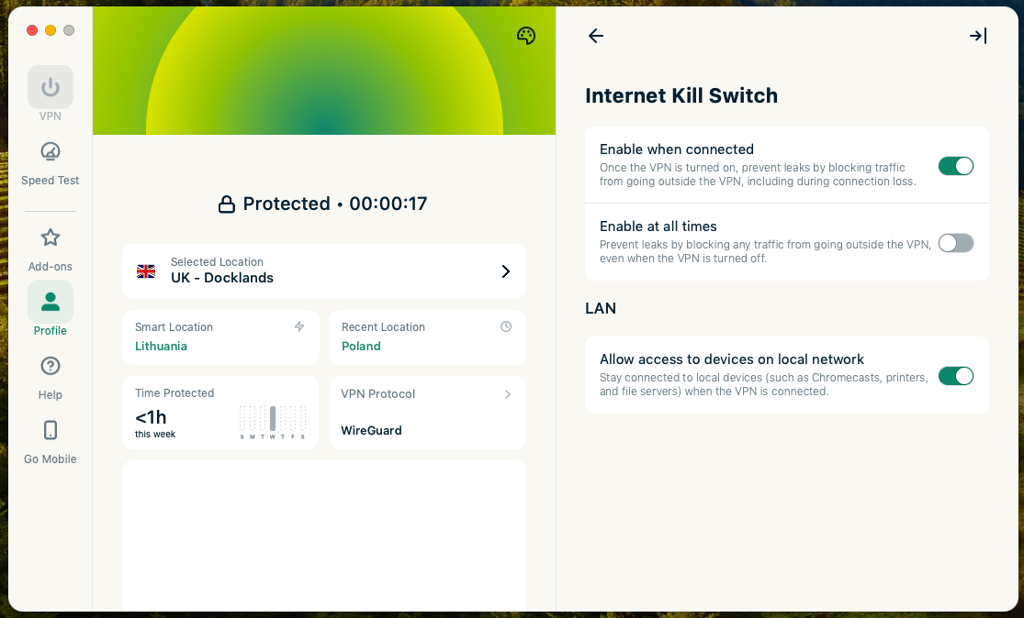
Configuration tips. ExpressVPN’s kill switch settings are very similar between Windows, iOS, and macOS. To enable the kill switch, click on Profile > Settings > Kill Switch > Enable when connected/Enable at all times. On Android, turning on the Kill Switch begins the same, but after the last step, you’ll be directed to the general phone settings, where you’ll have to tap on the ExpressVPN icon and turn on Always-on VPN and Block connections without VPN.
Other benefits. ExpressVPN uses strong AES-256 encryption and supports secure protocols like Lightway, OpenVPN, and IKEv2. During my tests, I received around 86% of my base rate with the help of high-speed servers and the Lightway protocol. Plus, its ad blocker prevents targeted ads, privacy-invading trackers, and malware from damaging your device.
Price. ExpressVPN starts at $2.79/month when a discount code is applied. You will also have a 30-day money-back guarantee to try the service risk-free.
Top 4. IPVanish - kill switch VPN with unlimited connections
![IPVanish mobile logo [IN USE]](https://media.vpnpro.com/images/170x89/IPVanish.jpg)
113
3200
24/7, email
-
Unlimited device connections
-
Solid security features
-
Beginner-friendly
-
Based in the US
IPVanish is a simple and budget-friendly kill switch VPN. If you're torrenting, streaming, or browsing public Wi-Fi from your desktop, it's a solid choice for keeping your data safe.
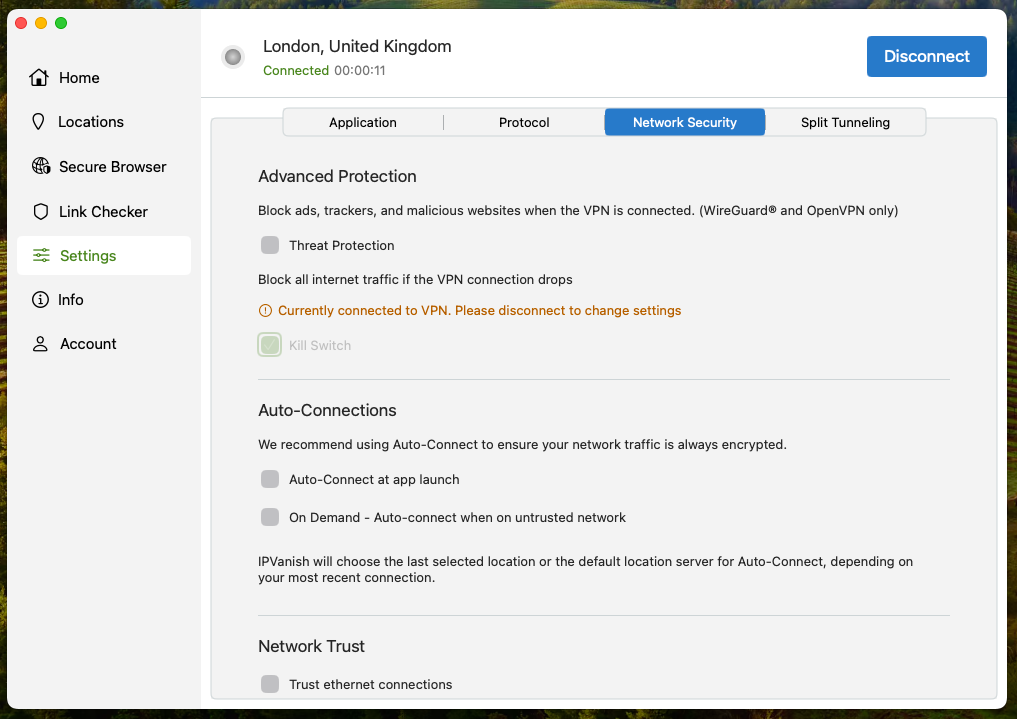
Kill switch. IPVanish includes a system-level kill switch for Windows, macOS, Android, and iOS. To turn on the kill switch, you first must disconnect from IPVanish. Windows, macOS, and iOS follow a similar kill switch setup: Settings > Kill Switch > Toggle the Kill Switch on. Meanwhile, on Android, the same steps will lead you to general phone settings, where you’ll have to tap on the settings (cog wheel) button next to the IPVanish app icon and toggle Always-on VPN and Block connections without VPN on to proceed. Once enabled, the kill switch will monitor your VPN connection and immediately cut your internet connection if it detects any disconnection, maintaining your online privacy at all times.
Other benefits. IPVanish offers solid performance with a 75% speed retention rate, making it a reliable and budget-friendly choice for HD streaming. It secures your data with AES-256 encryption and supports a range of protocols, including WireGuard, OpenVPN, and IKEv2. Even though the provider is based in the US, it has an audited no-logs policy and provides DNS leak protection to ensure your data remains private. While it lacks the advanced features of NordVPN and Surfshark, it provides great value for those seeking simple VPN protection.
Price. IPVanish costs $2.99/month and is bundled with the Threat Protection feature for added malware and ad-block protection. You can start with a 7-day free trial (mobile only) or a 30-day money-back guarantee before you make a commitment.
Top 5. CyberGhost - private kill switch VPN
![CyberGhost mobile logo [IN USE]](https://media.vpnpro.com/images/170x89/CyberGhost-VPN.jpg)
100
9887
24/7
-
IP leak protection
-
Based in Romania
-
45-day money-back guarantee
-
Limited simultaneous connections
CyberGhost is a solid option for users looking for a user-friendly VPN with a kill switch that makes core privacy protections easy to manage across all major platforms.
Kill switch. CyberGhost offers a robust system-level kill switch that immediately stops all internet traffic across your entire device if the VPN connection drops. Unlike some competitors, it does not offer an app-level kill switch to target specific programs; instead, it secures your entire network to prevent data leaks. This functionality works across Windows, macOS, Android, and iOS apps to prevent data leaks, along with an auto-reconnect feature, which automatically restores secure internet access without having to intervene manually. Even though CyberGhost supports the Linux operating system, it doesn’t have a built-in kill switch toggle, leaving Linux users to figure this out for themselves.
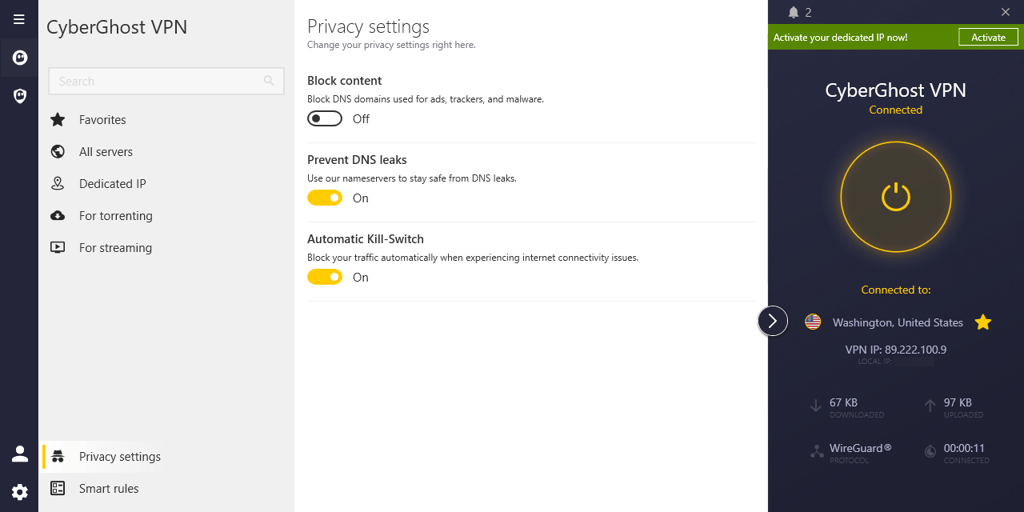
Configuration tips. The CyberGhost kill switch is always on by default to prevent data leaks if the VPN connection drops. It is intended to be a permanent feature that cannot be disabled on most platforms. While the kill switch is always on and is a mandatory feature on macOS and mobile, Windows offers the most flexibility, allowing users to disable it if necessary via privacy settings.
Other benefits. During my testing, speed was surprisingly solid, with me retaining around 63% of my base connection. Moreover, IPVanish uses the OpenVPN, IKEv2, and WireGuard protocols with AES-256 encryption for even better performance. This is also a no-log VPN based in Romania, which is ideal for privacy-focused users, with audits confirming it as trustworthy.
Price. CyberGhost pricing starts at $1.75/month with a discount code. You can also try it for 7 days for free on iOS devices. Plus, you will be covered with a 45-day money-back guarantee.
Best kill switch VPNs compared
| Best VPN with kill switch | VPN rating | Kill switch type | Auto-reconnect option | Supported platforms | Servers | Price | Free trial | |
| 1. NordVPN | 9.8⭐⭐⭐⭐⭐ | System-level and application-level | ✅ Yes | Windows, macOS, Linux, Android, iOS, Chrome, Firefox, smart TVs, TV sticks, and routers | 9,300+ servers in 137+ countries | $3.09/month | ✅ Yes, 3-day free trial on Android | |
| 2. Surfshark | 9.5⭐⭐⭐⭐⭐ | System-level and application-level | ✅ Yes | Windows, macOS, Linux, Android, iOS, Chrome, Firefox, smart TVs, TV sticks, and routers | 4,500+ servers in 100 countries | $1.99/month | ✅ Yes, 7-day free trial | |
| 3. ExpressVPN | 8.4 ⭐⭐⭐⭐⭐ |
Standard and advanced kill switch | ✅ Yes | Windows, macOS, Linux, Android, iOS, Chromebook, and smart TVs | Undisclosed number of servers in 105 countries |
$2.79/month | ✅ Yes, free version | |
| 4. IPVanish | 8.4⭐⭐⭐⭐ | System-level and application-level | ✅ Yes | Windows, macOS, iOS, Android, Linux, Chromebook, smart TVs, and routers | 3,200 servers in 113 countries | $2.99/month | ✅ Yes, 30-day money-back guarantee | |
| 5. CyberGhost | 8.9 ⭐⭐⭐⭐ |
System-level | ✅ Yes | Windows, macOS, Android (mobile and TV), iOS, Linux, Amazon Fire TV, and routers | Undisclosed number of servers in 100+ countries | $1.75/month | ✅ Yes, 45-day money-back guarantee |
![NordVPN winner logo [IN USE]](https://media.vpnpro.com/images/160x40/2025/01/NordVPN-winner-banner-logo.png)
How to test a VPN kill switch?
Testing the VPN connection drops is simpler than you might think, and I have personally used this method to confirm its reliability. Here is a step-by-step guide:
- Enable the kill switch. First, activate the kill switch feature on your VPN application's settings. Its exact location might vary slightly depending on your VPN provider.
- Connect to a VPN server of your choice.
- Initiate an online activity. Once connected, start an online activity. This could be anything from browsing a few webpages to streaming a video. The goal is to generate active internet traffic.
- Manually disconnect the VPN. This is a crucial step. While your online activity is ongoing, manually disconnect from your VPN in the application. Do not just close the app; disconnect it completely.
- Check for traffic stoppage and IP concealment. Try loading a new webpage immediately or, even better, visit a site like WhatIsMyIPAddress.com. If your kill switch functions correctly, your internet traffic should cease immediately. You should not be able to load any new pages. Instead, it should indicate a complete lack of connection or an error.
What to do if the VPN kill switch is not working?
In some cases, the kill switch does not function as expected, and your internet remains active or your real IP address is revealed after disconnecting from the VPN. Here are the troubleshooting steps:
- Recheck your VPN settings. Double-check that the kill switch is enabled in your VPN application. Some VPNs offer different levels of kill switch protection (e.g., application-level vs. system-level).
- Restart your VPN and device. A simple restart of both your VPN application and your computer or mobile device can often resolve glitches.
- Update your VPN software. Ensure your VPN client is up-to-date, as updates often fix bugs.
- Contact VPN support. If all else fails, contact your VPN provider's customer support. They can offer specific guidance on their software and help diagnose the issue.
Can I use a free VPN with a kill switch?
No, free VPNs don’t include kill switches. Free VPNs often have unstable connections that trigger the kill switch constantly, or worse, they lack the system-level protection needed to block all data leaks during a crash.
Unlike other free VPNs, Proton VPN is the only free VPN with a kill switch that protects your data if the connection drops, though its free version has several limitations. Speed can be slow, server locations are limited, and you can’t choose a server yourself, because the app connects you automatically. Since it isn't designed for streaming or heavy downloads, it is best suited for browsing rather than long sessions.
While these free services might seem tempting, choosing a premium VPN with a kill switch is important for your digital security. For this reason, I recommend NordVPN, which has a kill switch that works alongside fast speeds, stable servers, and automatic reconnection, so you stay protected without constant interruptions. It also offers a 3-day free trial on Android and a 30-day money-back guarantee, meaning you can use it risk-free for up to 33 days.
Conclusion
A VPN kill switch is one of the most important tools for anonymity online. This built-in safety feature restricts internet access if your VPN disconnects, keeping your real IP, location, and browsing history private. A kill switch is essential for torrenting, logging in to public Wi-Fi, and bypassing geo-restrictions.
After testing multiple providers, I recommend NordVPN as the best and most reliable VPN with a kill switch feature. It offers both system-level and app-level kill switches, so you can stay protected no matter how you connect, even if your VPN drops unexpectedly.

![Surfshark weekly deals logo [IN USE]](https://media.vpnpro.com/surfshark-weekly-deals.svg)
![Proton VPN winner logo [IN USE]](https://media.vpnpro.com/2025/05/protonvpn-winner.png)
FAQ
Do all VPNs have kill switches?
No, not all VPNs include kill switches. While most premium VPNs like NordVPN and Surfshark offer this feature by default, some lower-end or free VPNs either don’t offer it at all or limit it to paid plans.
Are VPN kill switches reliable?
Yes, VPN kill switches are generally reliable, especially when you use a premium VPN provider. The kill switch constantly monitors your VPN connection and blocks internet traffic if it drops, protecting your IP address, location, and data. In this case, I recommend a VPN like NordVPN, which has a built-in kill switch that works across Windows, macOS, iOS, and Android. Additionally, NordVPN automatically blocks internet access if the VPN drops, keeping your real IP address, location, and data secure at all times.
Should the VPN kill switch be on or off?
Yes, you should keep the VPN kill switch on. The kill switch acts as a safety net, blocking internet access if your VPN connection suddenly drops. This prevents your real IP address, location, or other online activity from being leaked. With the kill switch enabled, you can torrent, use public Wi-Fi, or access content in restricted regions.
Does NordVPN have a kill switch?
Yes, NordVPN includes a kill switch to protect your data if the VPN connection drops. You can enable it in the app’s Settings, choosing either a system-level kill switch (blocks all internet traffic) or an app-level kill switch (blocks selected apps). Once enabled, the kill switch automatically keeps your real IP, location, and data safe. If it isn’t working properly, toggling it off and back on usually fixes the issue.
Why does my VPN connection keep dropping?
VPN connections can drop for several reasons, such as unstable internet, busy servers, or interference from firewalls or antivirus software. If this happens often, try switching to a different server, changing the VPN protocol, for example, from OpenVPN to WireGuard, or checking your network connection. On mobile devices, make sure battery optimization or sleep mode isn’t blocking the VPN. Plus, updating or reinstalling your VPN app can also help fix connection issues.
Is a VPN kill switch necessary for torrenting?
Yes, a VPN kill switch is especially important for torrenting. In many cases, users leave their devices downloading for hours, and if the VPN disconnects during that time, their real IP address may be exposed. When you use a kill switch, your identity and activity remain hidden until your VPN connection is restored, even if you don't actively monitor the downloads.


- Top 5 VPNs with kill switch: shortlist
- How to use a VPN kill switch feature to secure your connection?
- What is a VPN kill switch?
- Best 5 kill switch VPNs: detailed list
- NordVPN
- Surfshark
- Proton VPN
- Compare kill switch VPNs
- How to test a VPN kill switch?
- What to do if the VPN kill switch is not working?
- Can I use a free VPN with a kill switch?
- Conclusion
- FAQ