Best VPNs with port forwarding in 2026


While port forwarding is beneficial for hosting servers, boosting torrent speed, and accessing your home devices remotely, open ports can pose security risks. Fortunately, you can mitigate these risks by choosing a reputable VPN. Based on my tests, Proton VPN is the best overall for port forwarding, ExpressVPN is the fastest and most reliable, and PIA offers the most customization.
🏷️ LIMITED OFFER: Proton VPN deal! Get up to 70% OFF Proton VPN 🏷️
Port forwarding VPNs create an opening in your VPN connection so that external devices can access your network. However, port forwarding comes with risks, as open ports can expose you to DDoS attacks, IP leaks, and unauthorized access.
Due to these dangers, finding a reliable VPN with port forwarding is crucial. To find the best ones, I thoroughly tested 21 VPNs by analyzing their port forwarding functionality, speed, app controls, and privacy protection. After my extensive review, Proton VPN, ExpressVPN, and Private Internet Access (PIA) stood out as the top VPNs with port forwarding. Keep reading to learn all about them and how you can set them up.
Our recommended port forwarding VPNs
-
Best overall VPN for port forwarding with an easy setup
-
Port forwarding VPN with P2P support on all of its servers
-
Security-focused VPN that allows port forwarding
![Proton VPN mobile logo [IN USE]](https://media.vpnpro.com/ProtonVPN-small.jpg)
![ExpressVPN mobile logo [IN USE]](https://media.vpnpro.com/expressvpn4.png)
![PIA mobile logo [IN USE]](https://media.vpnpro.com/PIA_60x60.jpg)
Try it risk-free: Proton VPN is the overall best VPN with port forwarding, which comes with a 30-day money-back guarantee, so you can try the service risk-free.


Since 2018, VPNpro has delivered unbiased, expert-backed insights through in-house research and thorough VPN testing. Our team ensures every review is fact-checked and reliable. Learn how we maintain these high standards in our testing methods.
The best VPNs with port forwarding – 2026 analysis
I tested out features that make my top picks the best VPN with port forwarding. Apart from port mapping, interface, security, performance, and pricing carried the most weight during my research. From the initial number of 21 providers, I ended up with the Top 3. Learn about them below.
RECENT UPDATE: I’ve removed PrivateVPN, PureVPN, and IvacyVPN from the list after a recent review. PrivateVPN showed slow speeds and only assigns random (not static) ports. PureVPN charges extra for port forwarding, offers limited ports, and changes them each session unless you buy a dedicated IP. Lastly, IvacyVPN only allows one fixed port and requires paid add-ons for both static IP and port forwarding.
Top 1. Proton VPN – best VPN with port forwarding for torrenting and gaming
![Proton VPN mobile logo [IN USE]](https://media.vpnpro.com/images/170x89/proton-vpn-review-logo-2.jpg)

145

20075

-
Easy in-app port forwarding for Windows, macOS & Linux
-
Quick download speeds with WireGuard and VPN Accelerator
-
Optimized P2P servers
-
No 24/7 live chat
Proton VPN is the best VPN with port forwarding if you’re after speedy torrenting. It supports port forwarding for selected VPN protocols and locations, and is available on Windows, macOS, and Linux for paid users.
Proton VPN makes port forwarding setup quick and easy: simply enable port forwarding and copy the assigned port into your torrent client or server app. Previously, macOS users faced a more technical setup, but now it’s becoming more beginner-friendly.
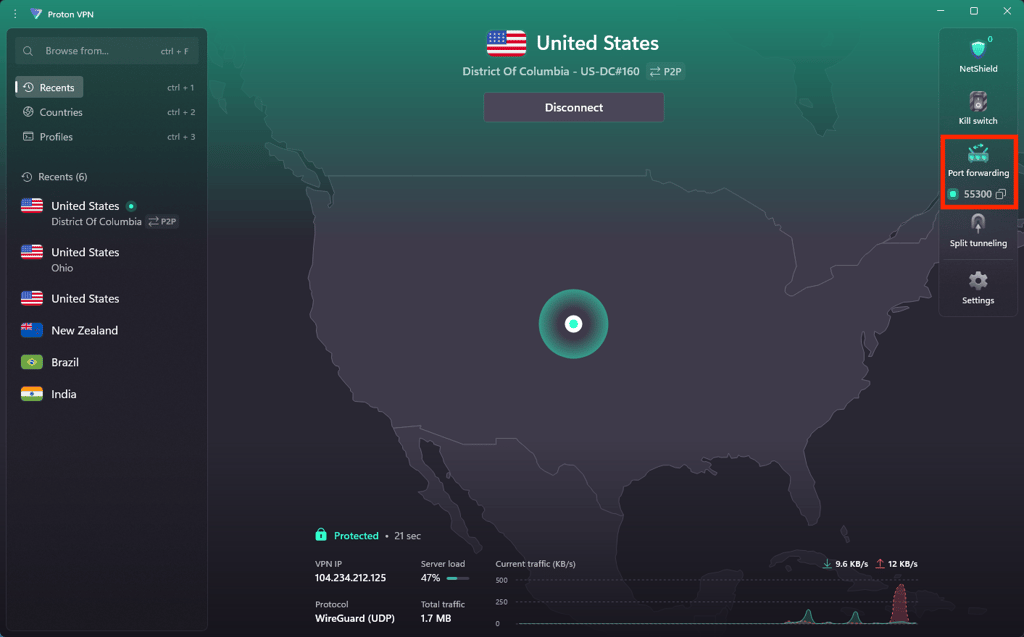
Performance. With Proton’s VPN Accelerator, I maintained approximately 85% of my original internet speed: download speeds averaged 737Mbps when torrenting, and ping stayed low while playing games like Fortnite.
Security. Proton VPN houses a roster of solid protection measures: DNS leak protection, a strict no-logs policy, and open-source apps offer transparency and trust. There’s also built-in Tor support and features like NetShield (ad/tracker blocker) and Secure Core (Proton VPN’s version of double VPN servers). And it’s just the tip of the security iceberg, as you can find in one of my expert’s Proton VPN reviews.
Pricing. You can get Proton VPN with port forwarding for $2.99/month, backed by a 30-day money-back guarantee. But it’s just one of the best Proton VPN deals. So if you’re after secure, fast torrenting with reliable port forwarding, look no further than Proton VPN.
Top 2. ExpressVPN – a good port forwarding VPN that works seamlessly on routers
![ExpressVPN mobile logo [IN USE]](https://media.vpnpro.com/images/170x89/expressvpn2.png)
105
3000
24/7, email
-
Stable and fast speeds with Lightway
-
Stealth VPN feature
-
Port forwarding setup on the router
-
Expensive
ExpressVPN is a reliable VPN with port forwarding support, which is available exclusively through its custom routers (v1 or v2+). That means the setup isn’t as beginner-friendly as some others, but it’s a great port forwarding VPN that works well with devices that don’t support native VPN apps, like gaming consoles or smart TVs.
To set up port forwarding, log in to your ExpressVPN router dashboard, navigate to the Port Forwarding tab, and configure the port and device you want to use.

Performance. During my tests, ExpressVPN showed great P2P performance on nearby servers, with speeds averaging around 378Mbps and retaining up to 81% of my original speed. Thanks to the Lightway protocol, downloads were fast and stable, and I experienced no lag during online gaming sessions.
Security. ExpressVPN has a strict, independently audited no-logs policy, plus RAM-only servers that wipe all data on every reboot. Its built-in Threat Manager blocks trackers and malicious domains, and the Stealth protocol helps you bypass VPN blocks in restrictive regions.
Pricing. Available for $2.44/month, ExpressVPN with port forwarding offers a 7-day free trial and a 30-day money-back guarantee, among other ExpressVPN deals.
Be sure to check the ExpressVPN pricing page for the latest deals and plans
Top 3. Private Internet Access – the cheapest VPN with static IP and port forwarding
![PIA mobile logo [IN USE]](https://media.vpnpro.com/images/170x89/PIA_520x520.jpg)
90
35000
-
Supports port forwarding via app
-
P2P-friendly on all servers
-
Affordable long-term plans
-
Port forwarding not available on US servers
Private Internet Access (PIA) is one of the best-value VPNs with built-in port forwarding. It supports dynamic port assignment through the app, with an optional manual configuration option for Linux users.
In order to enable it, you simply need to connect to a compatible P2P server, then go to Settings, select Network, and tick “Request Port Forwarding.” Once that’s done, the app will automatically assign a random port you can use in your torrent client or other tools.
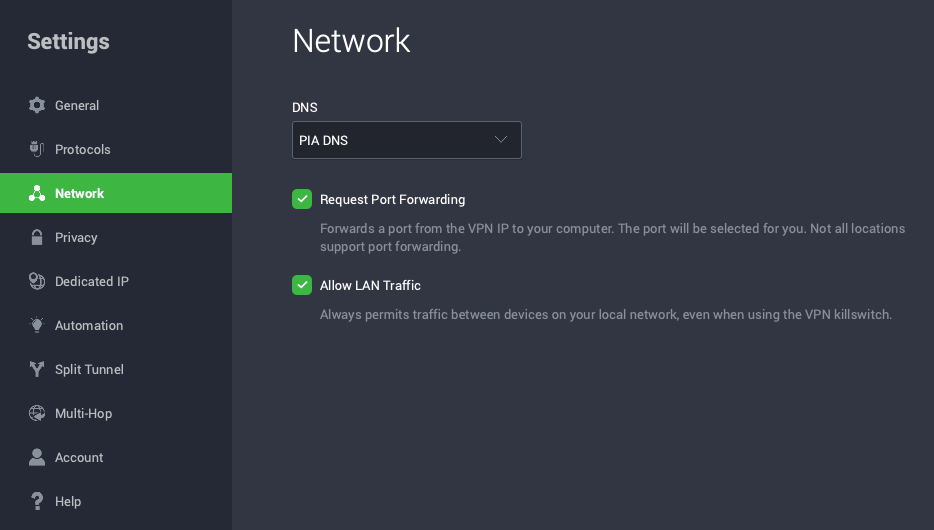
Performance. During speed tests, PIA demonstrated a solid 75% speed retention rate, with speeds averaging around 530Mbps. While not quite as fast as Proton VPN or ExpressVPN, it held up well during large file transfers, seeding, and remote access setups.
Security. For online safety, PIA includes a kill switch, DNS leak protection, and the MACE ad and tracker blocker. There’s also a Dedicated IP option and multi-hop routing, and thanks to the unlimited device connection support, you can connect your whole household. However, keep in mind that PIA’s port forwarding isn’t available on the US servers.
Pricing. PIA, top port forwarding VPN, delivers a great deal at just $2.03/month, with the addition of a 7-day free trial (mobile-only) and a 30-day money-back guarantee. This makes it one of the cheapest VPNs with port forwarding that still delivers strong privacy and reliable speeds.
For a deeper investigation of Ivacy VPN, read our Ivacy VPN review.
Best port forwarding VPNs comparison
| VPN for port forwarding | Rating | Price | Port forwarding | P2P support | Servers | Based in |
| 1. Proton VPN | 8.6⭐⭐⭐⭐⭐ | $2.99/month | ✅ Yes | ✅ Yes | 20,075+ servers in 145 countries | Based in Switzerland |
| 2. ExpressVPN | 8.4⭐⭐⭐⭐ | $2.44/month | ✅ Yes | ✅ Yes | 3,000+ servers in 105 countries | Based in the British Virgin Islands |
| 3. PIA | 8.1⭐⭐⭐⭐ | $2.03/month | ✅ Yes | ✅ Yes | 35,000+ servers in 90 countries | Based in the US |
![Proton VPN logo for comparison table [IN USE]](https://media.vpnpro.com/Proton-VPN.svg)
How I tested and selected these VPNs
I tested 21 VPN providers that offer port forwarding on a Lenovo ThinkPad T14s Gen 1 with an AMD Ryzen 7 PRO 4750U, Radeon Graphics, and 32 GB RAM, running Windows 11 Pro. Many VPNs avoid port-forwarding due to security concerns, so I ensured those offering this feature maintained high protection standards. Here’s what I paid attention to while testing:
- Successful port mapping (30%). This tool doesn’t work seamlessly with every service. So I tested port forwarding multiple times, focusing on torrenting and multiplayer games, to ensure it functions smoothly.
- Optimal speeds (20%). Performance is crucial for P2P sharing or gaming. My top port-forwarding VPN picks include only the fastest VPNs, maintaining at least 75% of their initial performance.
- Torrent-friendly servers (15%). I double-checked my top recommendations to ensure they support torrenting and gave extra points to VPNs with torrent-dedicated servers.
- High-end security (15%). For those in regions with restrictive legislation or online sports betting bans, I tested each provider for possible detection, DNS leaks, and data spills.
- Intuitive application (10%). A good VPN should be easy to use for all technical levels. I assessed the interface navigation and ease of toggling settings.
- Pocket-friendly pricing (10%). Affordability is critical, so I checked if port forwarding costs extra and ensured any additional costs were reasonable.
Get the best port forwarding VPN
When is port forwarding necessary?
Port forwarding is necessary whenever you need a direct connection between a remote device and a device on your home network. For example, you’ll need port forwarding to:
- Host a multiplayer game server;
- Remotely access your computer or NAS;
- Improve P2P file-sharing speeds;
- Connect to a smart home device when away;
- Run a VPN server at home.
In other words, port forwarding VPN helps you create a secure, direct path for external traffic to reach your local device.
Types of port forwarding
Here are some different types and use cases of port forwarding:
- Static Port Forwarding maps a specific port on your router to a device on your network. It’s ideal for hosting servers or game sessions, websites, and any other service that needs a constant connection path.
- Local Port Forwarding forwards traffic from your local machine to a remote server through an encrypted tunnel. It’s commonly used for accessing services (like databases or tools) on a remote private network from your local device.
- Remote Port Forwarding allows someone outside your network to access services on your local machine. It’s useful when you want to expose a local app or server to the internet.
- Dynamic Port Forwarding creates a flexible, proxy-like connection (usually through a SOCKS proxy), letting you route multiple apps or browser traffic through a secure tunnel. It’s typically used for safer web browsing or bypassing content restrictions.
How to set up port forwarding on a VPN?
Setting up port forwarding via a VPN app is the most straightforward way. First, you must download and install a VPN with port forwarding on your device. Note that the steps may vary depending on the VPN. I will show you how to forward ports with Proton VPN, as it offers the best port forwarding performance and features for remote access or hosting online services. Here’s a step-by-step breakdown:
Step 1. Sign up for a VPN that supports port forwarding
Not all VPNs offer port forwarding support, so always double-check if this feature is available. I recommend Proton VPN, which includes port forwarding on Windows, macOS, and Linux with all paid plans.
Step 2. Download and install the VPN app
Install the VPN on your device. With Proton VPN, the port forwarding feature is built directly into Windows and Linux apps, with a toggle for easy access.
Step 3. Enable the port forwarding feature
Turn on port forwarding in the VPN app. In Proton VPN, either head to Settings, then click Advanced, or use the Port Forwarding shortcut on the home screen. Once enabled, the app will assign you a random open port.

Step 4. Connect to a server that allows port forwarding
Certain VPN providers only enable port forwarding on specific P2P-optimized servers, which are clearly marked in the app. Connect to one of these to activate the forwarded port.
Step 5. Start using your applications with port forwarding enabled
Copy the assigned port from the VPN app and paste it into your torrent client, game server, or other tool that requires inbound connections.
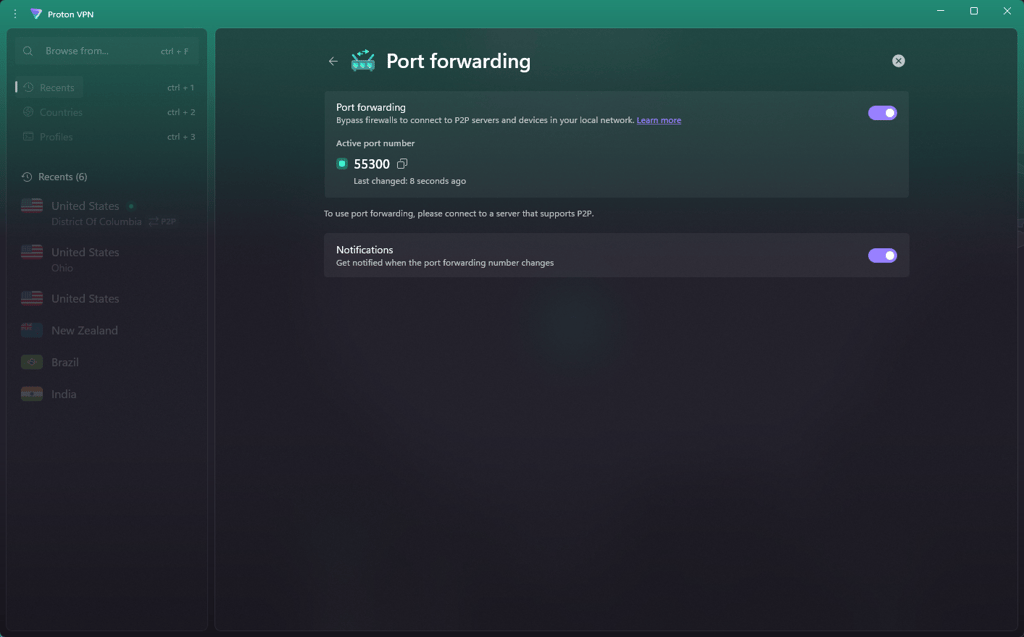
Step 6. Done! Port forwarding is now active.
You can now enjoy faster P2P connections, remote access, or game hosting — all without exposing your real IP. Just make sure to keep your VPN running to maintain the forwarded port and stay protected.
Get Proton VPN free for 30 days
How to set up port forwarding on a router?
The process of setting up the port forwarding will depend on the router model and firmware. Double-check that the VPN with port mapping supports your model. Here’s how to set it up:
Step 1. Choose a VPN with port forwarding
Not all VPNs offer port forwarding, let alone router setups, so make sure the provider supports it. If you want to make your local services accessible from the internet, this feature is essential. That said, a VPN like Proton VPN is a reliable option for not only native port forwarding support on Windows, macOS, and Linux, but also on routers.
Step 2. Access your router's settings:
Open a browser and enter your router's IP address/gateway into the address bar. Usually, these addresses look something like 192.168.1.1 or 192.168.0.1. Once that is done, you may need to log in with your router’s username and password. If you haven’t previously changed it, you can find this information printed on the router itself.

Step 3. Locate port forwarding settings:
Inside your router dashboard, look for the Port Forwarding, Virtual Server, NAT, or Firewall section. The name varies depending on your router model.

Step 4. Create a port forwarding rule:
Fill in the required fields as follows:
- Name: Label your rule (e.g., “uTorrent”, “GameServer”).
- Local IP Address: The internal IP address of the device you’re forwarding to (e.g., your PC).
- External Port: The port used by devices on the internet to connect (e.g., 6881 for torrent clients).
- Internal Port: The port your app listens on locally. It can match the external port or be different.
- Protocol: Pick the appropriate protocol (usually TCP/UDP or both, depending on what the app requires).

Step 5. Enable port forwarding:
Double-check everything, then enable the rule and save the changes. Do note that some routers may require a reboot for the settings to apply.
Step 6. Configure your VPN Client:
If you’re using a protocol like OpenVPN, simply update the configuration file with the port and IP you set up. As for other VPNs, follow their specific port forwarding setup instructions, which you can find in their support documentation.
Get Proton VPN – the best VPN with port forwarding
How to check if VPN port forwarding is working?
To confirm if port forwarding is working, you can use online port checking tools or simply try connecting to the forwarded port from a different network. In addition to that, always double-check your router settings and firewall to ensure the port is open and not being blocked.
Here are a couple of online port checking tools that you can try:
- CanYouSeeMe.org – Enter your port number, and the site will test whether it’s open from the internet.
- YouGetSignal.com – A similar tool to CanYouSeeMe.org, which shows if a specific port is reachable from outside your network.
However, if these sites say that the port is closed, make sure that the app using the port is actively running, that you’re connected to a server that supports port forwarding, and that your VPN’s port forwarding feature is enabled. Plus, if you’re comfortable with using command-line tools, you can also test your connection out with tools like Telnet, Nmap, or Netcat.
Why are VPNs removing port forwarding?
Port forwarding is not supported universally by all VPNs due to security concerns. Enabling port forwarding can potentially expose your device to external threats, as it opens specific ports on your router's firewall to allow inbound traffic. This increased exposure can make your device vulnerable to attacks from malicious actors who could exploit these open ports to gain unauthorized access or launch cyber attacks. However, reputable VPN providers that offer port forwarding often implement strict security measures to mitigate these risks, such as encryption and robust authentication protocols.
When configured correctly, port forwarding can be a valuable tool for remote access, P2P sharing, and hosting servers. Nevertheless, it should always be used with caution.
That said, if you’re looking for an alternative to VPN port forwarding, there are some options. For instance, NordVPN’s Meshnet lets you create encrypted, direct tunnels between devices without opening ports to the internet. Alternatively, reverse tunneling (via SSH or VPN tunnels) is another way to securely access internal services without the vulnerabilities of traditional port forwarding.
While NordVPN doesn’t support traditional port forwarding, its Meshnet feature is a safer and more flexible alternative to access devices remotely. Instead of opening ports, Meshnet creates encrypted tunnels between trusted devices – perfect for secure file sharing, remote desktop access, and private LAN parties. With high speeds, strong security, and a frequently audited no-logs policy, NordVPN is a strong alternative for anyone looking to avoid the risks of manual port forwarding.
Is port forwarding safe?
Opening a port for a VPN, if not configured properly, can pose security risks. Improper configuration may leave your network vulnerable to potential exploitation by hackers. When ports are left open incorrectly, they can serve as entry points for malicious actors to gain unauthorized access to your system or network. To mitigate these risks, ensuring that your VPN provider is reputable and that the port forwarding feature is tested and secure is crucial.
Therefore, follow these tips to configure port forwarding for your VPN safely:
- Rely on a robust and tested VPN. Only a good provider can guarantee a prosperous port forwarding implementation. A poor integration could only add security problems. My top port mapping VPNs are tested to ensure a safe installation.
- Be deliberate with port mapping. Only forward to the specific ports and choose the most necessary ones. If port mapping expands, it can quickly grow out of control and attract the attention of cyber crooks or malware.
- Use protective software. If you actively forward ports, it’s advisable to have a reliable antivirus running. The service deploys active real-time protection to identify incoming malicious code, making it one of the most essential security patches. Regularly scan ports for vulnerabilities.
- Create strong passwords. If a hacker decides to infiltrate your device, they’ll have a harder time breaking in with solid credentials. Additionally, port traffic filtering should also be implemented to manage incoming and outgoing packets effectively.
- Restrict the IP addresses. Permit only selected IP addresses for remote connection. This helps prevent agents from utilizing vulnerability points to slip inside your network or device.
Forward ports securely with Proton VPN
Can you use a free VPN with port forwarding?
No, you can’t use a free VPN with port forwarding. Port forwarding is a premium feature typically offered by paid VPNs, as it involves additional resources and important security considerations. A freebie offering port mapping as part of their suite should raise concerns. You can expect friction, if not downright malware or data harvesting, to hide behind the allegedly free port forwarding feature.
Instead of using a free VPN with port forwarding, opt for paid services with free trials and money-back guarantees, like Proton VPN, ExpressVPN, and PIA.
Thisat way, you get a safer port mapping experience with all the benefits of a good VPN, albeit for a limited time. But once time runs out, you can just switch to another provider. This resource is a hundred times better than relying on a free VPN with port forwarding.
Final remarks
Port forwarding is beneficial for improving torrenting speeds, hosting game servers, and setting up remote access to your devices. However, open ports can pose security risks, due to which many VPN providers no longer support them.
To find reliable port forwarding VPNs, I tested 21 services, of which Proton VPN emerged as the best one. It comes with an easy-to-use port forwarding setup, advanced privacy tools, and excellent overall performance, keeping your connection protected no matter if you’re port forwarding or casually browsing.
FAQ
What is port forwarding VPN?
Port forwarding VPN lets you create a secure tunnel between your device and the internet while allowing select inbound traffic. It’s commonly used for torrenting, game hosting, and remote access, providing both functionality and privacy.
Which VPN allows port forwarding?
VPNs that allow port forwarding include Proton VPN, ExpressVPN, and Private Internet Access (PIA). These services support secure port forwarding for tasks like torrenting, gaming, and remote access, while also offering strong encryption, no-logs policies, and reliable speeds.
Does NordVPN support port forwarding?
No, NordVPN doesn’t support port forwarding due to the inherent risks of opening ports to external sources. Port forwarding can expose users to serious security threats such as unauthorized access by hackers, increased vulnerability to malware, and potential breaches of sensitive data. Thus, NordVPN does not offer this feature to safeguard its users' privacy and security online.
Does Proton VPN have port forwarding?
Yes, Proton VPN offers port forwarding for paid users on Windows and Linux. You can enable it directly in the app settings, making it ideal for torrenting, hosting game servers, and securely accessing remote devices.
What is VPN dedicated IP and port forwarding?
A VPN dedicated IP is a static IP address used only by you, which is often helpful for whitelisting or remote access. Meanwhile, VPN port forwarding opens select ports through the encrypted tunnel, enabling better performance for apps like torrents, game servers, or private hosting.
What is the difference between static and dynamic port forwarding?
Static port forwarding maps a fixed port on your router to a specific device and port on your local network, which is ideal for servers or apps that need consistent access. On the other hand, dynamic port forwarding is typically used with SSH and creates an encrypted tunnel that routes traffic to different remote destinations based on your connection requests. This gives you more flexibility for secure web access.
Does port forwarding slow down the internet?
Port forwarding shouldn’t affect your internet speed, unless you're engaged in high-bandwidth gaming while utilizing it. Forwarding ports signal your router to open access to specific IP addresses or devices; however, the feature itself doesn’t add anything extra that would hog connection speeds.


- Our recommended port forwarding VPNs
- 🥇Proton VPN
- 🥈ExpressVPN
- 🥉Private Internet Access
- Best VPNs comparison
- How I tested VPNs
- How to set up port forwarding on a VPN?
- How to set up port forwarding on a router?
- Check if VPN port forwarding is working
- Why are VPNs removing port forwarding?
- Free VPN with port forwarding
- Conclusion
- FAQ