BBC iPlayer not working with a VPN? Here’s how to fix it


BBC iPlayer often blocks VPNs, so it may not work if your connection is detected outside the UK. To fix this, try connecting to a different UK server, clear your browser cache and cookies, turn off location services, or use a VPN that reliably bypasses BBC iPlayer.
BBC iPlayer is a UK-based streaming service that provides access to BBC TV channels and on-demand shows, but it’s only available to viewers inside the United Kingdom. Due to these geo-restrictions, accessing BBC iPlayer abroad requires using a VPN to change your virtual location to the UK and unlock the service. However, since BBC iPlayer uses a sophisticated VPN detection system, it actively identifies and blocks known VPN IP addresses. This is the main reason BBC iPlayer not working with a VPN has become such a common issue.
That said, for this article, I tested over 24 VPNs and shortlisted the few that still work reliably with BBC iPlayer in 2026. Keep reading to learn why BBC iPlayer blocks VPNs, what causes these errors, and step-by-step solutions to fix the BBC iPlayer not working with VPN error quickly.
| VPN that works with BBC iPlayer: |
In our testing we found that NordVPN, Surfshark, and Proton VPN works perfectly for BBC iPlayer. |
| VPN that doesn’t work with BBC iPlayer: | Services like TunnelBear, Hola VPN, and other free VPNs struggled to access BBC iPlayer during our tests due to its strong detection systems, while VPNs like PIA worked only with dedicated servers. |
🏷️ LIMITED OFFER: NordVPN deal! Get 76% OFF NordVPN + 3 months FREE 🏷️
Why does BBC iPlayer not work with VPN?
There may be several reasons why BBC iPlayer is not working with a VPN. These include blacklisted IP addresses, location data that’s stored in cookies, or DNS leaks. However, in most cases, the problem comes down to using a weak VPN that can’t reliably bypass BBC iPlayer’s VPN detection system.
If BBC iPlayer detects a VPN, you might see errors like “02066” or messages that say “Sorry, BBC iPlayer isn’t available in your region,” meaning your VPN’s been caught.

Most common reasons BBC iPlayer is not working with a VPN:
- Incorrect server location. The UK server you are connected to may not be recognized by BBC iPlayer as UK-based.
- Blacklisted VPN servers. BBC iPlayer actively scans for IP addresses linked to VPN services and blocks those commonly used to spoof UK locations.
- DNS or WebRTC leaks. If your VPN leaks DNS or WebRTC data, BBC iPlayer can detect your actual location instead of the one your VPN is trying to show.
- Unsupported VPN. Some VPNs aren’t optimized for streaming, meaning they lack the tools, like obfuscated servers, DNS leak protection, or advanced protocols, to bypass BBC iPlayer’s detection methods.
Before trying to fix the BBC iPlayer not working with a VPN issue, make sure that you’re using a reliable streaming VPN that can properly mask your location. In my latest tests, NordVPN, Surfshark, and Proton VPN delivered the most consistent and fast access to BBC iPlayer. All three regularly refresh UK IPs and come with strong anti-detection features. If your VPN meets that standard, the fixes below usually resolve BBC iPlayer issues quickly.

BBC iPlayer not working with VPN: 8 methods to solve it
Since BBC iPlayer puts lots of effort into preventing outsiders from accessing its content, VPN issues abound for many streaming enthusiasts. It’s more common than you think to see the dreaded “Sorry, BBC iPlayer isn’t available in your region. It looks like you’re outside of the UK" message.
Again, this problem is not permanent – you just need to do some troubleshooting from your end. And once all is said and done, you’ll watch the latest episodes of the most popular British dramas.
Method 1. Restart your device
Since BBC iPlayer is known for its strict VPN restrictions, sometimes your device just needs a clean slate to properly reestablish the VPN tunnel and get things working again. Whether you're on a smart TV, phone, or laptop, rebooting your device can clear out temporary glitches, flush DNS caches, and reset network settings, any of which could interfere with your VPN connection.
Method 2. Connect to a different server
In case your VPN isn't working with BBC iPlayer, try connecting to a different VPN server within the UK. Changing servers with unique IP addresses might work if BBC iPlayer blocks VPNs that are frequently used to bypass geo-restrictions.
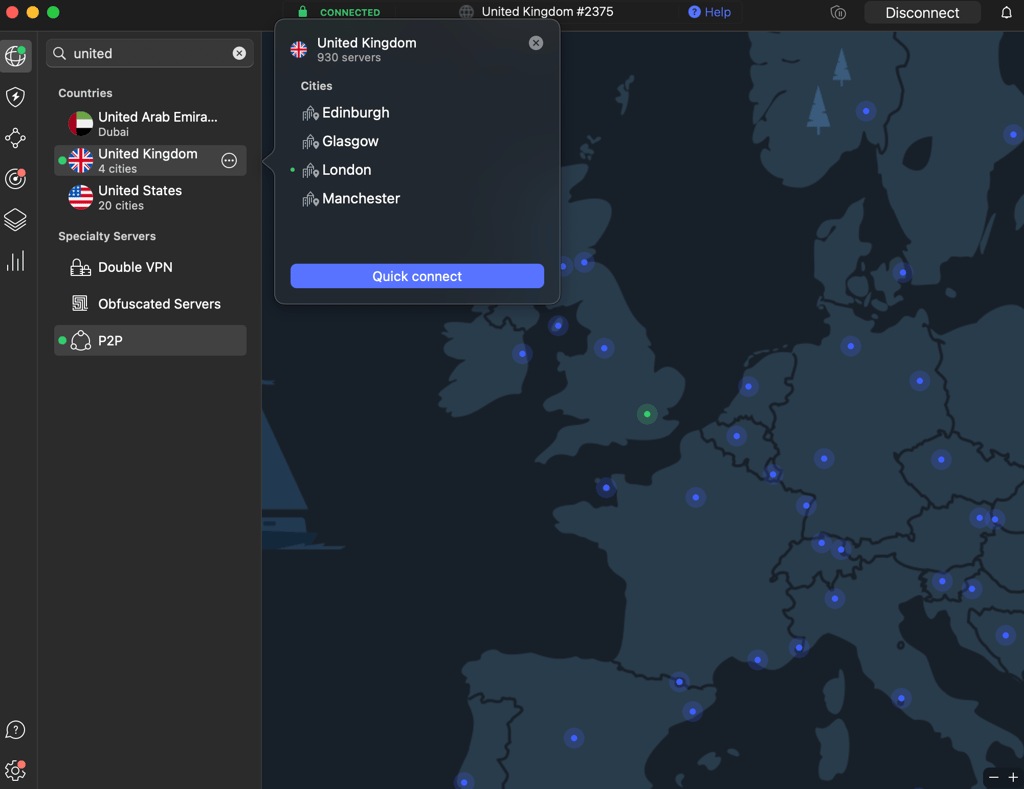
Moreover, VPN services usually offer multiple UK locations. From my experience, switching to UK servers in Manchester, Edinburgh, or Glasgow can work. These often have fresh IP addresses and lower traffic, making them less likely to be detected by BBC iPlayer. Don’t have many UK server options? Switch to another VPN provider that does.
Method 3. Check for IP and DNS leaks
When your IP address or DNS request slips through, BBC iPlayer is likely to block your account. That’s why it’s worth doing a quick IP and DNS leak test (ipleak.net) to make sure your VPN isn’t spilling the beans.

In any case, if you spot a leak, head to your VPN settings and turn on key privacy tools like the kill switch. Switching tunneling protocols (like IKEv2 to WireGuard or OpenVPN) is also a good idea to see if that patches things up. Then reconnect to a different UK server, re-run the leak test, and try accessing BBC iPlayer again.
Method 4. Clear browser cache and cookies
All web browsers have a cache that stores cookies, which track your online activities. The problem with them is that they also reveal your general location. BBC iPlayer is likely reading them and blocking you from accessing the streaming platform.

Thus, you’ll have to delete the cookies and clear the cache. You can do so by navigating to the browser’s settings:
Clear cookies and cache in Chrome and Firefox
- Navigate to the Privacy & Security panel.
- Open the Cookies and Site data
- Click the Clear Data button.
Clear Browser DNS cache
- Type chrome://net-internals/#dns in the address bar, and press ENTER.
- Click the Clear host cache button.
Clear cookies and cache in Edge
- In your browser settings, navigate to Cookies and site permissions.
- Click See all cookies and site data under the Manage and delete cookies and site data section.
- Click Remove all.
Clear cookies and cache in Safari
- Open Privacy in Safari settings.
- Navigate to the Manage website data button.
- Click Remove all to clear all cached data and cookies from Safari.
Method 5. Try a different browser or device
You can also try changing your browser extension to watch BBC iPlayer. For example, I tried to use DuckDuckGo, as it's a privacy-focused browser that blocks trackers and minimizes location leaks, making it less likely for BBC iPlayer to detect your real location.
For example, Android phones have Chrome browsers, which store location info and run extensions in the background. Even if Chrome doesn't share this data with third parties, it might still interfere with your VPN setup. That’s why I recommend BBC iPlayer on desktop: it doesn’t send GPS data, and you get a clean slate to stream BBC iPlayer content.
Method 6. Adjust device location settings
Many apps and some websites can use GPS or other location services to check where you actually are, no matter what your IP says. If there’s a mismatch between your VPN location (say, London) and your device’s GPS location (say, New York), that’s a red flag for BBC iPlayer, and access gets denied.
To avoid this, align your device’s location with your VPN server, both set to the UK. On some phones, that means turning off GPS altogether or using mock location apps. On desktops, switching off location services or using a browser extension that spoofs your location can do the trick.
Method 7. Get a dedicated IP address
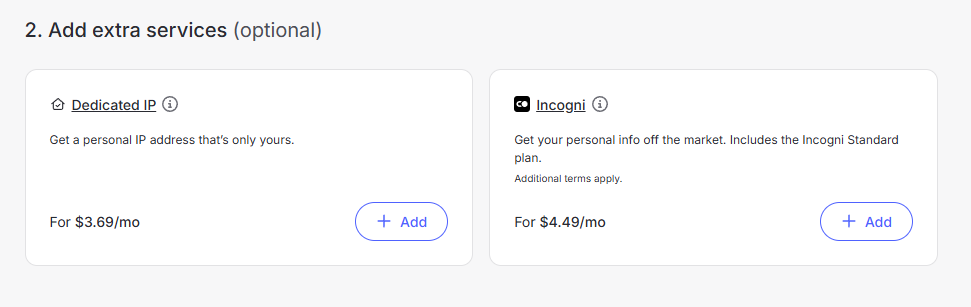
BBC iPlayer is known to block shared IP addresses, especially if several users are attempting to stream at the same time. Such traffic sets off alarms and often leads to IPs being blacklisted. One way around this is to get a dedicated IP address that you only use for your computer. Here’s how to get a dedicated IP for BBC iPlayer with NordVPN:
- Visit NordVPN's website and choose the plan that suits you best. I recommend the 2-year plan, which is currently 77% off.
-
At checkout, click the “+Add” button next to Dedicated IP (it costs $3.69/month)

- Download and install the NordVPN app on your device
-
Open the app, go to “Dedicated IP”, and connect to your assigned UK server

- Start streaming your favorite shows without restrictions with BBC iPlayer!

Unblock BBC iPlayer from anywhere with NordVPN
Method 8. Upgrade the VPN
Streaming platforms like BBC iPlayer constantly scan for VPN traffic and blacklist suspicious IPs. So even if your VPN worked yesterday, it might not work today if the service isn’t actively monitoring the blocks. Hence, investing in a VPN with a wide server network and regular IP resyncs can make a huge difference. Services like NordVPN or Surfshark are better equipped to stay under the radar and give you consistent access.
I personally recommend NordVPN. I have consistently used it while testing iPlayer abroad since it is one of the most reliable streaming options. Its UK servers are fast, the NordLynx protocol keeps speeds high, and it comes with a 30-day money-back guarantee, so you can try it risk-free.
What VPN works with BBC iPlayer?
I tested 24 VPN providers to see which ones still work with BBC iPlayer in 2026. Unfortunately, most failed almost immediately due to blocked UK IPs or weak detection evasion. That said, the VPNs recommended below proved to be reliable thanks to their stable and broad UK server networks, frequent IP rotation, and strong anti-detection technology, which allows them to stay undetected and stream BBC iPlayer without errors.
-
the best BBC iPlayer VPN in 2026. With 440+ UK servers, the NordLynx protocol, SmartPlay technology, and built-in DNS leak protection, it delivers fast, stable connections and strong anti-detection performance. During testing, it consistently unblocked BBC iPlayer without triggering VPN detection errors.
-
an affordable VPN that works with BBC iPlayer. Starting at just $1.99/month, it offers fast UK servers, strong anti-detection features, and unlimited device connections for unrestricted BBC iPlayer streaming.
-
a privacy-focused VPN for BBC iPlayer outside the UK. Backed by a strict no-logs policy and advanced security features, it delivers reliable streaming performance. This makes it ideal for users who want to unblock BBC iPlayer while keeping their data private.
![NordVPN mobile logo [IN USE]](https://media.vpnpro.com/Nord-VPN-review.jpg)
![Surfshark mobile logo [IN USE]](https://media.vpnpro.com/surfshark-60x60-1.jpg)
![Proton VPN mobile logo [IN USE]](https://media.vpnpro.com/ProtonVPN-small.jpg)
Unblock BBC iPlayer from anywhere with NordVPN
How to fix BBC iPlayer error code 02066
BBC iPlayer error code 02066 signals a playback or connection issue that prevents content from loading properly. This error usually occurs due to network connectivity problems, corrupted app cache or data, or conflicts caused by VPN usage. While the 02066 error can sometimes be triggered by temporary issues on BBC’s end, it’s worth double-checking your setup to rule out any potential local problems first. Here’s how to fix BBC iPlayer error code 02066:
- Reboot your device to clear background glitches or failed app launches. Unplug your streaming device or TV for 30 seconds, then power it back up.
- Update the BBC iPlayer app to the latest version. Outdated device software or app versions can cause compatibility issues and trigger error messages like this one.
- Make sure your internet connection is stable. Since BBC iPlayer requires at least 5 Mbps for HD streaming, unstable connections can cause error code 02066. If your internet is acting up, reboot your router.
- Clear the BBC iPlayer cache. Corrupted cached data can cause playback issues on some devices. If that’s not an option, try uninstalling and reinstalling the app.
- If you’re using a VPN, check your VPN connection. BBC iPlayer’s geo-restriction system can block or interfere with VPN traffic and trigger the 02066 error. Try connecting to a different UK server, or switch to a VPN that reliably works with BBC iPlayer, like NordVPN. If you’re inside the UK, briefly disabling the VPN can help confirm whether it’s causing the issue.
- If all else fails, try using BBC iPlayer on a different device, like a laptop, tablet, or even your phone. This can help you figure out whether the issue is tied to your TV or to the app itself.
How BBC iPlayer detect VPNs?
BBC iPlayer constantly works to detect and ban VPNs from the service, using a sophisticated VPN detection system and a large database of blacklisted IP addresses. The platform monitors shared IP addresses used to assess BBC iPlayer 24/7. Upon noticing that multiple devices use the same IP address to connect, BBC iPlayer flags it as potential VPN or proxy usage and blocks access. It also checks if the IP address is associated with VPNs and blocks it accordingly.
Unfortunately, masking your IP address alone is not enough. BBC iPlayer also employs advanced detection methods to identify what browser you’re using and even your device’s ID. Your IP address and browser data contain information about your geographical whereabouts. The platform cross-checks all data it collects to determine whether to let you in or not. So robust encryption and DNS leak prevention are just as important as an IP address.
VPNs that don't work with BBC iPlayer
Here are three VPNs that don’t work reliably with BBC iPlayer, based on my testing results:
- TunnelBear. Despite its simplicity and attractive design, TunnelBear lacks dedicated UK servers optimized for streaming. In my tests, BBC iPlayer consistently detected and blocked it, showing a message stating that BBC iPlayer isn’t available in your region. It looks like you’re outside of the UK.”
- Private Internet Access (PIA). PIA has strong privacy features, but streaming support for BBC iPlayer is hit-or-miss. Even when connected to UK servers, I couldn’t consistently bypass BBC iPlayer’s geo-blocks. Speeds were fine, but the platform wouldn't load content. In testing, BBC iPlayer only worked reliably when using PIA’s dedicated IP, which costs an extra $2.50/month on top of the VPN subscription.
- Hola VPN. Hola isn’t a real VPN but a peer-to-peer proxy network, which poses major privacy risks. Aside from security concerns, BBC iPlayer immediately blocked every attempt I made using Hola. I don’t recommend it for streaming or anything sensitive.


Since 2018, VPNpro has delivered unbiased, expert-backed insights through in-house research and thorough VPN testing. Our team ensures every review is fact-checked and reliable. Learn how we maintain these high standards in our testing methods.
Conclusion
If BBC iPlayer is not working with a VPN, the issue is almost always tied to VPN detection. Blocked IP addresses, DNS or IP leaks, cached location data, and weak UK server coverage are the most common reasons BBC iPlayer refuses to load content or shows errors like 02066. In most cases, the problem isn’t the platform itself but the VPN failing to stay undetected.
Based on extensive testing by my team and me, NordVPN, Surfshark, and Proton VPN are the best VPNs that work reliably with BBC iPlayer in 2026. All three offer stable and broad UK server networks, frequent IP rotation, and strong leak protection. All this and more allow them to easily bypass BBC iPlayer’s restrictions without triggering any errors. So if your current VPN no longer works, switching to one of these is the most reliable way to stream BBC iPlayer abroad without interruptions.

![Surfshark weekly deals logo [IN USE]](https://media.vpnpro.com/surfshark-weekly-deals.svg)
![Proton VPN winner logo [IN USE]](https://media.vpnpro.com/2025/05/protonvpn-winner.png)
FAQ
Why does BBC iPlayer not work outside the UK?
BBC iPlayer is available only to UK residents due to geographical restrictions. The streaming service blocks access to outsiders due to strict licensing agreements. Thus, if you live in another country, you have to change your IP address to a British one to view the shows and movies there.
Can BBC iPlayer detect VPN?
Yes, BBC iPlayer can detect and block VPNs. It actively monitors shared and known VPN IP addresses to enforce UK-only licensing rules. When VPN traffic is detected, BBC iPlayer blocks access or displays region-related errors, preventing streaming outside the UK.
Why is my VPN not working on BBC iPlayer?
Your VPN may not be working on BBC iPlayer because the website already blacklists the service provider or its servers. Additional issues should also be considered, such as IP and DNS leaks, weak unblocking capabilities, and outdated software.
Has BBC iPlayer blocked my VPN?
If BBC iPlayer isn’t working with your VPN, there’s a good chance the IP address or VPN server you’re using has been blocked. BBC iPlayer continuously detects and blacklists VPN IPs associated with UK location spoofing, which can prevent access even when you’re connected to a UK server.
How can I tell if iPlayer has blocked a VPN?
You can tell iPlayer has blocked your VPN when you see a geo-restriction error “Sorry, BBC iPlayer isn’t available in your region. It looks like you’re outside of the UK.“ You also won’t be able to play shows, as the start button will disappear from the menu.
Can I watch BBC iPlayer abroad with a VPN?
Yes, you can watch BBC iPlayer abroad with a VPN. However, only some VPNs could bypass BBC iPlayer's strict VPN detection methods. Plus, many providers are blacklisted by the platform. Watching BBC iPlayer abroad requires a VPN with advanced enough encryption and a rich enough UK server fleet to unblock BBC iPlayer. As such, I recommend NordVPN or Surfshark – these were tested and found to work with the platform without a hitch.
Which VPN works with BBC iPlayer?
NordVPN works reliably with BBC iPlayer and unblocks it consistently from anywhere. It offers fast UK servers, strong privacy tools, and uses obfuscated servers. These help hide the fact that you're using a VPN at all, making it even harder for BBC iPlayer to block your connection. Plus, the NordLynx protocol boosts streaming speed to watch it without any lags.
Why is NordVPN not working with BBC iPlayer?
BBC iPlayer is not working with NordVPN due to a blocked IP address or a potential IP and DNS leak. BBC iPlayer actively blocks known VPN traffic; sometimes, your current server might be on their radar. To fix it, try switching to a different UK server. You can also change the tunneling protocol (like switching from OpenVPN to NordLynx), make sure features like the kill switch and leak protection are turned on, and clear your browser’s cookies and cache.
Why is Surfshark not working with BBC iPlayer?
If Surfshark isn't working with BBC iPlayer your IP address might be on the BBC iPlayer blacklist or your true IP address could be leaked. To fix it, start by clearing your browser cache and cookies. Then, switch to another Surfshark server in the UK and switch to a different tunnelling protocol. Finally, make sure you have all Surfshark’s security features on.


