How to bypass Grindr age verification in the UK (June 2026)


Grindr has implemented a new age verification system for all UK users to comply with the Online Safety Act. This law requires anyone accessing Grindr in the UK, new and existing users, to prove they are over 18. This law aims to protect minors from content that is pornographic, encourages self-harm, promotes eating disorders, or depicts severe violence. The verification process involves biometric checks, such as a video selfie or a video selfie paired with an official photo ID. Many users view this step as unnecessary, as sharing personal data can expose them to serious privacy risks, including identity theft, unauthorized tracking, or even impersonation.
However, the only way to bypass Grindr's age verification and protect your data without sharing biometric data is with a VPN. A VPN changes your IP address to one from another country where these restrictions don’t apply, letting you access Grindr without the UK’s verification barrier. It also encrypts your connection, keeping your activity private and secure.
Learn which VPNs are the most effective for bypassing Grindr’s ID and age checks in the UK and how to use them in this in-depth guide.
🏷️ LIMITED OFFER: Proton VPN deal! Get up to 70% OFF Proton VPN 🏷️
This article discusses the requirement to share personal data when accessing adult websites in the UK, from the perspective of individuals who wish to remain anonymous. The content is provided for informational purposes only and is not, under any circumstances, intended for minors seeking to bypass restrictions in order to access material that may be harmful or inappropriate for them. We do not promote, encourage, or endorse such bypassing. Your use of the content herein is entirely at your own risk.
How adults can bypass Grindr age verification in the UK with a VPN
If you are of age and you don't want to upload personal documents, such as an ID or a video selfie, you can use a VPN to bypass Grindr's age verification. During my testing, this method consistently worked by connecting to a country where Grindr doesn’t require identity and age verification. Here are the steps on how to do it:
- Choose a reliable VPN. I recommend Proton VPN, which offers a 70% discount.
- Download the VPN app, install it on your device, and log in
- Launch the app and connect to a server outside of the UK, such as Ireland, the US, the Netherlands, or Germany
- Open Grindr – You should now be able to access the app without a verification prompt.
Tip. Proton VPN offers a free version on all devices and a 30-day money-back guarantee on all plans, so you can test it risk-free.
What should you know about Grindr’s age verification?
As of July 2025, Grindr requires all users in the UK to verify their age. According to the UK Government's Online Safety Act, platforms and services intended for adults are required to use age verification methods to ensure that only those aged 18 and over can access them. As a result, you will not be able to access Grindr in the UK until you complete this process. Here are two ways to verify your age on Grindr:
- A video selfie that uses facial recognition to estimate age
- A video selfie paired with an official photo ID, such as a passport or ID card, driver’s license, residents' permit, army ID, or PASS card
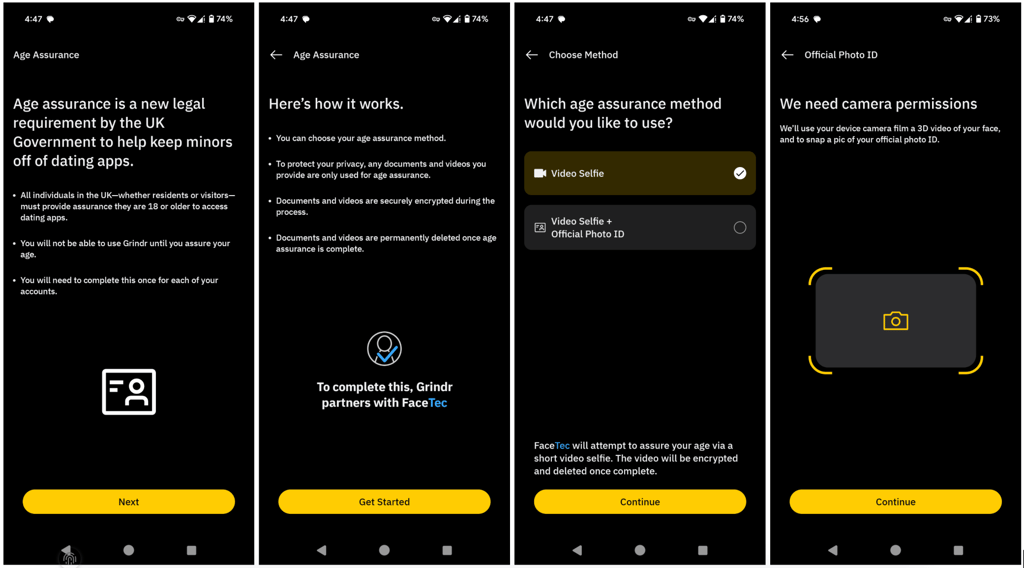
Grindr has partnered with FaceTec, a biometric verification provider, to handle identity and age checks. The process is mandatory but only needs to be completed once per account. However, if you are of age, you can't access the app until you verify your age. Here’s how to verify your age on Grindr:
- Launch the Grindr app in the UK. If you’re a new user or returning after the change, you’ll be prompted to start the age verification process. You will not be able to use Grindr until this step is completed.
- Select your preferred method. Either a quick video selfie or a video selfie with a government-issued ID, such as a passport, driver’s licence, army ID, or PASS card.
- Complete the verification. Make sure you’re in good lighting and keep your camera steady to take a selfie. If the check fails, you may be given another attempt, possibly with manual review by an experienced moderator.
Grindr age verification is not working
During the testing, I came across multiple Reddit threads filled with frustrated adults struggling to pass Grindr’s new identity and age verification. Many reported encountering issues, such as the Grindr video selfie not functioning, despite following all the steps, which in some cases led to wrongful bans due to AI moderation errors. For example, one user even joked about their grey hair and white beard making them look "too young" on Grindr, which resulted in a permanent ban.
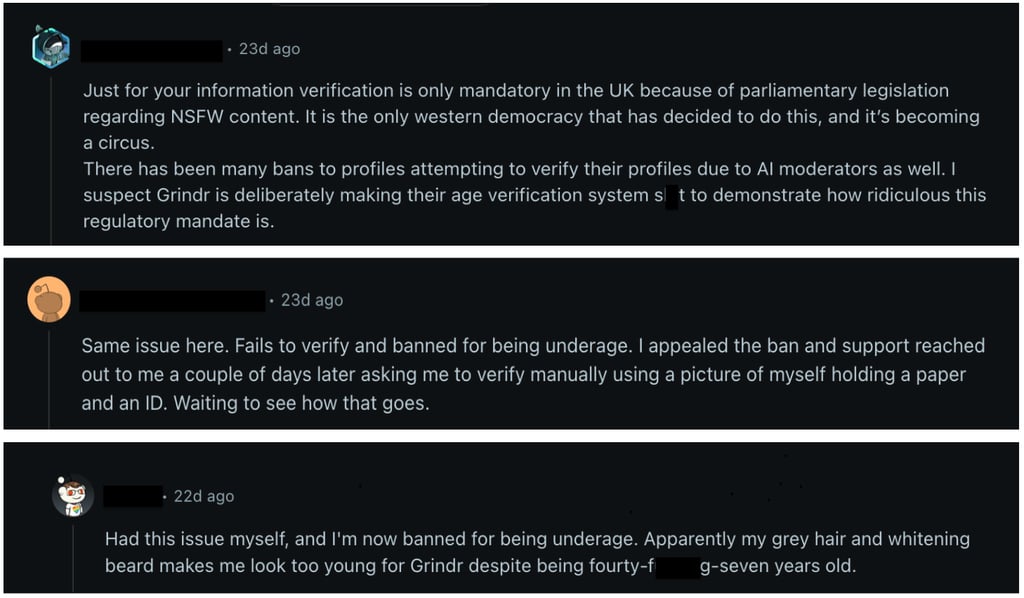
Another common complaint was that the Grindr age verification was not working at all, despite multiple attempts. Even tried to enable camera permissions for Grindr in the device settings and closed all other apps before starting the process. Nonetheless, this step is important because Grindr’s video verification needs exclusive, uninterrupted access to your camera and phone’s resources. If another app is using the camera in the background or your device is overloaded, the scan may freeze or fail to upload, resulting in the verification being rejected.

On the other hand, Grindr’s official support page suggests trying the verification process a few times in a well-lit space, using a clean, steady camera. If it still doesn’t work, the app may offer an alternative, like submitting a video selfie alongside your ID for manual review by a trained moderator.
If none of these fixes resolve the issue, the most reliable way for adults to keep using Grindr without repeated verification failures is to use a reliable VPN. By changing your IP address to a country where identity and age verification aren’t required, you can bypass the process entirely and access your account to create memorable friendships.
Bypass Grindr's age verification with Proton VPN
How to bypass Grindr age verification in the UK: step-by-step guide for adults
If you are 18 or older, this guide explains how to set up a VPN on your smartphone to improve privacy when accessing Grindr in the UK.
Step 1. Choose a reliable VPN service
To access Grindr securely and privately, choose a reliable VPN. I recommend Proton VPN, now 70% off, as it offers robust encryption, advanced tunneling protocols, and a wide range of server locations outside the UK.
![Proton VPN logo for comparison table [IN USE]](https://media.vpnpro.com/Proton-VPN.svg)
Step 2. Install the VPN app on your device
Grindr is compatible with a variety of devices, including smartphones, tablets, and laptops. Once you’ve chosen your VPN provider, download the VPN app from the official website or install it from the Google Play Store or Apple App Store on your device. After installation, log in with your credentials to access the full server list.
Step 3. Connect to a VPN server outside the UK
To achieve the best speed and reliability, I recommend connecting to a VPN server in the closest neighboring country to the UK, such as the Netherlands or Ireland. For me, Ireland servers worked best to bypass Grindr’s identity and age verification. Additionally, I recommend enabling split tunneling to route only the Grindr app through the VPN, and turning on the kill switch to protect your privacy if the VPN connection drops.
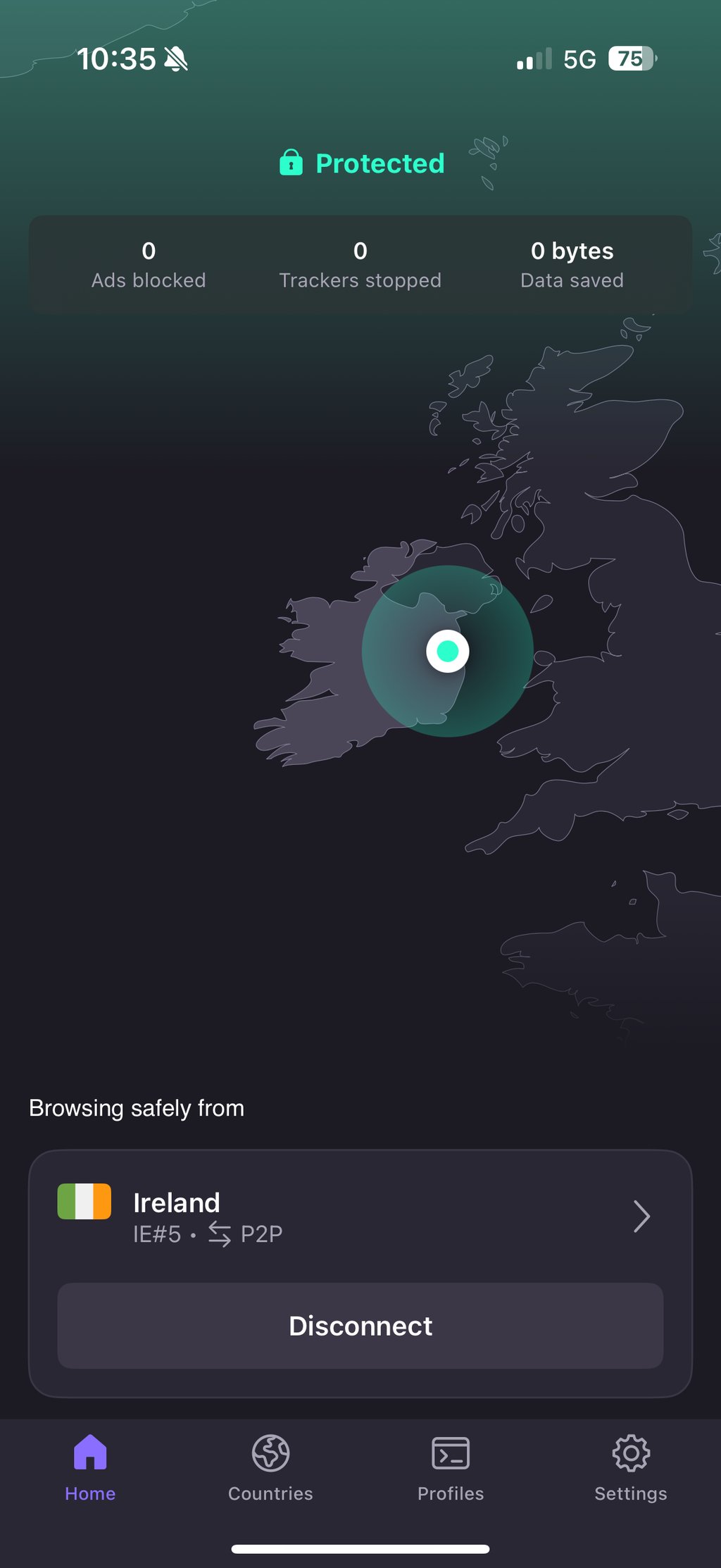
Step 4. Open Grindr while connected to the VPN
With your VPN connected, launch Grindr. The app should now recognize your location as outside the UK and not require you to verify your age if you are of age. You won't have to upload your ID or a video selfie to access all features. However, if you run into any issues, try switching to a different nearby server for the best results.

Access Grindr without verification
Top 3 VPNs to bypass Grindr age verification in the UK
During my testing, I found the fastest and safest way to avoid Grindr's age verification process for adults by using a VPN. My tests showed that Proton VPN, TotalVPN, and IPVanish stood out as the most reliable services for bypassing Grindr’s UK ID and age checks. They let me skip ID or selfie submission while keeping my location and activity private. Here are the best VPNs:
-
best VPN to bypass Grindr's age verification in the UK
-
budget-friendly VPN to protect your Grindr privacy
-
privacy-focused VPN that avoids ID or selfie requests on Grindr
![Proton VPN mobile logo [IN USE]](https://media.vpnpro.com/ProtonVPN-small.jpg)
![TotalVPN mobile logo [IN USE]](https://media.vpnpro.com/totalvpn-mobile.png)
![IPVanish mobile logo [IN USE]](https://media.vpnpro.com/IPVanish-VPN-small.jpg)
Proton VPN costs £2.44/month and offers the fastest speeds and the most stable nearby servers, which are convenient for accessing the Grindr experience. TotalVPN offers robust privacy tools and unlimited device connections at an affordable price – just £1.59/month. IPVanish price starts from £2.19/month, and the provider excels in transparency and security, ensuring no logs are kept while still reliably bypassing the UK’s verification rules for adults.
Can you use a VPN to bypass Grindr's age verification if you are of age?
According to Ofcom and the UK government, under the Online Safety Act, platforms are legally prohibited from hosting, sharing, or encouraging content that promotes the use of VPNs to circumvent identity and age verification checks. The government has confirmed to the BBC that it will be illegal for platforms to facilitate or promote this behaviour. However, this restriction does not apply to individual users who use VPNs privately. You won’t face specific legal penalties if you are an adult for using a VPN to bypass Grindr’s age verification on your own.
That said, it’s important to know that using a VPN to get around these ID and age checks may violate Grindr’s Terms of Service. You may be banned or suspended if your account is detected. You should carefully weigh the potential risks before bypassing age verification with a VPN. In this case, using a reliable VPN, such as Proton VPN, can protect your privacy and help you avoid sharing sensitive personal data; however, it’s best to proceed cautiously and understand the potential consequences.
Other popular sites affected by the UK Online Safety Act
The UK Online Safety Act protects children from harmful content and holds online platforms accountable, making the internet a safer place. It officially took effect in July 2025. There are three main objectives of this legislation: reducing access to adult content for underage users, limiting harmful and intimate online behavior, and ensuring platforms verify users' ages. For example, Grindr requires all new and returning users to verify their age with a selfie and a valid ID.
This law affects any site or app that hosts adult or explicit content, from social media to porn sites, that may have content unsafe for minors. During my research, I tested other platforms that are impacted by the law, including porn sites, like PornHub, XHamster, OnlyFans, FetLife, XVideos, XNXX, Chaturbate, Stripchat, FapHouse, Tube8, RedGIFs, and AdultWork. Social media sites like Reddit, Twitter (X), Discord, and dating apps, such as Grindr, Feeld, AdultFriendFinder, Bumble, and Erome. These services now require users to prove they’re over 18 before accessing them.
For everyone, using these platforms has become more complicated as they want to balance the need to access content, protect personal data, and stay anonymous. Every day, internet use is becoming more regulated, meaning users face stricter verification steps and increased data sharing, which can affect privacy and convenience. To maintain privacy and avoid unnecessary data exposure, I recommend a VPN. You'll be able to bypass geo-restrictions and age verification if you are over 18 by masking your location and encrypting your internet traffic.
Final tips for using a VPN to bypass Grindr age verification in the UK
The UK’s Online Safety Act, effective July 2025, introduced strict age verification rules on Grindr. Users over 18 must submit a video selfie or a valid government-issued ID to access the app; otherwise, they won't be able to use the app. There is a clear risk of leak, theft, or misuse of users' sensitive personal information.
Luckily, if you are an adult, there’s a simple and secure way to bypass this verification by using a VPN. I recommend Proton VPN, as it changes your IP address to a country without these ID and age checks, allowing you to use Grindr without sharing personal documents. Plus, with strong AES-256 encryption and privacy features, the provider keeps your real location hidden and your online activity private.

![Surfshark weekly deals logo [IN USE]](https://media.vpnpro.com/surfshark-weekly-deals.svg)
![Proton VPN winner logo [IN USE]](https://media.vpnpro.com/2025/05/protonvpn-winner.png)
FAQ
Can minors use a VPN to bypass age verification?
No, minors should not use a VPN or any other method to bypass age verification systems. These laws are specifically designed to protect young people from accessing content that could be harmful or inappropriate for their age. By bypassing these checks, minors would not only be violating the rules but also putting themselves at risk of exposure to explicit material that can have negative effects. Age verification exists to create a safer online environment, and it’s important for minors to respect these boundaries and avoid tools like VPNs to get around them.
What is the new age assurance rule on Grindr?
Before you can access Grindr, you’ll need to verify that you’re at least 18 years old, whether you’re a new or returning user. Verification options include submitting a video selfie alone or a video selfie with an official photo ID, such as a passport, driver’s licence, army ID, or PASS card.
How old do you have to be to use Grindr in the UK?
In the UK, you must be at least 18 years old to use Grindr. Before accessing the app, users are required to verify their age by uploading a video selfie or uploading a video selfie paired with an official photo ID.
Will Grindr unban me when I turn 18?
Grindr will keep your account suspended until you verify that you are 18 or older. Once you complete the identity and age verification process by submitting the required video selfie or photo ID, your account should be reinstated.
Is the Grindr age verification managed securely?
Grindr’s age verification is managed by an independent third-party validation company with no direct links to Grindr. According to Grindr, this company does not store copies of your ID after the check is completed, which helps ensure your documents and personal data remain private.
Why is Grindr not letting me verify?
Grindr may not allow you to verify your video selfie or ID if the details do not match your account, or if your internet connection drops during the verification process. You can fix the issues by using a stable connection, ensuring good lighting, and retaking the verification with a high-quality photo or video.
Is there any way to bypass Grindr's age verification for adults?
Yes, if you are of age, you can bypass Grindr's identity and age verification by using a VPN, such as Proton VPN. By connecting through a server in a nearby country where the rule isn't enforced, such as the Netherlands or Ireland, you can trick Grindr into thinking you're using the app outside the UK, thereby avoiding the need to upload your ID or video selfie. Additionally, Proton VPN provides fast speeds, reliable servers, and robust privacy features to secure your personal data.


