How to bypass Roblox age verification in 2026

Roblox has already started rolling out mandatory worldwide age verification, meaning that the mandatory Roblox age checks will apply far beyond the UK. The first Roblox enforcement wave hits Australia, New Zealand, and the Netherlands in early December 2025, with the rest of the world following in early January 2026. The new system primarily targets Roblox’s Voice Chat and other communication features, so unless users verify their age through facial estimation or official ID documents, access to these Roblox features will be restricted.
Once verified, each user will be sorted into strict age-based chat groups (such as 13-15, 16-17, or 18+) to limit interactions between minors and adults. Meanwhile, users under 9 can only enable chat with parental consent. Those who skip or fail age verification will lose access to Roblox’s voice chats and other unfiltered private messaging systems.
Because Roblox now requires sensitive ID or biometric data, many users are opting for a safer alternative. At this point, you can either complete the verification or bypass it with a VPN if you’re an adult user. A VPN changes your virtual location and helps adults maintain full access to Roblox Voice Chat without risking their personal information. Keep reading to learn more about the new changes and the available workarounds.
🏷️ LIMITED OFFER: Proton VPN deal! Get up to 70% OFF Proton VPN 🏷️
How to bypass Roblox age verification
Adults can get full access, like voice chat in Roblox, without an ID by using a VPN to bypass the new age verification scan. By changing your virtual location to one where age checks aren’t needed, a VPN helps mature users to access all chat features without having to share IDs or biometric data. Here’s how to set it up:
- Subscribe to a reliable Roblox VPN with global servers. I recommend Proton VPN, which offers servers in over 145 countries.
- Download and install the VPN app on your preferred device.
- Connect to a server outside the UK, Australia, New Zealand, or the Netherlands. This way, Roblox will think that you’re in a different region, letting adults bypass age verification.
- Create a new Roblox account or log in to your existing one.
- Enjoy full access to Roblox and its voice chat feature without an ID!
Best regions to connect to for bypassing Roblox voice chat blocks: I tested multiple VPN countries to find the best ones for bypassing Roblox voice chat ID checks. That said, during the rollout period, the best locations to connect without age verification triggers are Germany, Poland, Romania, Switzerland, and most of Western Europe. These locations still provide stable access before Roblox’s global enforcement begins in January 2026. For the best speeds, choose a server geographically close to you.
Our recommended VPNs to bypass Roblox age verification
To find the best VPNs for bypassing Roblox age verification, I tested and compared over 20 providers. A reliable Roblox VPN must offer fast and stable speeds, broad server coverage, and robust security features. That said, the following VPNs reliably avoid verification errors, protect your identity, and keep Roblox voice chat features fully accessible:
-
The best VPN for bypassing Roblox age checks thanks to its 20,075+ servers in over 145+ countries and the fastest speeds I tested. With it, I consistently avoided ID and biometric checks, while the obfuscated servers and leak protection kept my real location hidden. To access Roblox voice chat and communication features, I used servers in Germany and Poland.
-
The cheapest VPN to avoid Roblox age verification scans. It offers thousands of servers in 90+ locations, and its affordable plans make it ideal for budget-conscious users. With TotalVPN, your VPN usage is hidden, and its leak protection ensures Roblox cannot detect your real location.
-
The best reliable VPN for avoiding Roblox ID checks. Based in the US with an independently audited no-logs policy, it offers RAM-only and Double Hop servers for maximum anonymity and security. During testing, its US and UK servers consistently avoided age-verification triggers, making it ideal for adults who don’t want to share ID or biometric data.
![Proton VPN mobile logo [IN USE]](https://media.vpnpro.com/ProtonVPN-small.jpg)
![TotalVPN mobile logo [IN USE]](https://media.vpnpro.com/totalvpn-mobile.png)
![IPVanish mobile logo [IN USE]](https://media.vpnpro.com/IPVanish-VPN-small.jpg)
Use Roblox chat features without age verification


Since 2018, VPNpro has delivered unbiased, expert-backed insights through in-house research and thorough VPN testing. Our team ensures every review is fact-checked and reliable. Learn how we maintain these high standards in our testing methods.
How does Roblox age verification work?
Roblox now uses a mandatory age verification system to control access to its chat and communication features. This change is part of a broader push for online child safety, driven by increasing pressure from global regulators. For example, on December 10, 2025, Australia will launch the new Social Media Minimum Age (SMMA) scheme, which pushes platforms to verify user ages more aggressively – even though online games like Roblox are technically exempt.
There are two ways to verify your age on Roblox: through facial age estimation or by uploading an official ID document. Once verified, users are placed into strict age-based chat groups, like 13-15, 16-17, 18-20, and 21+. These groups limit how minors and adults can interact, while users under 9 can only enable chat with parental consent. If you skip or fail verification, you lose access to unfiltered private messaging and certain chat tools, though core gameplay remains available.

Here’s how the Roblox age verification works:
- Log in to your Roblox account and open Settings.
- Under “Account info” tab and below your birthday, select “Continue with selfie” or “Continue with ID.”
- Follow the prompts to complete the facial scan or ID upload.
- Wait for the verification to finish to unlock age-restricted features, like Roblox chat.
Roblox says the data is deleted after processing, but many users still worry about third-party services handling their biometric information, especially for minors. For adults who prefer not to share such sensitive information, using a reliable VPN is the safest way to bypass Roblox’s age-verification prompts and maintain access to chat features. To help keep your identity secure, I recommend using Proton VPN, which comes with strong encryption, fast speeds, and robust privacy tools.
Skip Roblox age checks with Proton VPN
I can’t verify my age on Roblox
Roblox age verification can fail for a number of reasons. Things like poor lighting, low-quality cameras, blurry selfies, or an incorrectly positioned face can cause the facial age estimation to reject your attempt. Meanwhile, ID verification can also fail if the document doesn’t match the birthday on your account or if the verification vendors can’t read the file. Some users in early rollout regions, like Australia or New Zealand, also report getting verification prompts even when they qualify for full access.
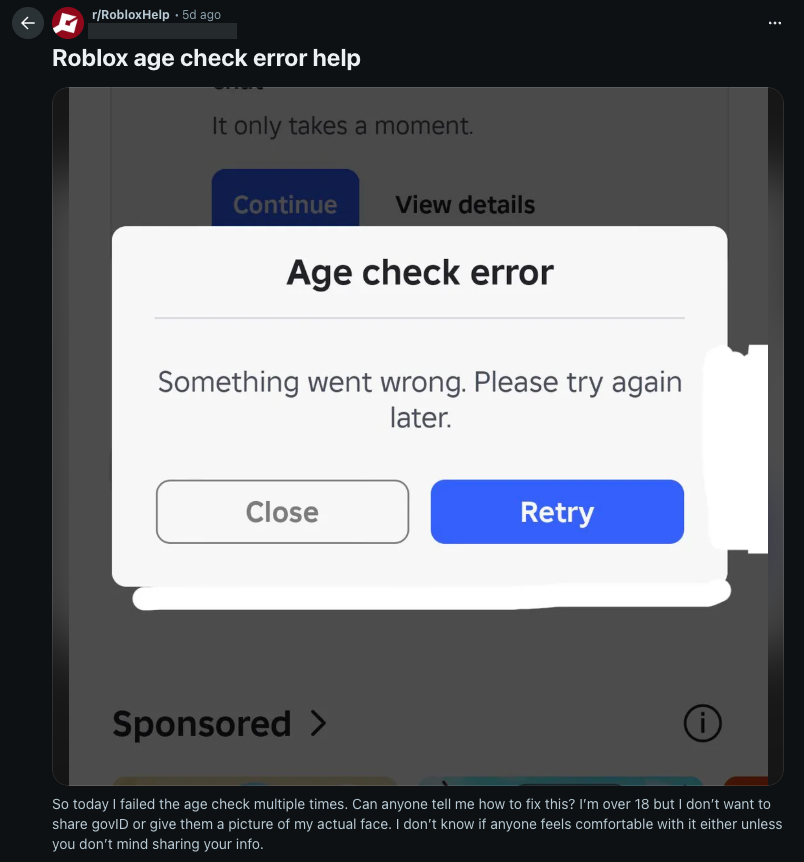
Here are some quick troubleshooting steps you can try to fix the Roblox verification issue:
- Fix your lighting. Bright, even lighting helps the camera detect your face properly.
- Clean the camera lens. Smudges or dust can cause blurry or rejected scans.
- Center your face or ID. Make sure it fully fills the frame and stays steady.
- Switch verification methods. Use ID verification if the selfie scan fails repeatedly.
- Match your account details. Ensure your birthday and personal info match your ID exactly.
- Use a better camera. A phone camera is more reliable than most laptop webcams for scans.
- Contact support. Roblox or Persona support can review failed attempts and provide guidance.
However, if you’re an adult user who still can’t verify, or you prefer not to upload biometric data at all, using a VPN like Proton VPN is the most reliable workaround. By changing your virtual location, you can access Roblox chat features without triggering age check errors.
How to get voice chat in Roblox without an ID: step-by-step guide
If you don’t want to upload selfies or personal documents, you can bypass Roblox’s age verification prompts with a VPN. By masking your real IP address and changing your virtual location, a VPN helps adult users keep full access to Roblox voice chat and communication features without risking their privacy.
Step 1. Get a reliable Roblox VPN
To bypass Roblox’s age-verification checks and access voice chat, you’ll need a reliable VPN with fast speeds and servers in multiple regions. I recommend Proton VPN, which offers a large server network, stable connections, and strong privacy features like AES-256 encryption, leak protection, and two types of kill switches.
![Proton VPN logo for comparison table [IN USE]](https://media.vpnpro.com/Proton-VPN.svg)
Step 2. Install and set up the VPN
Download the VPN app on your device and follow the setup instructions. Most premium VPNs, including Proton VPN, work on Windows, macOS, iOS, Android, and even routers, so you can secure Roblox on any platform. Once installed, log in with your account to access the full server list.
Step 3. Connect to a server in a supported Roblox Voice Chat region
Open your VPN and connect to a region where Roblox doesn’t strictly enforce ID or facial age checks. During testing, countries like Germany, Poland, and Romania provided stable access without triggering ID or biometric verification prompts. Once your IP switches, adult users can enable voice chat normally using a phone number for verification.
Note: Roblox provides a full list of countries where voice chat is available for eligible 13+ users on its official support page. However, being in one of these regions doesn’t always remove the age-verification requirement, as many users still encounter selfie scan or ID prompts. If this happens, switching your location with a VPN helps adult users avoid these checks and enable voice chat normally.
Step 4. Log in to Roblox or create a new account
Launch Roblox while your VPN is connected and log in to your account. Roblox detects your region by using your current IP address, but the change isn’t always instantaneous. If verification prompts don’t reflect your new region, try restarting the app or refreshing the website, logging out and back in, or waiting a short while. If you prefer, you can also create a new account while connected to the VPN so it’s assigned to the supported region immediately.
Step 5. Verify your account with a phone number
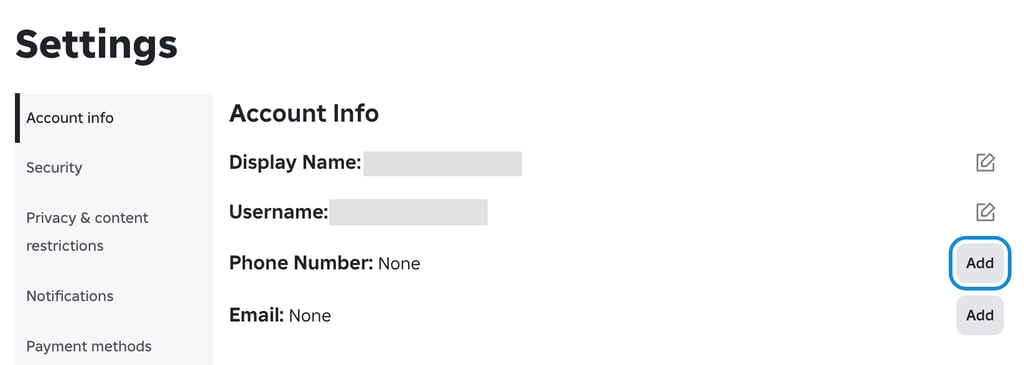
While still being connected to a country where Roblox supports Voice Chat and phone number verification, go to Settings. There, under the “Account info” tab, you will see the option to add your phone number. By doing so, eligible 13+ users can enable voice chat without uploading an ID or completing a facial age scan. Once verified, Roblox will unlock the Communication settings needed for voice chat.
Step 6. Enable Voice Chat in your Roblox settings
After verifying your phone number, go to Settings and open “Privacy and content restrictions.” Select “Communication” and toggle “Enable Microphone” to ON. If the option doesn’t appear immediately, restart Roblox so it can refresh your region and eligibility status. Once enabled, you can use Roblox Voice Chat.
Step 7. Enjoy Roblox voice chat without ID verification
With your VPN connected, region switched, and microphone enabled, adult users can now use Roblox Voice Chat without uploading an ID or completing a selfie scan. Just keep your VPN running while you play to avoid new age-verification prompts.
Use Proton VPN to access Roblox Voice Chat without ID
Is it legal to use a VPN to bypass Roblox age verification?
While using a VPN is not illegal, using it to bypass Roblox’s safety systems does violate Roblox’s Community Standards. Roblox fully allows VPNs for general privacy and security reasons, like protecting your connection on public Wi-Fi networks. However, Roblox prohibits VPN usage for reasons like masking your location to gain access to features that you’re not eligible for. This includes age-restricted chat tools or 17+ experiences. According to Roblox, this is considered “evading safety and security systems,” which can lead to account restrictions or termination.
In practice, this means adult users can legally use a VPN, but doing so specifically to avoid selfie scans or ID prompts may violate Roblox’s platform rules. Always consider these risks before attempting to bypass age verification, and make sure you use a trusted, secure VPN provider if you choose to do so.
Protect your privacy on Roblox
Closing tips for bypassing Roblox age restrictions Heading
Roblox’s global rollout of age verification affects features like Voice Chat, messaging tools, and how users interact across different age groups. With regulations such as Australia’s SMMA scheme pushing platforms toward stricter age checks, Roblox is moving in the same direction. Still, many adult users are hesitant to share personal documents or biometric data, and instead rely on VPNs to adjust their virtual location for privacy.
A VPN is the most effective way for adult users to avoid Roblox’s age-verification prompts and access communication features like Voice Chat without submitting an ID. By masking your IP address, a VPN makes Roblox treat your account as if it’s coming from a supported region. After testing more than 20 VPN providers, Proton VPN delivered the most consistent results, bypassing verification checks while keeping gameplay speeds stable.
For the best experience, stay connected to a reliable region – such as Germany, Switzerland, or Poland – throughout your session. If Roblox doesn’t update your location right away, refresh the app, and remember that bypassing verification may violate Roblox’s rules.

![Surfshark weekly deals logo [IN USE]](https://media.vpnpro.com/surfshark-weekly-deals.svg)
![Proton VPN winner logo [IN USE]](https://media.vpnpro.com/2025/05/protonvpn-winner.png)
FAQ
Can minors use a VPN to bypass Roblox age verification?
No, minors should not use a VPN or any other tool to get around Roblox’s age verification process. These checks exist to protect younger players from content and interactions that aren’t appropriate for their age group. Circumventing them goes against Roblox’s rules and may lead to unsafe experiences. Age verification is designed to keep the platform safer overall, so minors should follow it rather than trying to avoid it.
Do I have to verify my age on Roblox to use voice chat?
Yes, age verification is required to enable Roblox Voice Chat. Users must be 13+ and verified through a phone number, facial age estimation, or an official ID. In supported regions, phone-number verification alone unlocks Voice Chat, but in others, Roblox may still request an ID or selfie scan.
Can I use Roblox without verifying my age?
You can use Roblox without verifying your age, but your account will be limited. Unverified Roblox users can’t access Voice Chat, certain messaging features, or 17+ experiences. Gameplay remains available, but all communication tools that require age confirmation will stay locked.
How do I get Roblox Voice Chat without ID?
You can get Roblox Voice Chat without uploading an ID by verifying your age with a phone number in regions that support this method. Many adult users who prefer not to submit biometric data use a VPN such as Proton VPN to adjust their region, complete phone number verification on their account, and then enable Voice Chat in their settings.
Why did my Roblox age verification fail?
Roblox uses third-party verification tools, and failures are common when the selfie is poorly lit, off-angle, or doesn’t meet the system’s requirements. ID checks also fail if the file is low-resolution or your ID details don’t match your account. Even small mistakes, like glare on the document, can cause the process to restart. To fix this, retry the scan with better lighting, clean your camera lens, upload a clearer ID file, or use a different device or network.
Is it safe to upload my ID or selfie to Roblox?
Roblox uses third-party verification providers to process IDs and facial scans, and says this data is deleted once verification is complete. While the system follows standard privacy guidelines, many adult users are still hesitant to share sensitive documents or biometric data with external vendors (especially after high-profile incidents involving third-party processors, like Discord’s security breach). Because of these concerns, some adult users prefer to avoid ID uploads entirely and instead use a trusted VPN like Proton VPN to get around Roblox's age verification requirements.
Does a VPN actually bypass Roblox age verification?
Yes, a VPN can bypass Roblox’s age verification prompts for adult users by changing your virtual location. Roblox decides whether to display selfie scans or ID checks partly based on your IP region. For adults who prefer not to submit biometric data, using a reputable VPN like Proton VPN is the most consistent workaround for accessing Roblox Voice Chat without uploading an ID.


- How to bypass Roblox age verification
- Our recommended VPNs to bypass Roblox age verification
- How does Roblox age verification work?
- I can’t verify my age on Roblox
- How to get voice chat in Roblox without an ID: step-by-step guide
- Is it legal to use a VPN to bypass Roblox age verification?
- Closing tips for bypassing Roblox age restrictions
- FAQ