Best VPN for Peacock TV: how to watch Peacock outside the US


Quick summary. Peacock is geo-locked to the US and its territories. This means that if you want to watch Peacock from outside the US, you will need a VPN with US IP addresses that reliably bypasses the platform’s VPN detection. After my thorough testing, NordVPN stood out as the best VPN for streaming Peacock TV, with 3,159+ fast US servers. Surfshark comes next as the most affordable Peacock VPN at just $1.99/month, while Proton VPN is a strong choice for users who prioritize advanced security and privacy features
🏷️ LIMITED OFFER: NordVPN deal! Get 76% OFF NordVPN + 3 months FREE 🏷️
While Peacock is readily available to the US audience, it is geo-blocked for anyone abroad. Luckily, a VPN can trick Peacock into thinking you're streaming from America by changing your virtual location and granting access to stream it freely.
Based on my tests, the best VPN for Peacock is NordVPN, as it has a wide network of US servers and stands out for strong performance and unblocking capabilities. Keep on reading to learn all about the best VPNs for watching Peacock from anywhere.
Our recommended Peacock VPNs in 2026
-
The best VPN for Peacock TV overall
-
Affordable streaming VPN for Peacock TV
-
Freemium VPN for Peacock outside the US
-
Reliable Peacock VPN with servers in the US
-
Cheap VPN that works with Peacock TV internationally
![NordVPN mobile logo [IN USE]](https://media.vpnpro.com/Nord-VPN-review.jpg)
![Surfshark mobile logo [IN USE]](https://media.vpnpro.com/surfshark-60x60-1.jpg)
![Proton VPN mobile logo [IN USE]](https://media.vpnpro.com/ProtonVPN-small.jpg)

![TotalVPN mobile logo [IN USE]](https://media.vpnpro.com/totalvpn-mobile.png)
Try it before committing long term: NordVPN is my top pick for a Peacock VPN, and you can try it risk-free with a 3-day free trial on the Google Play Store or use the 30-day money-back guarantee on any device.


Since 2018, VPNpro has delivered unbiased, expert-backed insights through in-house research and thorough VPN testing. Our team ensures every review is fact-checked and reliable. Learn how we maintain these high standards in our testing methods.
How to watch Peacock with a VPN
For $7.99/month, Peacock delivers a massive library of live and on-demand content, including 175+ live Premier League matches (47 more games than Sky Sports, which can charge you £35/month in the UK). You can also stream the upcoming 2026 Winter Olympics, providing live coverage of every single event.
However, Peacock is only available in the US. That’s why it checks your device's IP address to pinpoint your location and will block you if you try to watch from another country.

To bypass Peacock’s regional restrictions and enjoy games or movies from anywhere, you just need a reliable VPN that gives your device a temporary US IP address. Below you’ll see the steps on how to watch Peacock TV from anywhere:
Step 1. Choose a reliable streaming VPN that offers US servers
Peacock works with a VPN, but you need a reliable VPN with US servers because the service is geo-restricted to the United States. Based on my tests, NordVPN stood out as the best VPN for Peacock TV, offering over 3,338 servers across 20 US cities and effectively bypassing Peacock’s geo-restrictions for smooth streaming.

Step 2. Download and install the app on your device
You can watch Peacock TV on smartphones, tablets, Windows and Mac computers, smart TVs, and streaming devices like Fire TV Stick or Roku. To get started, simply download the VPN app from the provider’s official website or your device’s app store, follow the on-screen instructions to install it, and then log in to your VPN account.
Step 3. Connect to a US server
Peacock is currently available to stream only within the United States and certain US territories, including American Samoa, Guam, Northern Mariana Islands, Puerto Rico, and the US Virgin Islands. To access Peacock from abroad, you need to connect to a US VPN server.
With NordVPN, I used servers in New York, Los Angeles, and Chicago, which worked seamlessly to unblock Peacock and let me stream the full US library without interruptions.
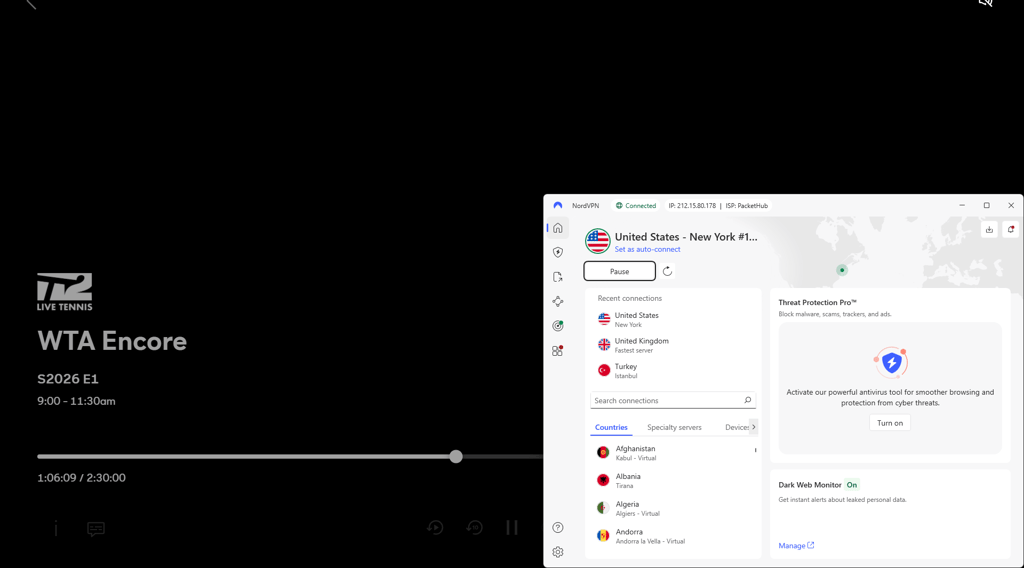
Step 4. Go to PeacockTV.com and start streaming
Once your VPN is connected to a US server, visit PeacockTV.com or open the Peacock app. You can now sign in or create an account and start streaming your favorite shows, movies, live sports, and Peacock Originals from anywhere in the world, just like you were in the United States.
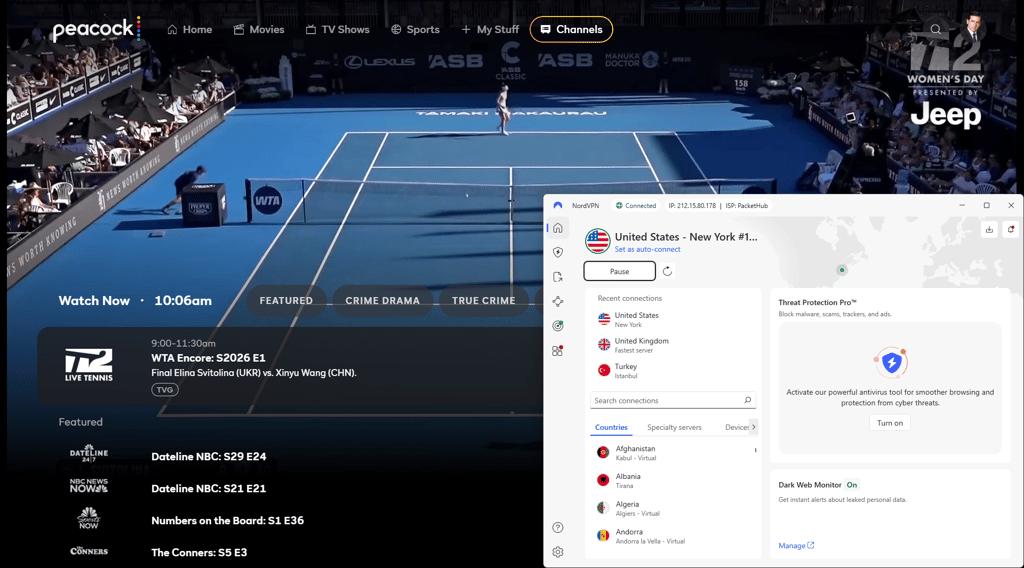
Watch Peacock TV from anywhere with NordVPN
Best VPNs for Peacock TV: a detailed analysis
I tested 18 premium VPNs following strict criteria. The best ones had to be fast and have lots of servers in the USA and elsewhere, so I could easily connect to the country or state I wanted. Additionally, they must offer robust security and privacy features like a kill switch, IP & DNS leak protection, AES-256 encryption, and modern tunneling protocols. I also considered bonus features such as ad blockers, Dark Web monitoring, password managers, and 24/7 customer support.
That said, after testing 24 VPN providers, NordVPN, Surfahark, Proton VPN, Norton VPN, and TotalVPN stood out as the best VPNs for Peacock TV. Below, you will see a detailed evaluation of each VPN.
Top 1. NordVPN – the best Peacock VPN in 2026
![NordVPN mobile logo [IN USE]](https://media.vpnpro.com/images/170x89/2025/08/nord-rreview.jpg)


137

9300

24/7, email
-
Over 3,159 US servers
-
Independently-audited no-logs policy
-
Easily unblocks popular streaming platforms
-
Only 10 simultaneous connections
NordVPN is the best VPN for Peacock TV in 2026, thanks to its vast network of servers worldwide, including over 3,338 servers in the USA, which effectively bypass Peacock’s geo-restrictions.
During testing, I unblocked Peacock on the first attempt and retained 94% of my original speed using the NordLynx protocol. NordVPN delivered consistent speeds, reliable connection, and top-notch security each time. Additionally, NordVPN allows 10 simultaneous connections, so I was able to connect to Peacock TV and stream all my favorite movies on any device.

NordVPN offers obfuscated servers and SmartPlay technology, which help you bypass geo-restrictions, making it easy to access Peacock outside the US. AES-256 encryption, a powerful kill switch, IP & DNS leak protection are also among NordVPN’s features, so your online endeavours stay undetected.
Currently, NordVPN is the best VPN for Peacock, offering a $3.09/month price point, a 3-day free trial, and a 30-day money-back guarantee. Just don’t forget to use a NordVPN coupon code for the best possible deal.
For a deeper investigation of NordVPN, read our NordVPN review.
Top 2. Surfshark – affordable VPN for Peacock TV
![Surfshark mobile logo [IN USE]](https://media.vpnpro.com/images/170x89/surfshark-review-logo-2.jpg)
100
4500
24/7, FAQ
-
600+ servers in the USA
-
WireGuard-powered speeds
-
Reliably bypasses Peacock's VPN blocks
-
Some features cost extra
Surfshark is one of the best Peacock TV VPNs in 2026. It provides lightning-fast speeds and a vast server fleet, so you can enjoy Peacock TV from anywhere without interruptions.
Surfshark has 4,500+ servers in 100+ countries, including 600+ servers in the USA. During my testing, I connected to the New York server from France and unblocked Peacock‘s full library.

The Surfshark app’s interface is user-friendly, so I could immediately connect to any server I wanted. Plus, it supports unlimited simultaneous connections from a single account, so I didn’t have to worry about which device to use it on or how to share it with my family.
Surfshark is one of the fastest VPNs available, delivering smooth 4K streaming on Peacock thanks to its WireGuard protocol and SDN technology. In my tests, it retained around 90% of my original speed, which meant no buffering, even during long sessions like watching a full Premier League match.
Moreover, Surfshark’s CleanWeb features helped to block ads and trackers while streaming Peacock TV. NoBorders and Camouflage Mode made it easier to avoid Peacock’s location restrictions without interruptions. I also used Smart DNS to watch Peacock on devices that don’t support VPN apps, such as smart TVs and gaming consoles.
That said, Surfshark is the most affordable VPN for Peacock, which costs only $1.99/month and comes with a 7-day free trial and a 30-day money-back guarantee.
For a deeper investigation of Surfshark VPN, read our Surfshark VPN review.
Top 3. Proton VPN – freemium VPN for Peacock
![Proton VPN mobile logo [IN USE]](https://media.vpnpro.com/images/170x89/proton-vpn-review-logo-2.jpg)
145
20075
-
5,255+ servers in the USA
-
Great at bypassing Peacock geo-restrictions
-
Free version available
-
Few P2P servers
Proton VPN is the best free VPN for Peacock, offering free US servers, unlimited data, no ads, and a strict no-logs policy. In my tests, I was able to unblock Peacock TV after just a few attempts, though I noticed occasional buffering and slower streaming speeds. However, for smoother playback and more consistent performance, I recommend upgrading to Proton VPN’s Premium plan, which delivers faster speeds and better reliability for streaming.

Proton VPN’s Premium plan offers 20,075+ servers in 145+ countries, including 5,255 servers across 21 US cities, all of which worked reliably for me to unblock Peacock outside the US.
In my speed tests, Proton VPN retained around 87% of my original speed, which was more than enough for smooth HD streaming and only minor slowdowns during peak hours. Plus, ProtonVPN allows 10 simultaneous connections – I tested it on a mix of smartphones, laptops, and smart TVs, and each device maintained steady connections.
Additionally, Proton VPN uses AES-256 encryption and includes a Stealth mode to bypass censorship and geographical restrictions on streaming sites like Peacock TV. Its powerful kill switch secured me online when I lost my connection. Plus, Proton VPN offers DNS leak protection, so you’ll stay safe from exposing yourself.
You can use the free Proton VPN version or upgrade to the Premium plan to stream Peacock for $2.99/month with a 30-day money-back guarantee.
For a deeper investigation of Proton VPN, read our Proton VPN review.
Top 4. Norton VPN – fast VPN that unblocks Peacock outside the US

65
2000
24/7 live chat
-
Servers in 22 US cities
-
60-day money-back guarantee
-
Bypasses Peacock TV blocks
-
Limited torrenting support
Norton VPN is an ideal VPN for Peacock TV if you want strong security and a simple, beginner-friendly app. While it lacks some advanced VPN features, it works well for basic streaming needs with built-in online protection.
Norton VPN offers over 2,000 servers across 65+ locations, including servers in 22 US cities. When I tested it, I connected to a New York server and retained 79% of my original internet speed using the OpenVPN protocol. Upload speeds were slightly slower than those of top providers like NordVPN and Surfshark, but I was still able to stream live games on Peacock TV without issues.
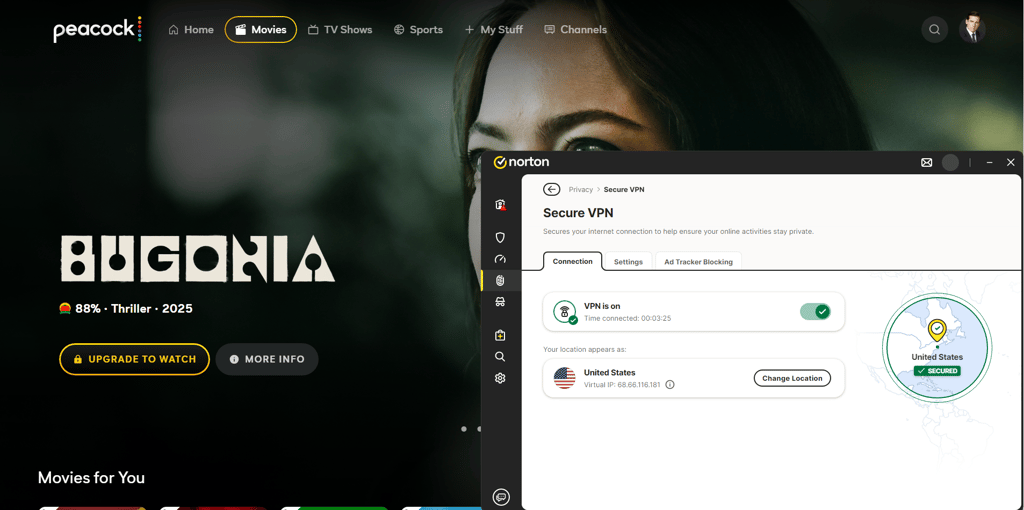
Norton VPN also provides strong security for Peacock TV, with military-grade encryption, a kill switch, and DNS leak protection to keep your data safe. Features like IP Rotator and Compromised Network Detection helped prevent tracking and alerted me when I connected to an unsafe Wi-Fi network. Plus, I could connect up to 10 devices on Android, iPhone, macOS, and Windows, making it easy to watch Peacock anytime, anywhere.
Stream Peacock with Norton VPN at $3.33/month, and don’t forget to take advantage of a 7-day free trial and a 60-day money-back guarantee.
For a deeper investigation of Norton VPN, read our Norton VPN review.
Top 5. TotalVPN – beginner-friendly VPN for Peacock international streaming
![TotalVPN mobile logo [IN USE]](https://media.vpnpro.com/images/170x89/totalvpn.jpg)
90
1800
24/7, email
-
US city coverage
-
30-day refund period for free streaming
-
Affordable pricing
-
Lacks WireGuard
TotalVPN is a great VPN for watching Peacock outside the US. It combines affordability with reliable streaming performance, including servers in the USA, and a solid ability to bypass geo-restrictions.
While its server fleet is smaller, it has servers in 90+ countries, including in the US cities, TotalVPN is enough to unblock Peacock and other streaming platforms. During my testing, I had no issues connecting to US servers, and the Peacock streaming quality was smooth and consistent on my phone and computer. Plus, the standalone TotalVPN subscription permits 8 simultaneous device connections.

The performance and speeds of TotalVPN were solid, thanks to the OpenVPN tunneling protocol. However, during my tests, I noticed that TotalVPN retained only around 73% of the download speed on average. While that’s slightly lower than NordVPN or Surfshark, it was more than enough for watching Peacock in HD without interruptions. Even during peak hours, I encountered no buffering or interruptions while streaming an entire episode of The Office in HD.
Besides solid streaming performance, TotalVPN also offers essential security and privacy features. It uses industry-standard AES-256 encryption and includes a kill switch to keep your identity safe from accidental data leaks.
TotalVPN is a budget-friendly Peacock TV VPN, which costs just $1.59/month and comes with a 7-day free trial. Plus, if you’re not satisfied with the results, take advantage of the 30-day money-back guarantee.
For a deeper investigation of TotalVPN, read our TotalVPN review.
Peacock VPNs comparison
| VPN for Peacock | Rating | Servers in the US | Lowest price | Free trial |
| 1. NordVPN | 9.8⭐️⭐️⭐️⭐️⭐️ | 3,159 servers in 20 US cities | $3.09/month | ✅ Yes, 3-day free trial |
| 2. Surfshark | 9.5⭐️⭐️⭐️⭐️⭐️ | 600+ servers in 24 US cities | $1.99/month | ✅ Yes, 7-day free trial |
| 3. Proton VPN | 8.6⭐️⭐️⭐️⭐️ | 5,255 servers in 21 US cities | $2.99/month | ✅ Yes |
| 4. Norton VPN | 7.3⭐️⭐️⭐️⭐️ | Servers in 22 US cities | $3.33/month | ✅ Yes, 7-day free trial |
| 5. TotalVPN | 8.2⭐️⭐️⭐️⭐️ | Undisclosed | $1.59/month | ✅ Yes, 7-day free trial |
What countries is Peacock available in
Peacock is officially available in the United States and its territories, while viewers in the UK, Ireland, Germany, Austria, Switzerland, and Italy can access selected content through Sky and NOW. In Canada, Peacock TV is available via Corus Entertainment for English-language viewers and Club Illico for French-language audiences. In Latin America, Peacock content is available on Universal+ in Mexico, Brazil, Argentina, and Colombia, while the Middle East and North Africa (MENA) region provides access to Peacock Originals via OSN+. Plus, some of Peacock's content is available on JioCinema in India. However, in most other countries, you’ll need a VPN to bypass geo-restrictions and access the main US Peacock service.
| Country | Is Peacock TV available? | How to watch Peacock TV |
| United States | ✅ Yes | Peacock in the USA is available through a website or an app. If you’re out of the country, use a VPN to access your account. |
| United Kingdom | ✅ Yes, on Sky and Now | Peacock TV is available in the United Kingdom through Sky or NOW TV subscriptions. If you don’t have a subscription, you can use a VPN with US servers to access the full Peacock TV library. |
| Italy | ✅ Yes, on Sky and Now | Italians can enjoy Peacock through Sky Q or other Sky services. Otherwise, you should use a VPN. |
| Germany | ✅ Yes, on Sky | In Germany, Peacock TV is available through a Sky subscription, but if you don't have one, you will need to use a VPN with US servers to access the full Peacock TV library. Check the best USA VPNs here. |
| Canada | ✅ Yes, Corus Entertainment and Club Illico | Peacock TV is available in Canada through Corus Entertainment for English-speaking viewers and via Club Illico for French-speaking audiences. |
| India | ✅ Yes, on JioCinema | Part of Peacock TV content is available in India on JioCinema, plus you can easily access it with a VPN using a US server. |
| Israel | ❌ No | Since Peacock TV is not available in Israel, citizens can unblock it in supported countries with a VPN. |
| Jamaica | ❌ No | You need to use a VPN to bypass geo-restrictions and watch Peacock TV in Jamaica. |
| South Africa | ❌ No | Viewers in South Africa have to use a VPN to stream Peacock TV. |
| Spain | ✅ Yes, on SkyShowTime | In Spain, Peacock TV is available via SkyShowTime, but if you don't have one, you'll need a VPN with US servers to watch Peacock TV. |
| Australia | ✅ Yes, on Binge, Foxtell, and Stan | In Australia, most Peacock content is available on Binge and Foxtel, with a small selection still on Stan. If you don't have a subscription to these local services or want to access the full American library, you will need a VPN to bypass geo-restrictions and stream Peacock TV directly from the US. |
| Latin America | ✅ Yes, on Universal+ | In Latin America, Peacock Originals stream primarily on Universal+ in countries such as Mexico, Brazil, Argentina, and Colombia. If you don’t have a subscription to this local service or want to unlock the complete US library and live sports, you will need a VPN to bypass geo-blocks. |
| Middle East and North Africa | ✅ Yes, on OSN+ | Yes, OSN+ in the Middle East and North Africa (MENA) streams some Peacock content. If you don’t use these services, but want to watch Peacock TV, you’ll need a VPN. |
How to watch Peacock outside the US?
Watching Peacock TV outside the US is simple with a trustworthy VPN like NordVPN. Just choose a US server to get a new IP address, and you'll instantly unlock access to Peacock TV, no matter where you are. Here’s a quick guide to help you get started:
- Get a premium VPN with servers in the US. I recommend NordVPN, currently 76% OFF.
- Download the VPN app on your streaming device.
- Connect to a US server
- Open Peacock TV, log in to your user account, and start streaming!
Peacock not working with a VPN: 4 easy fixes
If you receive the Peacock TV error code “It looks like you don’t meet the US roaming rules” while using a VPN, it likely means Peacock has detected your VPN and is blocking access due to its geo-restriction policies. Here’s how to fix Peacock not working with a VPN:
1. Select a different US server
Peacock TV is available in the United States and for Sky and NOW subscribers in the UK, Germany, Austria, Switzerland, Italy, and Ireland. If Peacock is unavailable in your region or you're traveling, you'll need to use a VPN to connect to a US server. Occasionally, specific servers get blacklisted, preventing access to the site. Connecting to a different US server can help determine if the issue is server-specific.
2. Check for IP/DNS leaks
An IP or DNS leak can expose your true location, and Peacock will block your VPN connection. To fix this, use dnsleaktest.com or ipleak.net to check if your IP or DNS is exposed. If leaks are detected, set the VPN provider’s DNS addresses on your device. In addition, before using a VPN, remember to enable the kill switch and DNS leak protection in your VPN settings.
3. Clear cache and cookies
Cached data and cookies may store information on your real location, allowing Peacock to detect inconsistencies in your connection. By clearing your cache and cookies, you’ll ensure you’re not leaving any digital footprints that expose your true location. Once cleared, reconnect to your VPN, and try streaming Peacock again.
4. Contact customer support
If you have tried everything but nothing helps, reach out to your VPN provider’s customer support for assistance. Most premium VPN services, like NordVPN and Surfshark, offer 24/7 live chat support to help you out with any issues. You can usually access support through the VPN’s official website or the app for a quick resolution.
How to subscribe to Peacock outside the US: working payment methods
If you want to subscribe to Peacock TV outside the US, you might run into some payment difficulties. Peacock TV typically requires a payment method linked to a US bank. However, there are a few alternative ways to subscribe to Peacock without a US card: a virtual credit card, a US Google Play gift card, or a US Apple gift card.
Here’s a guide on how to pay for Peacock without a US card:
- Get a premium VPN service. I recommend NordVPN, with over 1,970 US servers.
- Download and install the VPN on your favorite device.
- Open the application and connect to a US server.
- Go to Peacock’s sign up page.
- Select a subscription plan and create your account.
- On the payment page, use a virtual US prepaid card, US Google Play gift card, or a US Apple gift card.
- Click “Subscribe” to complete your purchase.
- Choose your favorite content and start streaming!
What to watch on Peacock TV?
Peacock TV has three pricing tiers:
- $7.99/month or $79.99/year – Select plan with the entire library, including NBC and Bravo live shows, sports, and more. This plan includes ads.
- $10.99/month or $109.99/year – Premium plan with no ads except for a few selected live events and programs. The plan includes NBC and Bravo live sports, events, hit films and Peacock Originals.
- $16.99/month or $169.99/year – Premium Plus plan includes everything in the Premium tier, plus the ability to download the movie or show and no ads (with limited exclusions).
In short, Select is best if you only want basic NBC and Bravo TV content and don’t mind ads, as it doesn’t include the full Peacock catalog. Premium expands access to live sports, events, hit films, and Peacock Originals, but it still includes sponsored ads. However, Premium Plus removes ads from most on-demand content, adds offline downloads for select titles, and offers the smoothest overall viewing experience, though ads may still appear on sponsored pages, live channels, and live sports.
Below is a quick look at some of the most appealing features of Peacock TV.
| Category | Title |
| Movies | Monkey man Back to Black Abigail Black Phone 2 Shooting Stars Downtown Abbey: The Grand Finale The Independent |
| TV shows | Love Island USA Yellowstone Suits Long Bright River The Copenhagen Test Found Summer House Bel Air |
| Sports |
Paris Olympics Premier League NFL Coverage Winter Olympics Milano Cortina NBA All-Star Game Super Bowl LIX |
Conclusion
The full Peacock library is geo-restricted to the US, which means that if you’re travelling or living abroad, you’ll need a VPN to access it.
To save you the time spent searching for a reliable Peacock VPN, I thoroughly tested over 20 VPN providers and found NordVPN to be the best VPN for streaming Peacock TV from anywhere. With 3,338 servers across 20 US cities, obfuscation, and military-grade encryption, it stays undetected by Peacock’s anti-VPN technology, ensuring reliable Peacock access and streaming.

![Surfshark weekly deals logo [IN USE]](https://media.vpnpro.com/surfshark-weekly-deals.svg)
![Proton VPN winner logo [IN USE]](https://media.vpnpro.com/2025/05/protonvpn-winner.png)
You may also like to read:
How to watch TSN in the USA
How to watch ITVX in the USA
How to get cheap YouTube premium
How to watch RuPaul’s Drag Race from anywhere
How to watch ABC live outside the US
How to watch American TV abroad
FAQ
Why is Peacock saying I don't meet the US roaming rules?
If you see the “It looks like you don't meet the US roaming rules” error message, you are either outside the US or using a VPN. Peacock enforces US roaming rules by checking your IP address to confirm you're in the United States.
Does Peacock work outside the US?
No, Peacock is only available in the United States, including select regions for Sky and NOW subscribers, like the UK, Germany, and Italy. To stream Peacock outside the US, you'll need a reliable VPN like NordVPN to bypass geo-restrictions.
Does Peacock work with VPN?
Yes, Peacock works with a VPN, but the service actively detects and blocks many VPN IP addresses to enforce its licensing restrictions. To reliably bypass these geo-restrictions and stream Peacock TV, I recommend a premium VPN like NordVPN. It offers RAM-only servers across 20 US cities with military-grade encryption, making it easy to access Peacock’s full library safely and securely.
Which VPN works with Peacock TV?
NordVPN is the best VPN for Peacock TV, offering excellent unblocking capabilities, fast speeds, and 3,159+ US servers. Surfshark and Proton VPN are also ideal options for bypassing Peacock’s geo-restrictions.
Does Peacock work in Mexico?
Yes, Peacock works in Mexico. Peacock TV has a licensing agreement with regional partner Universal+ to stream its content, which offers a selection of Peacock content.
Can I watch Peacock in Spain?
Yes, you can access some Peacock TV content in Spain through SkyShowtime, but it only includes a selection of shows and movies licensed for the region. To watch Peacock’s full US library, get a VPN to connect to a US server. For this, I recommend NordVPN, which offers fast, reliable connections, servers in 20 US cities, and strong encryption to securely bypass geo-restrictions and stream Peacock.
How to watch Peacock in Europe?
To watch Peacock in Europe, use a VPN with US servers, such as NordVPN. Connect to a US server, visit the Peacock website, and log in to stream content from anywhere.
How to get Peacock TV in the UK?
You can watch Peacock TV in the UK through streaming services like Sky TV and NOW, but these only offer selected shows and movies licensed for the region. If you want access to Peacock’s full US library, you’ll need a VPN such as NordVPN to connect to the US server. This allows you to bypass geo-restrictions and stream the full range of content from anywhere.
Is Peacock blocking VPNs?
Yes, Peacock detects and blocks VPNs to maintain geo-restrictions. To bypass these restrictions, use a VPN like NordVPN or Surfshark – both are known to work reliably with Peacock TV.


