Why Hulu is not working with a VPN and how to fix it



To fix Hulu not working with a VPN, start by changing to another US server, clearing your cache, or using obfuscated servers in your VPN settings. Since Hulu frequently blacklists VPN IP addresses, it’s important to use a premium VPN with streaming-optimized servers and DNS leak protection, such as NordVPN.
🏷️ LIMITED OFFER: NordVPN deal! Get 76% OFF NordVPN + 3 months FREE 🏷️
If Hulu is not working with VPN, you’ll usually encounter a message like “Hulu is not available in your region” or a Hulu VPN error code like P-EDU101. This is because Hulu actively detects and blocks many VPN and proxy IP addresses, especially if you’re using shared IPs or flagged servers.
Since Hulu's content is primarily restricted to the US (with a separate version in Japan), the platform uses strict geo-blocking measures to comply with licensing agreements. So if your VPN leaks your real location or if you get assigned a blacklisted IP, Hulu will block you, even if you have an active subscription.
However, not every VPN can bypass these blocks, so it's essential to choose a trustworthy provider with strong leak protection and regularly refreshed US IPs. That’s why NordVPN is the overall best VPN for Hulu for stable streaming. Keep reading to learn how to get around Hulu VPN issue quickly and safely.
VPNs that work with Hulu in 2026
-
the best Hulu VPN for fast US streaming
-
a budget-friendly Hulu VPN to watch Hulu outside the US
-
a secure VPN that works with Hulu for stable streaming
![NordVPN mobile logo [IN USE]](https://media.vpnpro.com/Nord-VPN-review.jpg)
![Surfshark mobile logo [IN USE]](https://media.vpnpro.com/surfshark-60x60-1.jpg)
![Proton VPN mobile logo [IN USE]](https://media.vpnpro.com/ProtonVPN-small.jpg)
Not every VPN passed my Hulu tests. Providers like Mullvad, PIA, Hotspot Shield, and TunnelBear failed to unblock Hulu US altogether or delivered unstable access. If you’d like to see detailed testing results and rankings, check out our full best VPN for Hulu comparison.
Why does Hulu block VPNs?
Hulu does not allow the use of anonymous proxy servers or VPNs because its licensing agreements only permit streaming content within the United States. Hulu can detect your VPN usage by checking an IP address on its blacklist or by detecting a leak of your real IP address. When this happens, you may see messages like “Hulu is not available in your region or you may be using a VPN error”, or similar location-based errors that stop playback.
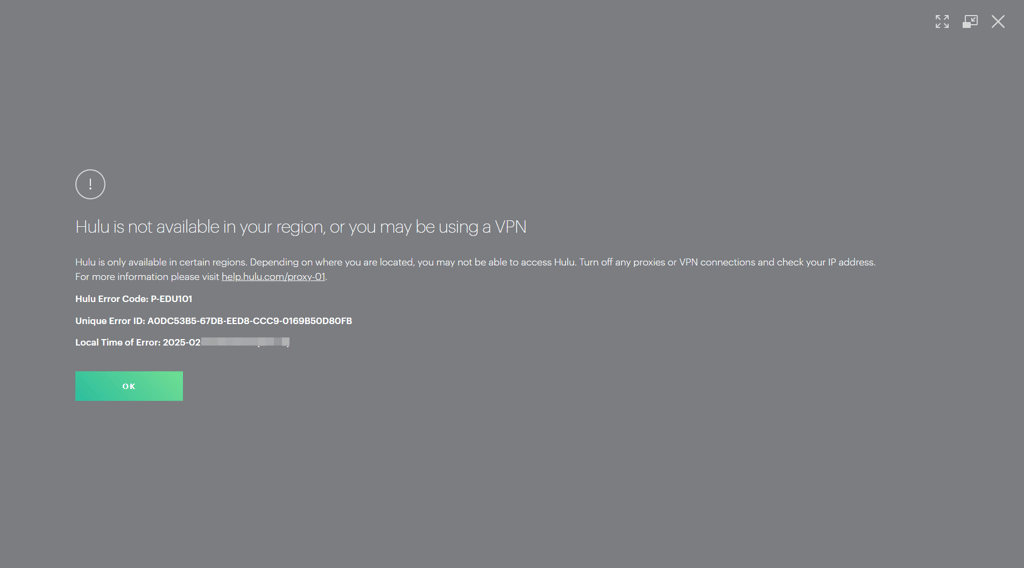
Hulu knows you’re using a VPN by relying on a mix of detection methods:
- IP blacklisting. Numerous users streaming content from the same IP address is suspicious and usually means a VPN is involved. Hulu regularly blacklists such IP addresses to prevent access.
- GeoIP databases. The Hulu website checks whether your IP address is linked to a VPN server and blocks you if it appears in one of these VPN IP databases. Plus, if your IP address shows you in one location, while your device’s GPS data or billing information indicates another, it raises red flags.
- IP, DNS, and WebRTC leaks. If your VPN leaks any of this data, your actual location is visible. Naturally, Hulu sees this mismatch and blocks access to its services.
- Browser/Device Data. Hulu stores location details in your browser cookies and cache. If you switch VPN locations but your stored data shows something different, the platform may block you.
The get around the Hulu VPN issue, first connect to a US-based server, then clear your browser’s cache and cookies or use incognito mode. If the issue persists, try a different server or switch to a high-quality, streaming-optimized VPN like NordVPN. A reliable VPN can fully mask your connection and prevent IP address leaks that trigger Hulu blocks.


Since 2018, VPNpro has delivered unbiased, expert-backed insights through in-house research and thorough VPN testing. Our team ensures every review is fact-checked and reliable. Learn how we maintain these high standards in our testing methods.
Detailed steps on how to get Hulu to work with a VPN
In most cases, if Hulu isn't working with your VPN, it's due to blocked IP addresses or data leaks. Below are the most effective steps to get around Hulu VPN issue and start streaming again:
Step 1. Connect to a different US VPN server
Hulu uses strict VPN detection and frequently blacklists IP addresses that are linked to VPN servers. So if you’re seeing a Hulu VPN error, there’s a chance that your current assigned IP has already been flagged and blocked.
To fix this, switch to a different US VPN server – this way, you’ll be assigned a new IP address, which can help you bypass the block. However, this only works if you’re using a reliable VPN with a large and frequently updated US server network. That’s why I recommend NordVPN, as it offers over 3204 US servers, making it easy to find one that still works with Hulu.

Step 2. Clear your browser’s cache and cookies
Clearing your cache and cookies is important because they store location data, such as your previous IP address or even GPS-related information. If such information isn’t deleted, it can reveal your location to Hulu. So even if your VPN is active, Hulu may detect the mismatch between your stored browser data and the new IP address, triggering a proxy error block. Deleting your cache and cookies forces the site to read the new, US-based VPN IP address, and helps you bypass location-based restrictions. Here’s how to do it:
- Open your browser and go to the menu (usually in the top right corner)
- Click on History or Privacy and Security
- Select Delete browsing data or a similar option
- Set the time range to All time
-
Check the boxes for Cookies and other site data and Cached images and files

- Click on Delete data

Step 3. Change the VPN protocol
Many VPNs offer various tunneling protocol options – some prioritize speed, others provide more stable connections, and some are great at bypassing geo-blocks. If the protocol you're using isn't effective with Hulu, try switching to a different one in your VPN's settings. During my tests, OpenVPN (TCP) was detected more often, while NordVPN’s NordLynx protocol provided more consistent access. The process of changing the connection protocol is as simple on NordVPN:
- Open the VPN’s settings
- Click on Connection
-
Try different VPN protocols within your VPN client

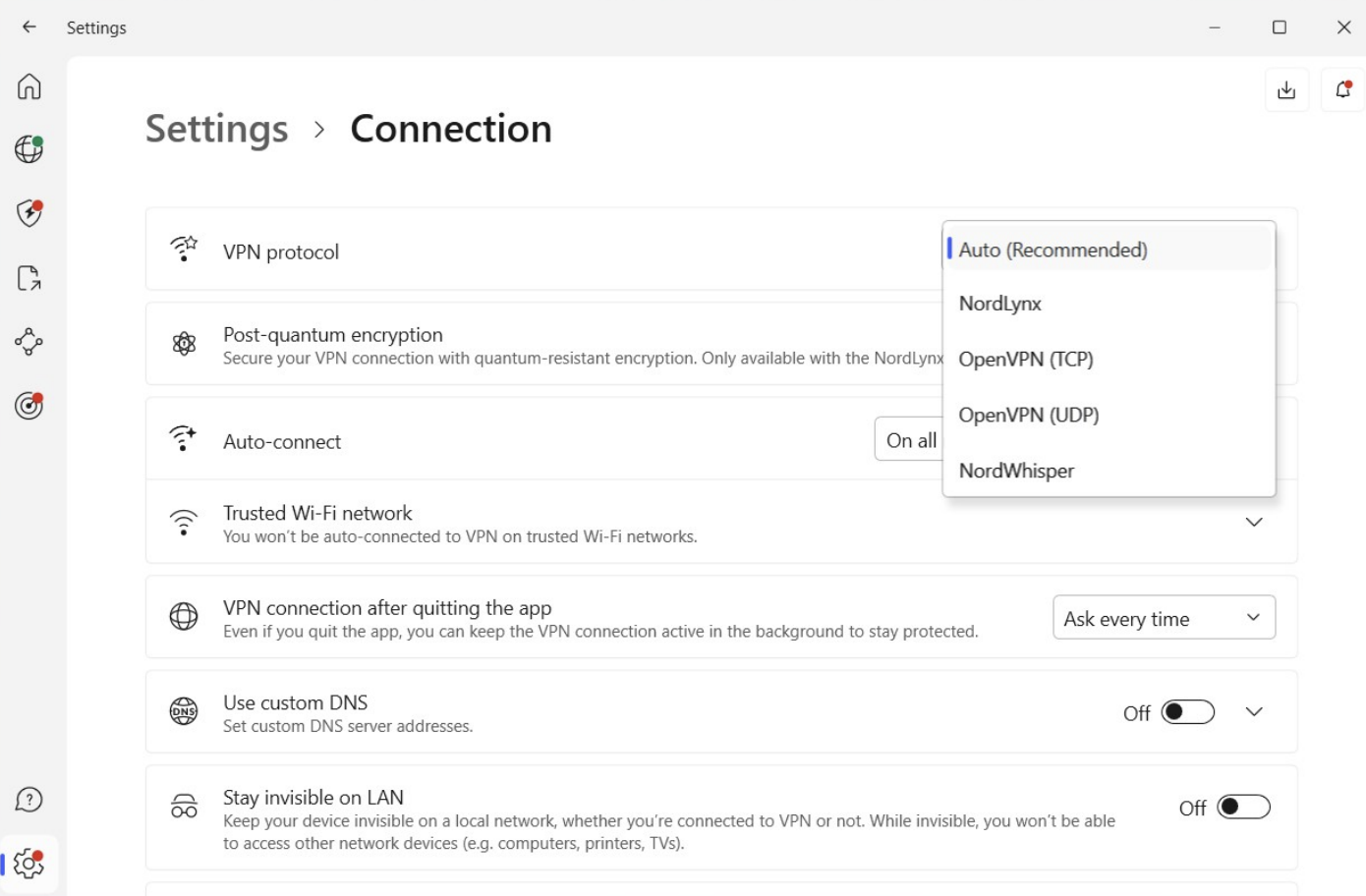
The most reliable tunneling protocol for Hulu is WireGuard. For example, NordVPN’s NordLynx protocol is built on WireGuard, which is why it’s known to deliver fast speeds and reliable access. However, OpenVPN (UDP) may also provide a high unblocking success rate depending on the provider. It all boils down to how a VPN provider implements each protocol.
Step 4. Check for IP and DNS leaks
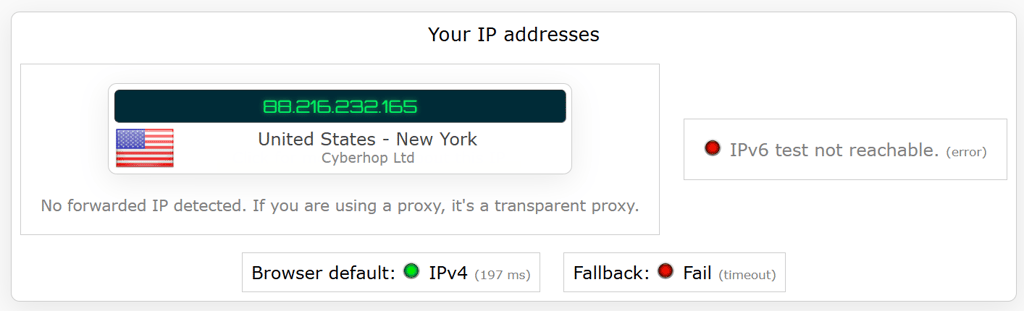
Hulu blocks VPNs that leak your real IP or DNS address, use blocklisted IP ranges, or create mismatched location data. So if your DNS queries and IP address expose your real location, Hulu can easily detect the VPN and restrict access.
To fix this, enable your VPN’s kill switch and DNS leak protection, then test your connection at ipleak.net or dnsleaktest.com. During my tests, I used NordVPN to see how it works. First, go to Settings, press Kill Switch, and lastly, turn on the Internet Kill Switch and check both boxes underneath
If Hulu still detects your location, flushing your DNS cache can help remove stored data from previous (non-VPN) connections. This forces your device to request fresh DNS data through the VPN. Here’s how to flush your DNS:
- On Windows: Open the Command Prompt as an admin and enter: ipconfig /flushdns and press Enter
- On macOS: Open Terminal and type in: sudo dscacheutil -flushcache; sudo killall -HUP mDNSResponder and press Enter (you might need to enter your password)
NordVPN also offers SmartDNS for smart TVs, which lets you bypass Hulu restrictions without using the VPN app. To set up SmartDNS on your smart TV using NordVPN:
- Log in to your NordVPN account dashboard, scroll down, and open the SmartDNS section
- A pop-up will appear showing your detected IP address — make sure your VPN is turned off at this stage
- Click Activate SmartDNS to register your current IP address
- Wait for the confirmation email from NordVPN
- After getting the confirmation, on your smart TV, go to Network Settings and select DNS Settings. There, manually enter the following addresses: primary DNS: 103.86.96.103 and secondary DNS (if available): 103.86.99.103
- Save the settings and restart your TV to complete the setup
Step 5. Disable IPv6
Even with a VPN, Hulu can detect your real location if IPv6 is enabled on your device. Your device might use both IPv4 and IPv6 protocols if your ISP provides them, but many VPNs only route IPv4 traffic through their encrypted tunnel. This means your IPv6 address can leak outside the VPN. Hulu's detection systems can use this leaked IPv6 address to determine your actual location by detecting mismatches between your VPN IP (IPv4) and your real IP (IPv6). To fully prevent leaks and bypass Hulu's blocks, disable IPv6 in your device's network settings.
- Windows. Head to Network & Internet settings > Network & Sharing Center. Select your network, then click its Properties. Uncheck the Internet Protocol Version 6 (TCP/IPv6) option and save the changes.
- Mac. Open Terminal (Cmd + Space, type “Terminal”). Type “networksetup -listallnetworkservices” to identify your connection name. Then type “sudo networksetup -setv6off Wi-Fi” (replacing “Wi-Fi” if necessary) and enter your password.
Note: Before changing your system settings, check your VPN app first. Many VPNs already include IPv6 leak protection. Look in the app’s Connection or Advanced settings for a toggle like “IPv6 Leak Protection” or “Block IPv6.” If it’s enabled, the VPN will automatically prevent IPv6 leaks whenever the connection is active.
Step 6. Check your antivirus and firewall settings
Antivirus and firewall programs are designed to block unknown or suspicious connections to protect your device. Sometimes, they mistakenly identify your VPN as a threat and block its traffic, especially if the VPN uses unfamiliar ports or encryption methods. This can prevent the VPN from working properly with Hulu. By temporarily disabling these tools, you can check if they're the cause and whitelist your VPN so they won't interfere again.
Step 7. Get a Dedicated IP
Hulu often blocks VPN connections by blacklisting shared IP addresses that are commonly used by VPN providers. As a result, this can trigger “anonymous proxy” errors. A dedicated IP address can help in some cases, since it’s assigned only to you, reducing the risk of being blocked, which is common with shared IPs.
From my experience, dedicated IPs work best as a backup solution. Switching servers usually fixes Hulu VPN errors, but if that doesn’t work, consider getting a dedicated IP address. This gives you a unique, stable address that’s less likely to be flagged by Hulu. Here is how to get a dedicated IP with NordVPN:
- Get a reliable VPN with a dedicated IP, like NordVPN
- Log in to your account, scroll down, and click Get Dedicated IP
- Add a dedicated IP to your subscription for $4.19/month and proceed to checkout
- Select a US-based location for Hulu
-
Once it’s active, open the NordVPN app and connect to your dedicated IP server before launching Hulu


Step 8. Contact your Hulu VPN support team
If Hulu still isn’t working, your VPN might need a quick configuration adjustment or be experiencing server issues. Reach out to your VPN’s support; live chat is usually the fastest. They can guide you through the fixes or let you know if Hulu is temporarily blocked on their servers.

Step 9. Consider switching a VPN provider
If you’ve tried everything and Hulu is still blocking you, the problem is likely with your VPN. Free or outdated VPNs often use overcrowded servers or IP addresses that Hulu has already blacklisted.
During my testing, several VPNs struggled to unblock Hulu reliably. Providers like Mullvad, PIA, Hotspot Shield, and TunnelBear frequently triggered Hulu’s proxy errors since their IPs were already flagged or shared by too many users. That said, NordVPN is the most reliable VPN that works with Hulu. It has a wide range of fast US servers, offers a dedicated IP feature, and consistently bypasses Hulu’s VPN detection and content restrictions. Plus, it comes with a 30-day money-back guarantee, so you can try it risk-free.

Hands-on testing: VPNs that work (and don’t work) with Hulu
To evaluate which VPNs actually work with Hulu, I tested 15 popular providers across Windows, macOS, iOS, and Android devices. I looked at whether each VPN could stream Hulu without proxy errors, buffering issues, or blocked access. Here are the results of that hands-on testing.
| VPN provider | Works with Hulu? | Streaming quality | Notes |
| NordVPN | ✅ Yes | Excellent (4K/HD) | No errors, stable streaming |
| Surfshark | ✅ Yes | Excellent (4K/HD) | Minor buffering on some servers |
| Proton VPN | ✅ Yes | Excellent (4K/HD) | Occasionally needed server switch |
| ExpressVPN | ✅ Yes | Excellent (4K/HD) | Stable streaming, no proxy errors during testing |
| IPVanish | ✅ Yes | Good (HD) | Some servers triggered Hulu proxy error |
| PrivateVPN | ✅ Yes | Good (HD) | Worked after switching to a different US server |
| TotalVPN | ✅ Yes | Good (HD) | Streaming worked, but speeds were noticeably slower than top providers |
| CyberGhost | ✅ Yes | Good (HD) | Streaming worked on dedicated streaming servers |
| Private Internet Access | ❌ No | Poor | Frequent buffering, occasional proxy error |
| Hotspot Shield | ❌ No | Poor | Hulu blocked VPN traffic |
| Windscribe | ❌ No | Poor | Geo-restriction message displayed |
| Mullvad | ❌ No | Poor | Hulu blocked VPN traffic |
| TunnelBear | ❌ No | Poor | Most servers blocked by Hulu |
| Hide.me | ❌ No | Poor | Hulu displayed proxy error on most servers |
The results showed a clear pattern: premium VPNs were far more reliable for streaming Hulu than free alternatives. Services like NordVPN, Surfshark, and Proton VPN worked consistently across Windows, macOS, iOS, and Android. Meanwhile, most free VPNs were blocked almost immediately. I also found that server selection played an important role, as some providers required switching between US servers to avoid proxy errors and maintain stable HD playback.
During testing, some VPNs immediately triggered Hulu’s proxy error message. This happened most often with smaller or free VPN providers whose IP addresses had already been flagged by Hulu’s VPN detection systems.
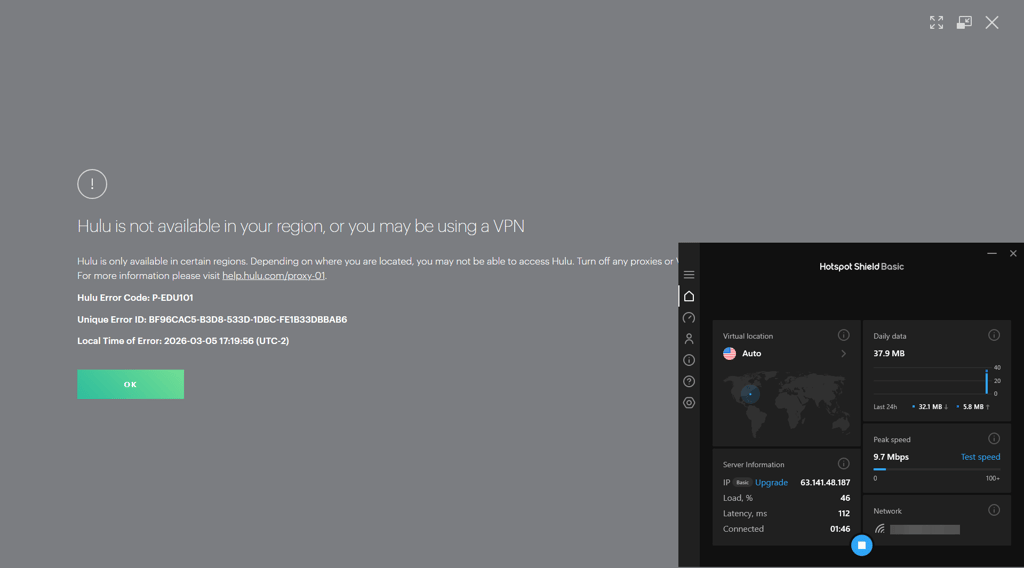
In contrast, premium providers performed much better. When connected to NordVPN, Hulu consistently loaded without proxy errors, and streaming started quickly while maintaining HD quality across several US servers.
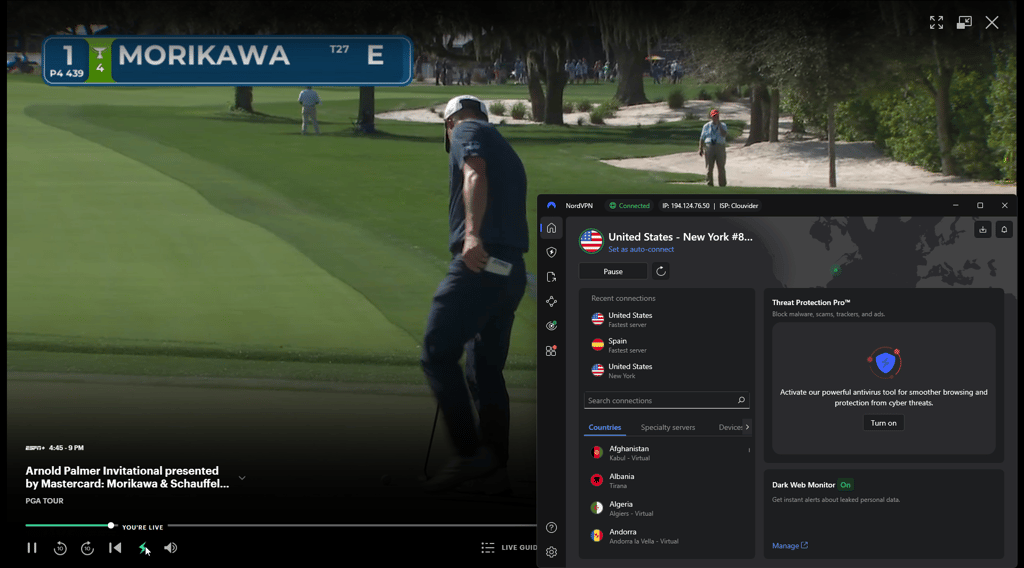
During my testing, I also measured VPN speeds to see how they affected streaming performance. In the end, NordVPN delivered the fastest results overall, maintaining high download speeds that allowed Hulu to stream smoothly in HD and 4K without buffering.
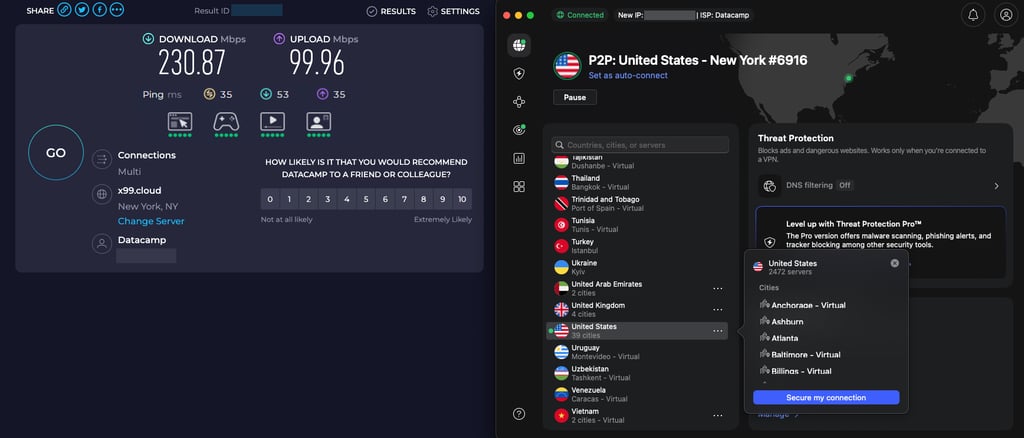
For the smoothest Hulu experience, I recommend using NordVPN or Surfshark and connecting to US servers with low load. If Hulu detects your VPN, try switching servers, clearing your browser cookies, or using the Hulu app instead of streaming through a browser. Free VPNs are far more likely to be blocked, so a premium provider is usually the safer option.
Conclusion
Hulu’s advanced VPN detection blocks many services, which is why users frequently run into proxy errors when trying to stream from abroad. Free or smaller VPN providers are especially easy for Hulu to detect, since their limited server pools and shared IP addresses are often flagged quickly. Still, the right VPN can reliably help you bypass these restrictions.
During my testing, NordVPN stood out as the most consistent option for accessing Hulu without buffering or detection. Its NordLynx delivers fast speeds for HD and 4K streaming, while its network of over 3000 US servers provides a large pool of regularly refreshed IP addresses, making it easy to switch locations if one gets blocked. Combined with strong privacy protections and features like Meshnet, NordVPN remains the best choice for watching Hulu with a VPN in 2026.
![Surfshark weekly deals logo [IN USE]](https://media.vpnpro.com/surfshark-weekly-deals.svg)
![Proton VPN winner logo [IN USE]](https://media.vpnpro.com/2025/05/protonvpn-winner.png)
FAQs
Why am I seeing “Hulu is not available in your region or you may be using a VPN” error?
You’re seeing the “Hulu is not available in your region or you may be using a VPN” error because Hulu has detected that your connection is coming through a VPN or proxy. This happens when your IP address is on Hulu’s blacklist or if your real location is exposed through an IP or DNS leak. In such cases, Hulu may also show error code P-EDU101. However, I recommend using a reliable VPN, such as NordVPN, to get around Hulu blocks, as it offers the fastest US servers and advanced leak protection to help you bypass Hulu’s VPN detection.
Does Hulu work with a VPN?
Yes, Hulu works with VPN; however, only some VPNs can bypass the Hulu VPN block. With NordVPN you can effortlessly access Hulu thanks to its extensive, US-based server network. NordVPN also gives you unlimited bandwidth and super-fast speeds for the best streaming experience.
How to get around Hulu VPN issue?
The easiest way to get around a Hulu VPN issue is to switch to a different server or use a VPN that consistently bypasses Hulu’s blocks. Not all VPNs work, so choosing a reliable provider like NordVPN, which ensures you can stream Hulu without triggering a VPN error.
Does NordVPN work with Hulu?
Yes, NordVPN works with Hulu and can reliably bypass Hulu’s VPN blocks. It offers the fastest US servers, the NordLynx protocol for smooth streaming, and advanced leak protection to prevent Hulu VPN errors. Plus, features like obfuscated servers and Meshnet help maintain uninterrupted access to Hulu even when Hulu tries to detect VPN traffic.
How does Hulu know I'm using a VPN?
Hulu knows you’re using a VPN when it detects that your IP address is on its blacklist or if your real IP leaks through your VPN. To avoid this, you need a reliable VPN, like NordVPN, that hides your VPN usage and prevents IP or DNS leaks, ensuring you can access Hulu without triggering errors.
How do I bypass the proxy error on Hulu?
To bypass the Hulu proxy error, you need to use a reliable streaming VPN that can effectively mask your IP address and avoid detection. Choose a premium VPN like NordVPN, which has no trouble bypassing Hulu’s geo-restrictions. Just make sure to connect to a server located in the United States, as Hulu is primarily available there.
Does Hulu block VPNs?
Hulu can block the VPN IP address if it detects suspicious activity coming through it. Otherwise, the platform won’t suspend your account – just block access to its services. Thus, you can still use such providers as NordVPN to stream content on Hulu.
Why is Hulu saying I have a VPN?
Hulu detects a VPN when it sees your connection is coming from a known VPN IP address. To avoid this, use a reliable VPN like NordVPN, which is designed to bypass Hulu’s detection and keep your streaming uninterrupted.


- VPNs that work with Hulu
- How to get Hulu to work with a VPN
- 1️⃣Connect to a different US VPN server
- 2️⃣Clear your browser’s cache
- 3️⃣Change the VPN protocol
- 4️⃣Check for IP and DNS leaks
- 5️⃣Disable IPv6
- 6️⃣Check your antivirus and firewall settings
- 7️⃣Get a Dedicated IP
- 8️⃣Contact your Hulu VPN support team
- 9️⃣Consider switching a VPN provider
- Conclusion
- FAQ