ITVX not working with a VPN? 10 easy fixes


If ITVX isn’t working with your VPN, try a different UK server, clear your browser’s cache and cookies, turn on the VPN’s kill switch and DNS leak protection, or change the VPN protocol. ITVX often blocks access if it detects your IP is outside the UK. This usually happens when the VPN’s IP is blocked or overloaded. A few simple VPN adjustments can usually fix the problem.
ITVX is a UK-only streaming platform that aggressively blocks VPN traffic to enforce regional restrictions. It constantly updates its firewall to detect and blocklist VPN IP addresses, making many VPNs ineffective. If you’re using a weak VPN, chances are ITVX has already blocked its servers.
To watch ITVX with a VPN, you need a reliable service that can bypass restrictions. After testing many options, I found that NordVPN, Surfshark, and ProtonVPN stood out as the best IPTV VPNs in 2026. With these VPNs, I never encounter the “ITVX not working with VPN” issue. They have fast servers for streaming, regularly update their IPs, and use advanced features to hide VPN traffic.
🏷️ LIMITED OFFER: NordVPN deal! Get 76% OFF NordVPN + 3 months FREE 🏷️
Best VPNs that work with ITVX in June 2026
-
overall best VPN for ITVX
-
affordable ITVX VPN with unlimited device connections
-
privacy-focused VPN for ITVX
![NordVPN mobile logo [IN USE]](https://media.vpnpro.com/Nord-VPN-review.jpg)
![Surfshark mobile logo [IN USE]](https://media.vpnpro.com/surfshark-60x60-1.jpg)
![Proton VPN mobile logo [IN USE]](https://media.vpnpro.com/ProtonVPN-small.jpg)
During my testing, I found that most free VPNs and unreliable providers don’t work with ITVX, including TunnelBear and HolaVPN, as ITVX consistently detected and blocked their IP addresses.
Why is ITVX VPN not working?
ITVX VPN may not be working because ITVX actively blocks many VPN IP addresses, especially those from popular or free VPN services. The issue can also occur if you’re connected to a non-UK server, using a blacklisted UK IP, or experiencing DNS or IP leaks that reveal your real location.

Several factors may cause ITVX not working with a VPN, such as:
- ITVX could be blocking your VPN's IP address. ITVX frequently updates its blocklist, so your VPN’s IP may no longer work.
- Your IP address or DNS requests are leaking. If your real IP or DNS requests are exposed, ITVX can detect your actual location and deny access.
- Other DNS problems. Incorrect DNS settings can reveal your actual region, preventing the VPN from working.
- ISP issues. Some internet providers route traffic through non-UK servers, making it seem like you're outside the country, even with a VPN.
- Using a VPN that doesn’t unblock ITVX. Not all VPNs have what it takes to bypass ITVX’s detection system. To ensure uninterrupted streaming, use an industry-leading VPN that reliably works with ITVX.
Therefore, if you're experiencing issues with ITV VPN not working, switching to a reliable VPN like NordVPN, trusted by millions worldwide, can help.
ITVX not working with a VPN: 10 quick fixes
If ITVX is not working with a VPN, there are several troubleshooting steps you can take to regain access. ITVX actively blocks VPN traffic, but you can bypass these restrictions by tweaking your VPN settings and ensuring your connection is secure. Here are ten easy fixes to get ITVX VPN access working again.
Step 1. Update the VPN and ITVX app
Outdated VPN or ITVX app versions may cause connectivity issues. Updates often include fixes that help bypass ITVX's restrictions. To update your VPN, open the app, check for updates in the settings or app store, install them, and restart the app. For ITVX, go to your device’s app store, search for ITVX, update it if needed, and restart the app to make sure everything runs smoothly.
Step 2. Clear your browser cache and cookies
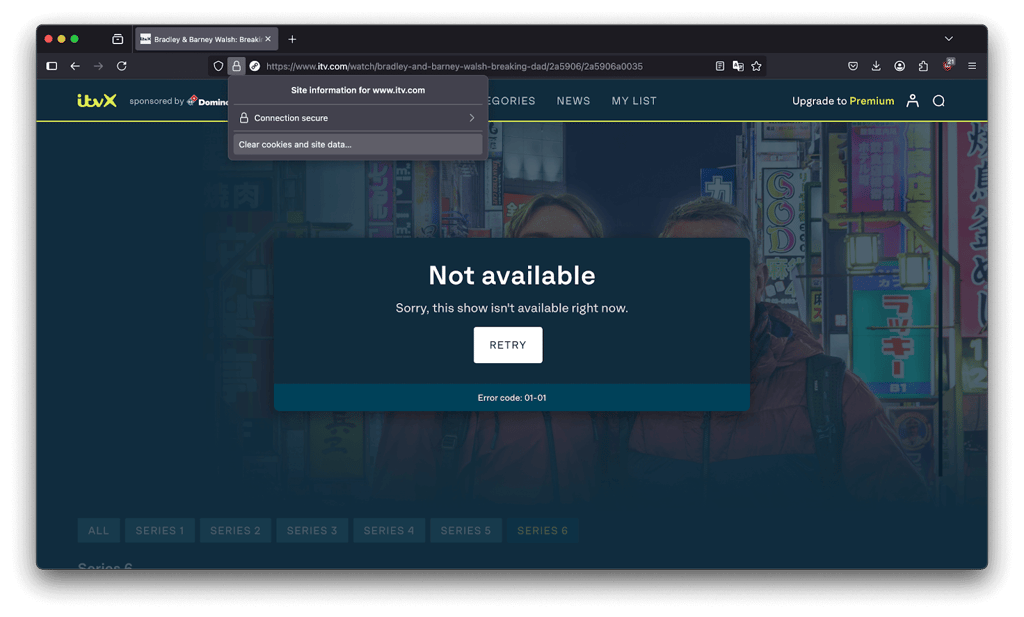
ITVX may store location-based data in your cache and cookies, preventing access even when using a VPN. Clearing them removes any saved location information.
How to clear cache and cookies:
- Google Chrome: Settings > Privacy & Security > Clear Browsing Data > Select "Cookies and site data" and "Cached images and files" > Clear Data.
- Firefox: Settings > Privacy & Security > Cookies and Site Data > Clear Data.
Step 3. Connect to a different UK server
ITVX only works in the UK, so ensure your VPN is connected to a UK server. If ITVX blocks your current IP, switching to another UK server might help.
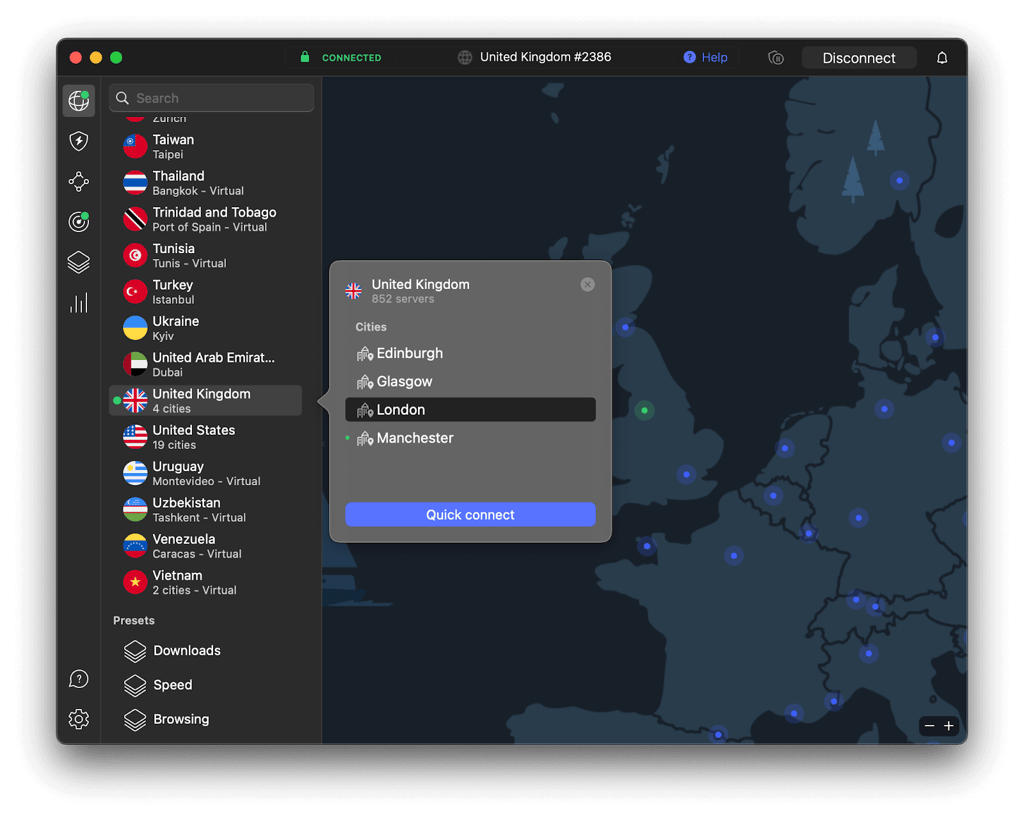
Tip: Consider using a dedicated IP address, a unique IP assigned only to you. It will reduce the chances of getting blocked. NordVPN offers this feature to improve streaming reliability.
Step 4. Activate the Kill Switch
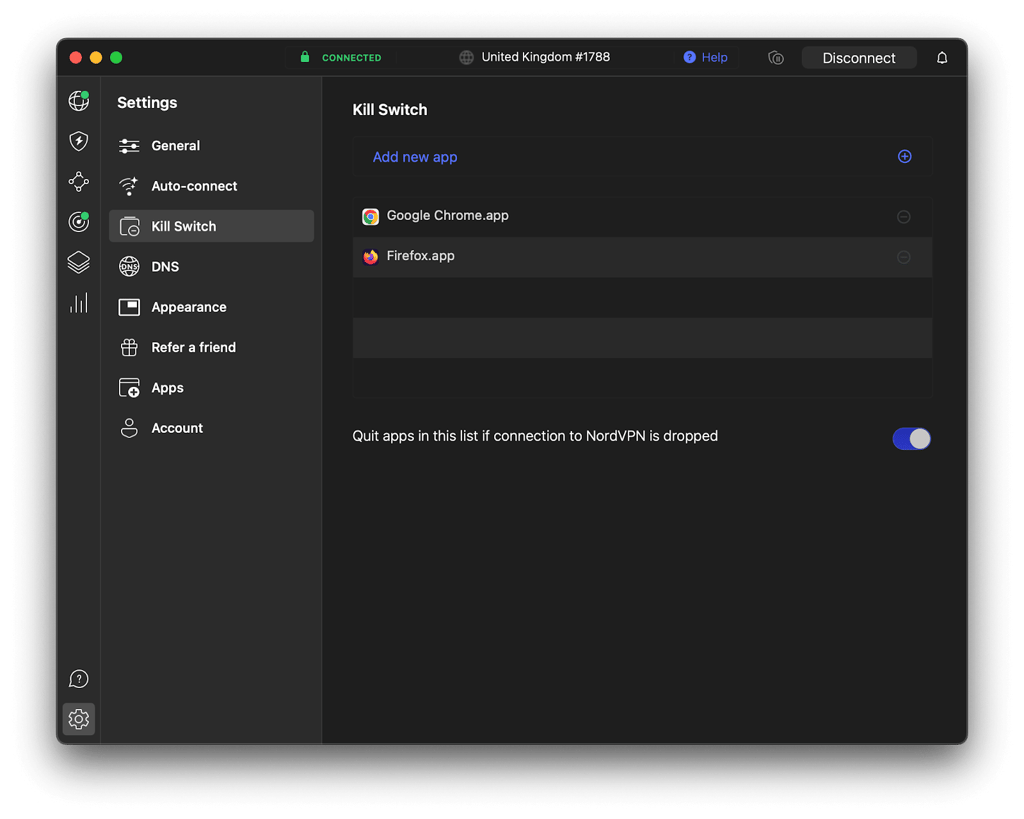
A Kill Switch prevents accidental location leaks by cutting your internet connection if the VPN drops. DNS Leak Protection ensures your actual IP address isn’t exposed.
How to activate NordVPN’s Kill Switch:
- Open NordVPN.
- Go to Settings > Kill Switch.
- Toggle on "Internet Kill Switch" or "App Kill Switch."
Step 5. Change VPN protocol
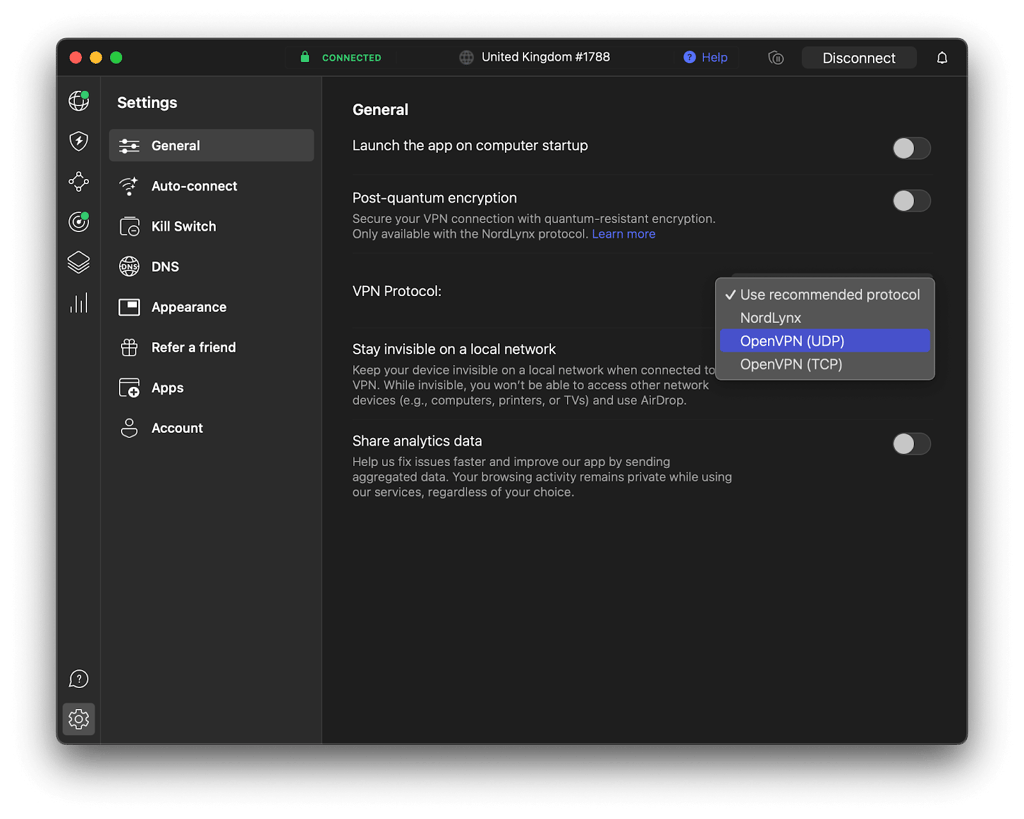
ITV Hub may detect specific VPN protocols, like OpenVPN, making them ineffective. Switching to a different protocol, such as WireGuard or NordLynx, can help bypass detection.
How to switch VPN protocols:
- Open your VPN settings.
- Navigate to "Protocol Settings" or "Connection Settings."
- Select WireGuard, NordLynx, or IKEv2 for better unblocking performance.
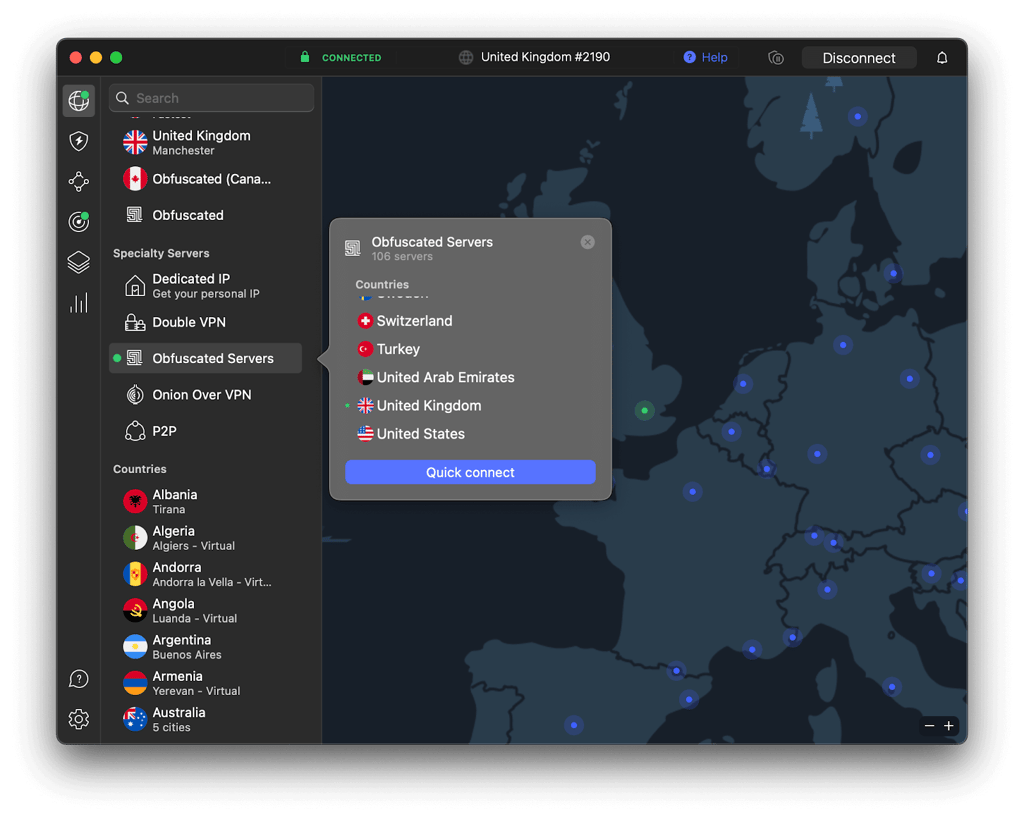
Step 6. Enable Stealth Mode or Obfuscated servers
Obfuscated servers disguise your VPN traffic, making it look like regular internet traffic. This helps bypass ITVX’s VPN detection.
How to enable obfuscation:
- In NordVPN, go to Settings > Advanced.
- Enable "Obfuscated Servers."
- Connect to a UK server using this mode.
Step 7. Flush your DNS cache
A DNS cache stores previous IP address data, which can prevent your VPN from working. Hence, flushing it resets your connection.
How to flush DNS on Windows:
- Open ‘Command Prompt’ as Administrator.
- Type ipconfig /flushdns and press Enter.
How to flush DNS on Mac:
- Open ‘Terminal’.
- Type sudo killall -HUP mDNSResponder and press Enter.
Step 8. Try watching ITVX on a different device
Some devices, such as specific Smart TVs and Firesticks, have built-in DNS settings that can leak your actual location. Therefore, try accessing ITVX on a laptop, PC, or mobile device instead.
Step 9. Contact VPN support
If you've tried multiple fixes listed above and ITVX is still not working, do not hesitate and contact your VPN’s support team. They will suggest specific servers or settings that work best for ITVX streaming 24/7.
Step 10. Upgrade to a premium streaming VPN
If none of these fixes persistently work, switching to a premium VPN might be time. NordVPN is the best option for VPN ITVX streaming. My team and I have tested it extensively, and it has always worked for watching ITVX from the USA and other non-UK regions. With UK-optimized servers, obfuscated technology, and high-speed connections, NordVPN guarantees uninterrupted ITVX access without frustrating geo-blocks.

VPNs that don't work with ITVX
While testing VPNs for ITVX streaming, I found that NordVPN, Surfshark, and Proton VPN were the most reliable options. However, many other VPNs failed to bypass ITVX’s strict geo-restrictions. ITVX has a sophisticated VPN detection system that blocks shared IP addresses, monitors traffic patterns, and detects weaker encryption. This makes it difficult for many less advanced VPN providers to keep up with ITVX’s evolving restrictions.
VPNs that don’t work with ITVX:
- Private Internet Access (PIA). PIA’s UK servers suffered from frequent detection issues during testing. Plus, ITVX continued to detect and block access even when switching servers, making it impossible to stream anything on ITVX.
- Windscribe. This VPN provider was also unable to maintain consistent access to ITVX. Despite multiple server options, ITVX identified and blocked connections quickly, making my team and I say, ‘Next!’
- TunnelBear. TunnelBear VPN’s free and premium servers failed to bypass ITVX’s restrictions. Period. The limited UK server selection contributed to its inability to work reliably.
- Atlas VPN. ITVX detected and blocked all tested Atlas VPN servers, unfortunately making them unsuitable for ITVX streaming.


Since 2018, VPNpro has delivered unbiased, expert-backed insights through in-house research and thorough VPN testing. Our team ensures every review is fact-checked and reliable. Learn how we maintain these high standards in our testing methods.
A guide to selecting the best ITVX VPN
Not all VPNs can bypass ITVX’s strict geo-blocking measures, so choosing the right provider is essential. Here are the most important factors to consider when selecting the best VPN for ITV Hub:
- Reliability. Your VPN should consistently unblock ITVX, even as the platform updates its detection methods. Tested VPNs like NordVPN offer dedicated streaming servers that work with ITVX.
- Speed. A fast ITVX VPN prevents buffering and ensures smooth HD streaming. Look for a VPN only with high-speed UK servers optimized for streaming.
- Server network. More UK servers mean more chances to find an IP that isn’t blocked. Choose a VPN provider with a wide selection of UK-based servers.
- Security features. ITVX detects VPNs through DNS leaks and weak encryption. A VPN with obfuscated servers, DNS leak protection, and a kill switch can help you stay undetected.
- Compatibility. Your VPN should support multiple devices, including Windows, macOS, iOS, Android, and Smart TVs, so you can watch ITVX however you like. Ideally, it would also cover routers, as specific smart TV sticks require configuring your VPN on a router, not the stick itself.
- Avoid free VPNs. Free VPNs often lack the infrastructure to bypass ITVX’s geo-restrictions. They also have slower speeds, limited UK servers, and weaker security. Plus, they usually log your data, which can be very unsafe.
For the best VPN for ITVX, NordVPN stands out with its blazing-fast UK servers, advanced security, and ability to bypass even the most burdensome streaming restrictions. Currently, NordVPN is available with a 76% discount on the long-term Standard plan.
Conclusion
The main reason for ITVX not working with a VPN is the platform’s aggressive geo-blocking, which detects and blocks most VPN IP addresses. If you encounter this issue, you can try switching to different UK servers, clearing browser cookies and cache, enabling DNS and IP leak protection, or using stealth/obfuscated modes.
However, in our testing, many VPNs failed to overcome ITVX’s geo-blocks and frequently resulted in ITVX not working with a VPN at all. By contrast, NordVPN proved to be the best VPN for ITVX, consistently working without error messages thanks to reliable UK servers, obfuscated technology, and strong leak protection.

![Surfshark weekly deals logo [IN USE]](https://media.vpnpro.com/surfshark-weekly-deals.svg)
![Proton VPN winner logo [IN USE]](https://media.vpnpro.com/2025/05/protonvpn-winner.png)
ITVX not working FAQ
Can I watch ITVX abroad?
Yes, you can watch ITVX outside the UK, but you’ll need a trustworthy VPN like NordVPN. ITVX is geo-restricted to the UK, meaning you can’t access it from abroad. A VPN with UK servers can bypass this restriction by masking your IP address and making it appear like you’re in the UK. NordVPN works reliably for this, ensuring uninterrupted access to ITVX.
How does ITVX know I'm using a VPN?
ITVX detects VPN use by identifying IP addresses linked to known VPN servers and blocking them. It also checks for mismatches between your IP location and DNS data, as well as signs of shared or abnormal traffic patterns typical of VPNs. In some cases, IP, IPv6, or WebRTC leaks can reveal your real location, making VPN use easier to detect. That’s why many VPNs fail to work with ITVX, especially if their IPs are already blacklisted.
What does the ITVX error code ITV-102 mean?
The ITVX ITV-102 error code usually appears when the service cannot verify your location or detects a problem with your network connection. This often happens if you’re trying to access ITVX from outside the UK or using a VPN or proxy that ITVX blocks. To fix it, try switching to a different UK server, clearing your cache, or using a VPN with obfuscated servers, like NordVPN.
Why is ITVX not working with a VPN?
ITVX actively blocks VPN traffic by detecting VPN usage patterns and blocklisting known VPN IP addresses. If ITVX is not working on your VPN, it could be due to a blocked IP, a DNS leak revealing your actual location, or the VPN being unable to bypass ITVX's geo-restrictions. Switching to a more reliable VPN with robust obfuscation features, like NordVPN, can solve this issue.
How to use a VPN to watch ITV?
Connect to a UK server via a reliable VPN to watch ITV outside the UK. This masks your actual location and lets ITV think you're in the UK. Ensure the VPN you use can bypass geo-restrictions and offers stable, high-speed servers in the UK. I recommend NordVPN for seamless access to ITV, as it consistently works with streaming platforms like ITVX.


- Steps to fix ITVX not working with a VPN
- Step 1: Update the VPN and ITVX
- Step 2: Clear browser cache and cookies
- Step 3: Connect to a different UK server
- Step 4: Activate the Kill Switch
- Step 5: Change VPN protocol
- Step 6: Enable Stealth Mode
- Step 7: Flush your DNS cache
- Step 8: Try watching on a different device
- Step 9: Contact VPN Support
- Step 10: Upgrade VPN
- Conclusion
- FAQ