How to bypass Netflix VPN ban in 2026


Summary: The Netflix VPN ban can stop region-specific titles from loading or trigger a proxy error. If you’re wondering how to bypass the Netflix VPN block, you need a reliable VPN that still works with Netflix, like NordVPN, Surfshark, or Proton VPN.
🏷️ LIMITED OFFER: NordVPN deal! Get 76% OFF NordVPN + 3 months FREE 🏷️
Netflix blocking VPN traffic is a common problem for users trying to access different regional libraries. If Netflix detects VPN use, the platform normally doesn’t ban your account, but it can stop certain titles from loading or show a proxy error instead. Netflix also has extra limits: VPNs do not work with the ad-supported plan, and live events require a direct connection. So while Netflix does allow VPNs in some cases, there are clear limits and restrictions on how they can be used with the service.
Since low-quality VPN providers are often detected and blocked almost instantly, you need to use a reliable VPN for Netflix that works consistently. A VPN with a broad global server network can mask your real IP address and change your virtual location, helping you bypass Netflix geo-restrictions.
Best Netflix VPNs compared
| Best VPN for Netflix | VPN rating | Number of servers | Unblocks Netflix | Free trial | Lowest price |
| 1. NordVPN | 9.8 ⭐⭐⭐⭐⭐ | 9,300+ servers in 137+ countries | ✅ Yes | ✅ Yes, 3-day free trial | $3.09/month |
| 2. Surfshark | 9.5 ⭐⭐⭐⭐⭐ | 4,500+ servers in 100+ countries | ✅ Yes | ✅ Yes, 7-day free trial | $1.99/month |
| 3. Proton VPN | 8.6 ⭐⭐⭐⭐ | 20,075+ servers in 145+ countries | ✅ Yes | ❌ No | $2.99/month |
![NordVPN winner logo [IN USE]](https://media.vpnpro.com/images/160x40/2025/01/NordVPN-winner-banner-logo.png)
How to get around the Netflix VPN ban
- Subscribe to a reliable Netflix VPN. My number one choice is NordVPN, currently available for 76%.
- Download and install the VPN app on your device.
- Log into your VPN account and connect to your desired server. For example, if you want to browse UK Netflix, pick a connection point in Britain.
- Clear your browser’s cookie cache and reload Netflix.
- Go to Netflix and enjoy uninterrupted access to all the new content!
Best VPNs to bypass Netflix VPN ban in 2026
-
Best VPN to bypass the Netflix VPN ban in 2026
-
Affordable VPN for fixing Netflix blocking VPN traffic
-
Privacy-focused VPN to avoid Netflix VPN detection
![NordVPN mobile logo [IN USE]](https://media.vpnpro.com/Nord-VPN-review.jpg)
![Surfshark mobile logo [IN USE]](https://media.vpnpro.com/surfshark-60x60-1.jpg)
![Proton VPN mobile logo [IN USE]](https://media.vpnpro.com/ProtonVPN-small.jpg)


Since 2018, VPNpro has delivered unbiased, expert-backed insights through in-house research and thorough VPN testing. Our team ensures every review is fact-checked and reliable. Learn how we maintain these high standards in our testing methods.
Is it legal to use Netflix with a VPN?
Using a VPN to access Netflix is not illegal, but it does violate Netflix's terms of service. Netflix’s licensing agreements restrict content availability based on geographic regions, so using a VPN to bypass these restrictions is technically against the rules. Despite this, Netflix typically doesn't ban users from using VPNs, although it may limit the content you can access if it detects VPN usage.
As of April 2026, no subscriber has faced legal action for using a VPN to stream Netflix content. While the practice is legally permissible, Netflix's detection measures mean VPNs might not always work, and the platform is committed to enforcing its regional licensing agreements.

Important note: A VPN changes your IP address, so websites like Netflix see you as browsing from another location.
While many Netflix users can still watch their usual shows and movies, geo-blocked titles often remain unavailable. Netflix explicitly states that when a VPN is detected, only content for which they have global rights (such as "Squid Game" or "Stranger Things") will be accessible. Therefore, even with a VPN, viewers may be unable to watch the region-specific content they hoped to access.
However, most users found that the issue was the VPN technology itself. Certain providers neglected to prioritize their streaming platform unblocking capabilities. Hence, choose a provider that focuses specifically on streaming, such as NordVPN, for an uninterrupted and unrestricted Netflix experience.
Fix Netflix VPN errors with NordVPN
How to bypass Netflix VPN block: a step-by-step guide
To bypass the Netflix VPN block, you first need to fix the issues that make Netflix detect VPN traffic in the first place. The most common causes include DNS leaks, blacklisted IP addresses, and old browser location data stored in your cache and cookies. Here is my step-by-step guide on how to bypass the Netflix VPN block and get your streaming access working again.
Step 1. Choose a VPN that works for bypassing Netflix geo-restrictions
First, choose a reliable VPN for Netflix that can bypass geo-restrictions and avoid detection more consistently. If you want to access a specific regional library, make sure your VPN has plenty of servers in that country. That’s why I recommend NordVPN – its large server network and broad country coverage give you more options, while regular IP refreshes help you find a server that still works with Netflix.

Step 2. Install your chosen VPN and log in
Download and install your chosen VPN for Netflix, then log into your account. If you choose NordVPN on Android, you can start with its 3-day free trial from the Google Play Store before committing to a longer plan.
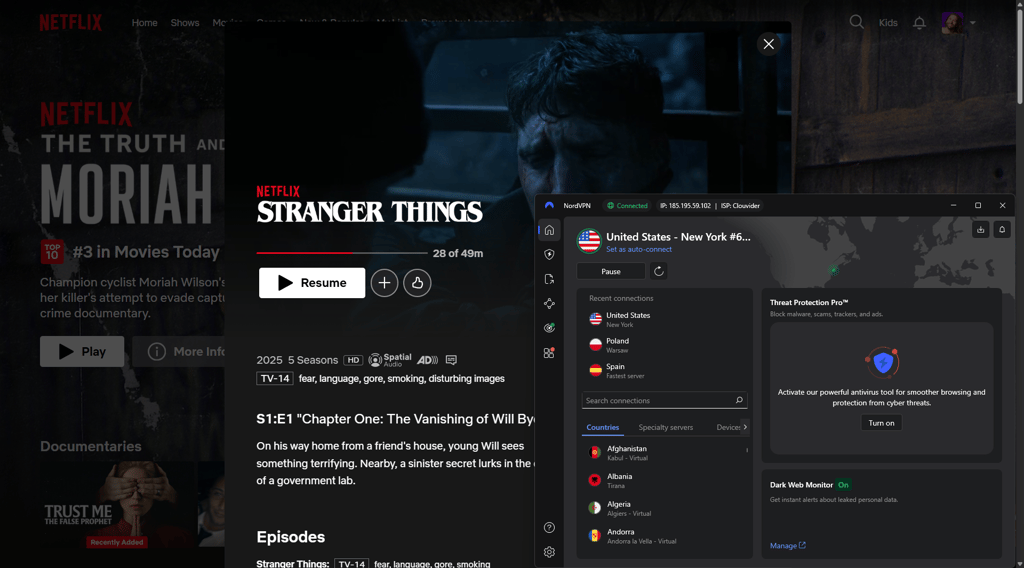
Step 3. Select a server in the country whose Netflix library you want to unblock
Connect to a VPN server in the country whose Netflix library you want to access. Once connected, open the Netflix app or website and check whether the regional catalog has changed. If not, try a different server in the same country, as some IP addresses may already be blocked.
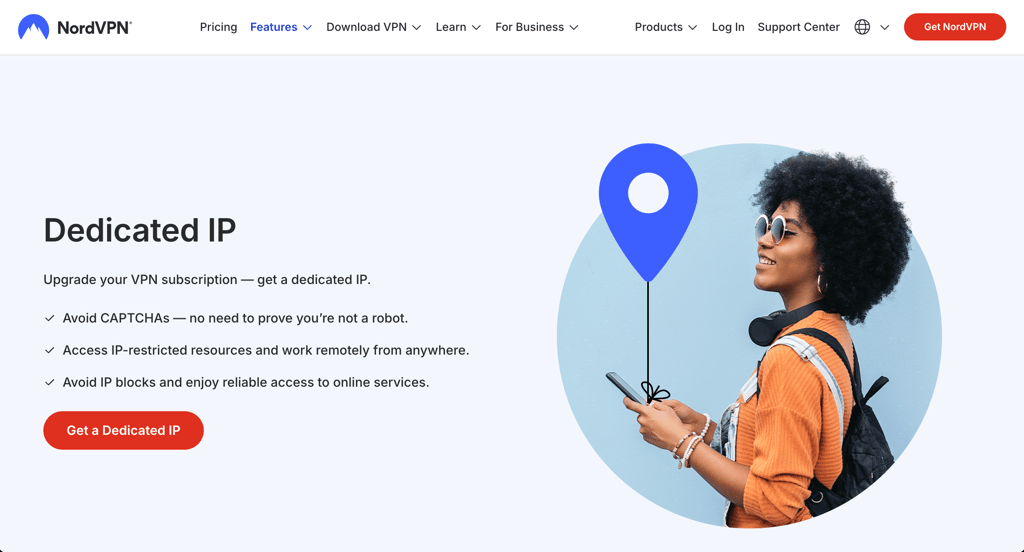
Step 4. Consider using a dedicated IP
If Netflix keeps blocking shared VPN servers, a dedicated IP may help in some cases. Since the IP is reserved for your use only, it is less affected by other users’ activity. Providers like NordVPN and Surfshark offer dedicated IP options in dozens of countries.
Step 5. Unblock Netflix and enjoy streaming without restrictions
Once your VPN is connected and working, you can unblock Netflix and start streaming the regional library you want. If Netflix blocks your connection again, switch servers and try refreshing the app or browser. If that does not help, try incognito mode, clear your cache and cookies, or use your VPN provider’s custom DNS addresses, such as NordVPN DNS.
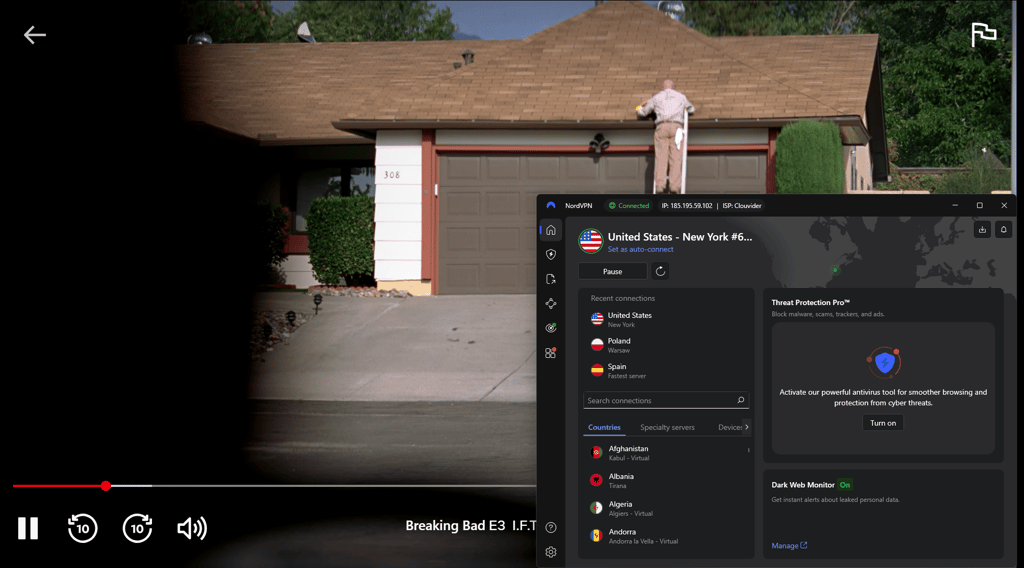
Best VPNs to bypass Netflix VPN block: detailed list
- NordVPN – the best VPN for Netflix with servers in over 137 countries
- Surfshark – an affordable Netflix VPN with unlimited simultaneous connections
- Proton VPN – a secure VPN for Netflix with strong streaming support
To fix Netflix VPN issues, start by switching servers, clearing your browser’s cache and cookies, or using a different browser. If nothing helps, it may be time to change VPN providers. Based on my testing of 20+ VPNs, NordVPN, Surfshark, and Proton VPN delivered the best results for bypassing Netflix geo-blocks.
Top 1. NordVPN – the best VPN for Netflix with the broadest server fleet
![NordVPN mobile logo [IN USE]](https://media.vpnpro.com/images/170x89/2025/08/nord-rreview.jpg)


137

9300

24/7, email
-
Rapid due to NordLynx protocol with 9,300 RAM-only servers in 137+ countries
-
SmartPlay technology for bypassing geo-blocks
-
Meshnet for password sharing
-
Only 10 simultaneous connections
NordVPN is the best Netflix VPN for bypassing geo-blocks and streaming country-exclusive content from anywhere. It seamlessly bypasses Netflix blocks and offers dedicated applications for all major operating systems, such as Amazon Fire TV Stick and Android TV. NordVPN also includes a Kodi add-on and the SmartDNS feature, which circumvent geographical restrictions on devices that don’t natively support VPNs.
The massive network of 9,300 RAM-only servers in 137+ countries gives you access to many foreign Netflix libraries. While on vacation in Corfu, I could stream exclusive Japanese anime series that are typically unavailable in Greece by connecting to NordVPN's Tokyo server. The speed was impressive, with minimal buffering, and the video quality remained consistently high throughout my viewing session.
This experience underscored NordVPN's reliability in accessing diverse Netflix content worldwide. With the in-house NordLynx protocol on the roster, no lag or endless buffering soured my streaming experience. Hence, you will enjoy trouble-free watching shows and films on BBC iPlayer, Disney+, Amazon Prime Video, etc.
NordVPN also helps bypass Netflix’s password-sharing restrictions. Its unique Meshnet feature lets your friends and family connect to the same internet network. Once they have the same IP address, it looks like they’re in the same house. This way, Netflix is convinced they’re in the right place and grants access to its shows and movies.
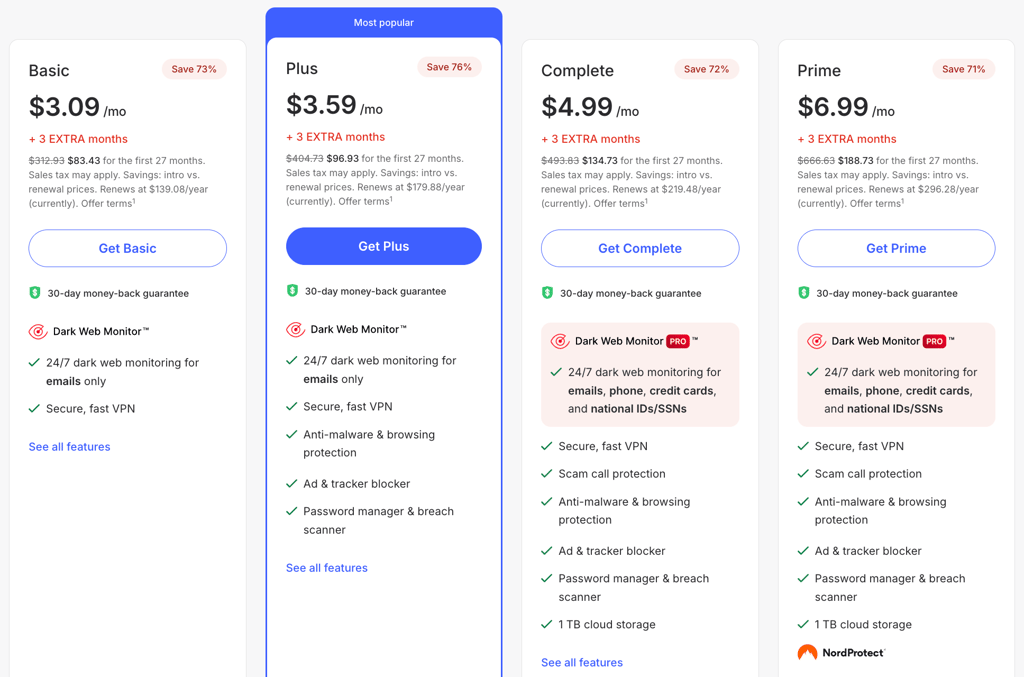
NordVPN offers a 76% discount with a special coupon, and current NordVPN pricing starts at $3.09/month. You can also try it risk-free with a 3-day free trial (available through the Google Play Store), while paid plans are covered by a 30-day money-back guarantee.
For a deeper investigation of NordVPN, read our NordVPN review.
Top 2. Surfshark VPN – streaming-friendly Netflix VPN with unlimited connections
![Surfshark mobile logo [IN USE]](https://media.vpnpro.com/images/170x89/surfshark-review-logo-2.jpg)
100
4500
24/7, FAQ
-
Speedy with 4,500+ RAM-only servers in over 100 countries
-
Smart DNS circumvents geo-restrictions
-
WireGuard-fuelled speeds
-
Some features cost extra
Surfshark VPN lets you bypass the Netflix VPN block in seconds. It includes apps for Android TV and Amazon Fire TV Stick. You can also configure it on routers and Chromebooks to browse HBO Max, Hulu, Hotstar, and other streaming services on different devices.
Surfshark’s massive fleet of 4,500+ RAM-only servers spanning more than 100 countries opens access to dozens of Netflix libraries. Thanks to Surfshark’s cutting-edge WireGuard protocol and Nexus technology, I've experienced seamless streaming of the most recent Netflix TV shows with minimal buffering. These innovations guarantee stable connections, low latency, and blazing-fast speeds.
Those seeking more reliability might be happy to see Surfshark’s dedicated IP servers available. These servers unlock streaming services more consistently and can improve one’s connections. Surfshark offers dedicated IPs in five US cities, the UK, Poland, Germany, the Netherlands, France, Italy, Brazil, Canada, Turkey, Japan, Singapore, Australia, Hong Kong, and South Africa.
You won’t even notice that Netflix blocks VPN services with this provider. Better yet, Surfshark’s budget-friendly pricing starts at just $1.99/month, with an 87% discount when you use a Surfshark VPN discount code. The 30-day money-back guarantee protects your subscription, and you can also test the waters first with the free 7-day trial.
For a deeper investigation of Surfshark VPN, read our Surfshark VPN review.
Top 3. Proton VPN – affordable VPN to bypass Netflix country restrictions
![Proton VPN mobile logo [IN USE]](https://media.vpnpro.com/images/170x89/proton-vpn-review-logo-2.jpg)
145
20075
-
Excellent geo-block circumvention with 20,075 servers across 145+ countries
-
Fast connectivity
-
Advanced security features
-
Premium version costs extra
Proton VPN reliably unblocks multiple Netflix libraries at guaranteed fast speeds for seamless HD streaming. It offers apps for all major operating systems, including Windows, macOS, Android, and iOS. This means you can stream not just Netflix but also unblock other popular platforms like Disney+, BBC iPlayer, Amazon Prime Video, and HBO Max. Plus, you can install Proton VPN on the router for all devices or have 10 simultaneous connections.
Proton VPN boasts an impressive network of 20,075 servers across 145 countries, which is key to unlocking Netflix libraries from diverse locations. Additionally, Proton VPN has a free version but has limitations: it only offers servers in 10 countries (the Netherlands, Japan, Romania, Poland, the US, Norway, Switzerland, Singapore, Mexico, and Canada), lacks the NetShield ad and malware blocker, and can only be used on one device.
Fortunately, Proton VPN's premium version offers greater security and performance. It stands out with its VPN Accelerator, ensuring smooth HD streaming. At the same time, the Stealth Protocol bypasses Netflix’s VPN detection system, making it easy to access content from countries like the US, UK, Germany, and Japan. Also, features like NetShield block ads, trackers, and malware, providing a safe and uninterrupted streaming experience. Plus, it offers military-grade encryption, a kill switch, and leak protection, so you can enjoy private streaming without worrying about data breaches.
Proton VPN's premium plan pricing starts at $2.99/month with a coupon discount. Besides, you will also get a 30-day money-back guarantee if you are not satisfied with it.
Read our detailed review of Proton VPN.
Does Netflix ban accounts for using VPN?
No, Netflix does not ban accounts for using a VPN. However, it does block VPNs and can prevent users from accessing region-specific libraries when it detects VPN traffic. Netflix’s system is built to spot VPN use that tries to get around licensing restrictions between countries, especially when a provider relies on crowded or easily flagged IP addresses. As a result, users are more likely to run into Netflix VPN blocks, proxy errors, or reduced content libraries than an actual account ban.
To lower the chances of this happening, use a reliable VPN for Netflix with a large server network and broad country coverage. These features give you more server options and improve your odds of finding an IP address that still works with Netflix. Premium providers like NordVPN also refresh their IP pools regularly, which can help you bypass Netflix restrictions more consistently.
Why is Netflix not the same in every country?
Netflix content libraries differ depending on the country due to intellectual property rules and content licensing. This means the platform's selection of TV shows and movies varies based on your location. For example, the US library is one of the largest, but due to licensing agreements and copyright laws, Netflix cannot offer all of its American content globally. This is why you may lose access to familiar titles when traveling abroad.
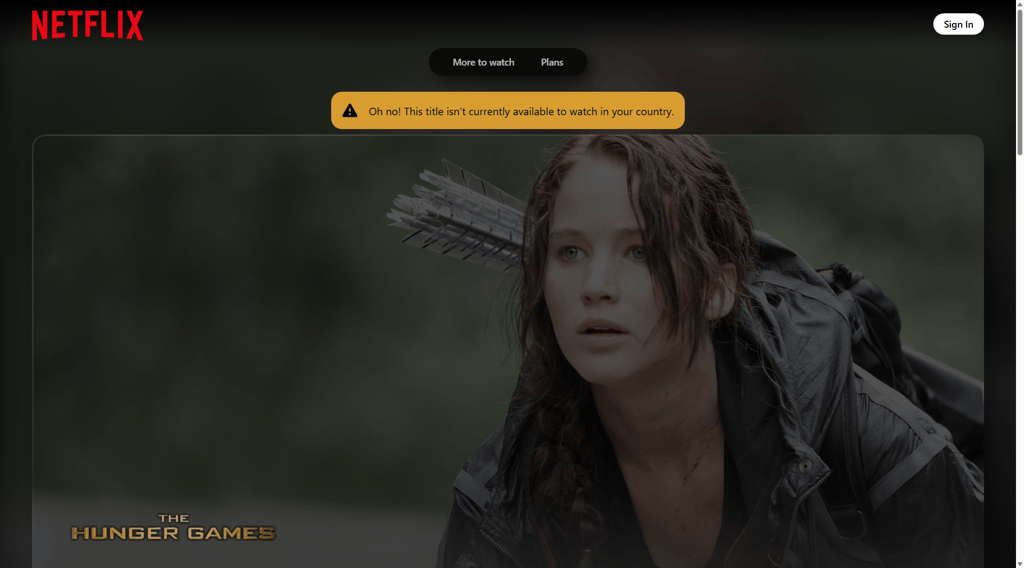
Netflix explains this simply: content rights are negotiated separately for each region, and in some cases, exclusive rights are given to other companies. As a result, Netflix may list a show in its general directory but still be unable to stream it in certain countries. Additionally, viewership preferences vary between countries, influencing which shows and movies Netflix chooses to carry.
To manage these differences, Netflix uses geo-blocking technology. It detects your location and shows the content library that’s available in your country. Some titles can also be more profitable in one market than another, so Netflix does not always carry the same content everywhere.
Netflix shows exclusive to certain countries
Using a VPN for specific countries can unlock some of the most coveted movies and TV shows on Netflix. Here are just a few examples.
| Show or movie | Genre | Netflix exclusive regions |
| The Life of Chuck | Sci-fi, fantasy, drama | UK |
| Paddington | Adventure, family film | Netherlands |
| Love at Last | Romance, comedy | Turkey |
| The Playroom | Drama, thriller | Turkey |
| Reboot | Drama | Japan |
| Suzuki=Bakudan | Crime, thriller | Japan |
| The Childe | Action, thriller | South Korea |
| Black Money | Crime, thriller | South Korea |
| Miss Fisher's Murder Mysteries | Drama, mystery | Australia |
| Muzzle: City of Wolves | Thriller, action | Australia |
| 28 Years Later: The Bone Temple | Horror | USA |
| It's Always Sunny in Philadelphia | Sitcom, comedy | UK |
| Série Noire | Crime, thriller | Canada |
| Breach | Action, sci-fi | Canada |
Naturally, these shows and movies aren’t exclusive to the countries mentioned above. For example, Rick and Morty is available on platforms like Netflix in Canada and the UK. However, it’s unavailable on Netflix in the US, where it’s instead streamed on platforms like HBO Max. This is a perfect case where VPNs can help access the show from other regions.
Can a VPN help beat Netflix ISP throttling?
Yes, a good VPN will make it impossible for ISPs to monitor and throttle your streams by hiding your data and anonymizing your identity. However, the issue is real and prevalent.
Data throttling is a much-discussed but often-denied phenomenon in which Internet Service Providers limit the speeds of particular users, especially those who use relatively high amounts of data. Although ISPs aren’t supposed to throttle anyone, the evidence strongly suggests that they do. Netflix is one of the data-hungry sites that appears to prompt ISPs to limit user speeds.
Although not all ISPs function this way, significant enough names like Verizon and Comcast have been implicated in data throttling. Thankfully, the best Netflix VPNs, such as NordVPN or Surfshark, offer a simple solution for compromised streaming speeds.
Bottom line
Netflix blocking VPN traffic is still a common problem, especially if your VPN provider uses IP addresses that are easy to detect. While the Netflix VPN ban doesn’t usually mean that your account gets suspended, it does limit your content library, cause proxy errors, and stop you from streaming region-specific titles.
The easiest fix is to use a VPN that works consistently with Netflix and has a strong record of bypassing streaming restrictions. That means you need to look for a Netflix VPN with fast speeds, a large server network, broad country coverage, and regular IP refreshes.
NordVPN is my top recommendation for bypassing Netflix geo-restrictions because it combines strong streaming performance with wide device support. With features like the NordLynx protocol and Meshnet, it can help you access Netflix libraries in multiple countries more reliably and work around Netflix’s password-sharing restrictions.

![Surfshark weekly deals logo [IN USE]](https://media.vpnpro.com/surfshark-weekly-deals.svg)
![Proton VPN winner logo [IN USE]](https://media.vpnpro.com/2025/05/protonvpn-winner.png)
FAQ
Can I get banned for watching Netflix with a VPN?
No, Netflix does not usually ban accounts for watching with a VPN. Instead, Netflix blocks VPN traffic when it detects it, which can trigger a proxy error, limit your content library, or stop region-specific titles from loading.
Why is Netflix blocking VPN services?
Netflix blocks VPNs because they allow viewers to bypass geo-blocks. These geographical restrictions are put in place because the platform needs to adhere to strict licensing agreements – the deals in question limit which countries get which shows and movies.
How to stop Netflix from detecting VPN?
The best way to avoid Netflix VPN blocking is to use a dedicated IP. That way, no one else will use your IP address, meaning it’s less likely to be discovered and blocked. In this case, NordVPN is the best VPN for streaming as it offers dedicated IPs.
How can I unblock Netflix?
You can unblock Netflix with a premium VPN service by changing your IP address to appear as if you are in a different region. Free VPNs don’t support streaming, so you need a robust VPN to enjoy UHD Netflix sessions from anywhere. For example, NordVPN offers stellar performance, supports major devices, and unlocks most global Netflix libraries.
Why does my VPN not work on Netflix?
If your VPN isn't working with Netflix, it might be because the streaming service has banned your IP address. Hence, ensure you are using a streaming-optimized VPN. Otherwise, switch to different servers, clear your browser cache, reset your network connection, flush your DNS cache, or talk to VPN customer support.
Why is NordVPN not working with Netflix?
NordVPN may not work with Netflix due to Netflix's efforts to block VPN servers, issues with specific server connections, or interference from cached browser data. If your VPN stops working with Netflix, connect to a different NordVPN server in the same country. Clearing your browser cache can also help, as cached data might interfere with your connection. If you’re still experiencing issues, switching servers might correct the problem. For persistent issues, contact NordVPN’s customer support.
What country VPN should I use for Netflix?
You should choose a VPN country based on the Netflix library. My top pick is NordVPN. It offers broad global coverage, high-end security, and anonymity while working swimmingly with Netflix.
How do I change my Netflix country with VPN?
To watch Netflix with a VPN, subscribe to a premium service. Download and install the VPN software. Then, connect to a server located in your desired country. Once your IP has changed, log into your Netflix account (or register a new one). Now, you can access the content of that country.
Is it legal to use Netflix with a VPN?
VPN use is legal in most parts of the world, though some authoritarian countries prohibit it. Netflix operates with specific licensing agreements for its TV shows and movies, limiting their availability to particular regions. Consequently, to watch restricted content, use a reliable streaming VPN to mask your location, access servers in the desired country, and enjoy the full range of available content.


- Best Netflix VPNs compared
- How to get around the Netflix VPN ban
- Best VPNs to bypass Netflix VPN ban in 2026
- Is it legal to use Netflix with a VPN?
- How to bypass Netflix VPN block: a step-by-step guide
- Best VPNs to bypass Netflix VPN block: detailed list
- Does Netflix ban accounts for using VPN?
- Why is Netflix not the same in every country?
- Netflix shows exclusive to certain countries
- Can a VPN help beat Netflix ISP throttling?
- Bottom line
- FAQ