NordVPN free trial: How to get NordVPN for free in 2026


NordVPN does not offer a completely free plan, but you can try it risk-free with a 3-day trial on Android or a 30-day money-back guarantee on all devices.
🏷️ LIMITED OFFER: NordVPN deal! Get 76% OFF NordVPN + 3 months FREE 🏷️
NordVPN doesn’t have a fully free version, but it does offer a secure, no-risk trial option to test its features. In 2026, new users can take advantage of the NordVPN 3-day trial by downloading the app through the Google Play Store on Android. For other platforms and devices, NordVPN includes a 30-day money-back guarantee so you can explore the service without commitment.
How to get a NordVPN 3-day free trial: quick step-by-step guide
- Open the Google Play Store on your Android device.
- Search for and install the NordVPN app.
- Create a NordVPN account.
- Select the 3-day free trial option within the app to activate your access.
- Use the same account to connect NordVPN on other devices during the 3-day free trial period.
If you don’t have an Android device, you can still try NordVPN risk-free by subscribing through its official website and requesting a refund within 30 days, thanks to the company’s money-back guarantee policy.
Note. This refund option doesn’t apply to subscriptions purchased through the Apple App Store, Amazon, or Google Play, or to payments made with cryptocurrency, and it excludes plan renewals.
If you don’t cancel your Android free trial, you can combine it with the 30-day money-back guarantee to use NordVPN free for up to 33 days.
How to get a NordVPN free trial in 2026
| NordVPN free trial duration: | 3 days |
| Availability: | The NordVPN 3-day trial is available only on Android devices when downloaded from the Google Play Store. |
| How it works: | Subscribe through the Google Play Store on an Android device, and use the free trial on any NordVPN-compatible device for up to 3 days. |
| Cancellation: | Cancel NordVPN free trial via your Google Play Account before the 3-day duration expires to avoid charges |
NordVPN’s three-day free trial is available only for new users who sign up on an Android device through the Google Play Store. The NordVPN 3-day trial gives full access to all premium features, which you can use on any other device once activated. You can also enjoy secure browsing on up to 10 simultaneous connections during your trial.
While NordVPN doesn’t offer the longest free trial on the market, it still ranks as the #1 VPN thanks to its strong security, fast speeds, and reliable performance.
Step 1. Download the NordVPN app
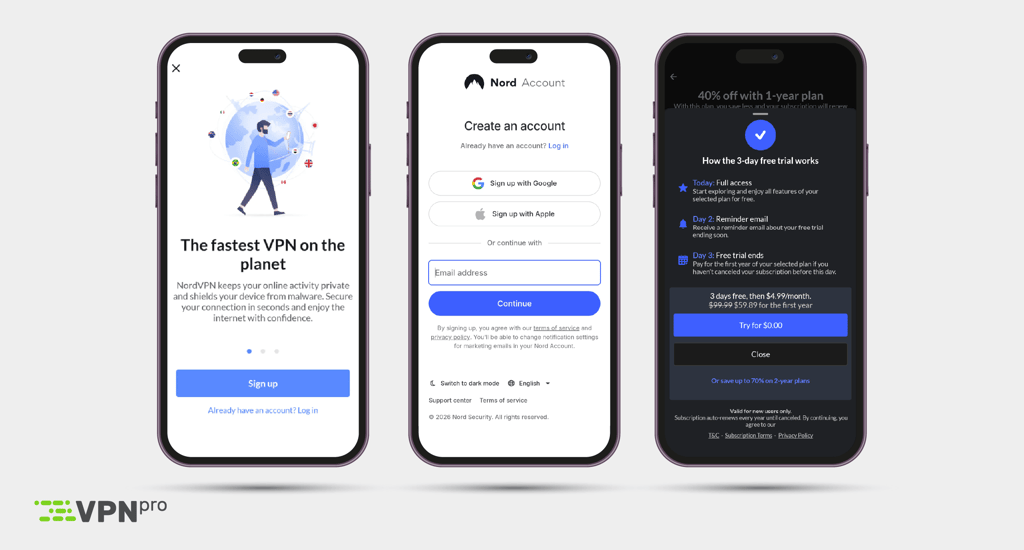
To start your NordVPN 3-day free trial, download and install the NordVPN app on your Android device. Open the Google Play Store, search for “NordVPN,” and tap Install to get the app. Once installed, you’ll be ready to create your account and activate the free trial.
Step 2. Sign up for a new account and pick a plan
After downloading the app, create a new account and select your preferred NordVPN plan. When prompted, choose the option to start the 3-day free trial.
NordVPN offers four subscription plan options: Basic, Plus, Complete, and Prime. Each plan includes access to a free trial. The most affordable NordVPN Basic plan, currently just $3.09/month with a 76% discount, delivers excellent performance for streaming, torrenting, and gaming, making it a strong choice for most users.
Step 3. Tap on "Try for $0.00" to begin the trial period
Tap the 'Try for $0.00' button to start your NordVPN free trial. However, bear in mind that you’ll need to provide payment information to complete the signup, but you won’t be charged until the 3-day trial ends. Cancel before the trial expires to avoid any charges.
Step 4. Cancel your subscription when the free NordVPN trial ends
To avoid being charged for a new NordVPN subscription at the end of your trial period, you’ll need to cancel your subscription. Open the Google Play Store, tap your profile icon, then go to Payments & subscriptions > Subscriptions. Find NordVPN in the list and select 'Cancel subscription.' Follow the prompts to confirm your cancellation. If you were charged already, remember that you have a 30-day money-back guarantee in which to get a refund.
Try NordVPN for a week with the free trial available on Google Play!
How to get NordVPN's 30-day money-back guarantee
| NordVPN money-back guarantee duration: | 30 days |
| Availability: | NordVPN's money-back guarantee is available to all new subscribers regardless of the device you use. |
| How it works: | If you want to exercise your right to get a full refund, cancel auto-renewal in your NordVPN account and request a refund from customer support. |
| Cancellation: | After disabling renewal in your account, contact customer support using live chat or [email protected] to request a refund. |
NordVPN doesn’t offer a free trial for purchases made through its website, but every customer is eligible for a refund under NordVPN's 30-day money-back guarantee. Once you’ve secured the deal, you can simply request a full refund within 30 days via live chat and get your money back. Customer service responds quickly, and neither my colleagues nor I have ever had an issue getting a refund while testing NordVPN.
While this isn’t technically a free NordVPN trial, you’ll still get all of your money back. Ultimately, you won’t have spent anything unless you decide to keep NordVPN, and you’ll still get to use the service for the duration of those 30 days.
Step 1. Sign in to NordVPN and purchase a plan
Go to the NordVPN website and click the ‘Get NordVPN’ button to open the subscription page. Choose your preferred plan, create an account, and enter your payment details. To keep upfront payment low, consider starting with the 1-month Basic Plan - it’s affordable and fully covered by the 30-day money-back guarantee.
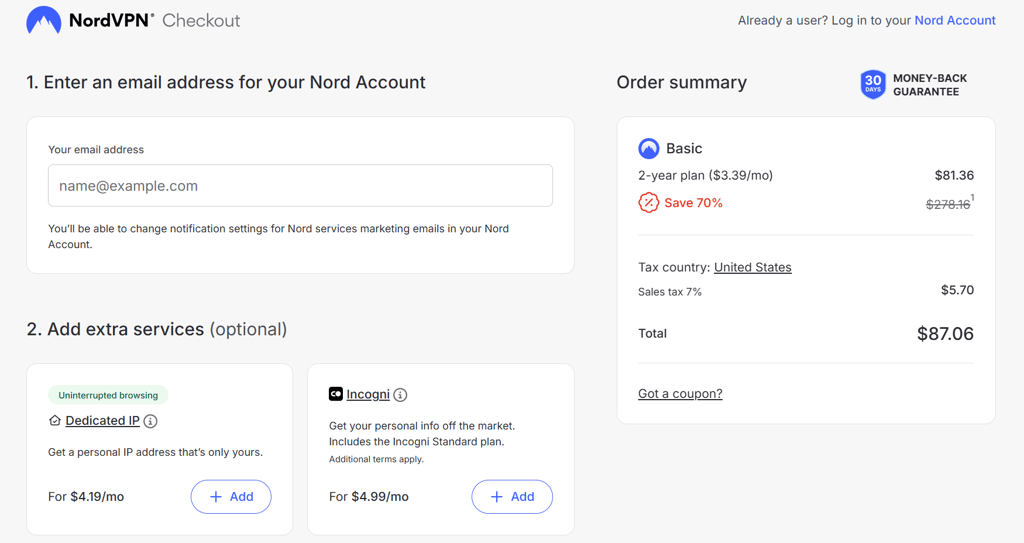
Bear in mind that not every payment method is eligible for NordVPN’s 30-day money-back guarantee. For instance, if you purchase NordVPN through the Apple App Store or Google Play Store, refunds are handled directly by Apple or Google, not NordVPN. Therefore, I recommend getting your subscription from NordVPN’s official website to make sure you’re covered.
Step 2. Download NordVPN and test it for free for 30 days
Go to the download page on the official NordVPN website and install the app on your preferred device by following the on-screen setup prompts. Once installed, open the NordVPN app and log in with your account details.
You can now enjoy unrestricted use of NordVPN for 30 days on up to 10 devices at once, including Windows, macOS, Fire TV Stick, Apple TV, and more. Or, you can install it on your router to get support for unlimited devices, provided that they’re connected to your internet network.

Step 3. Cancel your subscription and request a refund
To cancel your NordVPN 30-day trial, log into your NordVPN account, go to the Billing section, disable auto-renewal, and contact customer support for a refund. If you subscribed through the Apple App Store or Google Play Store, you must cancel directly through your respective app store’s settings as you would with any other app subscription.
If you signed up on the NordVPN website:
- Log in to your NordVPN account.
- Go to the Billing section.
- Choose Cancel next to your subscription.
- Request a refund within 30 days of the start of your subscription by live chat or email ([email protected]).
If you signed up via the Apple App Store:
- Open the Settings app on your iPhone or iPad.
- Tap on your Apple ID at the top.
- Tap on the Subscriptions option.
- Find NordVPN in the list.
- Tap on Cancel Subscription to cancel renewal and avoid future payments.
If you signed up via the Google Play Store:
- Open the Google Play Store app on your device.
- Tap on your profile icon in the top right.
- Tap on Payments and subscriptions and then Subscriptions.
- Select NordVPN in the list.
- Tap Cancel subscription and confirm.

Bear in mind that subscriptions bought through the Apple App Store, Google Play Store, or Amazon Appstore fall under each company’s remit. NordVPN won’t be able to refund you for such subscriptions, so for assistance, I recommend contacting your respective customer service team via Apple, Google, or Amazon customer support.
Get FREE months by using NordVPN referral program
NordVPN's referral program lets you get free months added to your subscription when you refer a friend. For each friend that you refer who signs up, you and your friend will both get 3 free months of NordVPN if they choose a 1-year or 2-year plan. If they sign up for a monthly plan, you’ll both get 1 free month added to your subscriptions.
How to use the NordVPN referral program:
- Locate your referral link in your NordVPN account, either online or in the native application dashboard.
- Share your link with your friends.
- Wait until a friend signs up, and you'll see the 1 or 3 free months added to your account automatically.
- Check with your friend to make sure they've also been credited with 1 or 3 free months.
Bear in mind that NordVPN's referral program is intended for new subscribers, so you can only gain free months by introducing friends who haven't used the service before. However, there is no limit on the number of friends you can invite, so you can claim as many free months as you have friends!
How does NordVPN’s free trial compare to other VPNs?
NordVPN is our top-ranked free trial VPN to try without commitment, thanks to its excellent performance and advanced security features. Though practical, NordVPN’s trial isn’t the longest - that honor goes to Norton VPN, which offers a generous 30‑day free trial plus a rare 60‑day money‑back guarantee. You can use the table below to compare NordVPN’s free trial offering to four other free trials available from highly‑rated VPNs.
| VPN with a free trial | Rating | Free trial duration | Devices needed to sign up | Restrictions | Credit card details required? | Money-back guarantee | Cheapest monthly plan |
| 1. NordVPN | 9.8⭐️⭐️⭐️⭐️⭐️ | 3 days | Android | ✅ No restrictions | ✅ Yes | 30 days | $3.09/month |
| 2. Surfshark | 9.5⭐️⭐️⭐️⭐️⭐️ | 7 days | Android and iOS | ✅ No restrictions | ✅ Yes | 30 days | $1.99/month |
| 3. Proton VPN | 8.6⭐️⭐️⭐️⭐ | No free trial, but offers an unlimited free plan | Windows, macOS, Android, iOS, ChromeOS, Linux, and Smart TVs | ❌ Limited features | ❌ No | 30 days | $2.99/month |
| 4. Norton VPN | 7.3⭐️⭐️⭐️⭐ | 30 days | Windows, macOS, Android, iOS | ✅ No restrictions | ✅ Yes | 60 days | $3.33/month |
| 5. TotalVPN | 8.2⭐️⭐️⭐️⭐ | 7 days (during occasional promotions) | Windows, macOS, Android, iOS | ✅ No restrictions | ✅ Yes | 30 days | $1.59/month |

NordVPN free trial vs money-back guarantee: key takeaways
NordVPN’s free trial now lasts only 3 days and is available exclusively through the Android app, down from the previous 7-day trial. NordVPN’s money-back guarantee applies to all devices and platforms, and lasts for 30 days. You will have to pay your chosen plan’s subscription fee upfront, but you’re guaranteed a refund if you cancel within the 30 days.
While you must pay upfront for the subscription, the refund process is straightforward, and you can expect to receive your money back within approximately 10 business days, depending on the payment method used.
Why I recommend NordVPN:
- Free use of a top VPN for up to 33 days
- Both the free trial and the money-back guarantee give access to the full set of features, including speeds, servers, and security tools.
- Works with Netflix, BBC iPlayer, Peacock, Hulu, and more
- Fast speeds with no throttling
- Allows torrenting
NordVPN weaknesses:
- Free trial available only on Android
- Manual cancellation via Google Play needed to avoid charges
- Free trial not available through NordVPN website or other platforms
- Upfront subscription payment needed for 30-day money-back guarantee

![Surfshark weekly deals logo [IN USE]](https://media.vpnpro.com/surfshark-weekly-deals.svg)
![Proton VPN winner logo [IN USE]](https://media.vpnpro.com/2025/05/protonvpn-winner.png)
FAQ
Does NordVPN have a free trial?
Yes, NordVPN currently offers a 3-day free trial on Android devices. Previously, the free trial lasted 7 days, but as of June 2025, it has been shortened to 3 days. To get 3 days of NordVPN for free, download the NordVPN app from the Google Play Store, sign up, and choose the plan that includes the 3-day free trial. You’ll need to enter your billing information, but no charges will be made if you cancel before the trial ends.
Does NordVPN have a free trial on iOS?
NordVPN’s 3-day free trial has to be selected on Android. However, once you get it, you can log in to your account and use the same trial on macOS, iOS, and Windows.
Can I get a NordVPN free trial without a credit card?
NordVPN, one of the best VPN services on the market, offers a 3-day free trial to Android users without a credit card or any upfront payment. For all other platforms and payment methods (including PayPal, Google Pay, Amazon Pay, and Union Pay) NordVPN offers a 30-day money-back guarantee. This means you pay upfront but can request a full refund within 30 days if you’re not satisfied.
How to cancel NordVPN free trial?
To cancel your NordVPN free trial, log in to your account on the NordVPN website, go to the Billing section, then to Subscriptions, and disable the auto-renewal option to prevent future charges while still being able to use the service until the trial ends.
Does NordVPN charge after a free trial?
NordVPN charges your payment method automatically after the 3-day free trial ends, unless you cancel beforehand. The free trial is exclusively available to Android users via the Google Play Store, which requires payment information upfront. If you miss cancelling in time, your subscription renews and you will be charged. However, NordVPN’s 30-day money-back guarantee allows you to request a full refund within 30 days if you decide not to continue
Can I get a refund from NordVPN?
Yes, you can get a refund from NordVPN by following the instructions below in case you decide the service doesn’t fit you. NordVPN’s 30-day money-back guarantee allows you to try the service risk-free. To get your refund, simply contact NordVPN’s 24/7 live chat support, and they will assist you with the refund process quickly and hassle-free.


