
Mullvad VPN Review 2026
 Fast, secure and anonymous
Mullvad VPN stands out for its strict no-logs policy, fully anonymous accounts, and transparent single-tier pricing. It has strong security features and good speeds, but its minimalist design, limited streaming access, and lack of extras like dedicated IPs may not appeal to power users. Overall, Mullvad is a reliable privacy-first service, but it’s best suited to people who want anonymity over unblocking and advanced features.


Mullvad VPN is a privacy-first VPN designed for anonymity and security when browsing, with a completely anonymous accounts system that uses randomized numbers instead of typical login credentials. It's based in Sweden under EU privacy regulations, with a strict no-logs policy and flat monthly pricing tier that's fixed at €5/month regardless of your term.
| Mullvad VPN rating: | 8.2 ⭐⭐⭐⭐ |
| Servers: | 696+ servers in 90+ countries |
| Supported platforms: | Windows, macOS, Linux, iOS, Android |
| Simultaneous connections: | 5 |
| Logging policy: | Strict no-logs policy |
| Best for: | Privacy-focused users and complete anonymity |
| Price: | €5/month |
| Free trial: | No free trial (14-day money-back guarantee) |
| Official website: | mullvad.net |
The VPNpro team and I have extensively researched and tested Mullvad VPN to understand the company behind the service and how the VPN performs in real-world scenarios. We ran speed benchmarking with Ookla Speedtest, evaluated security performance by testing various protocols and running leak tests, and attempted to use the VPN to unblock numerous international streaming platforms. We also tested every security feature, including the built-in kill switch, and we looked into Mullvad's privacy policies and its no-logs guarantee.
Read on for our detailed Mullvad VPN review, our test results, and our final verdict on whether Mullvad is a safe and secure VPN service.
Mullvad VPN pros and cons
Pros
- 14-day money-back guarantee
- Transparent, flat €5/month fee
- Completely anonymous accounts
- Reliable security and privacy
Cons
- Lacks a free trial or free version
- Struggles to unblock streaming sites
- Lacks advanced features
Based on our test results in 2026, Mullvad VPN is a safe and reliable VPN that offers solid basic security and privacy. With truly anonymous signups, you can rest assured that no personal data is shared. While not well-suited to streaming or unblocking in general, Mullvad is a strong choice for privacy-conscious users on a budget thanks to transparent pricing and a flat fee structure.
Mullvad VPN pricing 2026
Mullvad VPN costs a flat rate of €5/month, which is roughly $5.20–$5.80 USD depending on exchange rates. You’ll pay around €60 per year, or around $62 to $70.
I liked that Mullvad VPN has such flexibility in its pricing, as you know what you’ll pay regardless of your plan length or any renewal increases that can happen in some VPNs. However, this feels expensive in my opinion, as NordVPN costs around $3.09/month/month, or approximately $40/year and is a much more powerful and reliable VPN service. Similarly, Surfshark VPN is just $1.99/month, approximately $24/year, making it much more affordable.
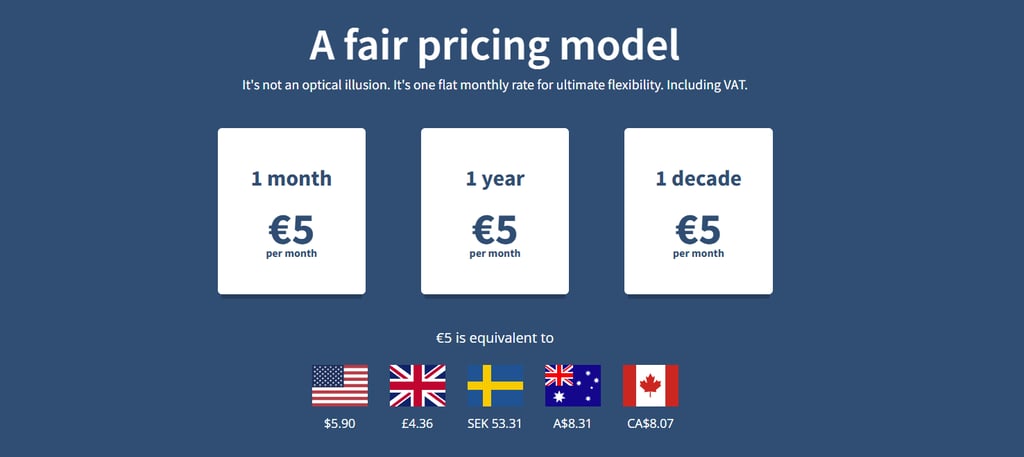
Most VPNs will offer significant discounts for yearly or multi-yearly plans, but you won’t find that here. Instead, to get a 10% discount you will have to pay using crypto. Available payment options are:
Available payment options are:
- Cash (in the mail)
- Cryptocurrencies
- PayPal
- Credit card
- Swish
- Bank transfer
Does Mullvad VPN have a free trial?
There is no Mullvad free trial period, but there is a 30-day money-back guarantee for most of the payment options, except for cash payments.
With all that said, $5 and a few cents a month is not a bad price, especially when you get five simultaneous connections per account. Most top services ask for similar amounts with much longer subscriptions.
Mullvad servers list
As of June 2026, Mullvad VPN operates over 696 servers across 90 countries. Their network focuses on high-speed 10 Gbps servers, with many of them being physically owned by the company.
| Region | Countries | Server count |
| The Americas | 7 | 180+ |
| Europe | 30+ | 420+ |
| Africa, Middle East, and India | 3 | 10+ |
| Asia and Oceania | 10+ | 80+ |
Most servers that I connected to (with Asia being the notable exception) were fast enough for general everyday use. Of course, there are differences based on the region but the overall speed is good, especially in Europe and the US. However, if you specifically need US servers, I recommend NordVPN, which has over 2,000 US servers. In my tests, NordVPN’s American server fleet was the fastest and farthest-reaching fleet available for a USA IP address.
Mullvad takes pride in the fact that they own a large portion of the servers. In fact, you can see a detailed breakdown of their servers’ status on their website. And the servers that they do rent are dedicated – meaning they are used for one purpose only.
Use Mullvad VPN in restrictive locations
Mullvad VPN speed test results
Mullvad has servers with either OpenVPN or WireGuard protocols, so it only seemed fair to test out the WireGuard servers to push the speed results to their limits. I used the results from the Ookla Speedtest tool to see the download and upload speed for various countries. On average, I saw speeds of over 300 Mbps, though distant servers provided slower results.
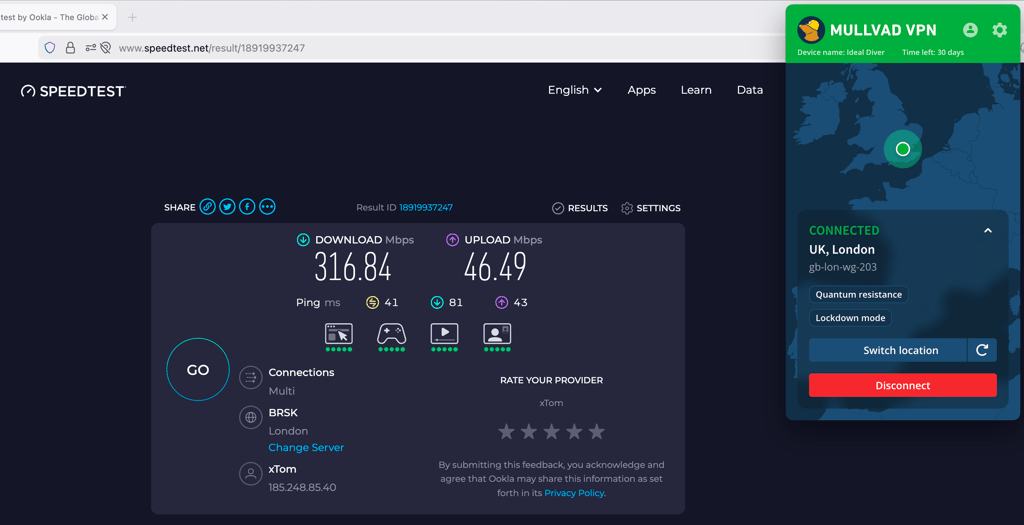
As we took a deeper look, the results were quite impressive. Throughout the whole week, the download speed retention never dropped below 93%, which was an honest surprise. It is great to see that security and anonymity do not come at the cost of connection speeds. These numbers are adequate enough to put Mullvad in our top 10 fastest VPNs list.
Test Mullvad VPN speed yourself with 30-day money back guarantee
Mullvad security and privacy features
Mullvad is often praised as one of the most privacy-focused VPNs available. During my tests, its security tools meant that I saw no DNS or IP leaks detected and had consistently fast connections using WireGuard. Below are the key privacy and security features that impressed me when testing Mullvad VPN:
- Completely anonymous sign-up and user accounts. Mullvad generates a random account number instead of using your email address or personal details. In my tests, creating an account was fast and required no identifiable information.
- Meets the privacytools.io criteria. Mullvad is frequently recommended by privacy-focused groups like PrivacyTools thanks to its transparent policies, open-source apps, and strict focus on anonymity.
- AES-256 encryption. Mullvad uses AES-256 encryption for OpenVPN connections, a military-grade standard that is widely used across the industry.
- OpenVPN and WireGuard tunneling protocols. In my speed tests, WireGuard delivered the best performance, providing the fastest connection speeds while having strong encryption.
- No identifiable logs. Mullvad has a strict no-logs policy, meaning it doesn’t track browsing activity, timestamps, or IP addresses.
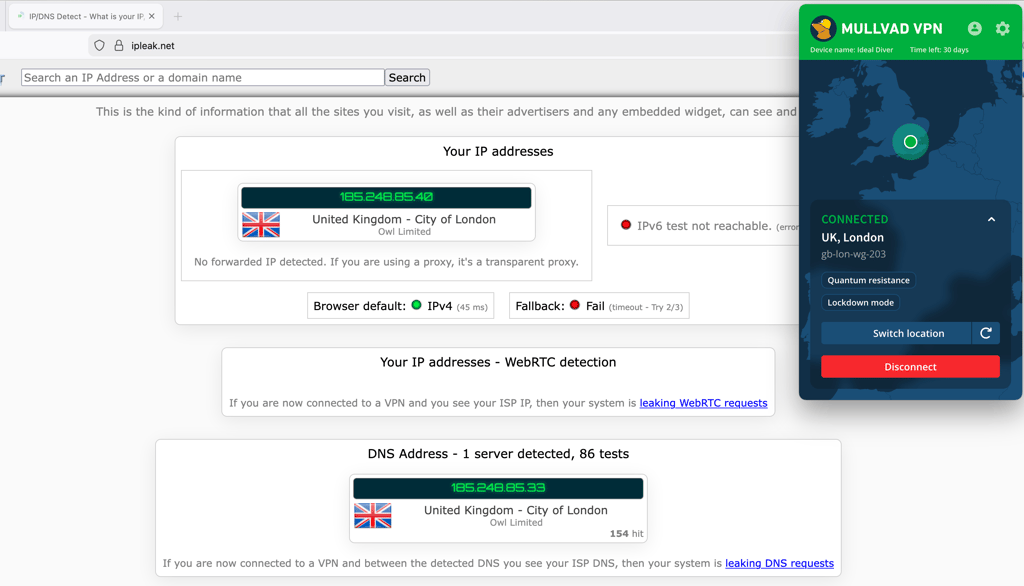
- DNS leak protection. During our testing using DNS leak detection tools, Mullvad successfully prevented DNS leaks and routed queries through its own secure DNS servers.
- IPv6 leak protection. Mullvad supports IPv6, and based on my tests, it suffers from IPv6 leaks so your true location won’t be detected.
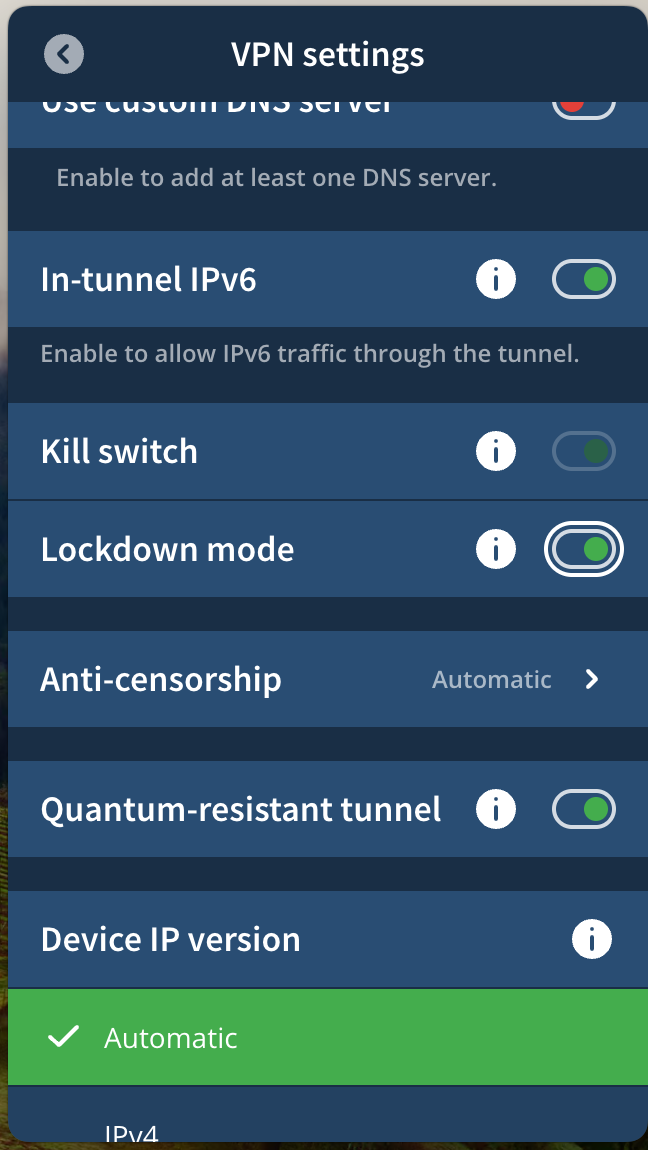
- Kill switch. Mullvad’s kill switch is enabled by default in the desktop apps. When I tested a dropped connection, this feature immediately blocked my internet access to stop my true IP from being exposed.
- Shadowsocks, SSH, and split tunneling. Mullvad includes advanced tools like Shadowsocks and SSH tunneling to bypass restrictive networks. Split tunneling that lets you choose which apps use the VPN connection.
Tunneling protocols
Mullvad uses WireGuard as its only tunneling protocol. The VPN used to support both OpenVPN and WireGuard, but OpenVPN was retired in early 2026 and Mullvad shifted its focus to WireGuard. However, WireGuard is regarded as one of the fastest and most secure VPN protocols available, and in my tests the connections were consistently fast and stable, so this isn’t a drawback in my opinion. My speeds were also excellent, especially on nearby servers. Mullvad’s decision to remove OpenVPN and focus on a single protocol simplifies the apps and configuration settings.
Internet kill-switch
During my tests, I saw that Mullvad provides kill switch protection on both Android and iOS devices. On Android, the app has a built-in kill switch that blocks internet traffic if the VPN connection drops. I was also able to enable Android’s system-level “Always-on VPN” option for extra protection. On iOS, Mullvad uses Apple’s on-demand VPN feature instead of a usual kill switch. However, this worked similarly in my tests, automatically reconnecting the VPN and preventing data from leaking.
Other security features
During my tests, Mullvad had several tools for bypassing network restrictions and controlling which apps use the VPN connection. On desktop, I was able to enable bridge mode, which routes traffic through a Shadowsocks proxy to disguise VPN traffic on restrictive networks. I found this useful in places where VPN connections are blocked, like school and work networks. Mullvad also supports split tunneling, letting me choose which apps use the VPN and which connect normally. In my tests, this feature was available on Windows, macOS, Linux, and Android, which made it easy to route only specific apps through the VPN. The only limitation is iOS, where split tunneling still isn’t available because of Apple’s developer restrictions.
IP and DNS leak tests
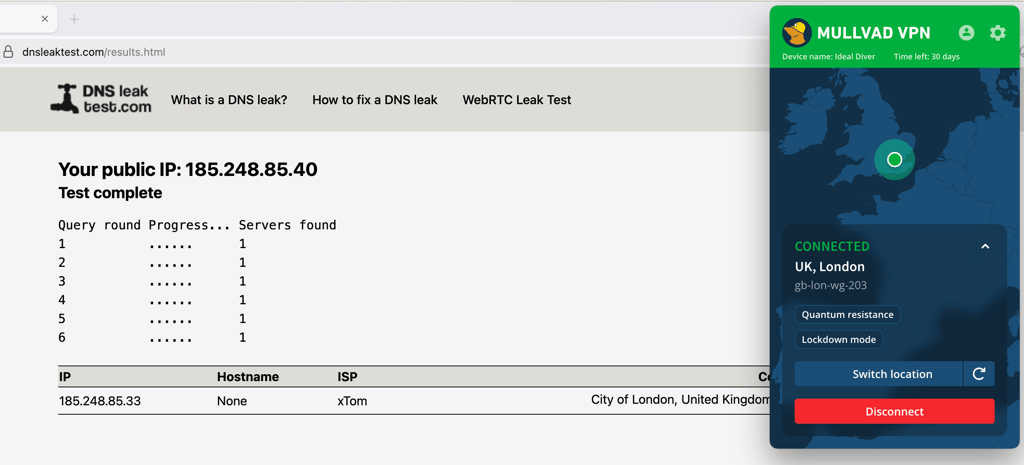
As part of my Mullvad VPN review, I conducted IP and DNS leak test by connecting to the home country of this VPN to see whether Mullvad leaks your data. Fortunately, the VPN passed the tests without a hitch and does not leak your data.
Visit Mullvad VPN official site
Online censorship in China and elsewhere
Using a VPN in China is a touchy subject as The Great Firewall is actively combating VPNs and providers can’t always verify the effectiveness of their products. Mullvad in particular does not market itself as an effective tool against China.
In my tests, Mullvad had a few tools that may help bypass network restrictions, such as bridge servers and Shadowsocks obfuscation. However, these servers are relatively limited compared to other providers like NordVPN or Surfshark, and connection speeds can be slower when I tested them.
This makes Mullvad VPN not a great choice for users both in China and other censorship-heavy countries. You’ll have better luck with a provider from our research into the best VPNs for China.
Does Mullvad VPN log your data?
No, Mullvad VPN does not log personally identifiable user information. During my testing and research, Mullvad stood out for how little information it collects about its users. When creating an account, I wasn’t asked for an email address or any personal details and was instead assigned a random account number. This is all that’s needed to log in and manage the subscription.
If you want to remain completely anonymous, Mullvad also allows privacy-friendly payment methods, such as cryptocurrency and cash payments sent by mail. This means it’s possible to use the VPN without linking your real identity to your account.
Mullvad also has a strict no-logs policy, meaning it doesn’t record browsing activity, timestamps, or IP addresses. This was put to the test in 2023 when Swedish authorities tried to seize user data during a raid. They left without any data, because Mullvad doesn’t store any.
Ease of use and software compatibility
For all the most common desktop environments, there’s an app available. Mullvad supports up to 5 simultaneous connections and works on:
- Windows
- macOS
- Linux (Debian & Fedora)
- Android (beta)
- iOS
For other devices, Mullvad provides you with OpenVPN and WireGuard configuration files that can be used to set up a secure connection through third-party applications. It’s also possible to set up your router with this VPN. However, there are no browser extensions currently available.
Desktop apps
Downloading and setting up Mullvad VPN was extremely easy based on my tests with the desktop application on Windows and macOS. First, I selected Generate account number to get my completely anonymous user account.

Next, I had to pay 5 Euros (roughly $5.20-$5.80 depending on exchange rates for one month of service using one of the many payment methods available. One thing to keep in mind while creating an account is that for true anonymity, you must use an anonymous method of payment, such as Bitcoin or a prepaid cash card. I completed my payment with a prepaid card to finish setting up my account.
Next, I could download the desktop application from Mullvad’s website to log in using my account number and tweak custom options, such as server or protocol choice, port selection, and a few others.
Although this VPN service boasts some of the best security available, I found that Mullvad VPN also does a great job of offering a user-friendly experience. I found the app interfaces easy to use and configurations were simple yet powerful. Unfortunately, split tunneling is available on Linux only.
Get Mullvad VPN on your computer
Mobile apps
My experience with Mullvad VPN’s mobile apps for Android and iOS was consistent with my experience on desktop, with all apps appearing extremely similar. In past tests, Mullvad’s Android app was still in beta, but both mobile apps are now fully featured on Android and iOS. The apps support the same core security features as the desktop client, including a built-in kill switch. During my tests, both apps connected quickly and maintained stable WireGuard connections.
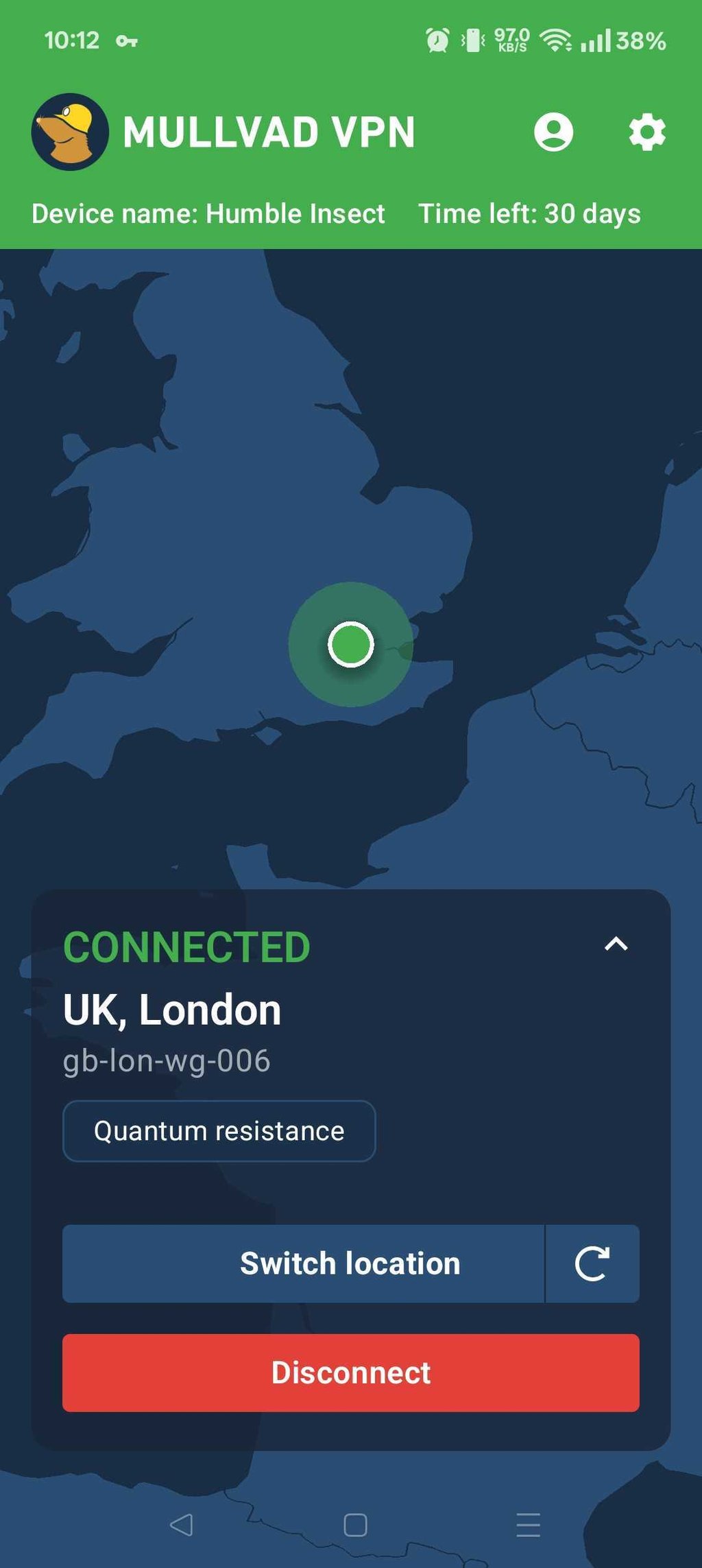
While, the mobile apps only support the WireGuard protocol, this isn’t a drawback in my experience, as it is the fastest, most stable, and most secure protocol you can use. It produced the fastest speed test results when I benchmarked Mullvad VPN’s speeds.
The apps also have the option to toggle local network sharing, which allows you to see (and be seen by) other devices on your local network.
Finally, the Android app has a split tunneling feature that allowed me to exclude apps from the VPN tunnel in my tests to optimize the VPN’s speeds and avoid causing issues with regional apps that I needed to keep on my native network connection.
Get Mullvad VPN on mobile device
Does Mullvad work with Netflix?

When testing Mullvad VPN with streaming platforms, my results were quite limited because Mullvad was unable to unblock Netflix libraries. My VPN connection was routinely detected by Netflix, which is likely because Mullvad doesn’t rotate IP addresses or have servers specifically optimized for streaming, something many competitor VPNs do to bypass geo-restrictions and avoid detection. While Mullvad has an obfuscation feature, this didn’t solve the issue.
| Streaming site | Does it work with Mullvad VPN? |
| Netflix | ❌ No |
| Amazon Prime Video | ❌ No |
| Disney+ | ❌ No |
| BBC iPlayer | ❌ No |
| Channel 4 | ⚠️ Inconsistently |
| ITVX | ⚠️ Inconsistently |
| HBO Max | ⚠️ Inconsistently |
Based on my tests, Mullvad isn’t well-suited to streaming. It couldn’t unblock the most popular streaming services, and it had spotty performance on the likes of Channel 4, ITVX, and HBO Max. For a list of VPNs that are able to unblock Netflix, check out our best VPN for Netflix list.
Is Mullvad good for torrenting?
In my tests, Mullvad performed very well for torrenting. Unlike some VPNs that limit P2P traffic to specific servers, Mullvad allows torrenting on all of its servers. I didn’t have to look for a special server before starting a download.
When downloading test torrents, my connection was stable and speeds were consistently fast when using the WireGuard protocol. Mullvad’s strong security tools add an extra layer of protection while torrenting too. Mullvad uses AES-256 encryption and has a strict no-logs policy, which helped keep my activity private and stopped my ISP and other torrent users from seeing my real IP address.
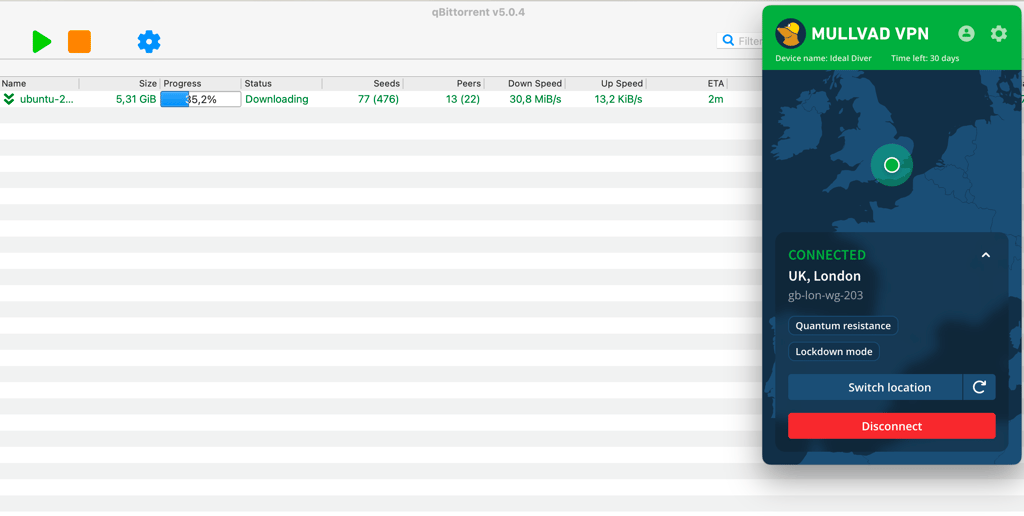
I also liked that Mullvad includes a free SOCKS5 proxy, which can be configured to improve speeds when torrenting. Split tunneling is available too, in case you want to route your torrent client through the VPN in isolation to optimize speed.
One limitation I noted is that Mullvad removed port forwarding in 2023, which can affect seeding performance for some advanced users. However, for most people who simply want to download torrents privately, I can confirm that Mullvad provides secure and reliable P2P performance.
Get Mullvad VPN for torrenting
Customer support
Email is the primary way to send a query to the Mullvad team, but you can also use a website contact form. Some advanced users also use GitHub issue tracking for its open-source apps.
To keep your complete anonymity intact, it’s a good idea to use an anonymous email service like ProtonMail or similar to send your help request. If you’re willing to do a bit of reading, however, chances of you even needing to speak with support are fairly slim.
Mullvad VPN also has an extensive help center filled with many detailed guides to walk their customers through all the services on offer. Also, there are comprehensive installation instructions for virtually every available OS and device type.

The guides are all smartly categorized into groups, such as:
- Troubleshooting guides
- Account management
- Privacy issues
- WireGuard
- Bridge
- …and much more
Finding the help you need at Mullvad VPN should never be a problem.
Conclusion: is Mullvad a good VPN in 2026?
In my testing, Mullvad proved to be one of the most privacy-focused VPNs available. The service stands out for its anonymous numbered account system, strict no-logs policy, and flat monthly pricing, which avoids any need for a long-term commitment at the cost of slightly higher pricing. Connections were fast and stable in my tests using WireGuard, and Mullvad performed well for secure browsing and torrenting.
However, Mullvad isn’t the most versatile VPN. During testing, it struggled to unblock major streaming platforms like Netflix and BBC iPlayer, and its feature set is more stripped back compared to competitors. The service is also based in Sweden, a 14 Eyes country, but its anonymous account system significantly limits the data it can provide to authorities.
Overall, Mullvad is an excellent choice for privacy-focused users, but those focused on streaming or extra features will prefer other VPNs in my assessment.
Use Mullvad VPN 30-day money back guarantee
Best Mullvad VPN alternatives of 2026
Top 1. NordVPN - better for speed, streaming, and a massive server network
If you’re in need of a VPN that can provide top-notch security and unblock streaming services like Netflix then my top Mullvad VPN alternative recommendation is NordVPN. With over 9,300 servers in 137 countries and powerful obfuscation, NordVPN can unblock every streaming service available. It also has the fastest streaming speeds in the industry thanks to the proprietary NordLynx protocol that delivered up to 850 Mbps in my benchmarks. At $3.09/month, it also works out cheaper than Mullvad VPN, and you can get a 30-day money-back guarantee, double the length of that provided by Mullvad.
Top 2. Surfshark - budget-friendly alternative to Mullvad VPN that excels in streaming
If your budget is tight but you still want a feature-rich VPN, Surfshark is another of my top recommendations. You can get Surfshark for just $1.99/month, and unlike Mullvad, Surfshark allows unlimited simultaneous connections. It also supports multiple tunneling protocols, including WireGuard, OpenVPN, and IKEv2, and includes features Mullvad lacks, like 24/7 live chat support, streaming-optimized servers, and ad and tracker blocking. In my tests, Surfshark was also far more reliable for unblocking streaming platforms like Netflix, BBC iPlayer, and Disney+, which Mullvad struggles with.
You may also want to read:
- Mullvad deals and coupon codes in 2026
- Mullvad VPN vs Proton VPN
- Mullvad VPN vs Private Internet Access

![Surfshark weekly deals logo [IN USE]](https://media.vpnpro.com/surfshark-weekly-deals.svg)
![Proton VPN winner logo [IN USE]](https://media.vpnpro.com/2025/05/protonvpn-winner.png)
FAQ
Where is Mullvad based?
Mullvad is based in Sweden. The company operates under Swedish jurisdiction, part of the European Union and subject to GDPR privacy laws. Sweden is a member of the 14 Eyes intelligence-sharing alliance, though Mullvad maintains a strict no-logs policy to maintain user privacy and anonymity.
Is Mullvad VPN free?
No, Mullvad VPN is not free, nor does it have a free version, though you can test it free with a 14-day money-back guarantee. Mullvad's pricing model is simple, costing €5/month no matter the length of your subscription. If you don’t want to continue then you can request a full refund before your initial two-week period is up.
How much does Mullvad VPN cost per month?
Mullvad costs 5€ per month, no matter how long your subscription.
Does Mullvad offer dedicated IP?
No, Mullvad does not offer a dedicated IP address feature. Mullvad's IP addresses are shared among users to make it more difficult for websites to track individuals. If you want access to a dedicated IP address, I recommend NordVPN, which offers dedicated IP addresses for an additional $4.19/month.
Does Mullvad work with BBC iPlayer?
No, Mullvad doesn’t work with BBC iPlayer as of my tests in June 2026. Mullvad’s servers have often struggled with unblocking BBC iPlayer in the past, and the situation has become more difficult with the UK’s focus on censorship and VPN blockades. If you want to unblock BBC iPlayer, I recommend using NordVPN, which has 440+ UK servers and successfully bypassed all streaming platform blocks during my tests.
Is Mullvad VPN safe?
Yes, Mullvad is a safe and secure VPN with powerful encryption, a no-logs guarantee, RAM-only servers, and an option to create a fully anonymous account. While less suited to tasks like streaming and unblocking, Mullvad has strong security and a track record of verified independent audits by third parties like Cure53 to guarantee its safety.
Does Mullvad really not keep logs?
No, Mullvad keeps no logs as part of its strict no-logging policy, which has been verified by independent audits from Cure53 and proven in real-world scenarios when authorities attempted to seize customer data. Thanks to RAM-only servers, Mullvad cannot store customer data and uses randomly generated account numbers that require no username or password.

